
vue中使用Ueditor编辑器 -- 1
一、 下载包:
从Ueditor的官网下载1.4.3.3jsp版本的Ueditor编辑器,官网地址为:http://ueditor.baidu.com/website/download.html
下载解压后会得到如果下文件目录:
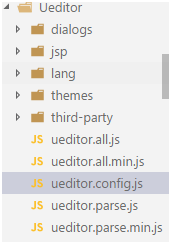
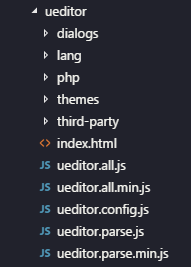
将上述Ueditor文件夹拷贝到vue项目的static文件夹中,此文件夹为项目的静态服务文件夹;
二、 修改配置
在ueditor.config.js中修改如下代码:
// 这里是配置Ueditor内部进行文件请求时的静态文件服务地址
 window.UEDITOR_HOME_URL = "/static/Ueditor/"

 var URL = window.UEDITOR_HOME_URL || getUEBasePath();
三、 文件的引入
在vue项目的入口文件main.js中将Ueditor所有的基础文件引入如下:(路径自行配制)
  import'../static/Ueditor/ueditor.config.js'

  import'../static/Ueditor/ueditor.all.min.js'

  import'../static/Ueditor/lang/zh-cn/zh-cn.js'

  import'../static/Ueditor/ueditor.parse.min.js'
四、 在相应vue的componnent文件中使用富文本编辑器
<template>

    <div>

    <!--editor的div为富文本的承载容器-->

    <div id="editor"></div>

    <button type="" @click="gettext">点击</button>

    </div>

    </template>

    <script>

    exportdefault {

            data() {

        return {

                    editor: null,

               }

          },

          mounted() {

          // 引入url

          UEDITOR_CONFIG.UEDITOR_HOME_URL = '../../static/Ueditor/'

      // 实例化editor编辑器

      this.editor = UE.getEditor('editor');

      // console.log(this.editor.setContent("1223"))

          },

          methods: {

              gettext() {

      // 获取editor中的文本

                  console.log(this.editor.getContent())

              }

          },

        destroyed() {

  // 将editor进行销毁

  this.editor.destroy();

          }

      }

 </script>
五、 执行上述代码可能会出现的问题
- 1. 出现如下报错
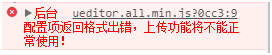
出现此种现象的原因是配置ueditor的图片以及文件的后台上传接口不正确;
如果Ueditor不需要使用文件以及图片的上传则在ueditor.config.js中进行如下配置:(将serverUrl注释掉)
  // 服务器统一请求接口路径

  // serverUrl: URL + "jsp/controller.jsp",
以后将不会再出现上述报错,但是也将无法进行图片的上传:如下图:

如果Ueditor需要使用文件以及图片的上传则在ueditor.config.js中进行如下配置:
  // 服务器统一请求接口路径,配置的服务端接口

          serverUrl: "http://127.0.0.1:9999/api/UE",

  //或者如果使用了代理,则可以如下进行配置

          serverUrl: "/api/ue",
六、 如果使用的是node的express做服务端,接口开发如下
首先下载编辑器包
npm install –save-dev ueditor
服务端项目文件中在public中增加如下目录以及文件
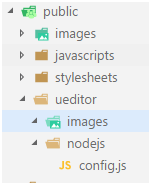
注:ueditor中的images文件夹是上传图片后存储的地方
nodejs中的config.js就是下载的ueditor包的jsp文件夹下config.json文件
开发接口
//加载ueditor 模块

  var ueditor = require("ueditor");

  //使用模块

  app.use("/api/ue", ueditor(path.join(__dirname, 'public'), function(req, res, next) {

  // ueditor 客户发起上传图片请求

  if (req.query.action === 'uploadimage') {

  var foo = req.ueditor;

  var imgname = req.ueditor.filename;

  var img_url = '/ueditor/images/';

          res.ue_up(img_url); //你只要输入要保存的地址。保存操作交给ueditor来做

          res.setHeader('Content-Type', 'text/html'); //IE8下载需要设置返回头尾text/html 不然json返回文件会被直接下载打开

    }

  //  客户端发起图片列表请求

  elseif (req.query.action === 'listimage') {

  var dir_url = '/ueditor/images/';

          res.ue_list(dir_url); // 客户端会列出 dir_url 目录下的所有图片

      }

  // 客户端发起其它请求

  else {

          console.log('config.json')

        res.setHeader('Content-Type', 'application/json');

        res.redirect('/ueditor/nodejs/config.js');

    }

}));
注:
上述接口中的"/api/ue"接口就是配置在前台项目ueditor.config.js文件中的serverUrl地址;
上述接口中img_url的'/ueditor/images/'和res.redirect的'/ueditor/nodejs/config.js'配置都是使用的express静态文件服务对图片存储路径和图片默认配置文件的存储和请求;
进行上述配置后,一定要在webpack的代理中添加如下代理:
  // 配置ueditor的图片上传服务器预览路径

  '/ueditor': {

    //后台接口地址

                target: 'http://localhost:9999',

    //这里可以模拟服务器进行get和post参数的传递

                changeOrigin: true,

    //前端所有的/ueditor'请求都会请求到后台的/ueditor'路径之下

                pathRewrite: {

            '^/ueditor': '/ueditor'

                }

            }
vue中使用Ueditor编辑器 -- 1的更多相关文章
- vue中使用Ueditor编辑器
一. 下载包: 从Ueditor的官网下载1.4.3.3jsp版本的Ueditor编辑器,官网地址为: http://ueditor.baidu.com/website/ 下载解压后会得到如果下文 ...
- vue中使用UEditor编辑器 -- 2
1:下载ueditor下来,放在vue项目中的static文件夹下 2:创建ueditor编辑界面 3:椰~~~~~此时已经可以使用了 但是你会发现 (黑人脸)what the fuck??? ...
- 开发中使用UEditor编辑器的注意事项
最近在一个刚结束的一个项目中使用到了UEditor编辑器,下面总结一下遇到的问题以及使用时需要注意的地方: 1. 使用UEditor插件需要先对其进行路径配置: 在ueditor.config.js文 ...
- thinkphp中插入ueditor编辑器的代码
1.需要在header中加入以下js内容:<script type="text/javascript" src="{$smarty.const.__ROOT__}/ ...
- tp5中使用ueditor编辑器保存文本到数据库后回显后显示html标签问题解决办法
在编辑器ueditor中获取文本,保存到到数据库后为 当在数据库中提取出来,在显示回ueditor编辑器时候,出了问题, html标签都显示出来了 百度了下别人的解决办法是,使用官方提供的api 可是 ...
- Vue 中使用UEditor富文本编辑器-亲测可用-vue-ueditor-wrap
其中UEditor中也存在不少错误,再引用过程中. 但是UEditor相对还是比较好用的一个富文本编辑器. vue-ueditor-wrap说明 Vue + UEditor + v-model 双向绑 ...
- vue 中 使用百度编辑器 UEditor
(单页应用,多编辑器也可行) 新建一个Ueditor.vue组件对象,该组件用来封装ueditor,用来进行复用. <template> <div> <!--下面通过传递 ...
- 在vue中使用Ueditor
今天研究的主角是:UEditor UEditor是由百度WEB前端研发部开发的所见即所得的开源富文本编辑器,具有轻量.可定制.用户体验优秀等特点. 版本有很多 我用的是:[1.4.3.3 PHP 版本 ...
- vue中使用ueditor富文本编辑框
1.把下载的Ueditor资源,放入静态资源static中. 修改ueditor.config.js中的window.UEDITOR_HOME_URL配置,如下图: 2.在main.js中引入以下文件 ...
随机推荐
- sublime text 3 上安装xdebug
安装完成之后启动xdebug,缺省设置下会显示warning等信息,很不方便. 可以参考 https://github.com/martomo/SublimeTextXdebug/blob/maste ...
- RxSwift の Observable とは何か
Qiita にあげていた記事ですが.ここにもバックアップをとっておきます この記事は.2017/09/15〜17 に早稲田大学 理工学部 西早稲田キャンパスで開催される iOSDC Japan 201 ...
- java 如何将异常Exception的信息转换为String
一般情况下,我们是通过log4j封装的api将异常打印到日志当中. logger.error("error", e); 如果我们想在程序中获得该异常的详细信息,并输出到数据库中,我 ...
- java中Map遍历的四种方式
在java中所有的map都实现了Map接口,因此所有的Map(如HashMap, TreeMap, LinkedHashMap, Hashtable等)都可以用以下的方式去遍历. 方法一:在for循环 ...
- web service服务是查询QQ用户是否在线
使用php5开发客户端: <?php try { //$client = new SoapClient("HelloService.wsdl",array('encoding ...
- 【Tool】Augmentor和imgaug——python图像数据增强库
Augmentor和imgaug--python图像数据增强库 Tags: ComputerVision Python 介绍两个图像增强库:Augmentor和imgaug,Augmentor使用比较 ...
- Centos6下创建Centos6基础镜像
在centos6下可以使用官方仓库拉取一个指定系统类型跟tag的镜像到本地 [root@localhost ~]# docker pull centos:6.8 6.8: Pulling from c ...
- vue使用SockJS实现webSocket通信
以前使用websocket都是使用 window.webSocket = new WebSocket('ws://' + config.webSocketUrl + '/webData/websock ...
- Top English interview Q&A
http://www.hjenglish.com/new/p581292/ vocabulary endeavour [ɪn'devər] relevant ['reləvənt] , efficie ...
- windowbuilde02 表格创建
/** * 设置表格 * * * */ private JTable getTable() { if (table == null) { table = new JTable(); //定义列名数组 ...