
在vue中使用Ueditor
今天研究的主角是:UEditor
UEditor是由百度WEB前端研发部开发的所见即所得的开源富文本编辑器,具有轻量、可定制、用户体验优秀等特点。
版本有很多
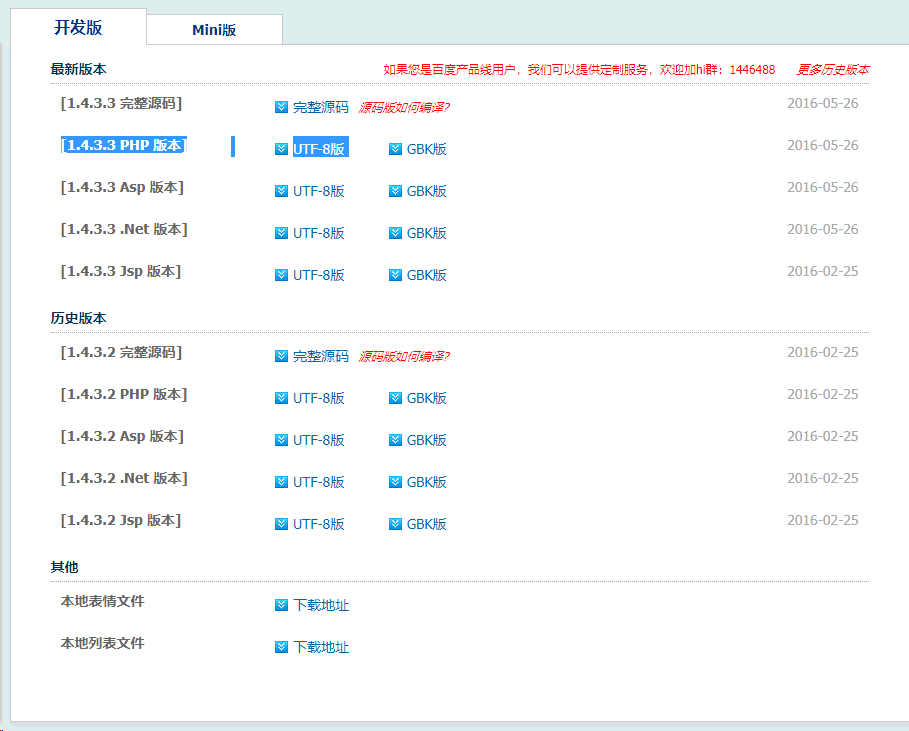
我用的是:[1.4.3.3 PHP 版本] UTF-8版
下载地址:http://ueditor.baidu.com/website/download.html
安装下载之后,将插件解压放在static目录下: static/ue/

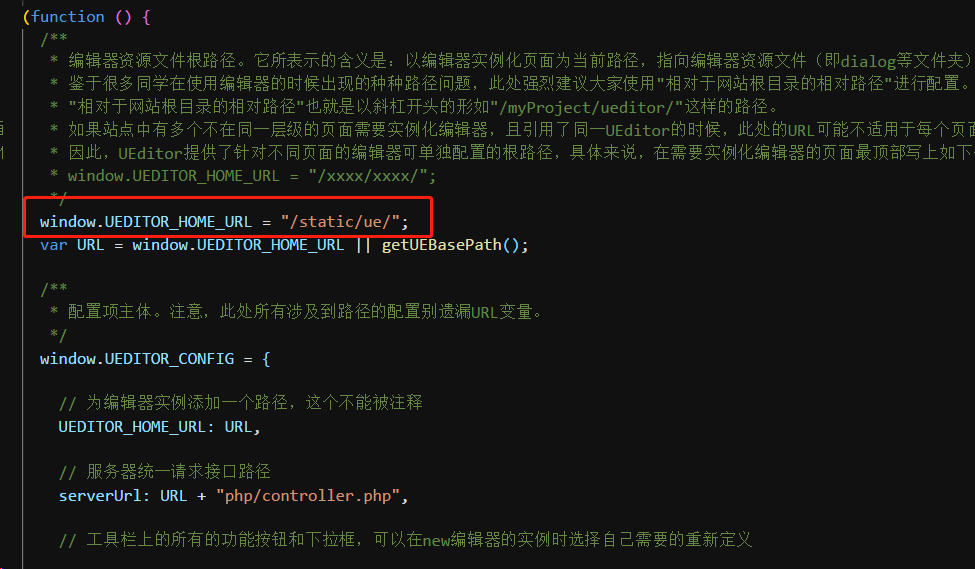
修改ueditor.config.js,配置目录 :
ps:这个插件的代码写的真的是”与众不同“,如果你用eslint检查代码,并且是个强迫症患者,那就很欢乐了。
下面是相关代码:
新建组件 /src/base/ueditor/ueditor.vue
<template>

  <div>

    <script id="editor" type="text/plain"></script>

  </div>

</template>

<script>

export default {

  name: "ue",

  data() {

    return {

      editor: null

    };

  },

  props: {

    value: "",

    config: {}

  },

  mounted() {

    const _this = this;

    this.editor = window.UE.getEditor("editor", this.config);

    // 初始化UE

    this.editor.addListener("ready", function() {

      _this.editor.setContent(_this.value);

      // 确保UE加载完成后,放入内容。

    });

  },

  methods: {

    getUEContent() {

      // 获取内容方法

      return this.editor.getContent();

    }

  },

  destroyed() {

    this.editor.destroy();

  }

};

</script>
在组件中引用
<template>

    <div>

        <Ueditor :value="ueditor.value" :config="ueditor.config" ref="ue"></Ueditor>

        <input type="button" value="显示编辑器内容(从控制台查看)" @click="returnContent">

      </div>

</template>

<script>

import Ueditor from "../../base/ueditor/ueditor";

export default {

  data() {

    return {

      dat: {

        content: "",

      },

      ueditor: {

        value: "编辑默认文字",

        config: {}

      }

    };

  },

  methods: {

    returnContent() {

      this.dat.content = this.$refs.ue.getUEContent();

      console.log(this.dat.content);

    },

    showContent() {

      this.show = !this.show;

    }

  },

  components: {

    Ueditor

  }

};

</script>
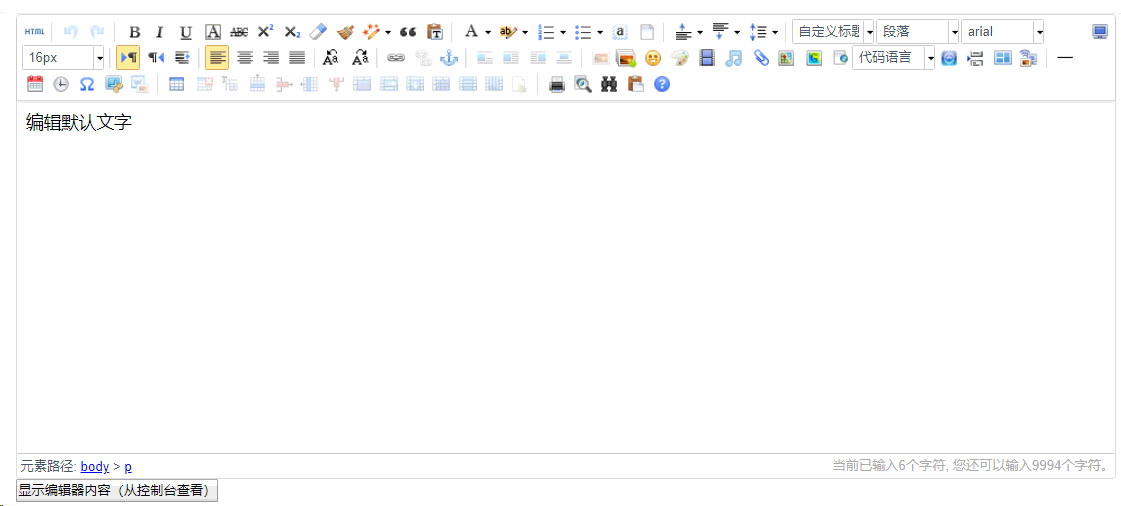
下面来看看要实现的效果:
在vue中使用Ueditor的更多相关文章
- vue中使用Ueditor编辑器
一. 下载包: 从Ueditor的官网下载1.4.3.3jsp版本的Ueditor编辑器,官网地址为: http://ueditor.baidu.com/website/ 下载解压后会得到如果下文 ...
- Vue 中使用UEditor富文本编辑器-亲测可用-vue-ueditor-wrap
其中UEditor中也存在不少错误,再引用过程中. 但是UEditor相对还是比较好用的一个富文本编辑器. vue-ueditor-wrap说明 Vue + UEditor + v-model 双向绑 ...
- vue中使用ueditor富文本编辑框
1.把下载的Ueditor资源,放入静态资源static中. 修改ueditor.config.js中的window.UEDITOR_HOME_URL配置,如下图: 2.在main.js中引入以下文件 ...
- vue中使用UEditor编辑器 -- 2
1:下载ueditor下来,放在vue项目中的static文件夹下 2:创建ueditor编辑界面 3:椰~~~~~此时已经可以使用了 但是你会发现 (黑人脸)what the fuck??? ...
- vue中使用Ueditor编辑器 -- 1
一. 下载包: 从Ueditor的官网下载1.4.3.3jsp版本的Ueditor编辑器,官网地址为:http://ueditor.baidu.com/website/download.html ...
- laravel+vue组合的项目中引入ueditor(打包成组件形式)
前言:最近写东西需要用到ueditor,并且需要是在vue组件中引入. (本博客默认你已经配置了laravel+vue的项目环境,如果还没有配置好的的小伙伴,可以看看我的另一篇博客,链接: http: ...
- 在vue中创建多个ueditor实例
简介 在vue中创建多个ueditor实例,我使用neditor,其实就是把ueditor样式美化了下,其他和ueditor几乎一样 截图 源码地址 https://github.com/oblivi ...
- nodejs+mongodb+vue前后台配置ueditor
笔者在做一个个人博客项目的时候需要一个富文本框输入组件与后台进行交互,但是官方配置里面没有关于nodejs的,于是自己查阅资料研究了一下,最后终于应用到了系统中. 一.后台配置 首先是找到了这个项目: ...
- vue集成百度UEditor富文本编辑器
在前端开发的项目中.难免会遇到需要在页面上集成一个富文本编辑器.那么.如果你有这个需求.希望可以帮助到你 vue是前端开发者所追捧的框架,简单易上手,但是基于vue的富文本编辑器大多数太过于精简.于是 ...
随机推荐
- 23种设计模式之代理模式(Proxy Pattern)
在软件开发过程中,有些对象有时候会由于网络或其他的障碍,以至于不能够或者不能直接访问到这些对象,如果直接访问对象给系统带来不必要的复杂性,这时候可以在客户端和目标对象之间增加一层中间层,让代理对象代替 ...
- Mycat 配置文件schema.xml
1.介绍 schema.xml 作为 MyCat 中重要的配置文件之一,管理着 MyCat 的逻辑库.表.分片规则. DataNode 以及 DataSource. 2.schema相关标签 sche ...
- 【SQL】sql统计不同类别的不同状态的数目
例子:某主机下有5149个设备,设备分不同类别,设备运行会有不同状态(1-正常.2-告警.3-故障.0-离线) sql: SELECT t.DEVICE_TYPE_NAME,SUM(CASE t.DE ...
- Timed out after 30000 ms while waiting to connect
今天使用mongo-java-drive写连接mongo的客户端,着实被上面那个错坑了一把.回顾一下解决过程: 报错: com.mongodb.MongoTimeoutException: Timed ...
- java中List、Set和Map三个接口及其主要实现类
三个接口都在java.util包下 List与Set具有相似性,它们都是单列元素的集合,所以,它们有一个共同的父接口,叫Collection,Map没有继承Collection接口 1.List接口: ...
- CentOS 8 网卡设置
本次测试环境是在虚拟机上测试 网卡配置文件路径:/etc/sysconfig/network-scripts/ifcfg-ens33 [root@localhost ~]# cd /etc/sysco ...
- B-概率论-常见的概率分布模型
目录 常见的概率分布模型 一.离散概率分布函数 二.连续概率分布函数 三.联合分布函数 四.多项分布(Multinomial Distribution) 4.1 多项分布简介 4.2 多项分布公式解析 ...
- 网页布局——grid弹性网格布局
网格布局(Grid)是最强大的 CSS 布局方案. Flexbox 是为一维布局设计的,而 Grid 是为二维布局设计. grid目前兼容性目前还可以,主流浏览器对它的支持力度很大,ie9,10宣布它 ...
- 【DP合集】背包 bound
N 种物品,第 i 种物品有 s i 个,单个重量为 w i ,单个价值为 v i .现有一个限重为 W 的背包,求能容 纳的物品的最大总价值. Input 输入第一行二个整数 N , W ( N ≤ ...
- 流水线机制、滑动窗口协议、GBN、SR
一.滑动窗口协议 为了解决停等操作的性能问题(发了一个分组之后一直等到确认了这个分组才发下一个),推出了流水线机制,提供资源利用率.就是允许发送方在收到对方的ACK前,发送多个分组 其中窗口是一个范围 ...