
HTML+CSS+JS制作一个黑灰色简约时钟
HTML+CSS+JS制作一个黑灰色简约时钟
1. 效果图:
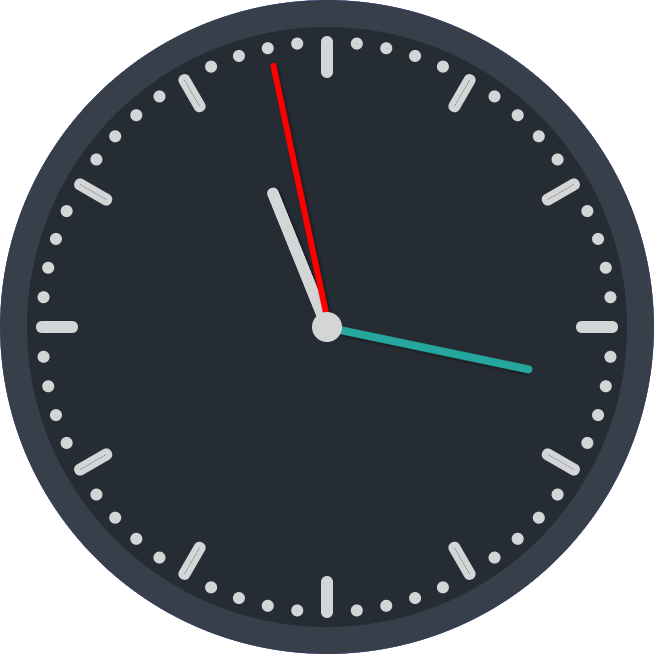
2. 特点:这次借鉴了网络上的代码,利用JS动态创建元素,减少html语句的数量,也便于与vue、react等语言进行结合。
3. 代码实现:
<!DOCTYPE html>

<head>

<meta http-equiv="Content-Type" content="text/html; charset=gb2312" />

<title>黑灰色简约时钟</title>

<style lang="css">

	.clock {

		position: absolute;

		margin: auto;

		width: 400px;

		height: 400px;

		padding: 0;

		background-color: #262c33;

		border: 18px solid #373f4a;

		border-radius: 50%;

		background-clip: border-box;

	}

	.point{

		position: absolute;

		width: 400px;

		height: 400px;

		top: 0;

	}

	.s,.m,.h{

		position: absolute;

		box-shadow: 1px 1px 2px rgba(0, 0, 0, 0.4);

		border-radius: 10px;

		left: 50%;

		bottom: 50%;

		transform-origin: center bottom;

	}

	.s{

		height: 180px;

		width: 4px;

		background: red;

		margin-left: -1px;

		z-index: 110;

	}

	.m{

		height: 140px;

		width: 5px;

		background: #26a79d;

		margin-left: -2.5px;

		z-index: 100;

	}

	.h{

		height: 100px;

		width: 8px;

		background: #d4d5d6;

		margin-left: -4px;

		z-index: 90;

		border-left: 1px solid rgba(255, 255, 255, 0.1);

		box-sizing: border-box;

	}

	.clock-center{

		width: 20px;

		height: 20px;

		margin: -10px 0 0 -10px;

		border-radius: 50%;

		background-color: #d4d5d6;

		position: absolute;

		top: 50%;

		left: 50%;

		z-index: 999;

	}

	.minute-marks {

		display: inline-block;

		padding: 0;

		margin: 0;

		list-style-type: none;

		width: 0px;

		height: 0px;

	}

	.minute-marks li {

		position: absolute;

		top: 0;

		bottom: 0;

		left: 0;

		right: 0;

		margin: auto;

		display: inline-block;

		width: 200px;

		height: 200px;

	}

	.minute-marks li:before,

	.minute-marks li:after {

		content: '';

		position: absolute;

		top: 0;

		bottom: 0;

		left: 0;

		right: 0;

		margin: auto;

		width: 0px;

		height: 0px;

		display: inline-block;

		border-color: #d4d5d6;

		border-width: 4px;

		border-style: solid;

		border-radius: 4px;

		background-clip: padding-box;

		opacity: 1;

	}

	.minute-marks li:before {top: -380px;}

	.minute-marks li:after {bottom: -380px;}

	.minute-marks li.five:before,.minute-marks li.five:after {width: 0px;height: 20px;}

	.minute-marks li.five:before {top: -360px;}

	.minute-marks li.five:after {bottom: -360px;}

</style>

</head>

<body>

		<div class='clock'>

			<ul class='minute-marks'></ul>

			<div class='point'>

				<div class="m"></div><div class="h"></div><div class="s"></div>

				<div class="clock-center"></div>

			</div>

		</div>

<script>

	// autor:戈小戈

	for (var i = 1; i <= 6; i++){

		for(var m = 1;m<=5;m++){

			var div=document.createElement('li');

			if(m==1){div.className = 'five';}

			div.style.transform = 'rotate('+(i*5-6+m)*6+'deg )';//设置每一分钟点所在位置

			document.getElementsByClassName("minute-marks")[0].appendChild(div);//添加分钟点

		}

	}

	function setTime() {

		const sHand = document.querySelector('.s');

		const mHand = document.querySelector('.m');

		const hHand = document.querySelector('.h');

		const d = new Date();

		const s = d.getSeconds();//秒

		const m = d.getMinutes();//分

		const h = d.getHours();//时

		const sDeg = (( s / 60 ) * 360 );

		const mDeg = (( m / 60 ) * 360 ) + (( s / 60 ) * 6 );

		const hDeg = (( h / 12 ) * 360 ) + (( m / 60 ) * 30 );

		sHand.style.transform = 'rotate('+sDeg+'deg )';

		mHand.style.transform = 'rotate('+mDeg+'deg )';

		hHand.style.transform = 'rotate('+hDeg+'deg )';

	}

	setInterval( setTime, 1000 );

</script>

</body>

</html>
HTML+CSS+JS制作一个黑灰色简约时钟的更多相关文章
- HTML/CSS+JS制作一个高考倒计时页面
2020-07-09更新 修复倒计时归零后出现负数的bug 自动切换至下一年日期 ##效果展示 前言 在B站上找视频学习的,勉强搞出来了,写下此篇文章作为笔记,也希望有更多感兴趣的人能够有所收获. ( ...
- 百度前端技术学院2018笔记 之 利用 CSS animation 制作一个炫酷的 Slider
前言 题目地址 利用 CSS animation 制作一个炫酷的 Slider 思路整理 首先页面包含三种东西 一个是type为radio的input其实就是单选框 二是每个单选框对应的label 三 ...
- #3使用html+css+js制作网页 番外篇 使用python flask 框架 (II)
#3使用html+css+js制作网页 番外篇 使用python flask 框架 II第二部 0. 本系列教程 1. 登录功能准备 a.python中操控mysql b. 安装数据库 c.安装mys ...
- #3使用html+css+js制作网页 番外篇 使用python flask 框架 (I)
#3使用html+css+js制作网页 番外篇 使用python flask 框架(I 第一部) 0. 本系列教程 1. 准备 a.python b. flask c. flask 环境安装 d. f ...
- #3使用html+css+js制作网页 番外篇 制作接收php
使用html+css+js制作网页 番外篇 制作接收php 本系列链接 基础 php语法 例子 本系列链接 #1使用html+css+js制作网站教程 准备 #2使用html+css+js制作网站教程 ...
- #3使用html+css+js制作网页 制作登录网页
#3使用html+css+js制作网页 制作登录网页 本系列链接 2制作登录网页 2.1 准备 2.1.1 创建文件夹 2.1.2 创建主文件 2.2 html部分 2.2.1 网站信息 2.2.2 ...
- #1使用html+css+js制作网站教程 准备
#1使用html+css+js制作网站教程 准备 本系列链接 0 准备 0.1 IDE编辑软件 0.2 浏览器 0.3 基础概念 0.3.1 html 0.3.2 css 0.3.3 js 0.4 文 ...
- 用JS制作一个信息管理平台完整版
前 言 JRedu 在之前的文章中,介绍了如何用JS制作一个实用的信息管理平台. 但是那样的平台功能过于简陋了,我们今天来继续完善一下. 首先我们回顾一下之前的内容. 1.JSON的基础知识 ...
- No.6 - 利用 CSS animation 制作一个炫酷的 Slider
*{ margin:; padding:; } div{ margin: auto; width: 800px; height: 681px; position: relative; overflow ...
- 如何使用纯js实现一个带有灰色半透明背景的弹出框
原文如何使用纯js实现一个带有灰色半透明背景的弹出框 // 加入透明背景 var body = document.body;var backgroundDiv = document.createEle ...
随机推荐
- el-table多选框根据条件隐藏显示
提供一个方法, 通过添加相应类来控制样式,设置 display: none ,达到隐藏 checkbox 的目的. 利用Table Attributes 属性里面的 cell-class-name 属 ...
- 论文阅读: CCF A 2022 MVD: 基于流敏感图神经网络的内存相关漏洞检测 (ICSE)
Motivation: 内存相关漏洞会导致性能下降和程序崩溃,严重威胁到现代软件的安全性. 静态分析方法使用一些预定义的漏洞规则或模式来搜索不正确的内存操作,然而,定义良好的漏洞规则或模式高度依赖于专 ...
- macos 安装多版本PHP,composer
PHP版本切换网上有写博客用 brew-php-switcher 切换实际没生效,博客也是相互抄,看了袭浪费时间.讲一下我的思路,因为php 可以cli 和fpm 的方式.安装php 将不同版本添加命 ...
- 使用yum快速安装mysql-5.7(用于测试)
1)CentOS 7 下安装 MySQL 5.7 下载并安装MySQL官方的 Yum Repository [wget -i -c http://dev.mysql.com/get/mysql57-c ...
- 【转】wamp如何添加多个站点
1.打开wamp目录下的bin目录下的apache/conf/extra/httpd-vhosts.conf文件(虚拟目录配置文件),修改文件:在num01下创建index.php文件,输出01,:在 ...
- apollo兼容mysql的时候报错Table 'apolloportaldb.hibernate_sequence' doesn't exist
解决方案: 配置文件里加: spring.jpa.properties.hibernate.hbm2ddl.auto=update
- Java-Java调用mysqldump进行数据库备份
1 public ResultData backupDatabase(Integer type) { 2 // 构建备份sql的文件名 3 String sqlFileName = "tes ...
- 浅谈dfs深度优先搜索
深度优先搜索(Depth First Search)是一种常见的暴力算法 此算法上限和下限较高,容易上手,适用情形多,学习性价比高 下限高于有固定的模板,且时间复杂度明显优于暴力枚举,容易拿到题目部分 ...
- Java语言中的复合运算符会自动进行类型转换
计算1/1-1/2+1/3+--+1/99-1/100 public class LoopControlExercise08{ public static void main(String[] arg ...
- uni-app学习笔记之----页面跳转
1.声明式跳转 <navigator url="/pages/detail/detail"> <button>跳转至详情页</button> & ...