
HTML+CSS+JS制作一个黑灰色简约时钟
HTML+CSS+JS制作一个黑灰色简约时钟
1. 效果图:
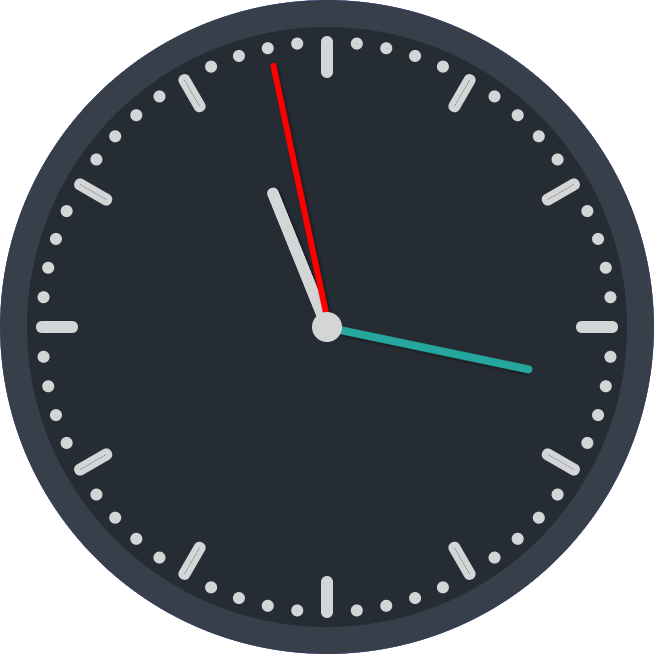
2. 特点:这次借鉴了网络上的代码,利用JS动态创建元素,减少html语句的数量,也便于与vue、react等语言进行结合。
3. 代码实现:
<!DOCTYPE html>

<head>

<meta http-equiv="Content-Type" content="text/html; charset=gb2312" />

<title>黑灰色简约时钟</title>

<style lang="css">

	.clock {

		position: absolute;

		margin: auto;

		width: 400px;

		height: 400px;

		padding: 0;

		background-color: #262c33;

		border: 18px solid #373f4a;

		border-radius: 50%;

		background-clip: border-box;

	}

	.point{

		position: absolute;

		width: 400px;

		height: 400px;

		top: 0;

	}

	.s,.m,.h{

		position: absolute;

		box-shadow: 1px 1px 2px rgba(0, 0, 0, 0.4);

		border-radius: 10px;

		left: 50%;

		bottom: 50%;

		transform-origin: center bottom;

	}

	.s{

		height: 180px;

		width: 4px;

		background: red;

		margin-left: -1px;

		z-index: 110;

	}

	.m{

		height: 140px;

		width: 5px;

		background: #26a79d;

		margin-left: -2.5px;

		z-index: 100;

	}

	.h{

		height: 100px;

		width: 8px;

		background: #d4d5d6;

		margin-left: -4px;

		z-index: 90;

		border-left: 1px solid rgba(255, 255, 255, 0.1);

		box-sizing: border-box;

	}

	.clock-center{

		width: 20px;

		height: 20px;

		margin: -10px 0 0 -10px;

		border-radius: 50%;

		background-color: #d4d5d6;

		position: absolute;

		top: 50%;

		left: 50%;

		z-index: 999;

	}

	.minute-marks {

		display: inline-block;

		padding: 0;

		margin: 0;

		list-style-type: none;

		width: 0px;

		height: 0px;

	}

	.minute-marks li {

		position: absolute;

		top: 0;

		bottom: 0;

		left: 0;

		right: 0;

		margin: auto;

		display: inline-block;

		width: 200px;

		height: 200px;

	}

	.minute-marks li:before,

	.minute-marks li:after {

		content: '';

		position: absolute;

		top: 0;

		bottom: 0;

		left: 0;

		right: 0;

		margin: auto;

		width: 0px;

		height: 0px;

		display: inline-block;

		border-color: #d4d5d6;

		border-width: 4px;

		border-style: solid;

		border-radius: 4px;

		background-clip: padding-box;

		opacity: 1;

	}

	.minute-marks li:before {top: -380px;}

	.minute-marks li:after {bottom: -380px;}

	.minute-marks li.five:before,.minute-marks li.five:after {width: 0px;height: 20px;}

	.minute-marks li.five:before {top: -360px;}

	.minute-marks li.five:after {bottom: -360px;}

</style>

</head>

<body>

		<div class='clock'>

			<ul class='minute-marks'></ul>

			<div class='point'>

				<div class="m"></div><div class="h"></div><div class="s"></div>

				<div class="clock-center"></div>

			</div>

		</div>

<script>

	// autor:戈小戈

	for (var i = 1; i <= 6; i++){

		for(var m = 1;m<=5;m++){

			var div=document.createElement('li');

			if(m==1){div.className = 'five';}

			div.style.transform = 'rotate('+(i*5-6+m)*6+'deg )';//设置每一分钟点所在位置

			document.getElementsByClassName("minute-marks")[0].appendChild(div);//添加分钟点

		}

	}

	function setTime() {

		const sHand = document.querySelector('.s');

		const mHand = document.querySelector('.m');

		const hHand = document.querySelector('.h');

		const d = new Date();

		const s = d.getSeconds();//秒

		const m = d.getMinutes();//分

		const h = d.getHours();//时

		const sDeg = (( s / 60 ) * 360 );

		const mDeg = (( m / 60 ) * 360 ) + (( s / 60 ) * 6 );

		const hDeg = (( h / 12 ) * 360 ) + (( m / 60 ) * 30 );

		sHand.style.transform = 'rotate('+sDeg+'deg )';

		mHand.style.transform = 'rotate('+mDeg+'deg )';

		hHand.style.transform = 'rotate('+hDeg+'deg )';

	}

	setInterval( setTime, 1000 );

</script>

</body>

</html>
HTML+CSS+JS制作一个黑灰色简约时钟的更多相关文章
- HTML/CSS+JS制作一个高考倒计时页面
2020-07-09更新 修复倒计时归零后出现负数的bug 自动切换至下一年日期 ##效果展示 前言 在B站上找视频学习的,勉强搞出来了,写下此篇文章作为笔记,也希望有更多感兴趣的人能够有所收获. ( ...
- 百度前端技术学院2018笔记 之 利用 CSS animation 制作一个炫酷的 Slider
前言 题目地址 利用 CSS animation 制作一个炫酷的 Slider 思路整理 首先页面包含三种东西 一个是type为radio的input其实就是单选框 二是每个单选框对应的label 三 ...
- #3使用html+css+js制作网页 番外篇 使用python flask 框架 (II)
#3使用html+css+js制作网页 番外篇 使用python flask 框架 II第二部 0. 本系列教程 1. 登录功能准备 a.python中操控mysql b. 安装数据库 c.安装mys ...
- #3使用html+css+js制作网页 番外篇 使用python flask 框架 (I)
#3使用html+css+js制作网页 番外篇 使用python flask 框架(I 第一部) 0. 本系列教程 1. 准备 a.python b. flask c. flask 环境安装 d. f ...
- #3使用html+css+js制作网页 番外篇 制作接收php
使用html+css+js制作网页 番外篇 制作接收php 本系列链接 基础 php语法 例子 本系列链接 #1使用html+css+js制作网站教程 准备 #2使用html+css+js制作网站教程 ...
- #3使用html+css+js制作网页 制作登录网页
#3使用html+css+js制作网页 制作登录网页 本系列链接 2制作登录网页 2.1 准备 2.1.1 创建文件夹 2.1.2 创建主文件 2.2 html部分 2.2.1 网站信息 2.2.2 ...
- #1使用html+css+js制作网站教程 准备
#1使用html+css+js制作网站教程 准备 本系列链接 0 准备 0.1 IDE编辑软件 0.2 浏览器 0.3 基础概念 0.3.1 html 0.3.2 css 0.3.3 js 0.4 文 ...
- 用JS制作一个信息管理平台完整版
前 言 JRedu 在之前的文章中,介绍了如何用JS制作一个实用的信息管理平台. 但是那样的平台功能过于简陋了,我们今天来继续完善一下. 首先我们回顾一下之前的内容. 1.JSON的基础知识 ...
- No.6 - 利用 CSS animation 制作一个炫酷的 Slider
*{ margin:; padding:; } div{ margin: auto; width: 800px; height: 681px; position: relative; overflow ...
- 如何使用纯js实现一个带有灰色半透明背景的弹出框
原文如何使用纯js实现一个带有灰色半透明背景的弹出框 // 加入透明背景 var body = document.body;var backgroundDiv = document.createEle ...
随机推荐
- DRF限流Throttling
限流Throttling 可以对接口访问的频次进行限制,以减轻服务器的压力 使用 可以在配置文件中,使用 DEFAULT_THROTTLE_CLASSES 和 DEFAULT_THROTTLE_RAT ...
- ABAP 委外采购收货调用过账bapi
相关的表: ekko:采购凭证抬头表 用于判断是否委外 ekpo:采购凭证行项目表 用于判断是否委外以及委外采购的数量 resb:获取委外采购单中bom的相应预留 mseg:获取已经委外原材料出库给供 ...
- golang 字符串函数
1. 统计字符串的长度,按字节进行统计 package main import "fmt" func main() { var s1 string = "hello,世界 ...
- 报错:cannot import name ‘escape’ from ‘jinja2’
jinja2版本问题导致 解决方法: 降低版本即可 pip3 install Jinja2==3.0.3 -U pip3 install werkzeug==2.0.3 -U jinja2介绍 jin ...
- react项目打包后点击index.html页面出现空白
当本地打包后的文件,直接通过文件路径访问,出现空白或者,提示打包后的build内的js,css文件路径错误,有以下两种方式 方式一(无网络限制的情况下使用): 1.全局安装serve启动本地服务: n ...
- [人脸识别]06-JPG人脸检测
1-程序 #导入CV模块 import cv2 as cv def face_detect_fun(): gray=cv.cvtColor(img,cv.COLOR_BGR2GRAY) print(c ...
- HIVE- 删除功能
删除分区: ALTER TABLE table_name DROP PARTITION (partition_name='20220101');
- Delphi播放铃声
两种方式: 一.简单直接 uses MMSystem; procedure TFmSound.playBtnClick(Sender: TObject); begin PlaySound(PChar( ...
- sql 字段分割函数 + 查询
结果: 用于解决 这种 字段的查询 1.先创建分割函数 => 复制到数据库直接执行 SET ANSI_NULLS ON GO SET QUOTED_IDENTIFIER ON GO /* by ...
- <CONTAINING_RECORD宏>引发的<结构体深度剖析(内存对齐,对齐参数,偏移量)>
什么是结构体内存对齐?为什么要对齐?怎样对齐? 结构体内存对齐:元素是按照定义顺序一个一个放到内存中去的,但并不是紧密排列的. 从结构体存储的首地址开始,每个元素放置到内存中时,它都会认为内存是按照自 ...