
GUI程序设计--班级信息收集系
import wx

from python实验2 import classinformation

class MyFrame(wx.Frame):

    def __init__(self,parent,id):

        wx.Frame.__init__(self,parent,id,title="班级信息收集程序",size=(600,400))

        pl = wx.Panel(self)

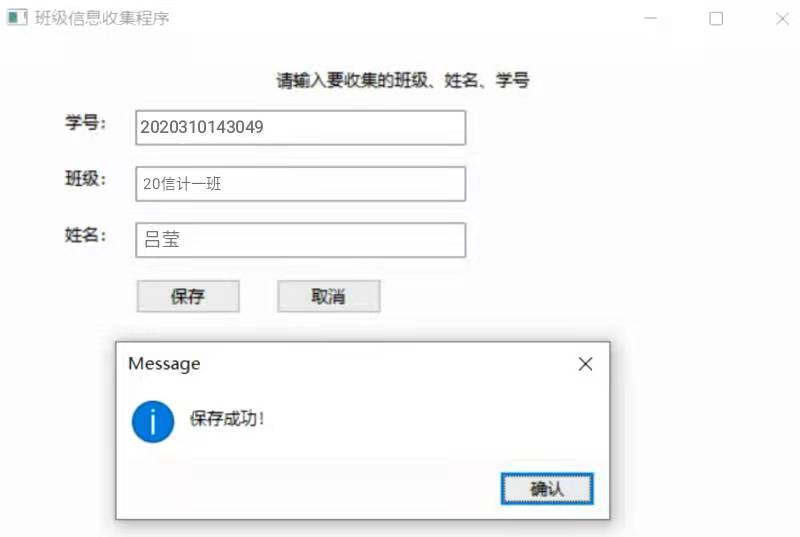
        self.title = wx.StaticText(pl,label="请输入要收集的班级、姓名、学号",pos=(200,20))

        self.label_id = wx.StaticText(pl,label="学号:",pos=(50,50))

        self.text_id = wx.TextCtrl(pl,pos=(100,50),size=(235,25),style=wx.TE_LEFT)

        self.label_bj = wx.StaticText(pl,label="班级:",pos=(50,90))

        self.text_bj = wx.TextCtrl(pl, pos=(100, 90), size=(235, 25), style=wx.TE_LEFT)

        self.label_xm = wx.StaticText(pl, label="姓名:", pos=(50, 130))

        self.text_xm = wx.TextCtrl(pl, pos=(100, 130), size=(235, 25), style=wx.TE_LEFT)

        self.bt_bc = wx.Button(pl,label="保存",pos=(100,170))

        self.bt_bc.Bind(wx.EVT_BUTTON,self.Baochun)

        self.bt_qx = wx.Button(pl,label="取消",pos=(200,170))

        self.bt_qx.Bind(wx.EVT_BUTTON, self.Cancel)

    def Baochun(self,event):

        id = self.text_id.GetValue()

        bj = self.text_bj.GetValue()

        xm = self.text_xm.GetValue()

        if id =='' or bj == '' or xm == '':

            message = '输入为空!'

        else:

            classinformation.baochuninformation(id,bj,xm)

            message = '保存成功!'

        wx.MessageBox(message)
    def Cancel(self,event):

        self.text_xm.SetValue('')

        self.text_bj.SetValue('')

        self.text_id.SetValue('')

        wx.MessageBox('取消成功!')

if __name__ == '__main__':

    app = wx.App()

    frame = MyFrame(parent=None,id=-1)

    frame.Show()

    app.MainLoop()
import wx

from python实验2 import classinformation

class MyFrame(wx.Frame):

    def __init__(self,parent,id):

        wx.Frame.__init__(self,parent,id,title="班级信息查询程序",size=(600,400))

        pl = wx.Panel(self)

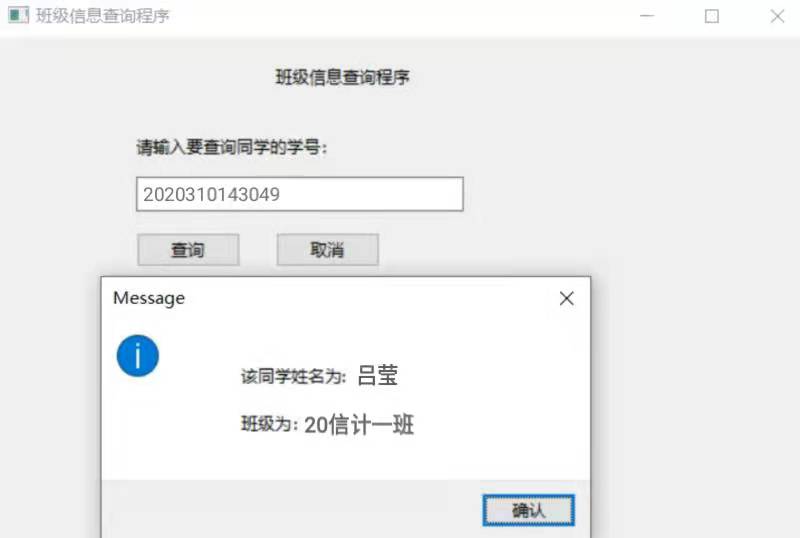
        self.title = wx.StaticText(pl, label="班级信息查询程序", pos=(200, 20))

        self.label_id = wx.StaticText(pl, label="请输入要查询同学的学号:", pos=(100, 70))

        self.text_id = wx.TextCtrl(pl, pos=(100, 100), size=(235, 25), style=wx.TE_LEFT)

        self.bt_bc = wx.Button(pl, label="查询", pos=(100, 140))

        self.bt_bc.Bind(wx.EVT_BUTTON, self.Chaxun)

        self.bt_qx = wx.Button(pl, label="取消", pos=(200, 140))

        self.bt_qx.Bind(wx.EVT_BUTTON, self.Cancel)

    def Chaxun(self,event):

        id = self.text_id.GetValue()

        if id =='':

            message = '输入为空!'

        else:

            (a,b,c) = classinformation.chaxuninformation(id)

            message = """

            该同学姓名为: {:s}

            班级为:{:s}

            """.format(c,b)

        wx.MessageBox(message)

        pass

    def Cancel(self, event):

        self.text_id.SetValue('')

        wx.MessageBox('取消成功!')

if __name__ == '__main__':

    app = wx.App()

    frame = MyFrame(parent=None,id=-1)

    frame.Show()

    app.MainLoop()
import sqlite3

def baochuninformation(a,b,c):

        """

        :param a: 学生的学号 (id)

        :param b: 班级 (bj)

        :param c: 姓名 (xm)

        :return:

        """

        conn = sqlite3.connect('mrsoft.db')

        cursor = conn.cursor()

        e = (a,b,c)

        cursor.execute('insert into classinformation (id,bj,xm) values (?,?,?)', e)

        cursor.close()

        conn.commit()

        conn.close()

def chaxuninformation(a):

        '''

        :param a: 学号

        :return: 返回元组

        '''

        b=()

        conn = sqlite3.connect('mrsoft.db')

        cursor = conn.cursor()

        a=int(a)

        cursor.execute('select * from classinformation where id = ?', (a,))

        b= cursor.fetchone()

        cursor.close()

        conn.close()

        return b

        #b是一个元组

if __name__=='__main__':

    conn = sqlite3.connect('mrsoft.db')

    cursor = conn.cursor()

    # create table classinformation (id int(15) primary key, bj varchar (20), xm varchar (4))

    a = ('20', '信计1班', '吕莹')

    #cursor.execute('insert into classinformation (id,bj,xm) values (?,?,?)', a)

    #cursor.execute('delete from classinformation where id = ?', (20,))

    cursor.execute('select * from classinformation where id = ?', (20,))

    b = cursor.fetchone()

    print(b)

    cursor.close()

    conn.commit()

    conn.close()
GUI程序设计--班级信息收集系的更多相关文章
- 最简单的方法是使用标准的 Linux GUI 程序之一: i-nex 收集硬件信息,并且类似于 Windows 下流行的 CPU-Z 的显示。 HardInfo 显示硬件具体信息,甚至包括一组八个的流行的性能基准程序,你可以用它们评估你的系统性能。 KInfoCenter 和 Lshw 也能够显示硬件的详细信息,并且可以从许多软件仓库中获取。
最简单的方法是使用标准的 Linux GUI 程序之一: i-nex 收集硬件信息,并且类似于 Windows 下流行的 CPU-Z 的显示. HardInfo 显示硬件具体信息,甚至包括一组八个的流 ...
- 信息收集->DNS分析->dnsdict6
如何获取域名的IPV4/IPV6地址之dnsdict6的使用 dnsdict6是一个用于获取网站信息的工具.dnsdict6可以扫描网站并显示有多少域或者子域,也可以扫描ipv6/ipv4地址.dns ...
- Kali Linux信息收集工具
http://www.freebuf.com/column/150118.html 可能大部分渗透测试者都想成为网络空间的007,而我个人的目标却是成为Q先生! 看过007系列电影的朋友,应该都还记得 ...
- Kali Linux信息收集工具全集
001:0trace.tcptraceroute.traceroute 描述:进行路径枚举时,传统基于ICMP协议的探测工具经常会受到屏蔽,造成探测结果不够全面的问题.与此相对基于TCP协议的探测,则 ...
- Kali Linux信息收集工具全
可能大部分渗透测试者都想成为网络空间的007,而我个人的目标却是成为Q先生! 看过007系列电影的朋友,应该都还记得那个戏份不多但一直都在的Q先生(由于年级太长目前已经退休).他为007发明了众多神奇 ...
- ATL的GUI程序设计(4)
第四章 对话框和控件 对于Win32 GUI的程序设计来说,其实大部分的情况下我们都不需要自己进行窗口类的设计,而是可以使用Win32中与用户交互的标准方式--对话框(Dialog Box).我们可以 ...
- ATL的GUI程序设计(3)
第三章 ATL的窗口类 CWindowImpl.CWindow.CWinTraits,ATL窗口类的奥秘尽在此三者之中.在本章里,李马将为你详细解说它们的使用方法.另外,本章的内容也可以算是本书的核心 ...
- ATL的GUI程序设计(2)
from:http://blog.titilima.com/atlgui-2.html 第二章 一个最简单窗口程序的转型 我知道,可能会有很多朋友对上一章的"Hello, World!&qu ...
- ATL的GUI程序设计(1)
from:http://blog.titilima.com/atlgui-1.html 第一章 不能免俗的"Hello, World!" 在这一章里,就像所有的入门级教程一样,我也 ...
- 渗透测试之信息收集(Web安全攻防渗透测试实战指南第1章)
收集域名信息 获得对象域名之后,需要收集域名的注册信息,包括该域名的DNS服务器信息和注册人的联系方式等. whois查询 对于中小型站点而言,域名所有人往往就是管理员,因此得到注册人的姓名和邮箱信息 ...
随机推荐
- 如何在不额外读流的情况下计算md5值
设想这样一个场景:从网络流中读取文件到硬盘中并计算文件的md5值.通常的做法是先将文件保存下来,再计算文件的md5,但这样会一共会出现三次I/O,一次网络I/O,两次磁盘I/O. 导致额外磁盘I/O的 ...
- 手把手教你为基于Netty的IM生成自签名SSL/TLS证书
1.引言 对于IM聊天应用来说,为了提升安全性,对聊天消息加密是常规操作. 众所周之,Netty是高性能的Java NIO网络通信框架,因而用Netty来写IM是再正常不过了.网上关于为Netty生成 ...
- js获取浏览器宽度和高度值
<html xmlns="http://www.w3.org/1999/xhtml"> <head> <title>请调整浏览器窗口</t ...
- java学习日记20230302-字符
JAVA字符 char c1 = 97 System.out.println(c1)// a 会输出97代表的字符(字符编码) 字符类型细节: 字符常量用单引号 java中允许使用\转义字符代表一个字 ...
- vue 2 中防抖节流在当前页面里写
isfilter(val) { // 过滤 this.debounce(() => { this.init(val); }, 1000); ...
- DRF限流Throttling
限流Throttling 可以对接口访问的频次进行限制,以减轻服务器的压力 使用 可以在配置文件中,使用 DEFAULT_THROTTLE_CLASSES 和 DEFAULT_THROTTLE_RAT ...
- iperf3带宽性能检测工具
iperf3用来测试两个节点之间的带宽传输,无论是几百k,还是几个G,基本可以满足两端的带宽测速. 1.软件环境 iperf3常用 windows环境 官网下载安装包,下载完成后解压,使用时,切换到c ...
- vscode 中用git命令合并分支
操作:主分支master的代码合并到当前分支wz 操作之前,两个分支的内容都要拉取最新的代码 命令为 git pull origin master git pull origin wz 或者vs内直接 ...
- SAP 开具发票的抬头文本带到会计凭证上
#需求 将开具发票的抬头文本带到会计凭证上.方便财务处理凭证,不然需要再去编辑凭证,容易遗忘. 达到的效果如图所示: #二代增强SDVFX001 事务码cmod分配增强 编写增强出口 代码如下: DA ...
- 肖sir___整理 电商详解__拼团活动
电商平台营销活动设计--拼团活动设计 2022-11-29 18:02 拼团是指一定数量的消费者在规定时间内,组织成团,并因人数优势而获取额外优惠或其他利益的一种形式 一.简介 拼团作为一种营销活动, ...