
Ubuntu WSL 下编译并使用OpenJDK12
一,安装Ubuntu WSL
1.Windows中设置WSL并安装Ubuntu wsl
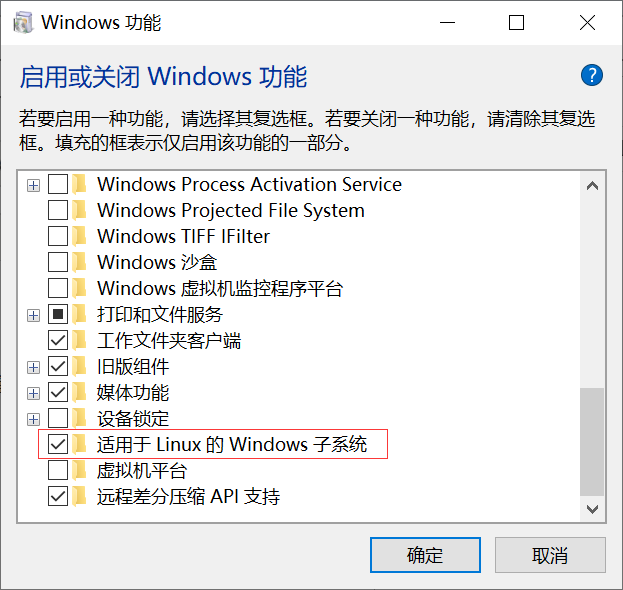
“控制面板”——>"程序”——>"启用或关闭Windows功能"中勾选如下,否则安装后无法开启
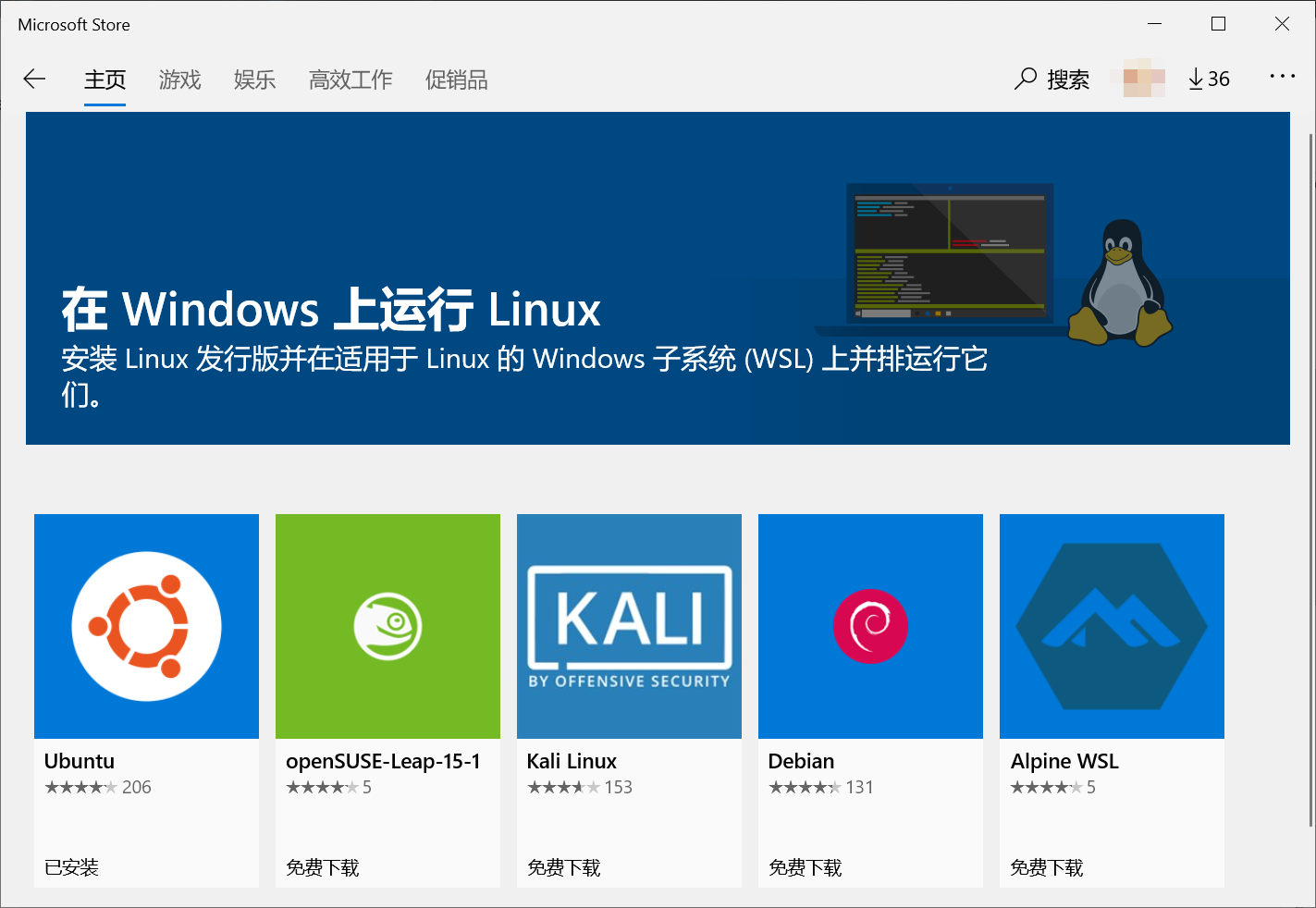
在Windows商店中搜索Ubuntu并下载安装
1.1 若要切换到root
刚进入是,root密码不知道的,可使用
sudo passwd
设置密码,设置后,使用 su root 便能切换到root用户。
1.2 若要使用windows资源管理器操作ubuntu中文件
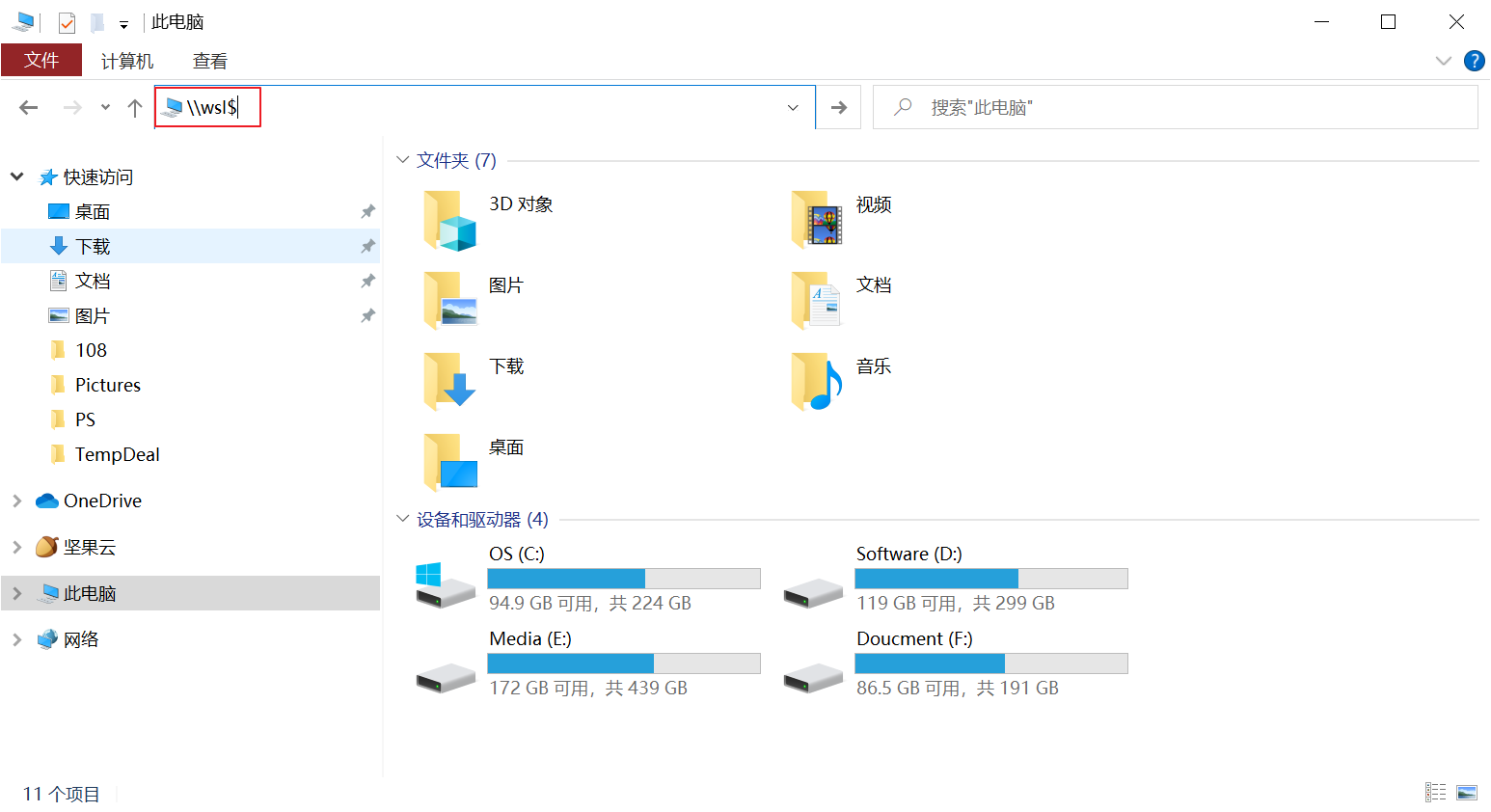
对与Linux命令不是很熟悉的同学,可以使用windows资源管理器操作wsl中的文件,更加的方便:
文件资源管理器输入\\wsl$
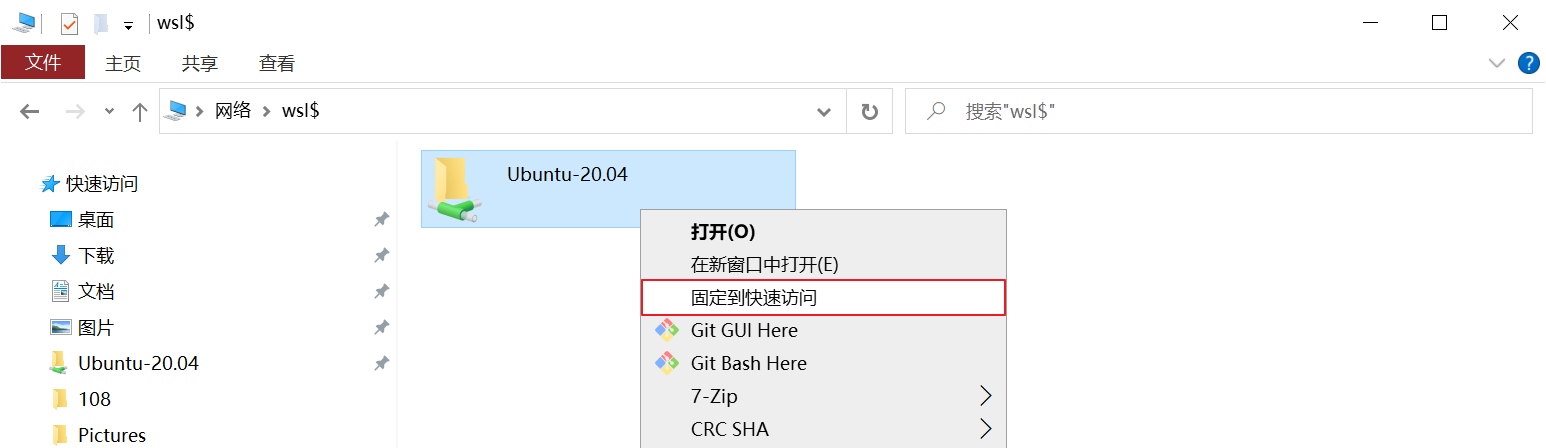
可将其固定到快速访问,方便以后的使用,
2.更换为国内源
将Ubuntu的更新源换到国内已获得更好的体验,本人换的为阿里云的源,当然你也可以换别的源:
更新源的目录是在 etc/apt/sources.list,先备份源
sudo cp sources.list sources.list.backup
然后在其前添加或将其内容替换为:
deb http://mirrors.aliyun.com/ubuntu/ bionic main restricted universe multiverse

deb-src http://mirrors.aliyun.com/ubuntu/ bionic main restricted universe multiverse

deb http://mirrors.aliyun.com/ubuntu/ bionic-security main restricted universe multiverse

deb-src http://mirrors.aliyun.com/ubuntu/ bionic-security main restricted universe multiverse

deb http://mirrors.aliyun.com/ubuntu/ bionic-updates main restricted universe multiverse

deb-src http://mirrors.aliyun.com/ubuntu/ bionic-updates main restricted universe multiverse

deb http://mirrors.aliyun.com/ubuntu/ bionic-proposed main restricted universe multiverse

deb-src http://mirrors.aliyun.com/ubuntu/ bionic-proposed main restricted universe multiverse

deb http://mirrors.aliyun.com/ubuntu/ bionic-backports main restricted universe multiverse

deb-src http://mirrors.aliyun.com/ubuntu/ bionic-backports main restricted universe multiverse
然后运行更新源
sudo apt-get update
二,OpenJDK12源码获取
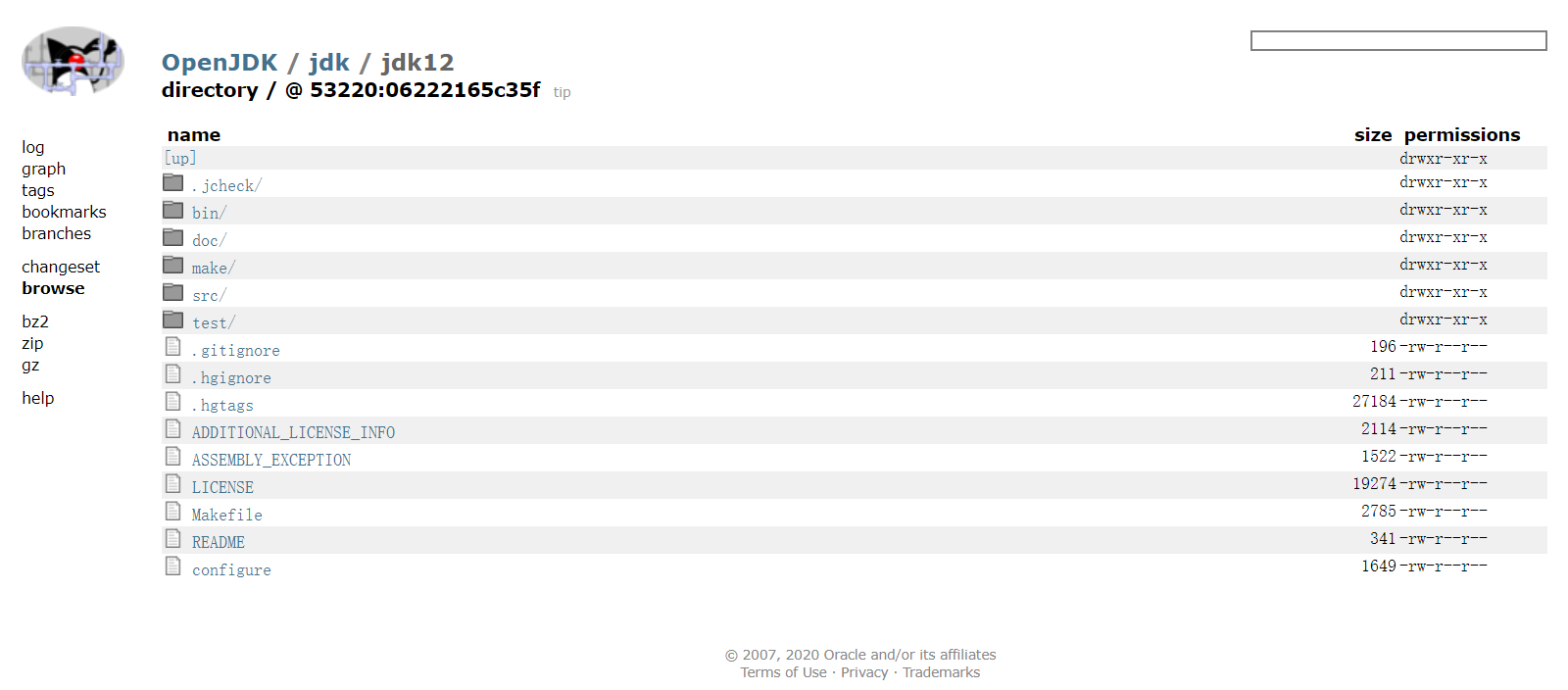
OpenJDK12源码地址:http://hg.openjdk.java.net/jdk/jdk12/file/06222165c35f
百度网盘 提取码:0h2s
三,构建编译环境
下载源码解压后,在其doc目录下有相关的说明文件,
安装GCC命令
sudo apt-get install build-essential
第三方依赖库
| 工具 | 库名称 | 安装命令 |
| FreeType | The Free Type Project | sudo apt-get install libfreetype6-dev |
| CUPS | Common UNIX Printing System | sudo apt-get install libcups2-dev |
| X11 | X Window System | sudo apt-get install libx11-dev libxext-dev libxrender-dev libxrandr-dev libxtst-dev libxt-dev |
| ALSA | Advanced Linux Sound Architecture | sudo apt-get install libasound2-dev |
| libffi | Portable Foreign Function Interface Library | sudo apt-get install libffi-dev |
| Autoconf | Extensible Package of M4 Macros | sudo apt-get install autoconf |
安装OpenJDK11
sudo apt-get install openjdk-11-jdk
安装zip
sudo apt-get install zip
如没安装zip在检查编译时可能会报如下错误
configure: error: Could not find required tool for ZIPEXE

configure exiting with result code 1
四,进行编译
编译时有很多参数可以供使用,如设置编译一个FastDebug版的,只有Server模式的HotSpot的虚拟机
bash configure --enable-debug --with-jvm-variants=server
如果环境已经构建好会出现如下类似内容:
====================================================

A new configuration has been successfully created in

/home/flytree/jdk12/build/linux-x86_64-server-fastdebug

using configure arguments '--enable-debug --with-jvm-variants=server'.

Configuration summary:

* Debug level:    fastdebug

* HS debug level: fastdebug

* JVM variants:   server

* JVM features:   server: 'aot cds cmsgc compiler1 compiler2 epsilongc g1gc graal jfr jni-check jvmci jvmti management nmt parallelgc serialgc services shenandoahgc vm-structs zgc'

* OpenJDK target: OS: linux, CPU architecture: x86, address length: 64

* Version string: 12-internal+0-adhoc.flytree.jdk12 (12-internal)

Tools summary:

* Boot JDK:       openjdk version "11.0.6" 2020-01-14 OpenJDK Runtime Environment (build 11.0.6+10-post-Ubuntu-1ubuntu118.04.1) OpenJDK 64-Bit Server VM (build 11.0.6+10-post-Ubuntu-1ubuntu118.04.1, mixed mode, sharing)  (at /usr/lib/jvm/java-11-openjdk-amd64)

* Toolchain:      gcc (GNU Compiler Collection)

* C Compiler:     Version 7.5.0 (at /usr/bin/gcc)

* C++ Compiler:   Version 7.5.0 (at /usr/bin/g++)

Build performance summary:

* Cores to use:   4

* Memory limit:   12154 MB
并会产生已下目录
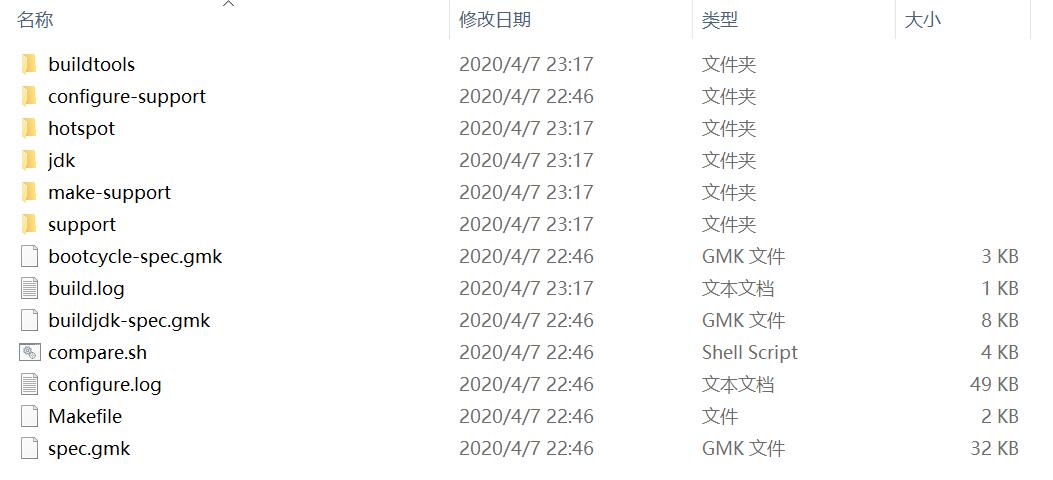
然后执行以下命令,进行编译
make images
编译后得到的JDK

文档中参数说明:
Configure Arguments for Tailoring the Build
--enable-debug- Set the debug level tofastdebug(this is a shorthand for--with-debug-level=fastdebug)--with-debug-level=<level>- Set the debug level, which can berelease,fastdebug,slowdebugoroptimized. Default isrelease.optimizedis variant ofreleasewith additional Hotspot debug code.--with-native-debug-symbols=<method>- Specify if and how native debug symbols should be built. Available methods arenone,internal,external,zipped. Default behavior depends on platform. See Native Debug Symbols for more details.--with-version-string=<string>- Specify the version string this build will be identified with.--with-version-<part>=<value>- A group of options, where<part>can be any ofpre,opt,build,major,minor,securityorpatch. Use these options to modify just the corresponding part of the version string from the default, or the value provided by--with-version-string.--with-jvm-variants=<variant>[,<variant>...]- Build the specified variant (or variants) of Hotspot. Valid variants are:server,client,minimal,core,zero,custom. Note that not all variants are possible to combine in a single build.--with-jvm-features=<feature>[,<feature>...]- Use the specified JVM features when building Hotspot. The list of features will be enabled on top of the default list. For thecustomJVM variant, this default list is empty. A complete list of available JVM features can be found usingbash configure --help.--with-target-bits=<bits>- Create a target binary suitable for running on a<bits>platform. Use this to create 32-bit output on a 64-bit build platform, instead of doing a full cross-compile. (This is known as a reduced build.)On Linux, BSD and AIX, it is possible to override where Java by default searches for runtime/JNI libraries. This can be useful in situations where there is a special shared directory for system JNI libraries. This setting can in turn be overriden at runtime by setting the
java.library.pathproperty.
--with-jni-libpath=<path>- Use the specified path as a default when searching for runtime libraries.Configure Arguments for Native Compilation
--with-devkit=<path>- Use this devkit for compilers, tools and resources--with-sysroot=<path>- Use this directory as sysroot--with-extra-path=<path>[;<path>]- Prepend these directories to the default path when searching for all kinds of binaries--with-toolchain-path=<path>[;<path>]- Prepend these directories when searching for toolchain binaries (compilers etc)--with-extra-cflags=<flags>- Append these flags when compiling JDK C files--with-extra-cxxflags=<flags>- Append these flags when compiling JDK C++ files--with-extra-ldflags=<flags>- Append these flags when linking JDK librariesConfigure Arguments for External Dependencies
--with-boot-jdk=<path>- Set the path to the Boot JDK--with-freetype=<path>- Set the path to FreeType--with-cups=<path>- Set the path to CUPS--with-x=<path>- Set the path to X11--with-alsa=<path>- Set the path to ALSA--with-libffi=<path>- Set the path to libffi--with-jtreg=<path>- Set the path to JTReg. See Running TestsCertain third-party libraries used by the JDK (libjpeg, giflib, libpng, lcms and zlib) are included in the JDK repository. The default behavior of the JDK build is to use this version of these libraries, but they might be replaced by an external version. To do so, specify
systemas the<source>option in these arguments. (The default isbundled).
--with-libjpeg=<source>- Use the specified source for libjpeg--with-giflib=<source>- Use the specified source for giflib--with-libpng=<source>- Use the specified source for libpng--with-lcms=<source>- Use the specified source for lcms--with-zlib=<source>- Use the specified source for zlib参考:《深入理解Java虚拟机:JVM高级特性与最佳实践》(第三版)
五,使用编译后的JDK
将编译后的JDK目录,设置为JAVA_HOME,修改文件
sudo vim ~/.bashrc
在其最后添加
export JAVA_HOME=/home/flytree/jdk12/build/linux-x86_64-server-fastdebug/jdk

export JRE_HOME=${JAVA_HOME}/jre

export CLASSPATH=.:${JAVA_HOME}/lib:${JRE_HOME}/lib

export PATH=${JAVA_HOME}/bin:$PATH
执行‘source ~/.bashrc’使得保存生效,执行'java -version'看时否有效
$ java -version

openjdk version "12-internal" 2019-03-19

OpenJDK Runtime Environment (fastdebug build 12-internal+0-adhoc.flytree.jdk12)

OpenJDK 64-Bit Server VM (fastdebug build 12-internal+0-adhoc.flytree.jdk12, mixed mode)
编写测试类
vim Hello.java
public class Hello {

    public static void main(String[] args) {

        System.out.println("Hello flytree");

    }

}
运行测试类
# javac Hello.java

# java Hello

Hello flytree
Ubuntu WSL 下编译并使用OpenJDK12的更多相关文章
- Ubuntu/CentOS下编译Nginx最基本参数
Ubuntu/CentOS下编译Nginx安装基本参数,做个记录: groupadd www useradd -g www www ./configure --user=www --group=www ...
- premake 在64位Ubuntu系统下编译32位GCC程序
首先,要安装GCC 4.8, 参考前文:Ubuntu 12.04 & 13.04 安装 GCC4.8.1 其中,重点是安装multilib apt-get install gcc-4.8-mu ...
- ubuntu 环境下编译 hadoop 2.6.0的简单方法
由于服务器一般都64位系统, hadoop网站的release版本32位native库不能运行,所以需要自己在编译一下.以下是我采用的一个编译的过程,比较简单,不用下载各种版本及环境配置,通过命令就能 ...
- ubuntu环境下编译linux内核问题解决备忘
在使用比较新的gcc编译内核时,经常遇到这个问题: 问题一: 提示: mkimage" command not found - U-Boot images will not be built ...
- Ubuntu/Debian下编译PC版的ffmpeg
1.安装git: 在命令行下执行 sudo apt-get install git-core 2.下载最新版本的ffmpeg: git clone git://source.ffmpeg.org/ff ...
- 在Ubuntu系统下编译arcsim仿真器
首先,用tar zxvf arcsim-0.2.1.tar.gz 将软件包解压 然后,打开里面的INSTALL文件,按照里面的步骤一步一步安装库.Ubuntu13.04下 1.BLAS sudo ap ...
- Ubuntu系统下arm-linux-gcc交叉编译环境搭建过程
搭建所需环境Linux版本:Ubuntu 14.10 交叉编译器版本:arm-linux-gcc-4.4.3资源链接 何为交叉编译环境搭建交叉编译环境,即安装.配置交叉编译工具链.在Ubuntu环境下 ...
- windows(wsl)下的trino编译和升级注意事项
最近在进行旧版本的prestosql和prestodb升级相关的操作,尝试自己编译了一下,这里记录一下过程和遇到问题的处理. 因为Trino不支持windows下的编译,如果使用windows最方便的 ...
- ubuntu下编译caffe
Ubuntu下编译caffe 纯粹是个人编译的记录.不用CUDA(笔记本是amd卡,万恶的nvidia):不手动编译依赖包(apt-get是用来干啥的?用来直接装二进制包,以及自动解决依赖项的) ca ...
- ubuntu下编译VLC
ubuntu下编译VLC 标签(空格分隔): ubuntu vlc 视频 编译 [TOC] 1.下载VLC源码包并解压 VLC的源码包在VLC的官网有,可以直接下载.也可以使用git来clone一个. ...
随机推荐
- vue中elementui组件el-dialog拖拽(已处理边界情况)
全局注册 Vue.directive("elDialogDrag", (el) => { const header = el.querySelector(".el- ...
- C# Image 图片缩放 截取
从大图中截取一部分图片 /// <summary> /// 从大图中截取一部分图片 /// </summary> /// <param name="fromIm ...
- FPGA中的速度优化
FPGA中的速度优化 一.逻辑设计中的速度概念 逻辑设计速度相关的概念有三个:设计吞吐量.设计延时和设计时序.速度优化策略而言,吞吐量需要提高,延时应该降低,时序应该收敛(时序余量slave越大,收敛 ...
- Java实现哈希表
2.哈希表 2.1.哈希冲突 冲突位置,把数据构建为链表结构. 装载因子=哈希表中的元素个数 / (散列表)哈希表的长度 装载因子越大,说明链表越长,性能就越低,那么哈希表就需要扩容,把数据迁移到新的 ...
- #博弈论#HDU 2516 取石子游戏
题目 \(n\)个石子,两人轮流取.先取者第1次可以取任意多个, 但不能全部取完.以后每次取的石子数不能超过上次取子数的2倍. 取完者胜.先取者负输出"Second win".先取 ...
- #斐波那契#洛谷 3424 [POI2005] SUM-Fibonacci Sums
题目 已知\(x,y\)的斐波那契表示,求\(x+y\)的斐波那契表示 分析 显然得到两条性质: \(f_{i+1}=f_{i-1}+f_i\) \(2f_i=f_{i+1}+f_{i-2}\) 那么 ...
- Java 日期和时间 API:实用技巧与示例 - 轻松处理日期和时间
Java 用户输入(Scanner) 简介 Scanner 类用于获取用户输入,它位于 java.util 包中. 使用 Scanner 类 要使用 Scanner 类,请执行以下步骤: 导入 jav ...
- 深入理解 Java 循环结构:while、do while、for 和 for-each 循环
Java 循环 循环可以执行一个代码块,只要达到指定的条件.循环很方便,因为它们节省时间,减少错误,并使代码更易读. Java While 循环 while 循环会循环执行一个代码块,只要指定的条件为 ...
- RabbitMQ 03 直连模式-可视化界面
这里先演示最简单的模型:直连模式.其结构图为: 一个生产者 -> 消息队列 -> 一个消费者 生产者只需要将数据丢进消息队列,而消费者只需要将数据从消息队列中取出,这样就实现了生产者和消费 ...
- 构筑立体世界,AR Engine助力B站会员购打造沉浸式营销
随着购物场景的逐渐多元化,越来越多电商平台把线下购物体验搬到线上,运用AR技术,跨越空间距离,帮助用户在购买前"体验"商品,增强购买意愿. 哔哩哔哩会员购(后称会员购)是B站于20 ...