
WordPress简码实现的一些常用的效果
首先要确保框架里已经安装好element pro插件,
下面是使用简码,来实现效果,在element中找到简码,并且在WordPress后台主题编辑器中,找到function.php文件,
显示产品的分类,下面是效果图
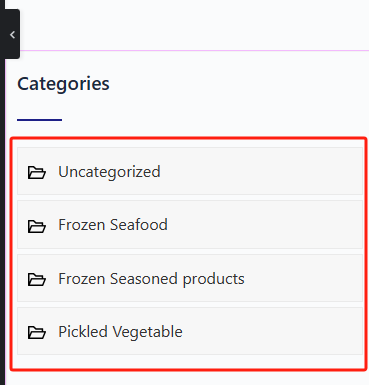
在function.php中添加如下代码,
add_theme_support( 'post-thumbnails' );

// 注册简码以显示产品分类

function my_custom_product_categories_shortcode() {

    $categories = get_terms('product_cat', array(

        'hide_empty' => false,

    ));

$current_category = single_cat_title('', false);

    $output = '<div class="my-custom-categories">';

    foreach ($categories as $category) {

		$class=$current_category==$category->name?'active':'';

        $output .= sprintf('<a class="%s" href="%s">%s</a>',

						   $class,

            esc_url(get_term_link($category)),

            esc_html($category->name)

        );

    }

    $output .= '</div>';

    return $output;

}

add_shortcode('my_product_categories', 'my_custom_product_categories_shortcode');
下面是实现这个该功能的的一个简单的css代码,具体可以根据需求进行更改
/* 自定义产品分类样式 */

.my-custom-categories {

    margin-bottom: 30px; /* 或根据您的布局调整 */

}

.my-custom-categories a {

    display: block;

    padding: 10px;

    margin: 5px 0;

    background: #f7f7f7;

    border: 1px solid #eaeaea;

    color: #333;

    text-decoration: none;

    transition: background-color 0.3s ease;

}

.my-custom-categories a:hover {

    background-color: #eaeaea;

}
在简码中插入
[my_product_categories]
即可实现上面的效果
下面这个是获取最新的四个产品以及搜索,一般用于产品展示页面的左侧或者右侧,图片大小在css代码里面可以进行修改,下面是效果图
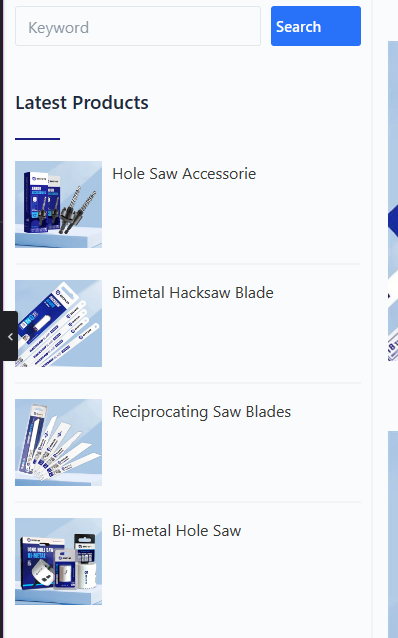
在function.php里面的简码是
//获取最新的四个产品

function my_latest_products_shortcode() {

    $args = array(

        'post_type' => 'product',

        'posts_per_page' => 4,

        'orderby' => 'date',

        'order' => 'DESC'

    );

    $loop = new WP_Query($args);

    $output = '<div class="latest-products-container">';

    while ($loop->have_posts()) : $loop->the_post();

        $thumbnail_id = get_post_thumbnail_id();

        $thumbnail_url = wp_get_attachment_image_src($thumbnail_id, 'full', true);

        $output .= '<div class="latest-product">';

        $output .= '<a href="' . get_the_permalink() . '" class="latest-product-link">';

        $output .= '<div class="latest-product-img">';

        $output .= '<img src="' . $thumbnail_url[0] . '" alt="' . get_the_title() . '"/>';

        $output .= '</div>';

        $output .= '<div class="latest-product-title">';

        $output .= '<h3>' . get_the_title() . '</h3>';

        $output .= '</div>';

        $output .= '</a>';

        $output .= '</div>';

    endwhile;

    wp_reset_postdata();

    $output .= '</div>';

    return $output;

}

add_shortcode('my_latest_products', 'my_latest_products_shortcode');

//搜索产品

function my_product_search_shortcode() {

    $output = '<form role="search" method="get" class="search-form" action="' . esc_url(home_url('/')) . '">

        <input type="search" class="search-field" placeholder="Keyword" value="' . get_search_query() . '" name="s" />

        <input type="submit" class="search-submit" value="Search" />

        <input type="hidden" value="product" name="post_type" />

    </form>';

    return $output;

}

add_shortcode('my_product_search', 'my_product_search_shortcode');
下面是如上图的一个简单的css样式效果代码,具体样式可以根据自己需求进行更改
//产品搜索的样式代码

.search-form {

    display: flex;

    margin-bottom: 20px;

}

.search-field {

    flex-grow: 1;

    margin-right: 10px;

    padding: 5px;

}

.search-submit {

    padding:  5px;

}

//最新的四个产品样式代码

.latest-products-container {

    display: flex;

    flex-direction: column;

}

.latest-product {

    display: flex;

    align-items: center;

    margin-bottom: 15px;

}

.latest-product-link {

    display: flex;

    text-decoration: none;

    color: inherit;

}

.latest-product-img {

    margin-right: 10px;

}

.latest-product-img img {

    width: 87px; /* 或根据您的需要调整 */

    height: 87px; /* 或根据您的需要调整 */

    object-fit: cover; /* 保持图片比例 */

}

.latest-product-title h3 {

    color: #373937;

    font-weight: 400;

    margin: 0;

    font-size: 16px; /* 根据您的需要调整 */

}

/* 选中前三个产品项 */

.latest-product:nth-child(-n+3) {

    border-bottom: 2px solid #F3F3F3;

    padding-bottom: 15px;

}

/* 最后一个产品项没有底部边距 */

.latest-product:last-child {

    margin-bottom: 0;

}
在简码中插入下面代码是搜索的
[my_product_search]
在简码中插入下面代码是最新产品展示的
[my_latest_products]
在文章页面,会有一个文章最新文章前三个的展示,只展示标题,效果图如下
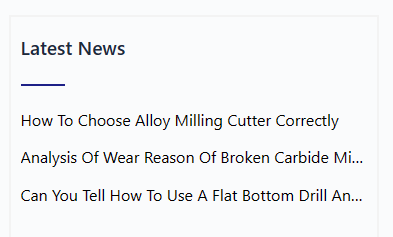
在function.php里面的简码如下,
//前三个最新文章

function my_latest_news_shortcode() {

    $args = array(

        'posts_per_page' => 3, // 获取三篇最新的文章

        'orderby' => 'date', // 按日期排序

        'order' => 'DESC', // 最新的文章在前

    );

    $latest_posts = new WP_Query($args);

    $output = '<div class="latest-news-container">';

    if ($latest_posts->have_posts()) {

        $count = 0;

        while ($latest_posts->have_posts()) {

            $latest_posts->the_post();

            $count++;

            $output .= '<div class="latest-news-item">';

            $output .= '<a href="' . get_permalink() . '" class="latest-news-link">' . get_the_title() . '</a>';

            if ($count < 3) {

                $output .= '<hr class="latest-news-divider">';

            }

            $output .= '</div>';

        }

    } else {

        $output .= '<p>No news found.</p>';

    }

    wp_reset_postdata();

    $output .= '</div>';

    return $output;

}

add_shortcode('my_latest_news', 'my_latest_news_shortcode');
下面是如上图的一个简单的样式css代码
.latest-news-container {

    /* 根据需要调整 */

}

.latest-news-item {

    margin-bottom: 10px; /* 为每个新闻条目添加间距 */

}

.latest-news-link {

    display: block; /* 使链接占据整行 */

    white-space: nowrap; /* 确保文本不会换行 */

    overflow: hidden; /* 隐藏超出容器的文本 */

    text-overflow: ellipsis; /* 用省略号表示超出的文本 */

    text-decoration: none; /* 移除下划线 */

    color: #000; /* 根据需要调整颜色 */

    /* 可能还需要其他样式 */

}

.latest-news-divider {

    border: none;

    height: 1px;

    background-color: #ccc; /* 分隔线的颜色 */

    margin-bottom: 10px; /* 分隔线和下一条新闻之间的间距 */

}
在简码中插入
[my_latest_news]
在产品详情页面 ,会有上一个产品,下一个产品的快捷按钮,以及当前产品详情分类下的别的相关产品展示,注意,这里相关产品只展示三个,效果图如下
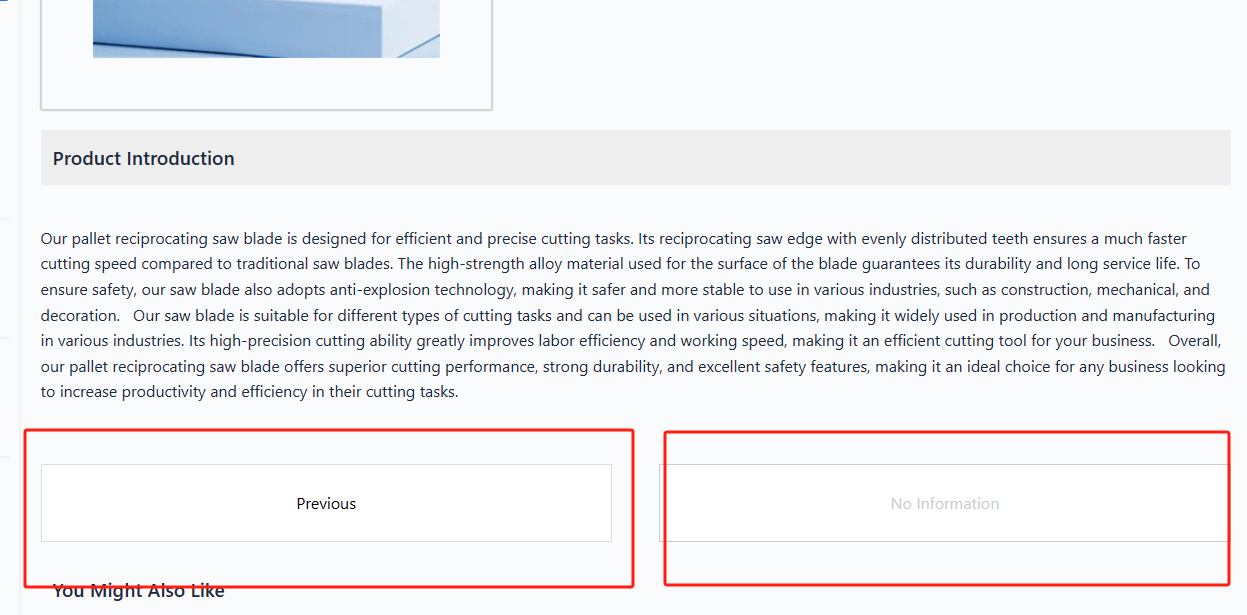
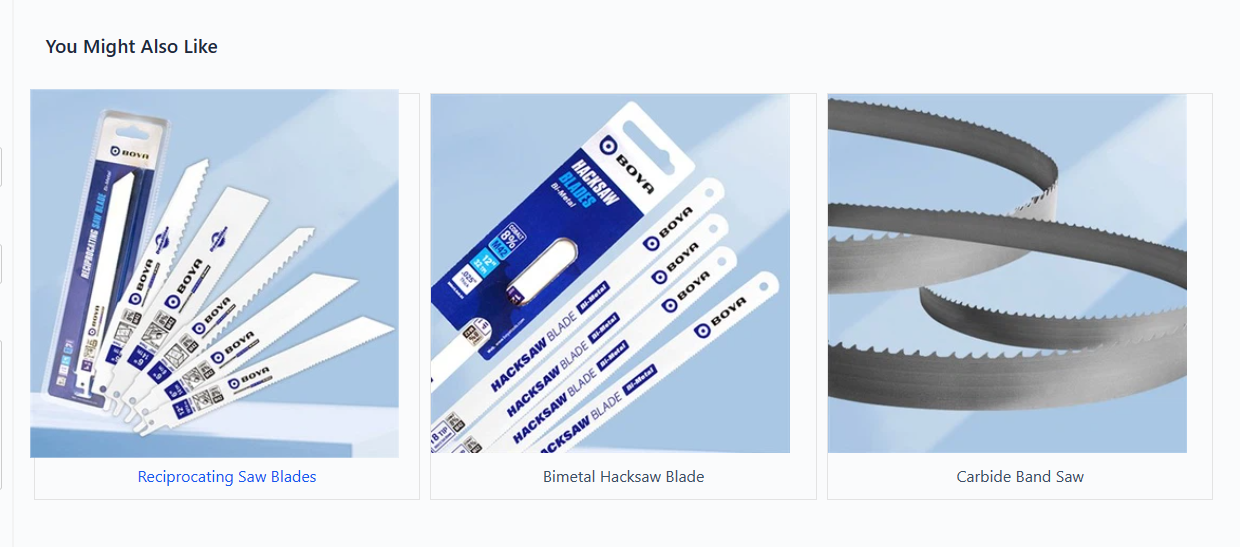
在function.php中插入如下代码
//上一个产品/下一个产品

function my_navigation_shortcode() {

    $prev_post = get_previous_post();

    $next_post = get_next_post();

    $output = '<div class="navigation-container">';

    if (!empty($prev_post)) {

        $output .= '<a href="' . get_permalink($prev_post->ID) . '" class="nav-link prev-link">Previous</a>';

    } else {

        $output .= '<span class="nav-link prev-link disabled">No Information</span>';

    }

    if (!empty($next_post)) {

        $output .= '<a href="' . get_permalink($next_post->ID) . '" class="nav-link next-link">Next</a>';

    } else {

        $output .= '<span class="nav-link next-link disabled">No Information</span>';

    }

    $output .= '</div>';

    return $output;

}

add_shortcode('my_navigation', 'my_navigation_shortcode');

//产品详情下面的相关产品

function my_related_products_shortcode() {

    // 获取当前产品的分类

    $terms = wp_get_post_terms(get_the_ID(), 'product_cat');

    if (empty($terms)) return ''; // 如果没有分类,返回空

    $term_ids = wp_list_pluck($terms, 'term_id');

    $args = array(

        'post_type' => 'product',

        'posts_per_page' => 3,

        'orderby' => 'rand',

        'post__not_in' => array(get_the_ID()), // 排除当前产品

        'tax_query' => array(

            array(

                'taxonomy' => 'product_cat',

                'field' => 'id',

                'terms' => $term_ids,

            ),

        ),

    );

    $related_products = new WP_Query($args);

    $output = '<div class="related-products-container">';

    if ($related_products->have_posts()) {

        while ($related_products->have_posts()) {

            $related_products->the_post();

            global $product;

            $output .= '<div class="related-product-item">';

            $output .= '<a href="' . get_the_permalink() . '" class="related-product-link">';

            $output .= '<img src="' . get_the_post_thumbnail_url(get_the_ID(), 'full') . '" alt="' . get_the_title() . '" class="related-product-image">';

            $output .= '<div class="related-product-title">' . get_the_title() . '</div>';

            $output .= '</a>';

            $output .= '</div>';

        }

    } else {

        $output .= '<div class="no-related-products">No related products found.</div>';

    }

    wp_reset_postdata();

    $output .= '</div>';

    return $output;

}

add_shortcode('my_related_products', 'my_related_products_shortcode');
下面是样式css代码
//上一个、下一个产品

/* 导航容器样式 */

.navigation-container {

    display: flex;

    justify-content: space-between; /* 两个按钮之间有间隙 */

    margin-top: 20px; /* 与内容的距离 */

}

/* 单个导航链接样式 */

.navigation-container .nav-link {

    width: 48%; /* 按钮宽度为容器的48% */

    padding: 25px; /* 内边距 */

    text-align: center; /* 文本居中 */

    background-color: #fff; /* 背景颜色 */

    border: 1px solid #ddd; /* 边框颜色 */

    transition: border 0.3s ease, box-shadow 0.3s ease; /* 平滑过渡效果 */

    box-sizing: border-box; /* 盒模型设置 */

    text-decoration: none; /* 移除文本下划线 */

    color: #000; /* 文字颜色 */

}

/* 悬停效果 */

.navigation-container .nav-link:hover {

    border-top: 2px solid #1d2087; /* 悬停时上边框 */

    box-shadow: 0 2px 2px rgba(0, 0, 0, 0.2); /* 盒阴影 */

}

/* 禁用链接样式 */

.navigation-container .nav-link.disabled {

    color: #ccc; /* 禁用链接的文字颜色 */

    cursor: not-allowed; /* 鼠标样式 */

    border: 1px solid #ccc; /* 禁用状态的边框颜色 */

}

//相关产品

.related-products-container {

    display: flex;

    flex-wrap: wrap;

    gap: 10px; /* 控制项目之间的间隙 */

    margin-bottom: 20px;

}

.related-product-item {

    flex: 0 1 calc(33.333% - 10px); /* 让每个项目占据1/3的容器宽度,减去间隙 */

    border: 1px solid #e3e3e3; /* 项目边框 */

    text-align: center; /* 文本居中 */

    margin-bottom: 10px; /* 项目底部的间隙 */

}

.related-product-image {

    width: 359px;

    height: 359px;

    object-fit: cover; /* 保持图片的宽高比 */

}

.related-product-title {

    padding: 10px 0; /* 上下内边距 */

}

.related-product-link {

    text-decoration: none;

    color: inherit; /* 继承字体颜色 */

}

.no-related-products {

    text-align: center;

    padding: 20px;

}

/* 其他样式保持不变 */

.related-product-image {

    width: 359px;

    height: 359px;

    object-fit: cover; /* 保持图片的宽高比 */

    transition: transform 1200ms ease; /* 平滑变换效果 */

    display: block; /* 修复内联元素的变形问题 */

}

.related-product-link:hover .related-product-image {

    transform: scale(1.05); /* 鼠标悬停时放大1.1倍 */

}
下面是插入的简码,上下个产品
[my_navigation]
产品详情页面的相关产品
[my_related_products]
WordPress简码实现的一些常用的效果的更多相关文章
- php模拟数据库常用操作效果
test.php <?php header("Content-type:text/html;charset='utf8'"); error_reporting(E_ALL); ...
- jquery-12 jquery常用动画效果有哪些
jquery-12 jquery常用动画效果有哪些 一.总结 一句话总结:jquery可以用户animate()自定义动画,也可以slide和fade系列方法来设置动画. 1.动画效果如何设置执行时间 ...
- HTML常用标签效果展示
HTML常用标签效果展示 一.文本效果 段落1---收到了开发建设看来得更加快乐圣诞节福利肯定是减肥的路上苏里科夫就是打开了飞机都是风口浪尖上的疯狂了大煞风景圣诞快乐的索科洛夫几点上课了关键是低空掠过 ...
- jQuery中常用网页效果应用
一.常用网页效果应用 1.表单应用 表单由表单标签.表单域和表单按钮组成. 1.1单行文本框应用 例:获取和失去焦点改变样式 首先,在网页中创建一个表单,HTML代码如下 <form actio ...
- WordPress主题模板层次和常用模板函数
首页: home.php index.php 文章页: single-{post_type}.php – 如果文章类型是videos(即视频),WordPress就会去查找single-videos. ...
- 常用JS效果 不断进步贴 不停更新~ 纪念用~
常用效果 JS 都是Jquery 没有特殊说明 1.选项卡 用的JQuery 以后学好点再来对比 看下 /* * @parent 最外层父级元素 * @EventElement 触发事件元素 ...
- WordPress主题开发:WP_Query常用参数
常用参数 用途 调用文章或页面 s 查询和某个关键词相关的所有的文章/页面信息 p 文章或页面id post__in 多篇id post__not_in 多篇id以外 post_type 查询的信息类 ...
- 常用JS效果 需要时更新。。。
1.手风琴效果 JS: $(function() { var aMenuOneLi = $(".menu-one > li"); var aMenuTwo = ...
- 常用CSS3效果:用text-shadow做CSS3 文字描边
思路: 利用CSS3的text-shadow属性,对文字的四个边均用阴影. 最终效果: 单纯的为了实现效果.未作任何美化. 实现代码: HTML: <div>文字描边效果</div& ...
- linear-gradient常用实现效果
之前也研究过css3的这个属性,感觉没什么大用,一般的开发不会用到,毕竟调出来的渐变不专业,不如找一个好看的图片,其实很多时候还是有用的,偷来三个例子. 一.控制虚线 一般写虚线都用dashed,但有 ...
随机推荐
- Spring面试攻略:如何展现你对Spring的深入理解
什么是Spring?谈谈你对IOC和AOP的理解. Spring是一种Java开发框架,旨在简化企业级应用程序的开发和部署.它具有以下优点: 对象托管:Spring能够管理和赋值所有对象,使开发人员不 ...
- SpringBoot 测试实践 - 2:单元测试与集成测试
单元测试 vs. 集成测试 只编写单测,无法测试方法之间的集成情况,而且某些需求可能会修改多个方法,这可能会影响方法对应的单测,涉及到大量的相关单测的修改,这样的维护成本很高 可以把重心放在完善集成测 ...
- 【干货】华为云图数据库GES技术演进
本文分享自华为云社区<[干货]华为云图数据库GES技术演进>,作者: Chenyi. 1 背景 大规模图数据无处不在,图查询.分析和表示学习已成为大数据和AI的核心部分之一.特别是知识图谱 ...
- win11安装ubuntu(by wsl2)
欢迎访问我的GitHub 这里分类和汇总了欣宸的全部原创(含配套源码):https://github.com/zq2599/blog_demos 本机情况 省吃俭用入手了ThinkPad T14,打算 ...
- 15.3K Star,超好用的开源协作式数字白板:tldraw
大家好,我是TJ 今天给大家推荐一个开源协作式数字白板:tldraw. tldraw的编辑器.用户界面和其他底层库都是开源的,你可以在它的开源仓库中找到它们.它们也在NPM上分发,提供开发者使用.您可 ...
- window操作系统安装多个版本nodejs版本-控制工具nvm
参考: https://blog.csdn.net/m0_38134431/article/details/118388297 https://juejin.cn/post/7044890876631 ...
- tree-test
#include <iostream> #include <stack> using namespace std; typedef struct BiTNode{ char d ...
- 编译器优化记录(Mem2Reg+SSA Destruction)
编译器优化记录(2) Mem2Reg+SSA Destruction 写的时候忽然想起来,这部分的内容恰好是在我十八岁生日的前一天完成的.算是自己给自己的一份成长的纪念吧. 0. 哪些东西可以Mem2 ...
- OPPO主题组件开发 - 组件内容自适应
OPPO桌面有 3*5.3*6.4*5.4*6.5*5.5*6 等布局,随着布局不同,组件大小也会发生改变:不同型号手机分辨率不同,组件大小也不一致.这就要求组件内容做到自适应. 说明 OPPO主题组 ...
- K8s部署轻量级日志收集系统EFK(elasticsear + filebeat + kibana)
目录 K8s部署EFK(elasticsear + filebeat + kibana)日志收集 一.准备镜像 二.搭建Elasticsearch + kibana 1.在可执行kubectl命令的服 ...