
vertx的学习总结7之用kotlin 与vertx搞一个简单的http
这里我就简单的聊几句,如何用vertx web来搞一个web项目的
1、首先先引入几个依赖,这里我就用maven了,这个是kotlin+vertx web
<?xml version="1.0" encoding="UTF-8"?>

<project xmlns="http://maven.apache.org/POM/4.0.0"

         xmlns:xsi="http://www.w3.org/2001/XMLSchema-instance"

         xsi:schemaLocation="http://maven.apache.org/POM/4.0.0 http://maven.apache.org/xsd/maven-4.0.0.xsd">

    <modelVersion>4.0.0</modelVersion>

    <groupId>org.example</groupId>

    <artifactId>kotlin-vertx</artifactId>

    <version>1.0-SNAPSHOT</version>

    <properties>

        <maven.compiler.source>17</maven.compiler.source>

        <maven.compiler.target>17</maven.compiler.target>

        <project.build.sourceEncoding>UTF-8</project.build.sourceEncoding>

        <kotlin.version>1.8.20</kotlin.version>

    </properties>

    <dependencies>

        <dependency>

            <groupId>io.vertx</groupId>

            <artifactId>vertx-core</artifactId>

        </dependency>

        <dependency>

            <groupId>io.vertx</groupId>

            <artifactId>vertx-codegen</artifactId>

        </dependency>

        <dependency>

            <groupId>io.vertx</groupId>

            <artifactId>vertx-service-proxy</artifactId>

        </dependency>

        <dependency>

            <groupId>io.vertx</groupId>

            <artifactId>vertx-web</artifactId>

        </dependency>

        <dependency>

            <groupId>io.vertx</groupId>

            <artifactId>vertx-auth-common</artifactId>

        </dependency>

        <dependency>

            <groupId>ch.qos.logback</groupId>

            <artifactId>logback-classic</artifactId>

            <version>1.2.3</version>

        </dependency>

        <dependency>

            <groupId>org.jetbrains.kotlinx</groupId>

            <artifactId>kotlinx-coroutines-core</artifactId>

            <version>1.7.1</version>

        </dependency>

        <dependency>

            <groupId>org.jetbrains.kotlin</groupId>

            <artifactId>kotlin-stdlib-jdk8</artifactId>

            <version>${kotlin.version}</version>

        </dependency>

        <dependency>

            <groupId>org.jetbrains.kotlin</groupId>

            <artifactId>kotlin-test</artifactId>

            <version>${kotlin.version}</version>

            <scope>test</scope>

        </dependency>

    </dependencies>

    <build>

        <plugins>

            <plugin>

                <groupId>org.jetbrains.kotlin</groupId>

                <artifactId>kotlin-maven-plugin</artifactId>

                <version>${kotlin.version}</version>

                <executions>

                    <execution>

                        <id>compile</id>

                        <phase>compile</phase>

                        <goals>

                            <goal>compile</goal>

                        </goals>

                        <configuration>

                            <sourceDirs>

                                <source>src/main/java</source>

                                <source>target/generated-sources/annotations</source>

                            </sourceDirs>

                        </configuration>

                    </execution>

                    <execution>

                        <id>test-compile</id>

                        <phase>test-compile</phase>

                        <goals>

                            <goal>test-compile</goal>

                        </goals>

                    </execution>

                </executions>

                <configuration>

                    <jvmTarget>${maven.compiler.target}</jvmTarget>

                </configuration>

            </plugin>

            <plugin>

                <groupId>org.apache.maven.plugins</groupId>

                <artifactId>maven-compiler-plugin</artifactId>

                <executions>

                    <execution>

                        <id>default-compile</id>

                        <phase>none</phase>

                    </execution>

                    <execution>

                        <id>default-testCompile</id>

                        <phase>none</phase>

                    </execution>

                    <execution>

                        <id>compile</id>

                        <phase>compile</phase>

                        <goals>

                            <goal>compile</goal>

                        </goals>

                    </execution>

                    <execution>

                        <id>testCompile</id>

                        <phase>test-compile</phase>

                        <goals>

                            <goal>testCompile</goal>

                        </goals>

                    </execution>

                </executions>

            </plugin>

        </plugins>

    </build>

    <dependencyManagement>

        <dependencies>

            <dependency>

                <groupId>io.vertx</groupId>

                <artifactId>vertx-dependencies</artifactId>

                <version>4.4.4</version>

                <type>pom</type>

                <scope>import</scope>

            </dependency>

        </dependencies>

    </dependencyManagement>

</project>
2、先创建一个简单的httpweb
package org.example.kotlin_web

import io.vertx.core.AbstractVerticle

import io.vertx.core.Vertx

import io.vertx.core.http.HttpServerOptions

import io.vertx.ext.web.Router

import kotlinx.coroutines.delay

class HttpWeb : AbstractVerticle() {

    override fun start() {

        var router = Router.router(vertx);

        router.get("/hello").handler { context ->

            context.response().end("Hello World")

        };

        vertx.createHttpServer().requestHandler(router).listen(8080)

    }

}

fun main(){

    var vertx = Vertx.vertx();

    vertx.deployVerticle(HttpWeb())

}这里用了路由,也就是说访问localhost:8080/hello 它会输出Hello World,这个是get请求
3、get请求带参数
package org.example.kotlin_web

import io.vertx.core.AbstractVerticle

import io.vertx.core.Vertx

import io.vertx.ext.web.Router

class HttpWeb : AbstractVerticle() {

    override fun start() {

        var router = Router.router(vertx);

        router.get("/hello").handler { ctx ->

            val name: String = ctx.request().getParam("name")

            // 处理逻辑

            val message = "Hello, $name!"

            // 返回响应

            ctx.response().end(message)

        };

        vertx.createHttpServer().requestHandler(router).listen(8080)

    }

}

fun main(){

    var vertx = Vertx.vertx();

    vertx.deployVerticle(HttpWeb())

}
可以看到非常简单

4、post请求带参数
package org.example.kotlin_web

import io.vertx.core.AbstractVerticle

import io.vertx.core.Vertx

import io.vertx.core.buffer.Buffer

import io.vertx.ext.web.Router

import io.vertx.ext.web.RoutingContext

import io.vertx.ext.web.handler.StaticHandler

class HttpWeb : AbstractVerticle() {

    override fun start() {

        var router = Router.router(vertx);

        router.route().handler(StaticHandler.create("src/main/resources/static").setCachingEnabled(false).setDefaultContentEncoding("UTF-8"));

        router.get("/hello").handler { ctx ->

            val name: String = ctx.request().getParam("name")

            // 处理逻辑

            val message = "Hello, $name!"

            // 返回响应

            ctx.response().end(message)

        };

        router.post().path("/index").handler { ctx: RoutingContext ->

            val request = ctx.request()

            val response = ctx.response()

            response.putHeader("Content-Type", "text/plain; charset=utf-8")

            val formAttributes = request.formAttributes()

            request.bodyHandler { body: Buffer ->

                val formData = body.toString()

                println("Received form data: $formData")

                response.setStatusCode(200)

                response.end("Form submitted successfully")

            }

        }

        vertx.createHttpServer().requestHandler(router).listen(8080)

    }

}

fun main(){

    var vertx = Vertx.vertx();

    vertx.deployVerticle(HttpWeb())

}
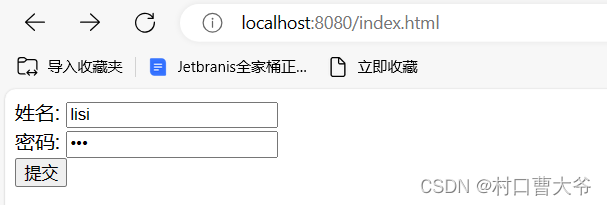
index.html
<!DOCTYPE html>

<html lang="en">

<head>

    <meta charset="UTF-8">

    <title>index</title>

</head>

<body>

<form method="post" action="http://localhost:8080/index">

  姓名:  <input type="text" name="name" ><br>

  密码:  <input type="password" name="password"> <br>

    <input type="submit">

</form>

</body>

</html>
这里的所有代码都写到了同一个文件里面,这样极其的不美观,可以优化一下
vertx的学习总结7之用kotlin 与vertx搞一个简单的http的更多相关文章
- 学习vi和vim编辑(3):一个简单的文本编辑器(2)
然后文章,继续评论vi编辑简单的文本编辑命令. 本文主要是删除的文字.复制,运动命令. 删除文本: 正如上一篇文章中讲过的,对于删除命令("d")也具有"(command ...
- [shiro学习笔记]第二节 shiro与web融合实现一个简单的授权认证
本文地址:http://blog.csdn.net/sushengmiyan/article/details/39933993 shiro官网:http://shiro.apache.org/ shi ...
- opengl学习笔记(五):组合变换,绘制一个简单的太阳系
创建太阳系模型 描述的程序绘制一个简单的太阳系,其中有一颗行星和一颗太阳,用同一个函数绘制.需要使用glRotate*()函数让这颗行星绕太阳旋转,并且绕自身的轴旋转.还需要使用glTranslate ...
- pipelinewise 学习二 创建一个简单的pipeline
pipelinewise 提供了方便的创建简单pipeline的命令,可以简化pipeline 的创建,同时也可以帮我们学习 生成demo pipeline pipelinewise init --n ...
- Openfire/XMPP学习之——一个简单的Smack样例
昨天讲了Openfire的搭建和配置,今天来讲一下Smack.如果对如何搭建和配置Openfire的,可以参考Openfire/XMPP学习之——Openfire的安装.配置. Smack是一个开源, ...
- Django 学习笔记之六 建立一个简单的博客应用程序
最近在学习django时建立了一个简单的博客应用程序,现在把简单的步骤说一下.本人的用的版本是python 2.7.3和django 1.10.3,Windows10系统 1.首先通过命令建立项目和a ...
- WCF学习——构建一个简单的WCF应用(一)
本文的WCF服务应用功能很简单,却涵盖了一个完整WCF应用的基本结构.希望本文能对那些准备开始学习WCF的初学者提供一些帮助. 在这个例子中,我们将实现一个简单的计算器和传统的分布式通信框架一样,WC ...
- 一起学习造轮子(二):从零开始写一个Redux
本文是一起学习造轮子系列的第二篇,本篇我们将从零开始写一个小巧完整的Redux,本系列文章将会选取一些前端比较经典的轮子进行源码分析,并且从零开始逐步实现,本系列将会学习Promises/A+,Red ...
- 一起学习造轮子(一):从零开始写一个符合Promises/A+规范的promise
本文是一起学习造轮子系列的第一篇,本篇我们将从零开始写一个符合Promises/A+规范的promise,本系列文章将会选取一些前端比较经典的轮子进行源码分析,并且从零开始逐步实现,本系列将会学习Pr ...
- 一起学习造轮子(三):从零开始写一个React-Redux
本文是一起学习造轮子系列的第三篇,本篇我们将从零开始写一个React-Redux,本系列文章将会选取一些前端比较经典的轮子进行源码分析,并且从零开始逐步实现,本系列将会学习Promises/A+,Re ...
随机推荐
- VINS中旋转外参初始化
VINS 中的旋转外参初始化 为了使这个两个传感器融合,我们首先需要做的事情是将两个传感器的数据对齐,除了时间上的对齐,还有空间上的对齐.空间上的对齐通俗的讲就是将一个传感器获取的数据统一到另一个 ...
- Python图片与Base64相互转换
import base64 #必须的 pic=open("img.png","rb")#读取本地文件 pic_base=base64.b64encode(pic ...
- 【题解】Educational Codeforces Round 141(CF1783)
评价:educational A.Make it Beautiful 题目描述: 如果一个数组中存在一个数恰好等于该数前面所有数之和,那么这个数组就是丑的.如果一个数组不是丑的,就是美的. 比如说: ...
- 织梦DEDEBIZ调用全站文章数量
织梦DEDEBIZ如何调用全站文章数量{dede:sql sql="select count(*) as c from biz_archives} 共有文章:[field:c/] 篇 {/d ...
- HTTPS相比HTTP为什么安全
HTTPS(超文本传输协议[安全]) 1.HTTPS为什么叫安全的超文本传输协议 在HTTPS中,S是Security的意思,是安全的意思,而HTTP是超文本传输协议,这就不得不谈起HTTP在安全方面 ...
- 贝塞尔曲线的切线及其AABB问题
贝塞尔曲线的切线及其AABB问题 先聊点别的 2023 年抖音上居然还看到很多前端培训 各种直播前端教学(虽然是录播)但看起来还是有大批前往前端卷啊 说明了什么,很可能说明其它行业更难卷 这不是行业不 ...
- 若依框架的startPage( )函数怎么自动关联查询SQL语句?
Question Description 使用JAVA语言的若依框架的时候,发现只要使用了startPage()函数, 并不需要前端传递分页的数据,也不需要注解,就能完成分页功能.预判他应该是使用类似 ...
- AcWing - 闫氏DP分析法
核心思想:从集合角度来分析DP问题 在我们遇到的DP问题中,一般都是求在一个有限集内的最值,但是这些方案数量一般都是指数级别的,想要一个一个查找出来不太可能.所以DP方法是用来优化这种寻找最优方案的过 ...
- 创建Oracle数据库实例、配置PLSQL连接数据库实例
方法一:仅安装Oracle即时客户端: 1.安装Oracle即时客户端Instant Client Setup.exe,配置环境变量 2.安装PLSQL工具,配置Oracle主目录名和OCI库 3.配 ...
- RocketMQ版控制台,在左侧
打开IntelliJ IDEA,创建一个Java工程. 在pom.xml文件中添加以下依赖引入Java SDK的依赖库. <dependency> <groupId>org ...