
微服务集成Spring Cloud Zipkin实现链路追踪并集成Dubbo
1、什么是ZipKin
Zipkin 是一个根据 Google 发表的论文“ Dapper” 进行开源实现的分布式跟踪系统。 Dapper是Google 公司内部的分布式追踪系统,用于生产环境中的系统分布式跟踪。 Google在其论文中对此进行了解释,他们“构建了Dapper,以向Google开发人员提供有关复杂分布式系统行为的更多信息。”从不同角度观察系统对于故障排除至关重要,在系统复杂且分布式的情况下更是如此。Zipkin可帮助您准确确定对应用程序的请求在哪里花费了更多时间。无论是代码内部的调用,还是对另一服务的内部或外部API调用,您都可以对系统进行检测以共享上下文。微服务通常通过将请求与唯一ID相关联来共享上下文。此外,在系统太复杂的情况下,可以选择仅使用样本追踪 (sample trace ,一种占用资源比例更低的追踪方式) 来减少系统开销。
官网地址: https://zipkin.io/
Github地址:https://github.com/openzipkin/zipkin
2、安装Zipkin
在 SpringBoot 2.x 版本后就不推荐自定义 zipkin server 了,推荐使用官网下载的 jar 包方式也就是说我们不需要编写一个zipkin服务了,而改成直接启动jar包即可。
老版本jar下载地址:
https://search.maven.org/remote_content?g=io.zipkin.java&a=zipkin-server&v=LATEST&c=exec
老版本查看其他版本信息下载
https://central.sonatype.com/artifact/io.zipkin.java/zipkin-server/versions
最新版本的服务jar下载地址:
https://search.maven.org/remote_content?g=io.zipkin&a=zipkin-server&v=LATEST&c=exec
最新版本查看其他版本信息下载
https://central.sonatype.com/artifact/io.zipkin/zipkin-server/versions
下载快速启动脚本:
https://zipkin.io/quickstart.sh
这里使用ZipKin老版本:zipkin-server-2.12.9-exec.jar
运行:
java -jar zipkin-server-2.12.9-exec.jar

# 或集成RabbitMQ

java -jar zipkin-server-2.12.9-exec.jar --zipkin.collector.rabbitmq.addresses=127.0.0.1
3、信息持久化启动
链路信息默认是存在内存中,下一次ZipKin重启后信息就会消失,所以需要信息持久化。官方提供了Elasticsearch方式与Mysql两种存储方式。本篇使用Mysql进行持久化,在正式环境推荐使用Elasticsearch进行持久化。首先创建一个zipkin数据库,然后下载数据库脚本: https://github.com/openzipkin/zipkin/blob/2.12.9/zipkin-storage/mysql-v1/src/main/resources/mysql.sql 或者复制以下sql语句在zipkin数据库中执行。
CREATE TABLE IF NOT EXISTS zipkin_spans (

  `trace_id_high` BIGINT NOT NULL DEFAULT 0 COMMENT 'If non zero, this means the trace uses 128 bit traceIds instead of 64 bit',

  `trace_id` BIGINT NOT NULL,

  `id` BIGINT NOT NULL,

  `name` VARCHAR(255) NOT NULL,

  `parent_id` BIGINT,

  `debug` BIT(1),

  `start_ts` BIGINT COMMENT 'Span.timestamp(): epoch micros used for endTs query and to implement TTL',

  `duration` BIGINT COMMENT 'Span.duration(): micros used for minDuration and maxDuration query',

  PRIMARY KEY (`trace_id_high`, `trace_id`, `id`)

) ENGINE=InnoDB ROW_FORMAT=COMPRESSED CHARACTER SET=utf8 COLLATE utf8_general_ci;

ALTER TABLE zipkin_spans ADD INDEX(`trace_id_high`, `trace_id`) COMMENT 'for getTracesByIds';

ALTER TABLE zipkin_spans ADD INDEX(`name`) COMMENT 'for getTraces and getSpanNames';

ALTER TABLE zipkin_spans ADD INDEX(`start_ts`) COMMENT 'for getTraces ordering and range';

CREATE TABLE IF NOT EXISTS zipkin_annotations (

  `trace_id_high` BIGINT NOT NULL DEFAULT 0 COMMENT 'If non zero, this means the trace uses 128 bit traceIds instead of 64 bit',

  `trace_id` BIGINT NOT NULL COMMENT 'coincides with zipkin_spans.trace_id',

  `span_id` BIGINT NOT NULL COMMENT 'coincides with zipkin_spans.id',

  `a_key` VARCHAR(255) NOT NULL COMMENT 'BinaryAnnotation.key or Annotation.value if type == -1',

  `a_value` BLOB COMMENT 'BinaryAnnotation.value(), which must be smaller than 64KB',

  `a_type` INT NOT NULL COMMENT 'BinaryAnnotation.type() or -1 if Annotation',

  `a_timestamp` BIGINT COMMENT 'Used to implement TTL; Annotation.timestamp or zipkin_spans.timestamp',

  `endpoint_ipv4` INT COMMENT 'Null when Binary/Annotation.endpoint is null',

  `endpoint_ipv6` BINARY(16) COMMENT 'Null when Binary/Annotation.endpoint is null, or no IPv6 address',

  `endpoint_port` SMALLINT COMMENT 'Null when Binary/Annotation.endpoint is null',

  `endpoint_service_name` VARCHAR(255) COMMENT 'Null when Binary/Annotation.endpoint is null'

) ENGINE=InnoDB ROW_FORMAT=COMPRESSED CHARACTER SET=utf8 COLLATE utf8_general_ci;

ALTER TABLE zipkin_annotations ADD UNIQUE KEY(`trace_id_high`, `trace_id`, `span_id`, `a_key`, `a_timestamp`) COMMENT 'Ignore insert on duplicate';

ALTER TABLE zipkin_annotations ADD INDEX(`trace_id_high`, `trace_id`, `span_id`) COMMENT 'for joining with zipkin_spans';

ALTER TABLE zipkin_annotations ADD INDEX(`trace_id_high`, `trace_id`) COMMENT 'for getTraces/ByIds';

ALTER TABLE zipkin_annotations ADD INDEX(`endpoint_service_name`) COMMENT 'for getTraces and getServiceNames';

ALTER TABLE zipkin_annotations ADD INDEX(`a_type`) COMMENT 'for getTraces and autocomplete values';

ALTER TABLE zipkin_annotations ADD INDEX(`a_key`) COMMENT 'for getTraces and autocomplete values';

ALTER TABLE zipkin_annotations ADD INDEX(`trace_id`, `span_id`, `a_key`) COMMENT 'for dependencies job';

CREATE TABLE IF NOT EXISTS zipkin_dependencies (

  `day` DATE NOT NULL,

  `parent` VARCHAR(255) NOT NULL,

  `child` VARCHAR(255) NOT NULL,

  `call_count` BIGINT,

  `error_count` BIGINT,

  PRIMARY KEY (`day`, `parent`, `child`)

) ENGINE=InnoDB ROW_FORMAT=COMPRESSED CHARACTER SET=utf8 COLLATE utf8_general_ci;
启动命令:
java -jar zipkin-server-2.12.9-exec.jar --STORAGE_TYPE=mysql --MYSQL_HOST=127.0.0.1 --MYSQL_TCP_PORT=3306 --MYSQL_DB=zipkin --MYSQL_USER=root --MYSQL_PASS=1234qwer
启动成功访问服务:http://127.0.0.1:9411/zipkin/

4、微服务集成Zipkin
4.1、 引入Maven依赖
        <!--依赖包含了sleuth,所以不需要再单独引入sleuth-->

        <!-- sleuth :链路追踪器  zipkin :链路分析器-->

        <dependency>

            <groupId>org.springframework.cloud</groupId>

            <artifactId>spring-cloud-starter-zipkin</artifactId>

        </dependency>

        <!--如果上面依赖飘红引不进来,那么原因可能是你使用的cloud版本已经移除了spring-cloud-starter-zipkin 则需要引入以下依赖-->

<!--        <dependency>-->

<!--            <groupId>org.springframework.cloud</groupId>-->

<!--            <artifactId>spring-cloud-starter-sleuth</artifactId>-->

<!--        </dependency>-->

<!--        <dependency>-->

<!--            <groupId>org.springframework.cloud</groupId>-->

<!--            <artifactId>spring-cloud-sleuth-zipkin</artifactId>-->

<!--        </dependency>-->
4.2、 配置ZipKin信息
用户模块配置:
spring:

  profiles:

    active: dev

  application:

    # 服务名称

    name: user-service-model

  zipkin:

    enabled: true #是否启用

    #zipkin服务所在地址

    base-url: http://127.0.0.1:9411/

    sender:

      type: web #使用http的方式传输数据到, Zipkin请求量比较大,可以通过消息中间件来发送,比如 RabbitMQ

    #配置采样百分比

    sleuth:

      sampler:

        probability: 1 # 将采样比例设置为 1.0,也就是全部都需要。默认是0.1也就是10%,一般情况下,10%就够用了
订单模块配置:
spring:

  profiles:

    active: dev

  application:

    # 服务名称

    name: order-service-model

  zipkin:

    enabled: true

    #zipkin服务所在地址

    base-url: http://localhost:9411/

    sender:

      type: web #使用http的方式传输数据到, Zipkin请求量比较大,可以通过消息中间件来发送,比如 RabbitMQ

    #配置采样百分比

    sleuth:

      sampler:

        probability: 1 # 将采样比例设置为 1.0,也就是全部都需要。默认是0.1也就是10%,一般情况下,10%就够用了
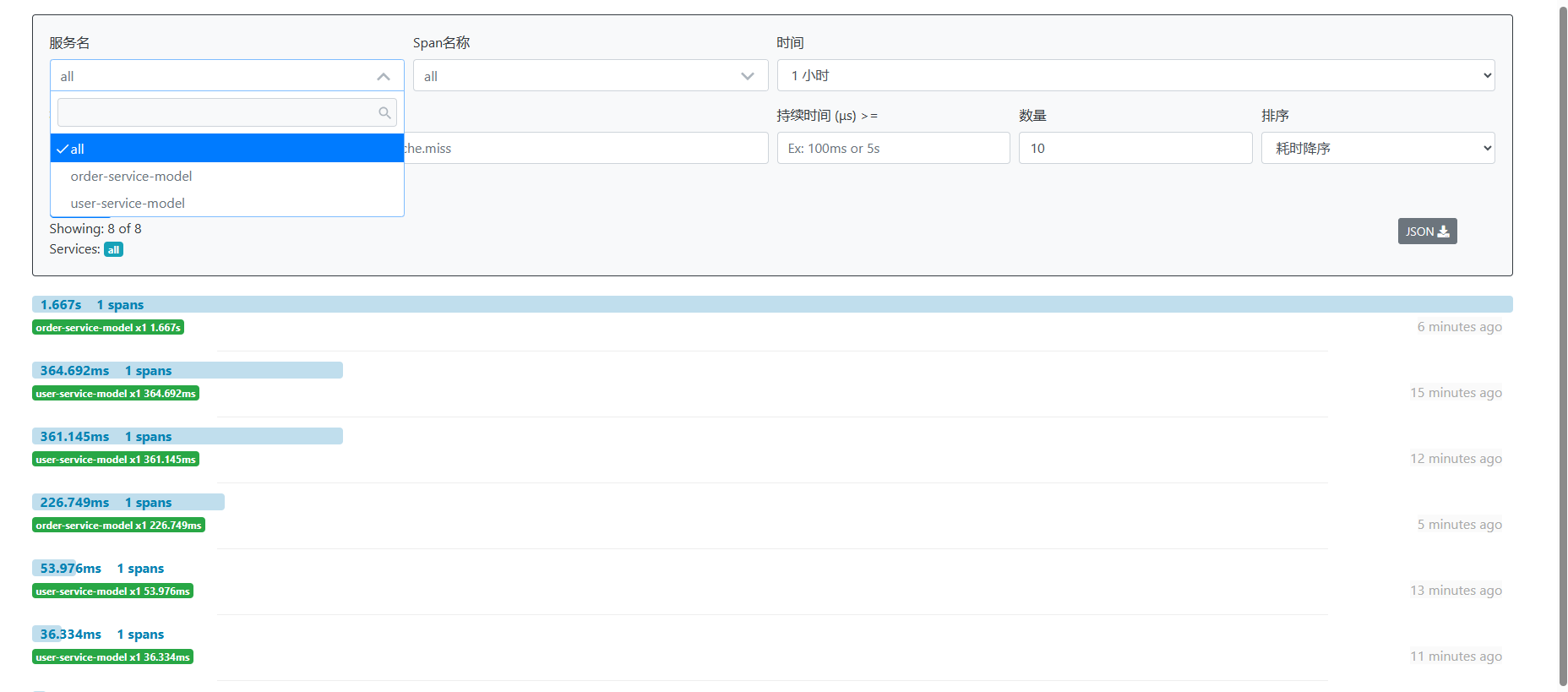
配置成功后,启动gateway-module、user-module、order-module模块相关服务。启动成功访问后台服务接口,可以看到在zipkin中已经加载了相关请求信息。
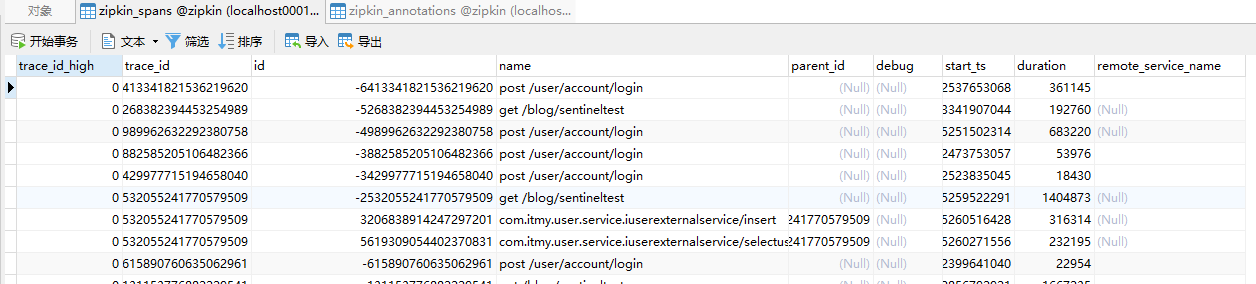
然后我们可以在看看数据库,检查下zipkin在数据库中信息是否持久化成功。查看下图可以发现数据也已经持久化成功了,这样不管zipkin重启多少次都不影响数据的展示。
5、ZipKin集成Dubbo
由于项目使用的是dubbo做为各服务模块之间的通信调用,要想zipkin采集到各服务模块的调用信息,所以需要自己去集成。操作也很方便zipkin为我们提供了集成dubbo相关依赖。首先在dubbo提供者和消费者模块中引入maven依赖:
		<!--适用于 Dubbo 2.7.X 版本-->

        <dependency>

            <groupId>io.zipkin.brave</groupId>

            <artifactId>brave-instrumentation-dubbo</artifactId>

        </dependency>

		<!--适用于 Dubbo 2.6.x-->

        <dependency>

            <groupId>io.zipkin.brave</groupId>

            <artifactId>brave-instrumentation-dubbo-rpc</artifactId>

        </dependency>
然后在dubbo配置中添加filter属性设置tracing参数,调用方:
dubbo:

  application:

    name: order-service-model-consumer

  consumer:

    group: DEFAULT_GROUP

    version: 2.0

    check: false

    filter: tracing  #tracingfilter过滤器对dubbo进行追踪

  provider:

    filter: tracing  #tracingfilter过滤器对dubbo进行追踪
提供方:
dubbo:

  application:

    name: user-service-model-provider

  protocol:

    name: dubbo

    port: -1

  consumer:

    check: false

    filter: tracing #tracingfilter过滤器对dubbo进行追踪

  provider:

    filter: tracing #tracingfilter过滤器对dubbo进行追踪

    group: DEFAULT_GROUP

    version: 2.0
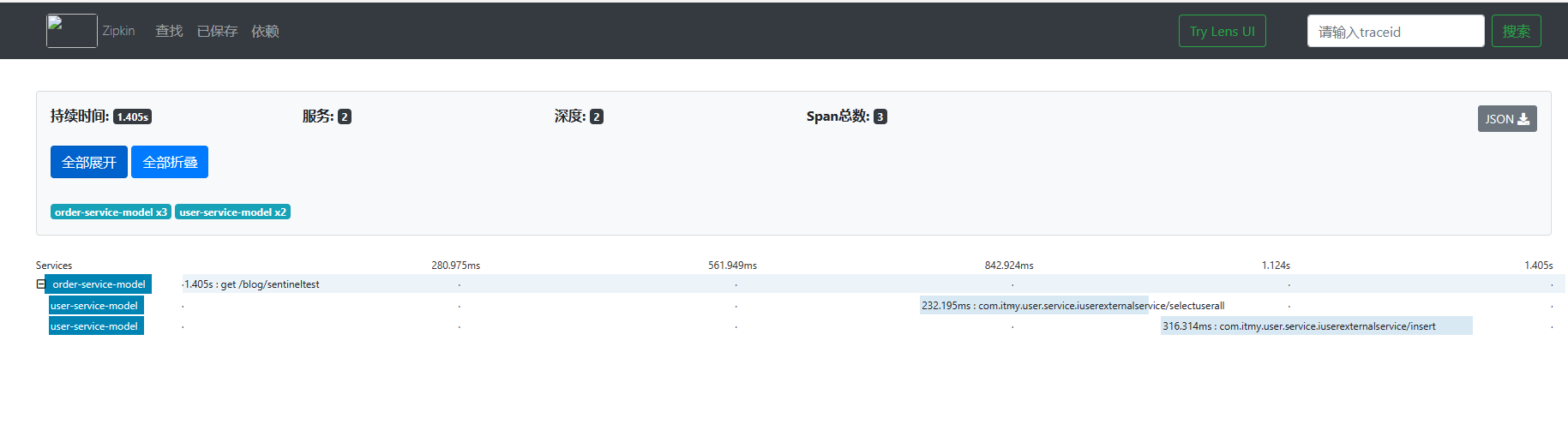
配置成功后,重新启动项目服务接口可以看出zipkin实现了对dubbo的链路追踪。查看下图可以发现该接口调用了订单和用户两个服务模块。
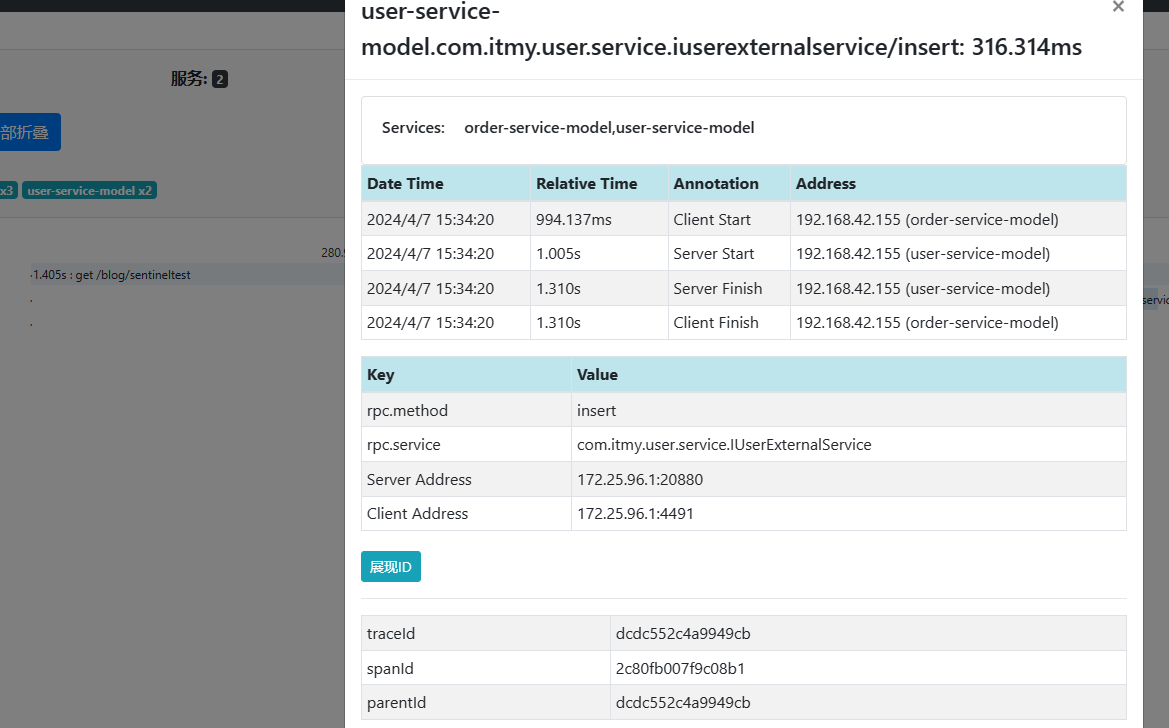
点击user-service-model可以查看出采集信息详情。
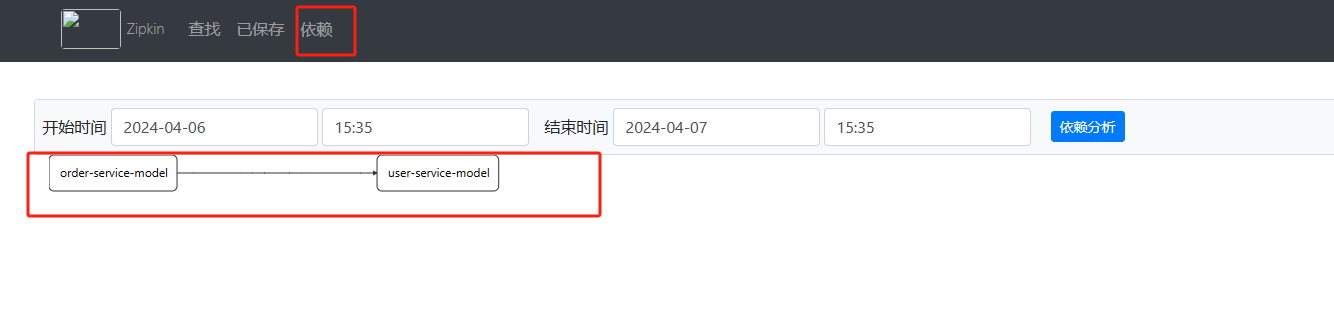
在zipkin导航菜单中,点击依赖可以查看每个服务模块的依赖信息。
微服务集成Spring Cloud Zipkin实现链路追踪并集成Dubbo的更多相关文章
- 什么是微服务架构 Spring Cloud?
1 为什么微服务架构需要Spring Cloud 简单来说,服务化的核心就是将传统的一站式应用根据业务拆分成一个一个的服务,而微服务在这个基础上要更彻底地去耦合(不再共享DB.KV,去掉重量级ESB) ...
- 微服务与Spring Cloud概述
微服务与Spring Cloud随着互联网的快速发展, 云计算近十年也得到蓬勃发展, 企业的IT环境和IT架构也逐渐在发生变革,从过去的单体应用架构发展为至今广泛流行的微服务架构. 微服务是一种架构风 ...
- 2.微服务开发框架——Spring Cloud
微服务开发框架—Spring Cloud 2.1. Spring Cloud简介及其特点 简介: Spring Cloud为开发人员提供了快速构建分布式系统中一些常见 ...
- [转帖]微服务框架Spring Cloud介绍 Part1: 使用事件和消息队列实现分布式事务
微服务框架Spring Cloud介绍 Part1: 使用事件和消息队列实现分布式事务 http://skaka.me/blog/2016/04/21/springcloud1/ APR 21ST, ...
- 消息驱动微服务:Spring Cloud Stream
最近在学习Spring Cloud的知识,现将消息驱动微服务:Spring Cloud Stream 的相关知识笔记整理如下.[采用 oneNote格式排版]
- 微服务网关 Spring Cloud Gateway
1. 为什么是Spring Cloud Gateway 一句话,Spring Cloud已经放弃Netflix Zuul了.现在Spring Cloud中引用的还是Zuul 1.x版本,而这个版本是 ...
- Spring Cloud 整合分布式链路追踪系统Sleuth和ZipKin实战,分析系统瓶颈
导读 微服务架构中,是否遇到过这种情况,服务间调用链过长,导致性能迟迟上不去,不知道哪里出问题了,巴拉巴拉....,回归正题,今天我们使用SpringCloud组件,来分析一下微服务架构中系统调用的瓶 ...
- 微服务框架-Spring Cloud
Spring Cloud入门 微服务与微服务架构 微服务架构是一种新型的系统架构.其设计思路是,将单体架构系统拆分为多个可以相互调用.配合的独立运行的小程序.这每个小程序对整体系统所提供的功能就称为微 ...
- 微服务与Spring Cloud资料
Microservices Using Spring Boot and Spring Cloud 微服务注册中心 Eureka 架构深入解读 50+ 顶级开源 Kubernetes 工具列表 Apol ...
- 微服务之Spring cloud
微服务 Spring cloud Spring Cloud provides tools for developers to quickly build some of the common patt ...
随机推荐
- sqlserver数据库jar包下载
链接:https://pan.baidu.com/s/1mCx5JpVpmU6uUaqMITxP_Q提取码:4piq 说明:若链接失效,联系会及时补上!
- 自然周算法-javascript实现
获取自然周 js获取自然周 本文作者:bigroc 本文链接:https://www.cnblogs.com/bigroc/p/14888550.html 代码 function getWeeks() ...
- 【Azure 应用服务】Azure Function HTTP Trigger 遇见奇妙的500 Internal Server Error: Failed to forward request to http://169.254.130.x
问题描述 使用 Azure Funciton App,在本地运行完全成功的Python代码,发布到Azure Function就出现了500 Internal Server Error. 而且错误消 ...
- STL-unordered_map,unordered_set模拟实现
unordered_set #pragma once #include"28hashtable_container.h" namespace test { //template & ...
- Java 属性赋值的先后顺序
1 package com.bytezero.circle; 2 /** 3 * 4 * @Description 5 * @author Bytezero·zhenglei! Email:42049 ...
- Java-- Arrays操纵数组的工具类
1 //操作数组的工具类 java.util.Arrays :操作数组的工具类 里面定义了很多操作数组的方法 2 public static void main(String[] args) 3 { ...
- select 条件语句【GO 基础】
〇.select 简介 select 语句类似于 switch 语句,但是 select 会随机执行一个可运行的 case.如果没有 case 可运行,它将阻塞,直到有 case 可运行. selec ...
- 3D模型+BI分析,打造全新的交互式3D可视化大屏开发方案
背景介绍 在数字经济建设和数字化转型的浪潮中,数据可视化大屏已成为各行各业的必备工具.然而,传统的数据大屏往往以图表和指标为主,无法真实地反映复杂的物理世界和数据关系.为了解决这个问题,3D模型可视化 ...
- 分布式理论 & RPC & Dubbo
分布式服务框架(RPC) 用于提高机器利用率的资源调度和治理中心*(SOA)[ Service Oriented Architecture] Dubbo(RPC框架) 服务提供者**(Provider ...
- Swagger (API框架,API 文档 与API 定义同步更新)
1.依赖 <parent> <groupId>org.springframework.boot</groupId> <artifactId>spring ...