
asp.net程序通过Microsoft Azure中SAML协议实现单点登录
1. 新建应用程序
登录Azure门户,进入左侧菜单“企业应用程序--所有应用程序”,点“新建应用程序”, 继续点“创建你自己的应用程序”,如下图选择和录入名称:
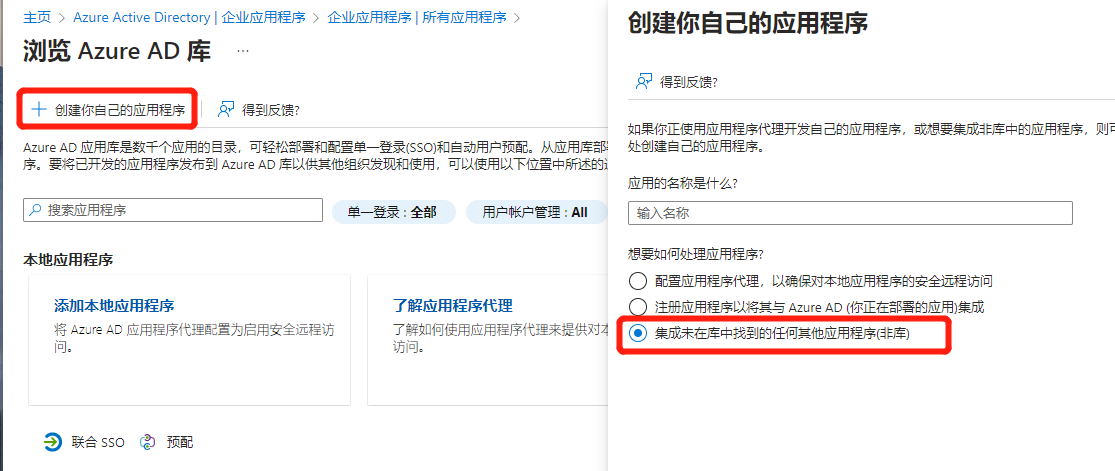
填好应用的名称、想要如何处理应用程序 必须选择第三个“继承未在库中找到的任何其他应用程序(非库)”,之后点“创建”按钮;
2. 单一登录设置
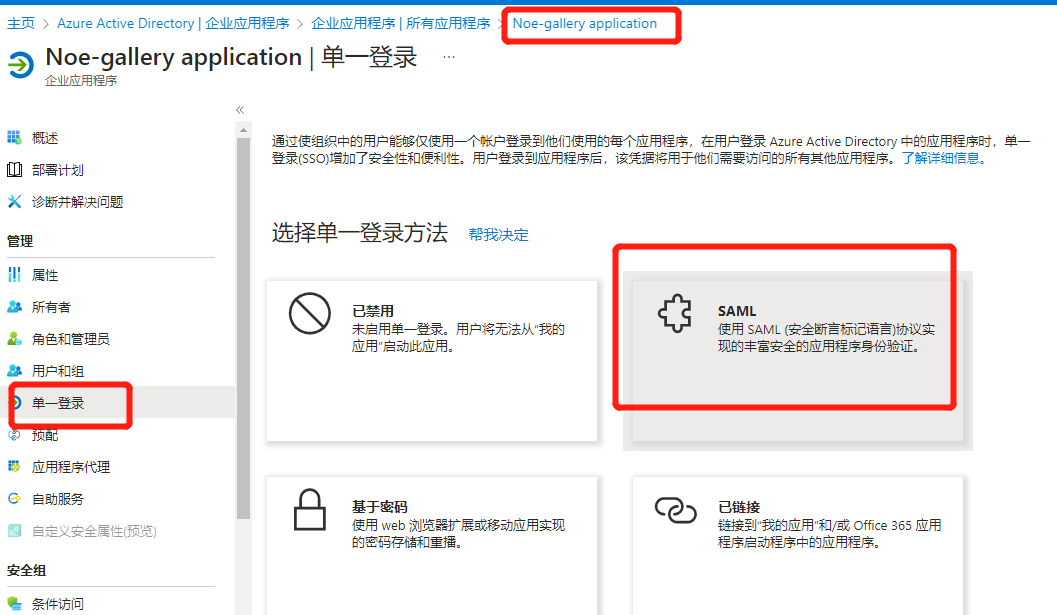
继续1中步骤,进入左侧菜单“单一登录”,选择单一登录方法为“SAML”,如下图:
继续,编辑“基本SAML配置”,如下图:
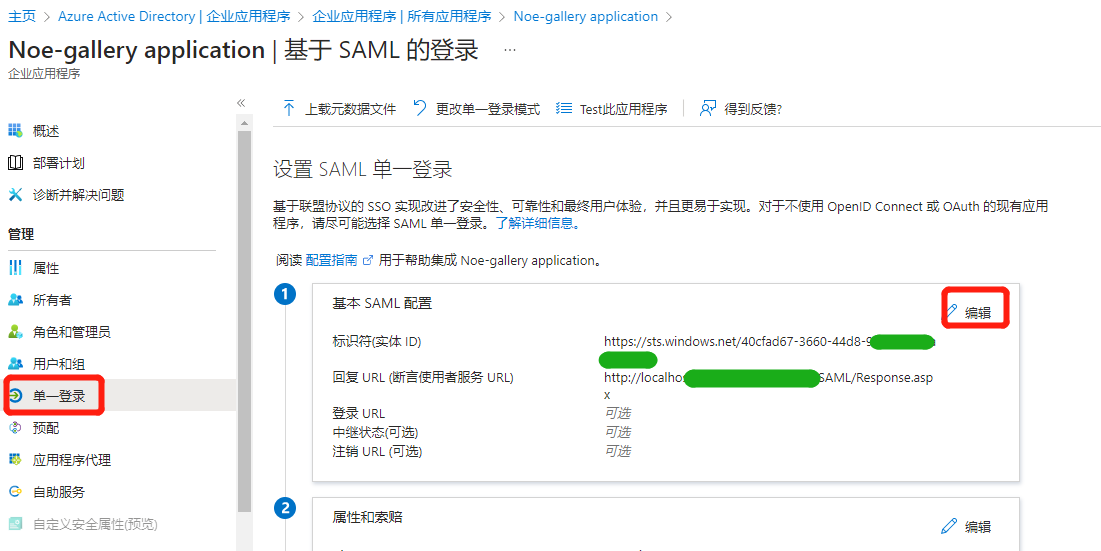
其中:
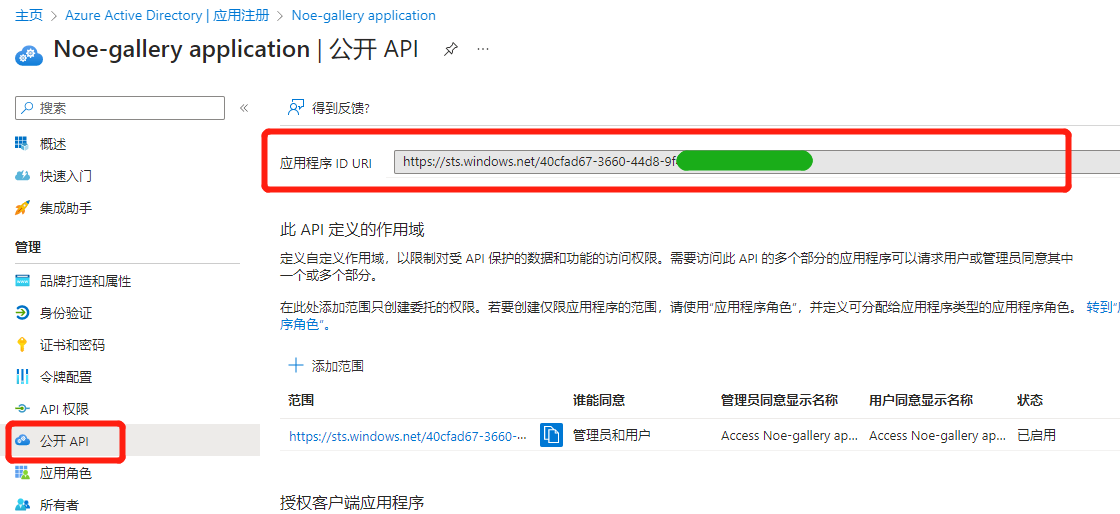
** 标识符(实体ID)**,从进入左侧菜单“应用注册”,双击进入该应用,进入左侧菜单“公开API”里复制,如下图:
回执URL,就是你自己web程序中用来处理响应数据的页面,参见后面步骤中的Response.aspx页面;
3、将用户增加到该应用中,此处不赘述;
4、idp--->sp模式测试:
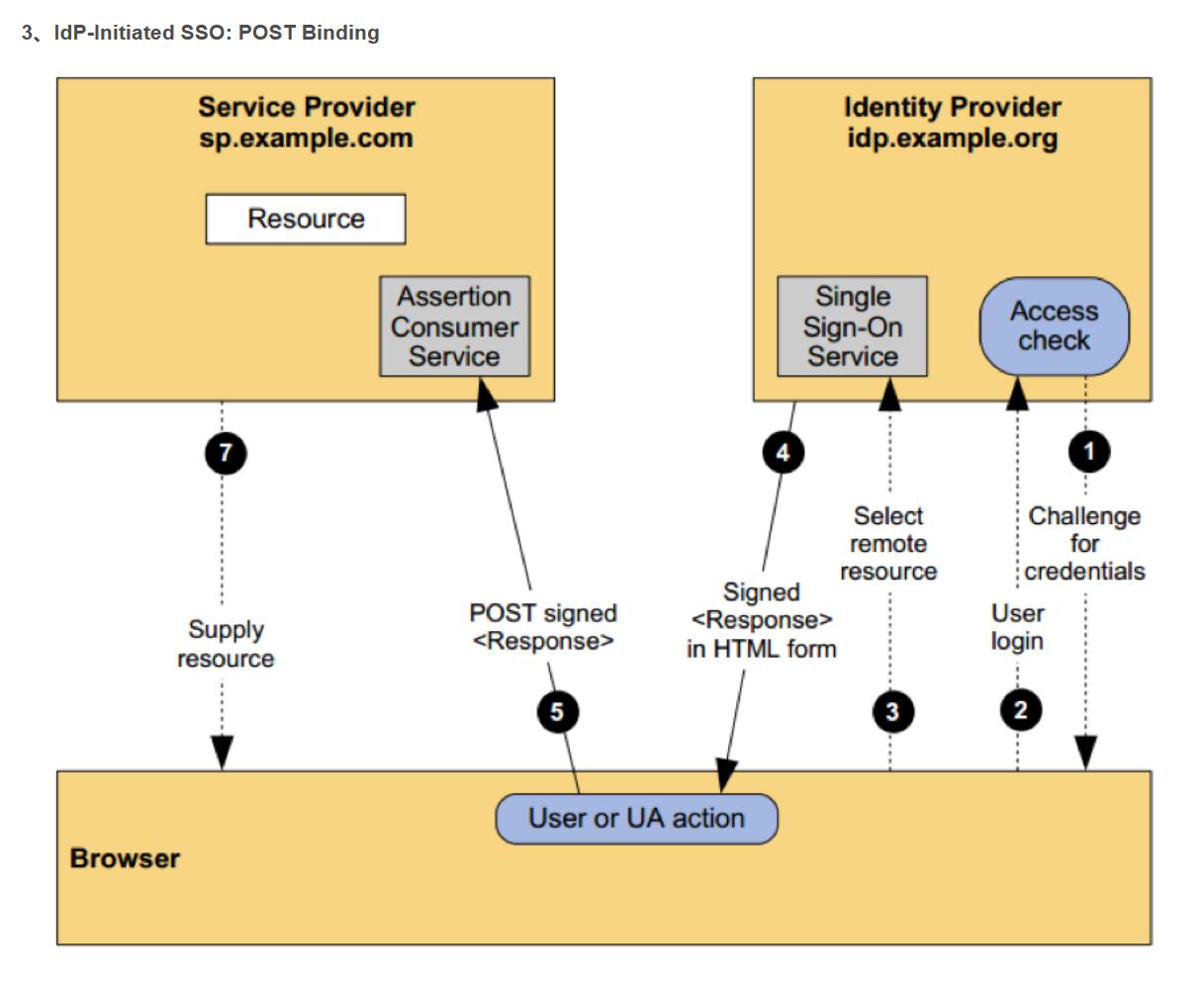
4.1. Azure管理台中操作如下图:
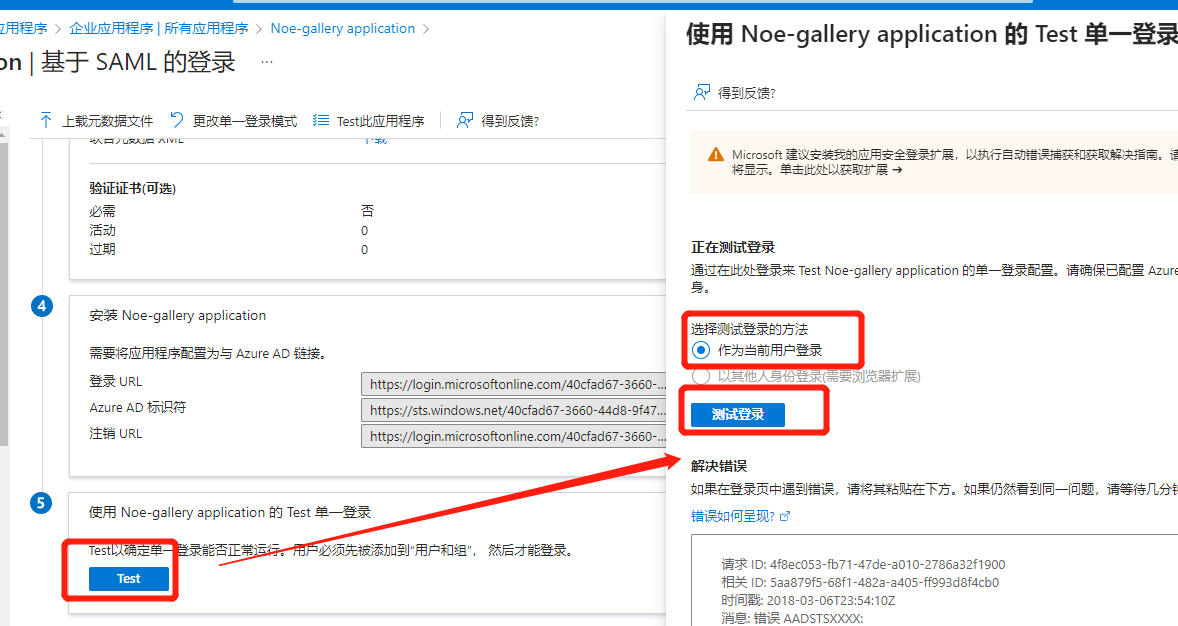
上图中,点击“测试登陆”,之后按照浏览器中显示内容,输入用户名密码,登录Azure成功后会重定向到4.2中Response.aspx页面;
4.2. 我的网站Response.aspx页面中处理如下(仅仅解析数据,不做验签):
点击查看源代码
 `

   //只解析XML中的用户唯一ID(NameID),不验签

   protected void Page_Load(object sender, EventArgs e)

    {

        if (!IsPostBack)

        {

            try

            {

                string key = "SAMLResponse";

                if (Request.Form.GetValues(key) != null)

                {

                    string sourceSamlResponseXml = Request.Form.GetValues(key)[0];

                    string samlResponseXml = Encoding.UTF8.GetString(Convert.FromBase64String(sourceSamlResponseXml));

                    txtSAMLResponse.Text = samlResponseXml;

                    XmlDocument xmlDoc = new XmlDocument();

                    xmlDoc.LoadXml(samlResponseXml);

                    //命名空间

                    XmlNamespaceManager xmlNamespaceManager = new XmlNamespaceManager(xmlDoc.NameTable);

                    xmlNamespaceManager.AddNamespace("samlp", "urn:oasis:names:tc:SAML:2.0:protocol");

                    xmlNamespaceManager.AddNamespace("assertion", "urn:oasis:names:tc:SAML:2.0:assertion");

                    //只读取数据,不验证数据的完整性(不验签)

                    string loginNo = xmlDoc.SelectSingleNode("/samlp:Response/assertion:Assertion/assertion:Subject/assertion:NameID", xmlNamespaceManager).InnerXml;

                    Response.Write("SP端收到的用户名为:" + loginNo);

                    txtNameID.Text = loginNo;

                }

                else

                {

                    Response.Write("非法访问,不能直接浏览本页面!");

                }

            }

            catch (Exception ex)

            {

                Response.Write("异常:" + ex.Message);

            }

        }

    }`
5、sp--->idp 模式测试:
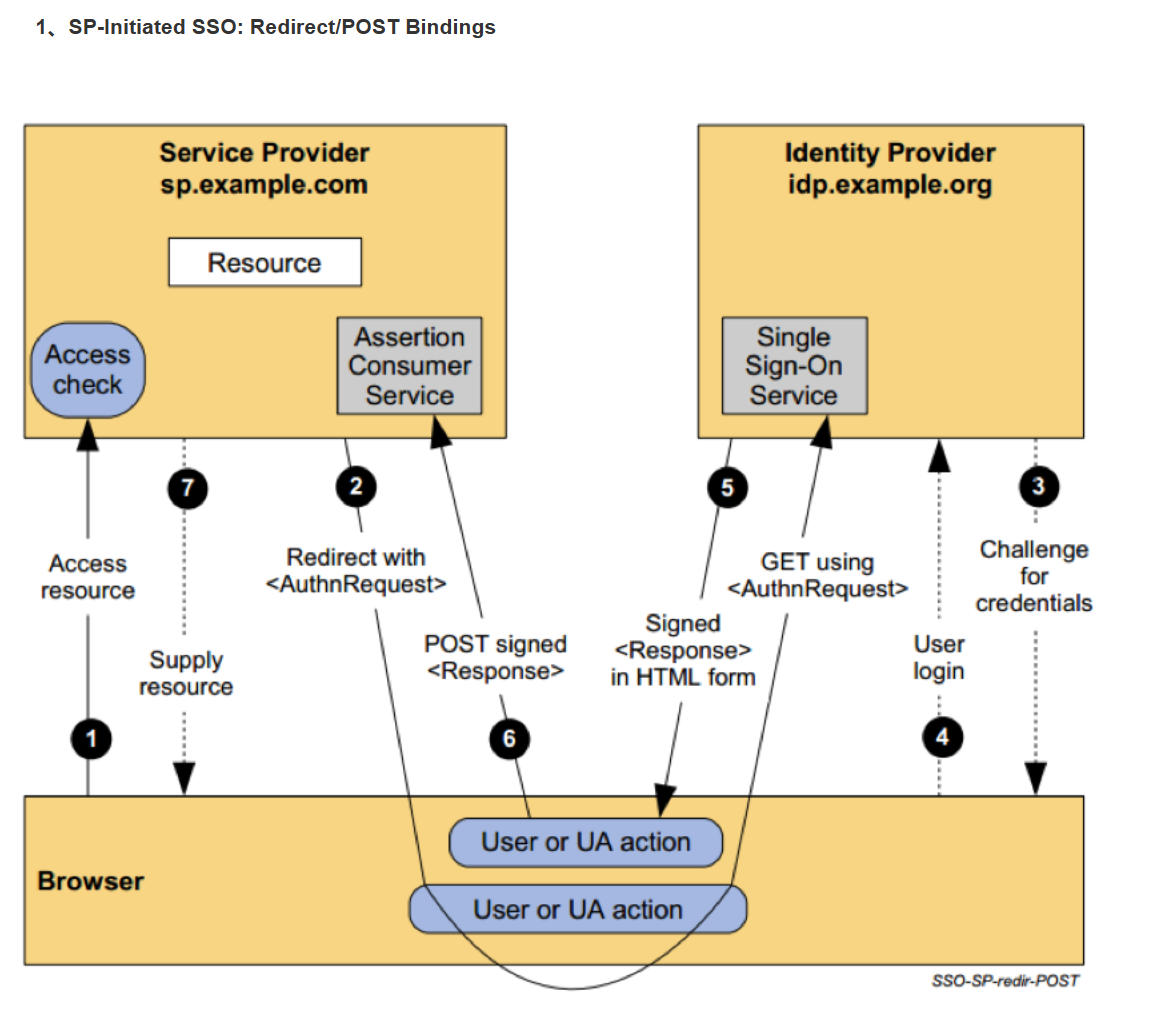
由我网站端发起:
5.1. 请求登陆的字符,点击查看源代码:
<samlp:AuthnRequest

  xmlns="urn:oasis:names:tc:SAML:2.0:metadata"

  ID="{0}"

  Version="2.0" IssueInstant="2013-03-18T03:28:54.1839884Z"

  xmlns:samlp="urn:oasis:names:tc:SAML:2.0:protocol" >

  <Issuer xmlns="urn:oasis:names:tc:SAML:2.0:assertion">{1}</Issuer>

</samlp:AuthnRequest>
其中:
ID,Azure AD 使用此属性来填充返回的响应的 InResponseTo 属性。 ID 的开头不能是数字,因此常见的策略是在 GUID 的字符串表示形式前面加上类似于“ID”的字符串。 例如,id6c1c178c166d486687be4aaf5e482730 是有效的 ID。
Issuer,必须与 Azure AD 中云服务的一个 ServicePrincipalNames 完全匹配。 通常,此参数设置为应用程序注册期间指定的应用 ID URI。参照2中实体ID;
重定向URL,从进入左侧菜单“应用注册”后,最上面的“终结点”中获取;
5.2. 重定向时:
点击查看源代码
` protected void Button1_Click(object sender, EventArgs e)

    {

        string requestData = ReadData();

        requestData = string.Format(requestData, "id" + Guid.NewGuid().ToString("N"), "http://XXXXXXX.com/Response.aspx", "https://sts.windows.net/40cfad67-3660-44d8-9f47-XXXXXXXXXXX");

        string requestDataDo = EncodeSamlAuthnRequest(requestData);

        string requestUr = "https://login.microsoftonline.com/40cfad67-3660-44d8-9f47-XXXXXXXXX/saml2?SAMLRequest=" + requestDataDo;

        Response.Redirect(requestUr, false);//必须增加第二个参数false,否则报:线程正在终止 的异常;

    }

    //先压缩后转base64字符串

    public static string EncodeSamlAuthnRequest(string authnRequest)

    {

        var bytes = Encoding.UTF8.GetBytes(authnRequest);

        using (var output = new MemoryStream())

        {

            using (var zip = new DeflateStream(output, CompressionMode.Compress))

            {

                zip.Write(bytes, 0, bytes.Length);

            }

            var base64 = Convert.ToBase64String(output.ToArray());

            return HttpUtility.UrlEncode(base64);

        }

    }

    private string ReadData()

    {

        string returnData = string.Empty;

        string filepath = Server.MapPath("") + "\\AuthnRequest.txt";

        using (FileStream fs = new FileStream(filepath, FileMode.OpenOrCreate, System.IO.FileAccess.ReadWrite, FileShare.ReadWrite))

        {

            using (StreamReader sr = new StreamReader(fs, Encoding.UTF8))

            {

                returnData = sr.ReadToEnd().ToString();

            }

        }

        return returnData;

    }`

AuthnRequest.txt的内容:参照5.1中介绍;
5.3. 重定向后:
重定向后,浏览器跳转到Azure网站,按照提示输入用户名和密码,登陆后,会重定向到4中的回调Response.aspx页面中,此页面能解析到用户名NameID;
5.4. 注销请求:
点击查看源代码
` /// <summary>

    /// 注销,Azure

    /// </summary>

    /// <param name="sender"></param>

    /// <param name="e"></param>

    protected void btnCancel_Click(object sender, EventArgs e)

    {

        if (string.IsNullOrEmpty(txtNameID.Text.Trim()))

        {

            Response.Write("NameID不能为空!");

            return;

        }

        string requestData = ReadData();

        DateTime dtUtc

            = new DateTime(DateTime.Now.Year, DateTime.Now.Month, DateTime.Now.Day, DateTime.Now.Hour, DateTime.Now.Minute, DateTime.Now.Second, DateTimeKind.Utc);

        string issueInstant = dtUtc.ToString("o");//这是具有 UTC 值和往返格式(“o”)的日期时间字符串。 Azure AD 需要这种类型的日期时间值,但不评估或使用该值。

        requestData = string.Format(requestData, "id" + Guid.NewGuid().ToString("N"), issueInstant, "https://sts.windows.net/40cfad67-3660-44d8-9f47-XXXXXXXXX", txtNameID.Text.Trim());

        string requestDataDo = EncodeSamlAuthnRequest(requestData);

        string cancelRequestUrl = "https://login.microsoftonline.com/40cfad67-3660-44d8-9f47-XXXXXXXXX/saml2?SAMLRequest=" + requestDataDo;

        Response.Redirect(cancelRequestUrl, false);//必须增加第二个参数false,否则报:线程正在终止 的异常;

    }

    public static string EncodeSamlAuthnRequest(string authnRequest)

    {

        var bytes = Encoding.UTF8.GetBytes(authnRequest);

        using (var output = new MemoryStream())

        {

            using (var zip = new DeflateStream(output, CompressionMode.Compress))

            {

                zip.Write(bytes, 0, bytes.Length);

            }

            var base64 = Convert.ToBase64String(output.ToArray());

            return HttpUtility.UrlEncode(base64);

        }

    }

    private string ReadData()

    {

        string returnData = string.Empty;

        string filepath = Server.MapPath("") + "\\LogoutRequest.txt";

        using (FileStream fs = new FileStream(filepath, FileMode.OpenOrCreate, System.IO.FileAccess.ReadWrite, FileShare.ReadWrite))

        {

            using (StreamReader sr = new StreamReader(fs, Encoding.UTF8))

            {

                returnData = sr.ReadToEnd().ToString();

            }

        }

        return returnData;

    }`
LogoutRequest.txt文件内容:
<samlp:LogoutRequest xmlns="urn:oasis:names:tc:SAML:2.0:metadata" ID="{0}" Version="2.0" IssueInstant="{1}" xmlns:samlp="urn:oasis:names:tc:SAML:2.0:protocol">

  <Issuer xmlns="urn:oasis:names:tc:SAML:2.0:assertion">{2}</Issuer>

  <NameID xmlns="urn:oasis:names:tc:SAML:2.0:assertion">{3}</NameID>

</samlp:LogoutRequest>
5.5. 注销请求后的响应:
点击查看源代码
` protected void Page_Load(object sender, EventArgs e)

    {

        if (!IsPostBack)

        {

            try

            {

                string logoutBackRequestUrl = Request.Url.ToString();//对方请求我们的URL地址(带参数) 也就是我们自己的URL(对方加了参数)

                string logoutBackSamlResponse = Request.QueryString["SAMLResponse"];

                if (!string.IsNullOrEmpty(logoutBackSamlResponse))

                {

                    string logoutBackSignature = Request.QueryString["Signature"];

                    string logoutBackSigAlg = Request.QueryString["SigAlg"];

                    string decCodeLogoutBackSamlResponse = InflateData(logoutBackSamlResponse);

                    txtSAMLResponse.Text = logoutBackSamlResponse;

                    txtSignature.Text = logoutBackSignature;

                    txtSigAlg.Text = logoutBackSigAlg;

                    txtDecCodeSAMLResponse.Text = decCodeLogoutBackSamlResponse;

                    ////////////////////////最终的XML格式参照本目录中文件“LogoutResponse.txt”;

                }

                else

                {

                    Response.Write("非法访问,URL中参数SAMLResponse值不能为空!");

                }

            }

            catch (Exception ex)

            {

                Response.Write("异常:" + ex.Message);

            }

        }

    }

    /// <summary>

    /// 解析:先通过base64转byte[],然后解压缩后得到byte[],然后转成普通 字符串;

    /// </summary>

    /// <param name="compressedData"></param>

    /// <returns></returns>

    public string InflateData(string logoutBackSamlResponse)

    {

        byte[] compressedData = Convert.FromBase64String(logoutBackSamlResponse);

        if (compressedData == null) return null;

        int deflen = compressedData.Length * 2;

        byte[] buffer = null;

        string deSamlResponseXml = "";

        using (MemoryStream stream = new MemoryStream(compressedData))

        {

            using (DeflateStream inflatestream = new DeflateStream(stream, CompressionMode.Decompress))

            {

                using (MemoryStream uncompressedstream = new MemoryStream())

                {

                    using (BinaryWriter writer = new BinaryWriter(uncompressedstream))

                    {

                        int offset = 0;

                        while (true)

                        {

                            byte[] tempbuffer = new byte[deflen];

                            int bytesread = inflatestream.Read(tempbuffer, offset, deflen);

                            writer.Write(tempbuffer, 0, bytesread);

                            if (bytesread < deflen || bytesread == 0) break;

                        }

                        uncompressedstream.Seek(0, SeekOrigin.Begin);

                        buffer = uncompressedstream.ToArray();

                        deSamlResponseXml = Encoding.UTF8.GetString(buffer);

                    }

                }

            }

        }

        return deSamlResponseXml;

    }`

注销请求后的响应的最终的XML格式 “LogoutResponse.txt”的内容:

`<samlp:LogoutResponse ID="_3f6da426-39ca-45c1-8c2c-363746bbe4b0" Version="2.0" IssueInstant="2023-04-24T05:02:19.752Z" Destination="https://xxxxxx.com/Logout.aspx" InResponseTo="idf237c5991545481eb6fce7825a4171b0" xmlns:samlp="urn:oasis:names:tc:SAML:2.0:protocol">

    <Issuer xmlns="urn:oasis:names:tc:SAML:2.0:assertion">https://sts.windows.net/40cfad67-3660-44d8-9f47-XXXXXXXXXXX/</Issuer>

    <samlp:Status>

        <samlp:StatusCode Value="urn:oasis:names:tc:SAML:2.0:status:Success" /></samlp:Status>

</samlp:LogoutResponse>`
asp.net程序通过Microsoft Azure中SAML协议实现单点登录的更多相关文章
- 如何修复在Microsoft Azure中“虚拟机防火墙打开,关闭RDP的连接端口”问题
注:下列步骤并不一定适用所有场景,提供思路,请灵活应用 我们在使用Microsoft Azure 中Windows 虚拟机,有时会发生错误打开防火墙或一些管家软件错误的关闭了"远程桌面 ...
- 使用Powershell在Microsoft Azure中创建Virtual Machine
获取虚拟机镜像 PS C:\WINDOWS\system32> Get-AzureVMImage 仅获得虚拟机名 PS C:\WINDOWS\system32> (Get-AzureVMI ...
- ASP.NET Core 2.0使用Cookie认证实现SSO单点登录
之前写了一个使用ASP.NET MVC实现SSO登录的Demo,https://github.com/bidianqing/SSO.Sample,这个Demo是基于.NET Framework,.NE ...
- 在liberty中通过LTPA设置单点登录
不要忘了下面的设置,参考: https://www-01.ibm.com/support/knowledgecenter/was_beta_liberty/com.ibm.websphere.wlp. ...
- Microsoft Azure 云存储服务概念
本文包括了以下几点内容: 什么是Azure云存储服务? 云存储服务分类 云存储服务的优势 什么是Azure云存储服务? Azure 云存储服务可以说是Azure 上最重要的SAAS服务了. 在Azur ...
- 设置将 Microsoft Azure 的网络基础结构以支持设置为灾难恢复站点
Prateek Sharma 云 + Enterprise 高级项目经理 Azure SiteRecovery (ASR)可以将Microsoft Azure用作您的虚拟机的灾难恢复站点. 当管理 ...
- Microsoft Azure 负载平衡服务
Microsoft Azure 为在其中托管的虚拟机(IaaS) 和云服务(PaaS) 提供负载平衡服务.负载平衡支持应用程序伸缩,并且提供应用程序故障恢复以及其他优势. 可以通过以下方式访问负 ...
- Windows Azure 安全最佳实践 - 第 5 部分:基于Claim 的标识,单点登录
基于Claim的身份标识是处理网站与 Web 服务的身份认证和访问一种简单而强大的方式,无论您是在本地工作还是面向云工作.您可以通过减少自定义实施和使用基于Claim的单一简化标识模型,创建更安全的应 ...
- 单点登录(十二)-----遇到问题-----cas启用mongodb验证方式登录后没反应-pac4j-mongo包中的MongoAuthenticatInvocationTargetException
cas启用mongodb验证方式登录后没反应 控制台输出 2017-02-09 20:27:15,766 INFO [org.jasig.cas.authentication.MongoAuthent ...
- 基于Microsoft Azure、ASP.NET Core和Docker的博客系统
欢迎阅读daxnet的新博客:一个基于Microsoft Azure.ASP.NET Core和Docker的博客系统 2008年11月,我在博客园开通了个人帐号,并在博客园发表了自己的第一篇博客 ...
随机推荐
- [数据库]MySQL解决:MySQLNonTransientConnectionException: Could not create connection to database server.【待完善】
场景复现 mysql数据库 5.7.24 jdbc driver: mysql-connector-java: 5.1.33 jdbc 配置: + jdbc.url + driverName: Tom ...
- [数据库]Ubuntu Linux/Kylin: 安装MySQL
1 文由 由于安装环境较为特殊,实在折煞人也.而此环境的网络博客/教程偏少,觉得有必要记录一下. 2 环境 安装主机不支持联网 即 不支持APT/APT-GET等傻瓜式的在线安装方式. 硬件架构: A ...
- 深入理解 python 虚拟机:字节码教程(2)——控制流是如何实现的?
深入理解 python 虚拟机:字节码教程(2)--控制流是如何实现的? 在本篇文章当中主要给大家分析 python 当中与控制流有关的字节码,通过对这部分字节码的了解,我们可以更加深入了解 pyth ...
- iOS16新特性 | 灵动岛适配开发与到家业务场景结合的探索实践
作者:京东零售 姜海 灵动岛是苹果在iPhone 14 Pro和iPhone 14 Pro Max上首次提出的全新UI交互形式,创新性的让虚拟软件和硬件的交互变得更为流畅.当有来电.短信等通知时,灵动 ...
- Yii framework 应用小窍门
Yii framework 应用小窍门 1. Yii Framework] 如何获取当前controller的名称? 下面语句就可以获取当前控制器的名称了! Php代码 Yii::app ...
- shell执行一个程序过程
1:shell调用执行程序或脚本 2:unix内核启动一个新的进程,在该进程中执行所指定的程序. 3:如果是编译型程序,内核成执行,如果无法执行指定的程序,返回"not executable ...
- 【性能】JDK和Jmeter的安装与配置
一.JDK环境配置 1. 下载JDK 官网下载地址:http://www.oracle.com/technetwork/java/javase/downloads/java-archive-downl ...
- Prism Sample 29-InvokeCommandAction
一下子跳到29,不是我的错,应该是新版本中去掉了一些过重的功能,案例就也去掉了,所以不是我的错. 本例是演示行为转命令的,事实上前面已经用到了. xmlns:i="http://schema ...
- Prism Sample 15-FilteringEvents
例14演示了怎样事件聚合器怎样发布与接收信息. 例15增加了一个事件的过滤功能,即设定一个条件,符合的才接收. _ea.GetEvent<MessageSentEvent>().Subsc ...
- 2022-10-12:以下go语言代码输出什么?A:1;B:2;C:panic;D:不能编译。 package main import “fmt“ func main() { m := m
2022-10-12:以下go语言代码输出什么?A:1:B:2:C:panic:D:不能编译. package main import "fmt" func main() { m ...