
Android 开发笔记___SD卡基本操作__图片读取写入
 package com.example.alimjan.hello_world.Utils;

 import android.graphics.Bitmap;

 import android.graphics.BitmapFactory;

 import java.io.BufferedInputStream;

 import java.io.BufferedOutputStream;

 import java.io.File;

 import java.io.FileInputStream;

 import java.io.FileOutputStream;

 import java.io.FilenameFilter;

 import java.util.ArrayList;

 import java.util.Locale;

 public class FileUtil {

     public static void saveText(String path, String txt) {

         try {

             FileOutputStream fos = new FileOutputStream(path);

             fos.write(txt.getBytes());

             fos.close();

         } catch (Exception e) {

             e.printStackTrace();

         }

     }

     public static String openText(String path) {

         String readStr = "";

         try {

             FileInputStream fis = new FileInputStream(path);

             byte[] b = new byte[fis.available()];

             fis.read(b);

             readStr = new String(b);

             fis.close();

         } catch (Exception e) {

             e.printStackTrace();

         }

         return readStr;

     }

     public static void saveImage(String path, Bitmap bitmap) {

         try {

             BufferedOutputStream bos = new BufferedOutputStream(new FileOutputStream(path));

             bitmap.compress(Bitmap.CompressFormat.JPEG, 80, bos);

             bos.flush();

             bos.close();

         } catch (Exception e) {

             e.printStackTrace();

         }

     }

     public static Bitmap openImage(String path) {

         Bitmap bitmap = null;

         try {

             BufferedInputStream bis = new BufferedInputStream(new FileInputStream(path));

             bitmap = BitmapFactory.decodeStream(bis);

             bis.close();

         } catch (Exception e) {

             e.printStackTrace();

         }

         return bitmap;

     }

     public static ArrayList<File> getFileList(String path, String[] extendArray) {

         ArrayList<File> displayedContent = new ArrayList<File>();

         File[] files = null;

         File directory = new File(path);

         if (extendArray != null && extendArray.length>0) {

             FilenameFilter fileFilter = getTypeFilter(extendArray);

             files = directory.listFiles(fileFilter);

         } else {

             files = directory.listFiles();

         }

         if (files != null) {

             for (File f : files) {

                 if (!f.isDirectory() && !f.isHidden()) {

                     displayedContent.add(f);

                 }

             }

         }

         return displayedContent;

     }

     public static FilenameFilter getTypeFilter(String[] extendArray) {

         final ArrayList<String> fileExtensions = new ArrayList<String>();

         for (int i=0; i<extendArray.length; i++) {

             fileExtensions.add(extendArray[i]);

         }

         FilenameFilter fileNameFilter = new FilenameFilter() {

             @Override

             public boolean accept(File directory, String fileName) {

                 boolean matched = false;

                 File f = new File(String.format("%s/%s",

                         directory.getAbsolutePath(), fileName));

                 matched = f.isDirectory();

                 if (!matched) {

                     for (String s : fileExtensions) {

                         s = String.format(".{0,}\\%s$", s);

                         s = s.toUpperCase(Locale.getDefault());

                         fileName = fileName.toUpperCase(Locale.getDefault());

                         matched = fileName.matches(s);

                         if (matched) {

                             break;

                         }

                     }

                 }

                 return matched;

             }

         };

         return fileNameFilter;

     }

 }
 package com.example.alimjan.hello_world;

 /**

  * Created by alimjan on 7/5/2017.

  */

         import android.content.Context;

         import android.content.Intent;

         import android.graphics.Bitmap;

         import android.os.Bundle;

         import android.os.Environment;

         import android.support.v7.app.AppCompatActivity;

         import android.view.View;

         import android.view.View.OnClickListener;

         import android.widget.AdapterView;

         import android.widget.ArrayAdapter;

         import android.widget.EditText;

         import android.widget.LinearLayout;

         import android.widget.Spinner;

         import android.widget.TextView;

         import android.widget.Toast;

         import android.widget.AdapterView.OnItemSelectedListener;

         import com.example.alimjan.hello_world.Utils.DateUtil;

         import com.example.alimjan.hello_world.Utils.FileUtil;

 public class class_4_3_3 extends AppCompatActivity implements OnClickListener {

     private LinearLayout ll_info;

     private EditText et_name;

     private EditText et_age;

     private EditText et_height;

     private EditText et_weight;

     private boolean bMarried = false;

     private String mPath;

     private TextView tv_path;

     @Override

     protected void onCreate(Bundle savedInstanceState) {

         super.onCreate(savedInstanceState);

         setContentView(R.layout.code_4_3_3);

         ll_info = (LinearLayout) findViewById(R.id.ll_info);

         et_name = (EditText) findViewById(R.id.et_name);

         et_age = (EditText) findViewById(R.id.et_age);

         et_height = (EditText) findViewById(R.id.et_height);

         et_weight = (EditText) findViewById(R.id.et_weight);

         tv_path = (TextView) findViewById(R.id.tv_path);

         findViewById(R.id.btn_save).setOnClickListener(this);

         ArrayAdapter<String> typeAdapter = new ArrayAdapter<String>(this,

                 R.layout.item_select, typeArray);

         typeAdapter.setDropDownViewResource(R.layout.item_dropdown);

         Spinner sp_married = (Spinner) findViewById(R.id.sp_married);

         sp_married.setPrompt("请选择婚姻状况");

         sp_married.setAdapter(typeAdapter);

         sp_married.setSelection(0);

         sp_married.setOnItemSelectedListener(new TypeSelectedListener());

         mPath = Environment.getExternalStoragePublicDirectory(Environment.DIRECTORY_DOWNLOADS) + "/";

     }

     private String[] typeArray = {"未婚", "已婚"};

     class TypeSelectedListener implements OnItemSelectedListener {

         public void onItemSelected(AdapterView<?> arg0, View arg1, int arg2, long arg3) {

             bMarried = (arg2==0)?false:true;

         }

         public void onNothingSelected(AdapterView<?> arg0) {

         }

     }

     @Override

     public void onClick(View v) {

         if (v.getId() == R.id.btn_save) {

             String name = et_name.getText().toString();

             String age = et_age.getText().toString();

             String height = et_height.getText().toString();

             String weight = et_weight.getText().toString();

             if (name==null || name.length()<=0) {

                 showToast("请先填写姓名");

                 return;

             }

             if (age==null || age.length()<=0) {

                 showToast("请先填写年龄");

                 return;

             }

             if (height==null || height.length()<=0) {

                 showToast("请先填写身高");

                 return;

             }

             if (weight==null || weight.length()<=0) {

                 showToast("请先填写体重");

                 return;

             }

             if (Environment.getExternalStorageState().equals(Environment.MEDIA_MOUNTED) == true) {

                 Bitmap bitmap = ll_info.getDrawingCache();

                 String file_path = mPath + DateUtil.getCurDateStr("") + ".png";

                 FileUtil.saveImage(file_path, bitmap);

                 bitmap.recycle();

                 tv_path.setText("用户注册信息图片的保存路径为:\n"+file_path);

                 showToast("图片已存入SD卡文件");

             } else {

                 showToast("未发现已挂载的SD卡,请检查");

             }

         }

     }

     @Override

     protected void onStart() {

         super.onStart();

         ll_info.setDrawingCacheEnabled(true);

     }

     @Override

     protected void onStop() {

         super.onStop();

         ll_info.setDrawingCacheEnabled(false);

     }

     private void showToast(String desc) {

         Toast.makeText(this, desc, Toast.LENGTH_SHORT).show();

     }

     public static void startHome(Context mcontext){

         Intent intent = new Intent(mcontext,class_4_3_3.class);

         mcontext.startActivity(intent);

     }

 }
 <LinearLayout xmlns:android="http://schemas.android.com/apk/res/android"

     android:layout_width="match_parent"

     android:layout_height="match_parent"

     android:focusable="true"

     android:focusableInTouchMode="true"

     android:orientation="vertical"

     android:padding="10dp" >

     <LinearLayout

         android:id="@+id/ll_info"

         android:layout_width="match_parent"

         android:layout_height="wrap_content"

         android:background="#f9f9f9"

         android:orientation="vertical" >

         <RelativeLayout

             android:layout_width="match_parent"

             android:layout_height="50dp" >

             <TextView

                 android:id="@+id/tv_name"

                 android:layout_width="wrap_content"

                 android:layout_height="match_parent"

                 android:layout_alignParentLeft="true"

                 android:gravity="center"

                 android:text="姓名:"

                 android:textColor="@color/black"

                 android:textSize="17sp" />

             <EditText

                 android:id="@+id/et_name"

                 android:layout_width="match_parent"

                 android:layout_height="match_parent"

                 android:layout_marginBottom="5dp"

                 android:layout_marginTop="5dp"

                 android:layout_toRightOf="@+id/tv_name"

                 android:background="@drawable/editext_selector"

                 android:gravity="left|center"

                 android:hint="请输入姓名"

                 android:inputType="text"

                 android:maxLength="12"

                 android:textColor="@color/black"

                 android:textColorHint="@color/grey"

                 android:textCursorDrawable="@drawable/text_cursor"

                 android:textSize="17sp" />

         </RelativeLayout>

         <RelativeLayout

             android:layout_width="match_parent"

             android:layout_height="50dp" >

             <TextView

                 android:id="@+id/tv_age"

                 android:layout_width="wrap_content"

                 android:layout_height="match_parent"

                 android:layout_alignParentLeft="true"

                 android:gravity="center"

                 android:text="年龄:"

                 android:textColor="@color/black"

                 android:textSize="17sp" />

             <EditText

                 android:id="@+id/et_age"

                 android:layout_width="match_parent"

                 android:layout_height="match_parent"

                 android:layout_marginBottom="5dp"

                 android:layout_marginTop="5dp"

                 android:layout_toRightOf="@+id/tv_age"

                 android:background="@drawable/editext_selector"

                 android:gravity="left|center"

                 android:hint="请输入年龄"

                 android:inputType="number"

                 android:maxLength="2"

                 android:textColor="@color/black"

                 android:textColorHint="@color/grey"

                 android:textCursorDrawable="@drawable/text_cursor"

                 android:textSize="17sp" />

         </RelativeLayout>

         <RelativeLayout

             android:layout_width="match_parent"

             android:layout_height="50dp" >

             <TextView

                 android:id="@+id/tv_height"

                 android:layout_width="wrap_content"

                 android:layout_height="match_parent"

                 android:layout_alignParentLeft="true"

                 android:gravity="center"

                 android:text="身高:"

                 android:textColor="@color/black"

                 android:textSize="17sp" />

             <EditText

                 android:id="@+id/et_height"

                 android:layout_width="match_parent"

                 android:layout_height="match_parent"

                 android:layout_marginBottom="5dp"

                 android:layout_marginTop="5dp"

                 android:layout_toRightOf="@+id/tv_height"

                 android:background="@drawable/editext_selector"

                 android:gravity="left|center"

                 android:hint="请输入身高"

                 android:inputType="number"

                 android:maxLength="3"

                 android:textColor="@color/black"

                 android:textColorHint="@color/grey"

                 android:textCursorDrawable="@drawable/text_cursor"

                 android:textSize="17sp" />

         </RelativeLayout>

         <RelativeLayout

             android:layout_width="match_parent"

             android:layout_height="50dp" >

             <TextView

                 android:id="@+id/tv_weight"

                 android:layout_width="wrap_content"

                 android:layout_height="match_parent"

                 android:layout_alignParentLeft="true"

                 android:gravity="center"

                 android:text="体重:"

                 android:textColor="@color/black"

                 android:textSize="17sp" />

             <EditText

                 android:id="@+id/et_weight"

                 android:layout_width="match_parent"

                 android:layout_height="match_parent"

                 android:layout_marginBottom="5dp"

                 android:layout_marginTop="5dp"

                 android:layout_toRightOf="@+id/tv_weight"

                 android:background="@drawable/editext_selector"

                 android:gravity="left|center"

                 android:hint="请输入体重"

                 android:inputType="numberDecimal"

                 android:maxLength="5"

                 android:textColor="@color/black"

                 android:textColorHint="@color/grey"

                 android:textCursorDrawable="@drawable/text_cursor"

                 android:textSize="17sp" />

         </RelativeLayout>

         <RelativeLayout

             android:layout_width="match_parent"

             android:layout_height="50dp" >

             <TextView

                 android:id="@+id/tv_married"

                 android:layout_width="wrap_content"

                 android:layout_height="match_parent"

                 android:layout_alignParentLeft="true"

                 android:gravity="center"

                 android:text="婚否:"

                 android:textColor="@color/black"

                 android:textSize="17sp" />

             <Spinner

                 android:id="@+id/sp_married"

                 android:layout_width="match_parent"

                 android:layout_height="match_parent"

                 android:layout_toRightOf="@+id/tv_married"

                 android:gravity="left|center"

                 android:spinnerMode="dialog" />

         </RelativeLayout>

     </LinearLayout>

     <Button

         android:id="@+id/btn_save"

         android:layout_width="match_parent"

         android:layout_height="wrap_content"

         android:text="保存图片到SD卡"

         android:textColor="@color/black"

         android:textSize="20sp" />

     <TextView

         android:id="@+id/tv_path"

         android:layout_width="wrap_content"

         android:layout_height="match_parent"

         android:textColor="@color/black"

         android:textSize="17sp" />

 </LinearLayout>
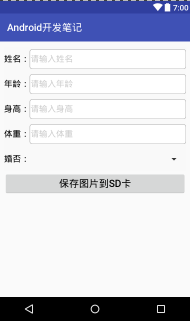
 package com.example.alimjan.hello_world;

 import java.io.File;

 import java.util.ArrayList;

 /**

  * Created by alimjan on 7/5/2017.

  */

 import android.content.Context;

 import android.content.Intent;

 import android.graphics.Bitmap;

         import android.os.Bundle;

         import android.os.Environment;

         import android.support.v7.app.AppCompatActivity;

         import android.util.Log;

         import android.view.View;

         import android.view.View.OnClickListener;

         import android.widget.AdapterView;

         import android.widget.ArrayAdapter;

         import android.widget.Spinner;

         import android.widget.ImageView;

         import android.widget.Toast;

         import android.widget.AdapterView.OnItemSelectedListener;

         import com.example.alimjan.hello_world.Utils.FileUtil;

 /**

  * Created by ouyangshen on 2016/10/1.

  */

 public class class_4_3_3_1 extends AppCompatActivity implements OnClickListener {

     private final static String TAG = "ImageReadActivity";

     private ImageView iv_image;

     private Spinner sp_file;

     private String mPath;

     @Override

     protected void onCreate(Bundle savedInstanceState) {

         super.onCreate(savedInstanceState);

         setContentView(R.layout.code_4_3_3_1);

         iv_image = (ImageView) findViewById(R.id.iv_image);

         sp_file = (Spinner) findViewById(R.id.sp_file);

         findViewById(R.id.btn_delete).setOnClickListener(this);

         mPath = Environment.getExternalStoragePublicDirectory(Environment.DIRECTORY_DOWNLOADS) + "/";

         if (Environment.getExternalStorageState().equals(Environment.MEDIA_MOUNTED) == true) {

             refreshSpinner();

         } else {

             showToast("未发现已挂载的SD卡,请检查");

         }

     }

     private void refreshSpinner() {

         ArrayList<File> fileAlllist = FileUtil.getFileList(mPath, new String[]{".png", ".jpg"});

         if (fileAlllist.size() > 0) {

             fileArray = new String[fileAlllist.size()];

             for (int i=0; i<fileAlllist.size(); i++) {

                 fileArray[i] = fileAlllist.get(i).getName();

             }

             ArrayAdapter<String> typeAdapter = new ArrayAdapter<String>(this,

                     R.layout.item_select, fileArray);

             typeAdapter.setDropDownViewResource(R.layout.item_dropdown);

             sp_file.setPrompt("请选择图片文件");

             sp_file.setAdapter(typeAdapter);

             sp_file.setSelection(0);

             sp_file.setOnItemSelectedListener(new FileSelectedListener());

         } else {

             fileArray = null;

             fileArray = new String[1];

             fileArray[0] = "";

             ArrayAdapter<String> typeAdapter = new ArrayAdapter<String>(this,

                     R.layout.item_select, fileArray);

             sp_file.setPrompt(null);

             sp_file.setAdapter(typeAdapter);

             sp_file.setOnItemSelectedListener(null);

             iv_image.setImageDrawable(null);

         }

     }

     private String[] fileArray;

     class FileSelectedListener implements OnItemSelectedListener {

         public void onItemSelected(AdapterView<?> arg0, View arg1, int arg2, long arg3) {

             String file_path = mPath + fileArray[arg2];

             Bitmap bitmap = FileUtil.openImage(file_path);

             iv_image.setImageBitmap(bitmap);

         }

         public void onNothingSelected(AdapterView<?> arg0) {

         }

     }

     @Override

     public void onClick(View v) {

         if (v.getId() == R.id.btn_delete) {

             for (int i=0; i<fileArray.length; i++) {

                 String file_path = mPath + fileArray[i];

                 File f = new File(file_path);

                 boolean result = f.delete();

                 if (result != true) {

                     Log.d(TAG, "file_path="+file_path+", delete failed");

                 }

             }

             refreshSpinner();

             showToast("已删除临时目录下的所有图片文件");

         }

     }

     private void showToast(String desc) {

         Toast.makeText(this, desc, Toast.LENGTH_SHORT).show();

     }

     public static void startHome(Context mcontext){

         Intent intent = new Intent(mcontext,class_4_3_3_1.class);

         mcontext.startActivity(intent);

     }

 }
 <LinearLayout xmlns:android="http://schemas.android.com/apk/res/android"

     android:layout_width="match_parent"

     android:layout_height="match_parent"

     android:focusable="true"

     android:focusableInTouchMode="true"

     android:orientation="vertical"

     android:padding="10dp" >

     <Button

         android:id="@+id/btn_delete"

         android:layout_width="match_parent"

         android:layout_height="wrap_content"

         android:text="删除所有图片文件"

         android:textColor="@color/black"

         android:textSize="20sp" />

     <RelativeLayout

         android:layout_width="match_parent"

         android:layout_height="50dp" >

         <TextView

             android:id="@+id/tv_file"

             android:layout_width="wrap_content"

             android:layout_height="match_parent"

             android:layout_alignParentLeft="true"

             android:gravity="center"

             android:text="文件名:"

             android:textColor="@color/black"

             android:textSize="17sp" />

         <Spinner

             android:id="@+id/sp_file"

             android:layout_width="match_parent"

             android:layout_height="match_parent"

             android:layout_toRightOf="@+id/tv_file"

             android:gravity="left|center"

             android:spinnerMode="dialog" />

     </RelativeLayout>

     <ImageView

         android:id="@+id/iv_image"

         android:layout_width="match_parent"

         android:layout_height="wrap_content"

         android:scaleType="fitCenter" />

 </LinearLayout>

Android 开发笔记___SD卡基本操作__图片读取写入的更多相关文章
- Android 开发笔记___SD卡基本操作
package com.example.alimjan.hello_world; /** * Created by alimjan on 7/5/2017. */ import android.ann ...
- Android 开发笔记___SD卡文件操作
package com.example.alimjan.hello_world.Utils; import android.graphics.Bitmap; import android.graphi ...
- Android 开发笔记___存储方式__共享参数__sharedprefences
Android 的数据存储方式有四种,这次是[共享参数__sharedprefences] 听起来挺别扭的,平时看到的app里面,当用户删除了一些软件以后下次安装,发现原来的设置还在,这种情况就是把一 ...
- Android 开发笔记___图像视图__简单截屏
<?xml version="1.0" encoding="utf-8"?> <LinearLayout xmlns:android=&quo ...
- 【转】Android开发笔记(序)写在前面的目录
原文:http://blog.csdn.net/aqi00/article/details/50012511 知识点分类 一方面写写自己走过的弯路掉进去的坑,避免以后再犯:另一方面希望通过分享自己的经 ...
- Android开发笔记——以Volley图片加载、缓存、请求及展示为例理解Volley架构设计
Volley是由Google开源的.用于Android平台上的网络通信库.Volley通过优化Android的网络请求流程,形成了以Request-RequestQueue-Response为主线的网 ...
- [置顶] Android开发笔记(成长轨迹)
分类: 开发学习笔记2013-06-21 09:44 26043人阅读 评论(5) 收藏 Android开发笔记 1.控制台输出:called unimplemented OpenGL ES API ...
- Android开发笔记--hello world 和目录结构
原文:Android开发笔记--hello world 和目录结构 每接触一个新东西 都有一个hello world的例子. 1.新建项目 2.配置AVD AVD 没有要新建个,如果不能创建 运行SD ...
- 【转】Android开发笔记——圆角和边框们
原文地址:http://blog.xianqu.org/2012/04/android-borders-and-radius-corners/ Android开发笔记——圆角和边框们 在做Androi ...
随机推荐
- C++代码使用 CppUnit 进行单元检测
CppUnit是一个很方便的对C++代码进行单元检测的工具. 如何编译CppUnit参照博客:http://blog.csdn.net/x_iya/article/details/8433716 该博 ...
- XCode消除警告、错误
1.集成支付宝SDK后,报一堆warning: (arm64) /Users/scmbuild/workspace/standard-pay/.....警告 解决方法: 1) Go to Build ...
- 如何关闭eclipse对js xml的验证
经常会发现导入一些js框架,eclipse会编译报错 这是eclipse对js的瞎验证,如何解决呢? 关闭eclipse对js,xml的验证即可: 菜单Window - > Preference ...
- U方法
U方法用于完成对URL地址的组装,特点在于可以自动根据当前的URL模式和设置生成对应的URL地址,格式为:U('地址','参数','伪静态','是否跳转','显示域名');在模板中使用U方法而不是固定 ...
- jQuery中的常用内容总结(二)
jQuery中的常用内容总结(二) 转载请注明地址: http://www.cnblogs.com/funnyzpc/p/7571993.html 前言 距离上次博客更新已经有二十来天了(●′ω`●) ...
- es6零基础学习之构建脚本(二)
编译器打开你的es6项目 首先:创建我们的第一个脚本,tasks/util/args.js 在文件里面要先引入一个包,处理命令行参数 import yargs from 'yargs'; / ...
- c# 【MVC】WebApi开发实例
using System; using System.Collections.Generic; using System.ComponentModel.DataAnnotations; using S ...
- 浅谈Java多态
什么是Java中的多态?又是一个纸老虎的概念,老套路,把它具体化,细分化,先想三个问题(注意,这里不是简单的化整为零,而是要建立在学习一个新概念时的思考框架): 1.这个东西有什么用?用来干什么的?它 ...
- win10 UWP 申请微软开发者
申请微软开发者可以到https://dev.windows.com/zh-cn/programs/join 如果是学生,先去http://www.dreamspark.com/ 如果是英文,点stud ...
- 转:C++输入一行字符串的一点小结
原文链接: http://www.wutianqi.com/?p=1181 大家在学习C++编程时,一般在输入方面都是使用的cin.而cin是使用空白(空格,制表符和换行符)来定字符串的界的.这就导致 ...