
Customer segmentation – LifeCycle Grids with R(转)
I want to share a very powerful approach for customer segmentation in this post. It is based on customer’s lifecycle, specifically on frequency and recency of purchases. The idea of using these metrics comes from the RFM analysis. Recency and frequency are very important behavior metrics. We are interested in frequent and recent purchases, because frequency affects client’s lifetime value and recency affects retention. Therefore, these metrics can help us to understand the current phase of the client’s lifecycle. When we know each client’s phase, we can split customer base into groups (segments) in order to:
- understand the state of affairs,
- effectively using marketing budget through accurate targeting,
- use different offers for every group,
- effectively using email marketing,
- increase customers’ life-time and value, finally.
For this, we will use a matrix called LifeCycle Grids. We will study how to process initial data (transaction) to the matrix, how to visualize it, and how to do some in-depth analysis. We will do all these steps with the R programming language.
Let’s create a data sample with the following code:
|
1
2
3
4
5
6
7
8
9
10
11
12
13
14
15
16
17
18
19
20
21
22
|
# loading librarieslibrary(dplyr)library(reshape2)library(ggplot2)# creating data sampleset.seed(10)data <- data.frame(orderId=sample(c(1:1000), 5000, replace=TRUE),product=sample(c('NULL','a','b','c'), 5000, replace=TRUE,prob=c(0.15, 0.65, 0.3, 0.15)))order <- data.frame(orderId=c(1:1000),clientId=sample(c(1:300), 1000, replace=TRUE))gender <- data.frame(clientId=c(1:300),gender=sample(c('male', 'female'), 300, replace=TRUE, prob=c(0.40, 0.60)))date <- data.frame(orderId=c(1:1000),orderdate=sample((1:100), 1000, replace=TRUE))orders <- merge(data, order, by='orderId')orders <- merge(orders, gender, by='clientId')orders <- merge(orders, date, by='orderId')orders <- orders[orders$product!='NULL', ]orders$orderdate <- as.Date(orders$orderdate, origin="2012-01-01")rm(data, date, order, gender) |
The head of our data sample looks like:
  orderId clientId product gender orderdate

1   1       254       a    female 2012-04-03

2   1       254       b    female 2012-04-03

3   1       254       c    female 2012-04-03

4   1       254       b    female 2012-04-03

5   2       151       a    female 2012-01-31

6   2       151       b    female 2012-01-31
You can see that there is a gender of customer in the table. We will use it as an example of some in-depth analysis later. I recommend you to use any additional features, that you have, for seeking insights. It can be source of client, channel, campaign, geo data and so on.
A few words about LifeCycle Grids. It is a matrix with 2 dimensions:
- frequency, which is expressed in number of purchased items or placed orders,
- recency, which is expressed in days or months since the last purchase.
The first step is to think about suitable grids for your business. It is impossible to work with infinite segments. Therefore, we need to define some boundaries of frequency and recency, which should help us to split customers into homogeneous groups (segments). The analysis of the distribution of the frequency and the recency in our data set combined with the knowledge of business aspects can help us to find suitable boundaries.
Therefore, we need to calculate two values:
- number of orders that were placed by each client (or in some cases, it can be the number of items),
- time lapse from the last purchase to the reporting date.
Then, plot the distribution with the following code:
|
1
2
3
4
5
6
7
8
9
10
11
12
13
14
15
16
17
18
19
20
21
22
23
24
|
# reporting datetoday <- as.Date('2012-04-11', format='%Y-%m-%d')# processing dataorders <- dcast(orders, orderId + clientId + gender + orderdate ~ product, value.var='product', fun.aggregate=length)orders <- orders %>% group_by(clientId) %>% mutate(frequency=n(), recency=as.numeric(today-orderdate)) %>% filter(orderdate==max(orderdate)) %>% filter(orderId==max(orderId))# exploratory analysisggplot(orders, aes(x=frequency)) + theme_bw() + scale_x_continuous(breaks=c(1:10)) + geom_bar(alpha=0.6, binwidth=1) + ggtitle("Dustribution by frequency")ggplot(orders, aes(x=recency)) + theme_bw() + geom_bar(alpha=0.6, binwidth=1) + ggtitle("Dustribution by recency") |


Early behavior is most important, so finer detail is good there. Usually, there is a significant difference between customers who bought 1 time and those who bought 3 times, but is there any difference between customers who bought 50 times and other who bought 53 times? That is why it makes sense to set boundaries from lower values to higher gaps. We will use the following boundaries:
- for frequency: 1, 2, 3, 4, 5, >5,
- for recency: 0-6, 7-13, 14-19, 20-45, 46-80, >80
Next, we need to add segments to each client based on the boundaries. Also, we will create new variable ‘cart’, which includes products from the last cart, for doing in-depth analysis.
|
1
2
3
4
5
6
7
8
9
10
11
12
13
14
15
16
17
18
19
20
|
orders.segm <- orders %>% mutate(segm.freq=ifelse(between(frequency, 1, 1), '1', ifelse(between(frequency, 2, 2), '2', ifelse(between(frequency, 3, 3), '3', ifelse(between(frequency, 4, 4), '4', ifelse(between(frequency, 5, 5), '5', '>5')))))) %>% mutate(segm.rec=ifelse(between(recency, 0, 6), '0-6 days', ifelse(between(recency, 7, 13), '7-13 days', ifelse(between(recency, 14, 19), '14-19 days', ifelse(between(recency, 20, 45), '20-45 days', ifelse(between(recency, 46, 80), '46-80 days', '>80 days')))))) %>% # creating last cart feature mutate(cart=paste(ifelse(a!=0, 'a', ''), ifelse(b!=0, 'b', ''), ifelse(c!=0, 'c', ''), sep='')) %>% arrange(clientId)# defining order of boundariesorders.segm$segm.freq <- factor(orders.segm$segm.freq, levels=c('>5', '5', '4', '3', '2', '1'))orders.segm$segm.rec <- factor(orders.segm$segm.rec, levels=c('>80 days', '46-80 days', '20-45 days', '14-19 days', '7-13 days', '0-6 days')) |
We have everything need to create LifeCycle Grids. We need to combine clients into segments with the following code:
|
1
2
3
4
5
|
lcg <- orders.segm %>% group_by(segm.rec, segm.freq) %>% summarise(quantity=n()) %>% mutate(client='client') %>% ungroup() |
The classic matrix can be created with the following code:
|
1
|
lcg.matrix <- dcast(lcg, segm.freq ~ segm.rec, value.var='quantity', fun.aggregate=sum) |

However, I suppose a good visualization is obtained through the following code:
|
1
2
3
4
5
6
7
|
ggplot(lcg, aes(x=client, y=quantity, fill=quantity)) + theme_bw() + theme(panel.grid = element_blank())+ geom_bar(stat='identity', alpha=0.6) + geom_text(aes(y=max(quantity)/2, label=quantity), size=4) + facet_grid(segm.freq ~ segm.rec) + ggtitle("LifeCycle Grids") |

I’ve added colored borders for a better understanding of how to work with this matrix. We have four quadrants:
- yellow – here are our best customers, who have placed quite a few orders and made their last purchase recently. They have higher value and higher potential to buy again. We have to take care of them.
- green – here are our new clients, who placed several orders (1-3) recently. Although they have lower value, they have potential to move into the yellow zone. Therefore, we have to help them move into the right quadrant (yellow).
- red – here are our former best customers. We need to understand why they are former and, maybe, try to reactivate them.
- blue – here are our onetime-buyers.
Does it make sense to make the same offer to all of these customers? Certainly, it doesn’t! It makes sense to create different approaches not only for each quadrant, but for border grids as well.
What I really like about this model of segmentation is that it is stable and alive simultaneously. It is alive in terms of customers flow. Every day, with or without purchases, it will provide customers flow from one grid to another. And it is stable in terms of working with segments. It allows to work with customers who have the same behavior profile. That means you can create suitable campaigns / offers / emails for each or several close grids and use them constantly.
Ok, it’s time to study how we can do some in-depth analysis. R allows us to create subsegments and visualize them effectively. It can be helpful to distribute each grid via some features. For instance, there can be some dependence between behavior and gender. For the other example, where our products have different lifecycles, it can be helpful to analyze which product/s was/were in the last cart or we can combine these features. Let’s do this with the following code:
|
1
2
3
4
5
6
7
8
9
10
11
12
|
lcg.sub <- orders.segm %>% group_by(gender, cart, segm.rec, segm.freq) %>% summarise(quantity=n()) %>% mutate(client='client') %>% ungroup()ggplot(lcg.sub, aes(x=client, y=quantity, fill=gender)) + theme_bw() + theme(panel.grid = element_blank())+ geom_bar(stat='identity', position='fill' , alpha=0.6) + facet_grid(segm.freq ~ segm.rec) + ggtitle("LifeCycle Grids by gender (propotion)") |
 or even:
|
1
2
3
4
5
6
|
ggplot(lcg.sub, aes(x=gender, y=quantity, fill=cart)) + theme_bw() + theme(panel.grid = element_blank())+ geom_bar(stat='identity', position='fill' , alpha=0.6) + facet_grid(segm.freq ~ segm.rec) + ggtitle("LifeCycle Grids by gender and last cart (propotion)") |
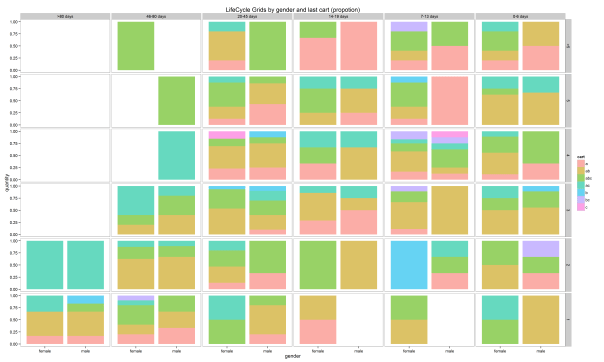
Therefore, there is a lot of space for creativity. If you want to know much more about LifeCycle Grids and strategies for working with quadrants, I highly recommend that you read Jim Novo’s works, e.g. this blogpost.
Thank you for reading this!
转自:http://analyzecore.com/2015/02/16/customer-segmentation-lifecycle-grids-with-r/
Customer segmentation – LifeCycle Grids with R(转)的更多相关文章
- Customer segmentation – LifeCycle Grids, CLV and CAC with R(转)
We studied a very powerful approach for customer segmentation in the previous post, which is based o ...
- Cohort Analysis and LifeCycle Grids mixed segmentation with R(转)
This is the third post about LifeCycle Grids. You can find the first post about the sense of LifeCyc ...
- 大规模视觉识别挑战赛ILSVRC2015各团队结果和方法 Large Scale Visual Recognition Challenge 2015
Large Scale Visual Recognition Challenge 2015 (ILSVRC2015) Legend: Yellow background = winner in thi ...
- python excel 文件合并
Combining Data From Multiple Excel Files Introduction A common task for python and pandas is to auto ...
- Rxlifecycle(二):源码解析
1.结构 Rxlifecycle代码很少,也很好理解,来看核心类. 接口ActivityLifecycleProvider RxFragmentActivity.RxAppCompatActivity ...
- Appboy 基于 MongoDB 的数据密集型实践
摘要:Appboy 正在过手机等新兴渠道尝试一种新的方法,让机构可以与顾客建立更好的关系,可以说是市场自动化产业的一个前沿探索者.在移动端探索上,该公司已经取得了一定的成功,知名产品有 iHeartM ...
- Mybatis的分页查询
示例1:查询业务员的联系记录 1.控制器代码(RelationController.java) //分页列出联系记录 @RequestMapping(value="toPage/custom ...
- crm 添加用户 编辑用户 公户和私户的展示,公户和私户的转化
1.添加用户 和编辑可以写在一起 urls.py url(r'^customer_add/', customer.customer_change, name='customer_add'), url( ...
- 史上最全面的Neo4j使用指南
Neo4j图形数据库教程 Neo4j图形数据库教程 第一章:介绍 Neo4j是什么 Neo4j的特点 Neo4j的优点 第二章:安装 1.环境 2.下载 3.开启远程访问 4.测试 第三章:CQL 1 ...
随机推荐
- oracle导入时提示IMP-00010:不是有效的导出文件,头部验证失败
oracle导入时提示IMP-00010:不是有效的导出文件,头部验证失败: 原因分析:导出的oracle的版本与导入的oracle数据库的版本不一致: 可直接将dmp文件用notepad++打开修改 ...
- TaintDroid简介
1.Information-Flow tracking,Realtime Privacy Monitoring.信息流动追踪,实时动态监控. 2.TaintDroid是一个全系统动态污点跟踪和分析系统 ...
- 使用Maven构建SSH
本人自己进行的SSH整合,中间遇到不少问题,特此做些总结,仅供参考. 项目环境: struts-2.3.31 + spring-4.3.7 + hibernate-4.2.21 + maven-3.3 ...
- HTML表单基本格式与代码
咱们先来看下今天咱们需要学习的内容,理解起来很简单,像我这种英语不好的只是需要背几个单词 在HTML中创建表单需要用到的最基本的代码和格式 <form method="post/get ...
- JAVA Struts2 搭建
java struts 2搭建 1.web工程 2.将struts2 用到的jar包,拷贝到webcontent/webinf/lib文件夹.下 3.webcontent 下的web.xml 下 ...
- Android系统--输入系统(九)Reader线程_核心类及配置文件
Android系统--输入系统(九)Reader线程_核心类及配置文件 1. Reader线程核心类--EventHub 1.1 Reader线程核心结构体 实例化对象:mEventHub--表示多个 ...
- 闭包(匿名函数) php
php中的闭包,之前不理解.以前项目中虽然有用到,也是别人怎么用,自己也跟着怎么用,也没具体去看一下,时间长了就忘了,也不知道闭包是怎么回事.今天网上搜集了关于php闭包相关的文章,看了7,8篇,干货 ...
- stl_泛型的一些基本
一.泛型编程的一些基本 : 1.泛型程序设计: 1.1.程序尽可能的通用. 1.2.将算法从数据结构中抽象出来,成为通用. 1.3.模板并不是单纯的函数,不能凭空的生成,是用来产生代码的代码,可以减少 ...
- bzoj1087 [SCOI2005]互不侵犯
Description 在N×N的棋盘里面放K个国王,使他们互不攻击,共有多少种摆放方案.国王能攻击到它上下左右,以及左上左下右上右下八个方向上附近的各一个格子,共8个格子. Input 只有一行,包 ...
- Azure IoT 技术研究系列5-Azure IoT Hub与Event Hub比较
上篇博文中,我们介绍了Azure IoT Hub的使用配额和缩放级别: Azure IoT 技术研究系列4-Azure IoT Hub的配额及缩放级别 本文中,我们比较一下Azure IoT Hub和 ...