
learning armbian steps(7) ----- armbian 源码分析(二)
从compile.sh开始入手:
 SRC="$(dirname "$(realpath "${BASH_SOURCE}")")"

  # fallback for Trusty

  [[ -z "${SRC}" ]] && SRC="$(pwd)"

  # check for whitespace in $SRC and exit for safety reasons

  grep -q "[[:space:]]" <<<"${SRC}" && { echo "\"${SRC}\" contains whitespace. Not supported. Aborting." >& ; exit  ; }

  cd $SRC
如上主要是获取源代码的路径,并判断路径是否存在空格合法
在compile.sh
 if [[ -f $SRC/lib/general.sh && -L $SRC/main.sh ]]; then

          source $SRC/lib/general.sh

  else

          echo "Error: missing build directory structure"

          echo "Please clone the full repository https://github.com/armbian/build/"

          exit -

  fi
很明显在这一步里,我们可以进入general.sh看一下实际做了什么?
在lib/general.sh
定义了很多的shell 函数
Cleaning()
根据不同的参数做清除工作
Exit_with_error()
出错时用于显示错误调节的功能,文件,行号,是否高亮,及相关的出错描述
Get_package_list_hash()
打印新构建的文件系统安装包列表,以及文件系统的版本
Create_source_list()
更新apt source.list到新构建的文件系统当中
fetch_from_repo()
用于拉取git 仓库的代码
# fetch_from_repo <url> <directory> <ref> <ref_subdir>
# <url>: remote repository URL
# <directory>: local directory; subdir for branch/tag will be created
# <ref>:
# branch:name
# tag:name
# head(*)
# commit:hash@depth(**)
#
# *: Implies ref_subdir=no
# **: Not implemented yet
# <ref_subdir>: "yes" to create subdirectory for tag or branch name
#
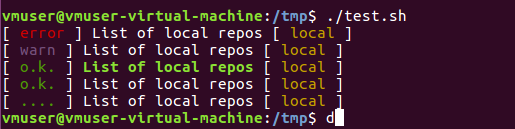
display_alert()
根据不同的级别显示
fingerprint_image()
将编译信息生成至etc/armbian.txt,其中包含
Title: Armbian $REVISION ${BOARD^} $DISTRIBUTION $RELEASE $BRANCH
Kernel: Linux $VER
Build date: $(date +'%d.%m.%Y')
Authors: https://www.armbian.com/authors
Sources: https://github.com/armbian/
Support: https://forum.armbian.com/
Changelog: https://www.armbian.com/logbook/
Documantation: https://docs.armbian.com/
addtorepo()
用于创建本地的apt仓库,下载交叉编译工具链,下载etcher_cli工具。可定制自已的镜像打包脚本。
[[ ! -f $SRC/userpatches/customize-image.sh ]] && cp $SRC/config/templates/customize-image.sh.template $SRC/userpatches/customize-image.sh
download_toolchain()
用于下载工具链。
download_etcher_cli()
用于下载etcher_cli,该命令工具的功能相当于dd命令与校验功能的合体。
接来再次回到compile.sh脚本当中
 # copy default config from the template

  [[ ! -f $SRC/config-default.conf ]] && cp $SRC/config/templates/config-example.conf $SRC/config-default.conf

  # source build configuration file

  if [[ -n $ && -f $SRC/config-$.conf ]]; then

          display_alert "Using config file" "config-$1.conf" "info"

          source $SRC/config-$.conf

  else

          display_alert "Using config file" "config-default.conf" "info"

          source $SRC/config-default.conf

  fi
在默认的config-default.conf内容如下所示:
KERNEL_ONLY=""                          # leave empty to select each time, set to "yes" or "no" to skip dialog prompt

KERNEL_CONFIGURE=""                     # leave empty to select each time, set to "yes" or "no" to skip dialog prompt

CLEAN_LEVEL="make,debs,oldcache"        # comma-separated list of clean targets: "make" = make clean for selected kernel and u-boot,

                                        # "debs" = delete packages in "./output/debs" for current branch and family,

                                        # "alldebs" = delete all packages in "./output/debs", "images" = delete "./output/images",

                                        # "cache" = delete "./output/cache", "sources" = delete "./sources"

                                        # "oldcache" = remove old cached rootfs except for the newest  files

DEST_LANG="en_US.UTF-8"                 # sl_SI.UTF-, en_US.UTF-

# advanced

KERNEL_KEEP_CONFIG="no"                 # do not overwrite kernel config before compilation

EXTERNAL="yes"                          # build and install extra applications and drivers

EXTERNAL_NEW="prebuilt"                 # compile and install or install prebuilt additional packages

CREATE_PATCHES="no"                     # wait that you make changes to uboot and kernel source and creates patches

BUILD_ALL="no"                          # cycle through available boards and make images or kernel/u-boot packages.

                                        # set KERNEL_ONLY to "yes" or "no" to build all packages/all images

BSPFREEZE=""                            # freeze armbian packages (u-boot, kernel, dtb)

INSTALL_HEADERS=""                      # install kernel headers package

LIB_TAG="master"                        # change to "branchname" to use any branch currently available.

CARD_DEVICE=""                          # device name /dev/sdx of your SD card to burn directly to the card when done

PROGRESS_LOG_TO_FILE="yes"

BUILD_KSRC="no"
在compile.sh当中允许传递 key=value, 比如./compile.sh test_cmd=test_value
 # Script parameters handling

  for i in "$@"; do

          if [[ $i == *=* ]]; then

                  parameter=${i%%=*}

                  value=${i##*=}

                  display_alert "Command line: setting $parameter to" "${value:-(empty)}" "info"

                  eval $parameter=$value

          fi

  done
接下来我们继续看compile.sh
 if [[ $BUILD_ALL == yes || $BUILD_ALL == demo ]]; then

          source $SRC/lib/build-all.sh

  else

          source $SRC/lib/main.sh

  fi
由于默认的BUILD_ALL = “no” , 所以接下来会去执行$SRC/lib/main.sh.脚本。
总结一下compile.sh的功能:
1) 获取shell脚本相关的钩子函数,在lib/generate.sh当中
2) 获取并解析默认的参数。
3) 最后的主要功能还是在/lib/main.sh脚本当中,接下来我们会来解析main.sh脚本的功能。
learning armbian steps(7) ----- armbian 源码分析(二)的更多相关文章
- Fresco 源码分析(二) Fresco客户端与服务端交互(1) 解决遗留的Q1问题
4.2 Fresco客户端与服务端的交互(一) 解决Q1问题 从这篇博客开始,我们开始讨论客户端与服务端是如何交互的,这个交互的入口,我们从Q1问题入手(博客按照这样的问题入手,是因为当时我也是从这里 ...
- 框架-springmvc源码分析(二)
框架-springmvc源码分析(二) 参考: http://www.cnblogs.com/leftthen/p/5207787.html http://www.cnblogs.com/leftth ...
- Tomcat源码分析二:先看看Tomcat的整体架构
Tomcat源码分析二:先看看Tomcat的整体架构 Tomcat架构图 我们先来看一张比较经典的Tomcat架构图: 从这张图中,我们可以看出Tomcat中含有Server.Service.Conn ...
- 十、Spring之BeanFactory源码分析(二)
Spring之BeanFactory源码分析(二) 前言 在前面我们简单的分析了BeanFactory的结构,ListableBeanFactory,HierarchicalBeanFactory,A ...
- Vue源码分析(二) : Vue实例挂载
Vue源码分析(二) : Vue实例挂载 author: @TiffanysBear 实例挂载主要是 $mount 方法的实现,在 src/platforms/web/entry-runtime-wi ...
- 多线程之美8一 AbstractQueuedSynchronizer源码分析<二>
目录 AQS的源码分析 该篇主要分析AQS的ConditionObject,是AQS的内部类,实现等待通知机制. 1.条件队列 条件队列与AQS中的同步队列有所不同,结构图如下: 两者区别: 1.链表 ...
- ABP源码分析二:ABP中配置的注册和初始化
一般来说,ASP.NET Web应用程序的第一个执行的方法是Global.asax下定义的Start方法.执行这个方法前HttpApplication 实例必须存在,也就是说其构造函数的执行必然是完成 ...
- ABP源码分析二十:ApplicationService
IApplicationService : 空接口,起标识作用.所有实现了IApplicationService 的类都会被自动注入到容器中.同时所有IApplicationService对象都会被注 ...
- ABP源码分析二十一:Feature
Feature是什么?Feature就是对function的分类方法,其与function的关系就比如Role和User的关系一样. ABP中Feature具有以下属性: 其中最重要的属性是name, ...
- ABP源码分析二十二:Navigation
MenuDefinition:封装了导航栏上的主菜单的属性. MenuItemDefinition:封装了主菜单的子菜单的属性.子菜单可以引用其他子菜单构成一个菜单树 UserMenu/UserMen ...
随机推荐
- 串的模式匹配,KMP算法
串的模式匹配 现考虑一个常用操作,在字符串s(我们称为主串)中的第pos开始处往后查找,看在主串s中有没有和子串p相匹配的的,如果有,则返回字串p第一次出现的位置. 暴力求解 int Index(ch ...
- C程序设计语言练习 第三章
3.3 else-if语句 折半查找,这里通过一个折半查找说明三路判定程序的用法.该函数用于判定已排序好的数组v中是否存在某个特定的值.数组v的元素必须以升序排列.如果v中包含x,则该函数返回x在v中 ...
- gitlab LFS 的应用实践
今天看到的gitlab LFS的文档,将自己的理解整理成博客,加深自己的印象.具体gitlab LFS的介绍可以直接百度了,不在这里详细阐述.只提一下他的作用:LFS就是Large File Stor ...
- php实现只需要一个QQ号就可以获得用户信息
<?php // 通过QQ号即可获取用户信息 // 获取QQ头像接口 // http://q1.qlogo.cn/g?b=qq&nk=QQ号&s=100&t=154790 ...
- k8s之资源指标API部署metrics-server
1.部署metrics-server 从v1.8开始,引入了新的功能,即把资源指标引入api,资源指标:metrics-server,自定义指标:prometheus,k8s-prometheus-a ...
- 数据库优化SQL
sql优化规则: 1.对于查询,尽量不要使用全表扫描,尽量在where子句以及order by所对应的字段建立索引. 2.应尽量避免在 where 子句中对字段进行 null 值判断,否则将导致引擎放 ...
- skywalking-agent 与docker组合使用
docker部署 公司有使用docker部署的微服务 可以直接使用 仓库/java:8-jdk-alpine-asla-shanghai-1-skyagent-2作为基础镜像 这个镜像包是java8 ...
- JTree实现QQ好友列表
最近学习了一下JTree的使用方法: 先来看一下树的实例: 构建一个树, DefaultMutableTreeNode root = new DefaultMutableTreeNode(" ...
- beego从入门到弃坑(一)
最近由于要写课程设计的原因,我便开始一边学习beego,一边开始用它写一个小型的管理系统.但是只有你真正的去用的时候,才会发现这个框架巨坑,他是第一个让我写出了心里阴影的框架,也是第一个让我写着写 ...
- 为什么有了uwsgi还要nginx这个“前端”服务器
相信每一个使用nginx+uwsgi+django部署过的人,都感到非常复杂.到底为什么一个项目的发布要经过这么多层级,他们每一层有什么理由存在?这就带大家宏观地看待一下 首先nginx 是对外的服务 ...