
pyecharts v1 版本 学习笔记 饼图,玫瑰图
饼图:
普通案例
from example.commons import Faker

from pyecharts import options as opts

from pyecharts.charts import Page, Pie

l1 = ['aa','bb','cc','dd','ee']

num =[10,20,15,25,30]

c = (

        Pie()

        .add("", [list(z) for z in zip(l1,num)])

        .set_global_opts(title_opts=opts.TitleOpts(title="Pie-基本示例"))

        .set_series_opts(label_opts=opts.LabelOpts(formatter="{b}: {c}"))

    )

c.render_notebook()
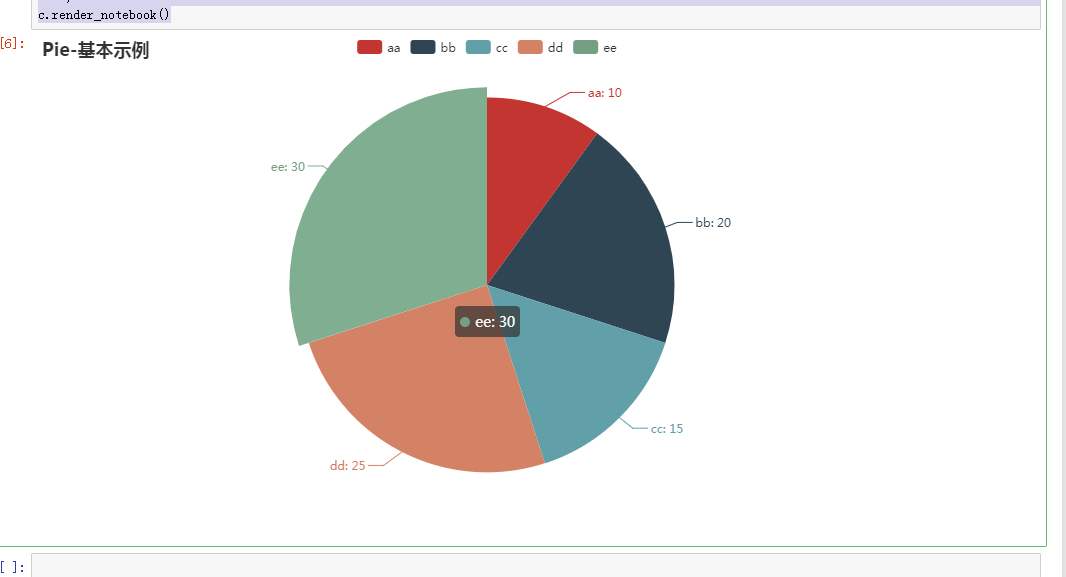
圆环图:
from example.commons import Faker

from pyecharts import options as opts

from pyecharts.charts import Page, Pie

l1 = ['aa','bb','cc','dd','ee']

num =[10,20,15,25,30]

c = (

        Pie()

        .add(

            "",

            [list(z) for z in zip(l1, num)],

            radius=["40%", "75%"],   # 圆环的粗细和大小

        )

        .set_global_opts(

            title_opts=opts.TitleOpts(title="Pie-Radius"),

            legend_opts=opts.LegendOpts(

                orient="vertical", pos_top="5%", pos_left="2%"  # 左面比例尺

            ),

        )

        .set_series_opts(label_opts=opts.LabelOpts(formatter="{b}: {c}"))

    )

c.render_notebook()
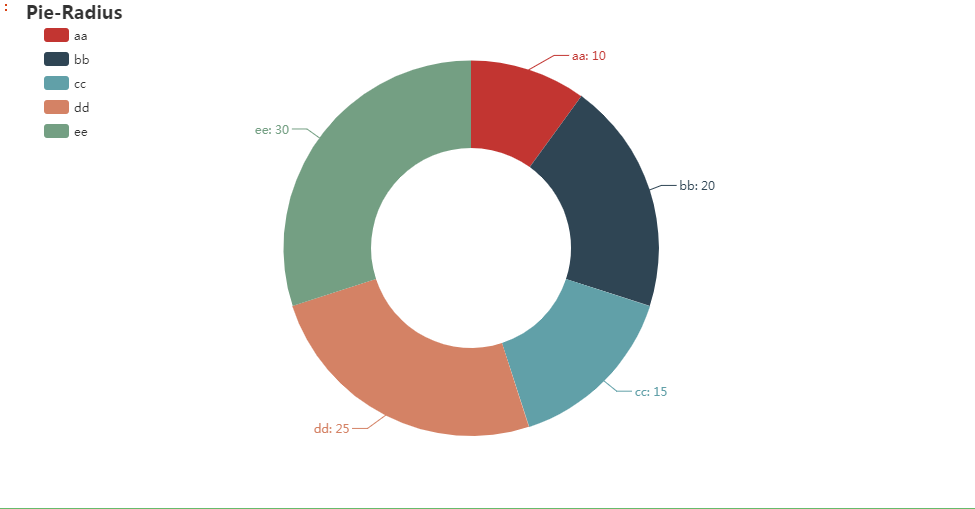
圆环显示百分比
from example.commons import Faker

from pyecharts import options as opts

from pyecharts.charts import Page, Pie

l1 = ['aa','bb','cc','dd','ee']

num =[10,20,15,25,30]

c = (

        Pie()

        .add(

            "",

            [list(z) for z in zip(l1, num)],

            radius=["40%", "55%"],

            label_opts=opts.LabelOpts(

                position="outside",

                formatter="{a|{a}}{abg|}\n{hr|}\n {b|{b}: }{c}  {per|{d}%}  ",

                background_color="#eee",

                border_color="#aaa",

                border_width=1,

                border_radius=4,

                rich={

                    "a": {"color": "#999", "lineHeight": 22, "align": "center"},

                    "abg": {

                        "backgroundColor": "#e3e3e3",

                        "width": "100%",

                        "align": "right",

                        "height": 22,

                        "borderRadius": [4, 4, 0, 0],

                    },

                    "hr": {

                        "borderColor": "#aaa",

                        "width": "100%",

                        "borderWidth": 0.5,

                        "height": 0,

                    },

                    "b": {"fontSize": 16, "lineHeight": 33},

                    "per": {

                        "color": "#eee",

                        "backgroundColor": "#334455",

                        "padding": [2, 4],

                        "borderRadius": 2,

                    },

                },

            ),

        )

        .set_global_opts(title_opts=opts.TitleOpts(title="Pie-富文本示例"))

    )

c.render_notebook()
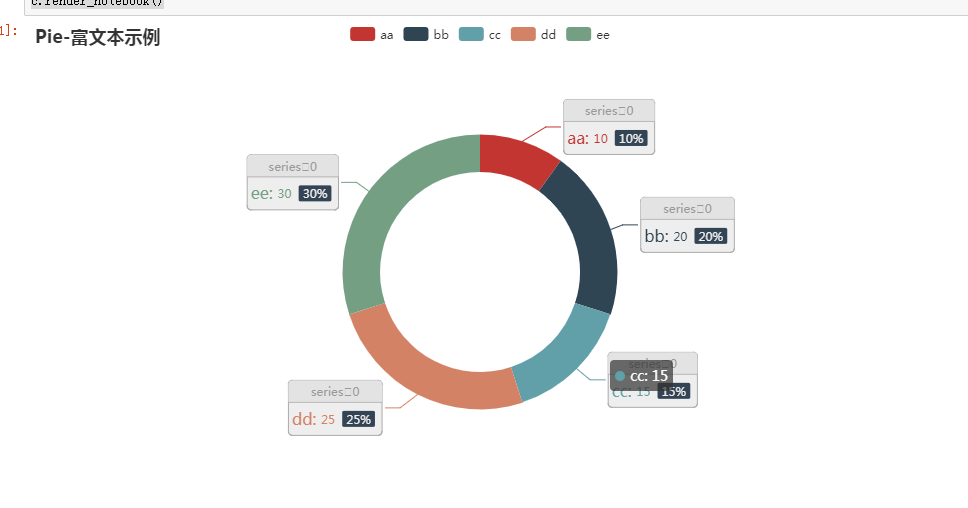
pyecharts v1 版本 学习笔记 饼图,玫瑰图的更多相关文章
- pyecharts v1 版本 学习笔记 折线图,面积图
折线图 折线图 基本demo import pyecharts.options as opts from pyecharts.charts import Line c = ( Line() .add_ ...
- pyecharts v1 版本 学习笔记 散点图
散点图 基本案例 from example.commons import Faker from pyecharts import options as opts from pyecharts.char ...
- pyecharts v1 版本 学习笔记 柱状图
柱状图 bar 基本演示例子 from pyecharts import options as opts from pyecharts.charts import Bar c =( Bar().add ...
- GIS案例学习笔记-ArcGIS整图大图出图实例教程
GIS案例学习笔记-ArcGIS整图大图出图实例教程 联系方式:谢老师,135-4855-4328,xiexiaokui#qq.com 1. 通过出图比例尺(1:2000),地图范围测算图纸大小. 图 ...
- UML学习笔记:类图
UML学习笔记:类图 有些问题,不去解决,就永远都是问题! 类图 类图(Class Diagrame)是描述类.接口以及它们之间关系的图,用来显示系统中各个类的静态结构. 类图包含2种元素:类.接口, ...
- UML学习笔记:活动图
UML学习笔记:活动图 活动图 活动图是UML中描述系统动态行为的图之一,用于展现参与行为的类的活动或动作.在UML里,活动图很类似于流程图,但是有一些区别: 活动图着重表现系统行为,描述对象活动的顺 ...
- ubuntu上pyecharts V1版本环境搭建
1 背景 今天想用pyecharts画图,在新的环境下使用pip安装之后发现,导入pyecharts模块一直失败,报错如下. 图 1 导入pyecharts错误图 请注意:我这里使用的python版本 ...
- FAT文件系统规范v1.03学习笔记---4.文件和目录数据区之长目录项
1.前言 本文主要是对Microsoft Extensible Firmware Initiative FAT32 File System Specification中文翻译版的学习笔记. 每个FAT ...
- FAT文件系统规范v1.03学习笔记---3.根目录区之FAT目录项结构
1.前言 本文主要是对Microsoft Extensible Firmware Initiative FAT32 File System Specification中文翻译版的学习笔记. 每个FAT ...
随机推荐
- 20190705-Python数据驱动之DDT
DDT ddt 是第三方模块,需安装, pip install ddt DDT包含的装饰器 包含一个类装饰器@ddt和两个方法装饰器@data和@file_data 通常情况下,@data中的数据按照 ...
- java 用户线程和守护线程
在Java中通常有两种线程:用户线程和守护线程(也被称为服务线程)通过Thread.setDaemon(false)设置为用户线程通过Thread.setDaemon(true)设置为守护线程线程属性 ...
- Angular系列-AngularJs1使用Ace编辑器
Ace编辑器 Ace编辑器是一个嵌入web的代码编辑器,支持语法高亮,自动补全等功能,如果想在页面展示或编辑代码,使用该工具是很合适的. 参考项目地址:https://github.com/ajaxo ...
- python几个轻量级web框架
python几个轻量级web框架 2016-04-11 18:04:34 惹不起的程咬金 阅读数 7944更多 分类专栏: 云计算/大数据/并行计算 Python 我最近发表了一篇名为 ‘7 Mi ...
- springboot启动流程(七)ioc容器refresh过程(上篇)
所有文章 https://www.cnblogs.com/lay2017/p/11478237.html 正文 在前面的几篇文章中,我们看到Environment创建.application配置文件的 ...
- Flutter自定义绘制(1)- 绘制基础
CustomPainter Flutter 中实现绘制的主要是CustomPainter类. 我们一般继承这个类,来使用它: class MyPainter extends CustomPainter ...
- SpringCloud之Config配置中心+BUS消息总线原理及其配置
一.配置中心作用 在常规的开发中,每个微服务都包含代码和配置.其配置包含服务配置.各类开关和业务配置.如果系统结构中的微服务节点较少,那么常规的代码+配置的开发方式足以解决问题.当系统逐步迭代,其微服 ...
- SpringCloud之Zuul网关原理及其配置
Zuul是spring cloud中的微服务网关.网关: 是一个网络整体系统中的前置门户入口.请求首先通过网关,进行路径的路由,定位到具体的服务节点上. Zuul是一个微服务网关,首先是一个微服务.也 ...
- Dell T30解决报Alert! Cover was previously removed.
DELL T30自检中卡在F1/F2/F5选项,需要F1手动启动时报:Alert! Cover was previously removed是指向机器盖问题 [解决方法]: 1.检查机箱盖是否有盖紧 ...
- vue sample
<template> <section> <header class="top_tips"> <span class="num_ ...