
编写测试类实现并发访问固定URL(亲测能用!!!)
1.类目录
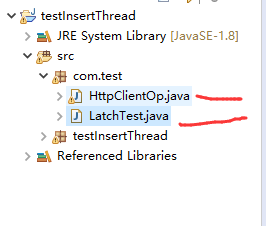
2.LatchTest.java类
package com.test;
import java.util.concurrent.CountDownLatch;
public class LatchTest {
static Runnable taskTemp = new Runnable() {
// 注意,此处是非线程安全的留坑
private int iCounter;
@Override
public void run() {
System.out.println("=====222========");
for(int i = 0; i < 10; i++) {
// 发起请求
//http://localhost:8080/insertUser?name=赵云&age=18&id=18
//http://localhost:8080/insertUser?name=aaa&age=18&id=1811
try {
HttpClientOp.doGet("http://localhost:8080/insertUser?name=aaa&age=18&id=1811");//自己的URL地址,注意:name=汉字会报错
} catch (Exception e1) {
// TODO Auto-generated catch block
e1.printStackTrace();
}
iCounter++;
System.out.println(System.nanoTime() + " [" + Thread.currentThread().getName() + "] iCounter = " + iCounter);
try {
Thread.sleep(100);
} catch (InterruptedException e) {
e.printStackTrace();
}
}
}
};
public static void main(String[] args) throws InterruptedException {
System.out.println("=====111========");
taskTemp.run();
LatchTest latchTest = new LatchTest();
latchTest.startTaskAllInOnce(5, taskTemp);
}
public long startTaskAllInOnce(int threadNums, final Runnable task) throws InterruptedException {
final CountDownLatch startGate = new CountDownLatch(1);
final CountDownLatch endGate = new CountDownLatch(threadNums);
for(int i = 0; i < threadNums; i++) {
Thread t = new Thread() {
public void run() {
try {
// 使线程在此等待,当开始门打开时,一起涌入门中
startGate.await();
try {
task.run();
} finally {
// 将结束门减1,减到0时,就可以开启结束门了
endGate.countDown();
}
} catch (InterruptedException ie) {
ie.printStackTrace();
}
}
};
t.start();
}
long startTime = System.nanoTime();
System.out.println(startTime + " [" + Thread.currentThread() + "] All thread is ready, concurrent going...");
// 因开启门只需一个开关,所以立马就开启开始门
startGate.countDown();
// 等等结束门开启
endGate.await();
long endTime = System.nanoTime();
System.out.println(endTime + " [" + Thread.currentThread() + "] All thread is completed.");
return endTime - startTime;
}
}
2.HttpClientOp类
package com.test;
import java.io.BufferedReader;
import java.io.IOException;
import java.io.InputStream;
import java.io.InputStreamReader;
import java.io.OutputStream;
import java.net.HttpURLConnection;
import java.net.MalformedURLException;
import java.net.URL;
public class HttpClientOp {
public static String doGet(String httpurl) throws Exception {
HttpURLConnection connection = null;
InputStream is = null;
BufferedReader br = null;
String result = null;// 返回结果字符串
// try {
// 创建远程url连接对象
URL url = new URL(httpurl);
// 通过远程url连接对象打开一个连接,强转成httpURLConnection类
connection = (HttpURLConnection) url.openConnection();
System.out.println("======333======="+connection.getContent());
// 设置连接方式:get
connection.setRequestMethod("GET");
// 设置连接主机服务器的超时时间:15000毫秒
connection.setConnectTimeout(15000);
// 设置读取远程返回的数据时间:60000毫秒
connection.setReadTimeout(60000);
// 发送请求
connection.connect();
// 通过connection连接,获取输入流
/* if (connection.getResponseCode() == 200) {
is = connection.getInputStream();
// 封装输入流is,并指定字符集
br = new BufferedReader(new InputStreamReader(is, "UTF-8"));
// 存放数据
StringBuffer sbf = new StringBuffer();
String temp = null;
while ((temp = br.readLine()) != null) {
sbf.append(temp);
sbf.append("\r\n");
}
result = sbf.toString();
}
} catch (MalformedURLException e) {
e.printStackTrace();
} catch (IOException e) {
e.printStackTrace();
}*/ /*finally {
// 关闭资源
if (null != br) {
try {
br.close();
} catch (IOException e) {
e.printStackTrace();
}
}
if (null != is) {
try {
is.close();
} catch (IOException e) {
e.printStackTrace();
}
}
//connection.disconnect();// 关闭远程连接
}
*/
//绿色部分不要加,加上之后测试不能通过
br.close();
is.close();
return result;
}
public static String doPost(String httpUrl, String param) {
HttpURLConnection connection = null;
InputStream is = null;
OutputStream os = null;
BufferedReader br = null;
String result = null;
try {
URL url = new URL(httpUrl);
// 通过远程url连接对象打开连接
connection = (HttpURLConnection) url.openConnection();
// 设置连接请求方式
connection.setRequestMethod("POST");
// 设置连接主机服务器超时时间:15000毫秒
connection.setConnectTimeout(15000);
// 设置读取主机服务器返回数据超时时间:60000毫秒
connection.setReadTimeout(60000);
// 默认值为:false,当向远程服务器传送数据/写数据时,需要设置为true
connection.setDoOutput(true);
// 默认值为:true,当前向远程服务读取数据时,设置为true,该参数可有可无
connection.setDoInput(true);
// 设置传入参数的格式:请求参数应该是 name1=value1&name2=value2 的形式。
connection.setRequestProperty("Content-Type", "application/x-www-form-urlencoded");
// 设置鉴权信息:Authorization: Bearer da3efcbf-0845-4fe3-8aba-ee040be542c0
connection.setRequestProperty("Authorization", "Bearer da3efcbf-0845-4fe3-8aba-ee040be542c0");
// 通过连接对象获取一个输出流
os = connection.getOutputStream();
// 通过输出流对象将参数写出去/传输出去,它是通过字节数组写出的
os.write(param.getBytes());
// 通过连接对象获取一个输入流,向远程读取
if (connection.getResponseCode() == 200) {
is = connection.getInputStream();
// 对输入流对象进行包装:charset根据工作项目组的要求来设置
br = new BufferedReader(new InputStreamReader(is, "UTF-8"));
StringBuffer sbf = new StringBuffer();
String temp = null;
// 循环遍历一行一行读取数据
while ((temp = br.readLine()) != null) {
sbf.append(temp);
sbf.append("\r\n");
}
result = sbf.toString();
}
} catch (MalformedURLException e) {
e.printStackTrace();
} catch (IOException e) {
e.printStackTrace();
} finally {
// 关闭资源
if (null != br) {
try {
br.close();
} catch (IOException e) {
e.printStackTrace();
}
}
if (null != os) {
try {
os.close();
} catch (IOException e) {
e.printStackTrace();
}
}
if (null != is) {
try {
is.close();
} catch (IOException e) {
e.printStackTrace();
}
}
// 断开与远程地址url的连接
connection.disconnect();
}
return result;
}
}
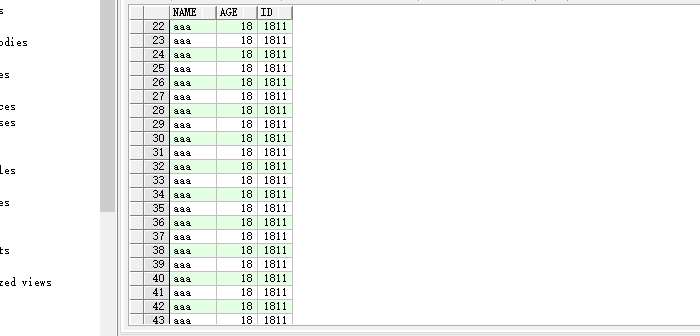
4.测试截图:

报错问题没有解决,但是确实能入库操作实现并行访问,截图如下:

5.HttpClientOp.doGet("http://localhost:8080/insertUser?name=aaa&age=18&id=1811");//自己的URL地址,注意:name=汉字会报错

报错问题,大家谁解决了,欢迎回复,谢谢!!!
编写测试类实现并发访问固定URL(亲测能用!!!)的更多相关文章
- 编写测试类,了解ArrayList的方法
这篇文章主要介绍了C#中动态数组用法,实例分析了C#中ArrayList实现动态数组的技巧,非常具有实用价值,需要的朋友可以参考下 本文实例讲述了C#中动态数组用法.分享给大家供大家参考.具体分析如下 ...
- java 编程基础:【注解】 提取注解信息,利用自定义注解编写测试类,注解绑定事件
提取注解信息 使用注解修饰了类.方法.成员变量等成员之后,这些注解不会自己生效,必须由开发者提供相应工具来提取并处理注解信息. Java使用java.lang.annotation.Annotat ...
- XCode中的单元测试:编写测试类和方法(内容意译自苹果官方文档)
当你在工程中通过测试导航栏添加了一个测试target之后, xcode会在测试导航栏中显示该target所属的测试类和方法. 这一章演示了怎么创建测试类,以及如何编写测试方法. 测试targets, ...
- android编写测试类
由于网上很多教程,我就不多说.在这里我就说说我遇到的问题. 在android studio编写单元测试类中,在androidTest包下编写了两个类,分别如下 import junit.framewo ...
- 学习springboot整合mybatis并编写测试类
报名立减200元.暑假直降6888. 邀请链接:http://www.jnshu.com/login/1/20535344 邀请码:20535344 遇到的问题: 1.原因是在启动类上只有一个@Map ...
- (1)编写一个接口:InterfaceA,只含有一个方法int method(int n); (2)编写一个类:ClassA来实现接口InterfaceA,实现int method(int n)接口方 法时,要求计算1到n的和; (3)编写另一个类:ClassB来实现接口InterfaceA,实现int method(int n)接口 方法时,要求计算n的阶乘(n!); (4)编写测试类E测试
package a; public interface InterfaceA { int method(int n); } package a; public class ClassA impleme ...
- A11-java学习-二维数组-面向对象概念-类的编写-测试类的编写-创建对象-使用对象-递归
二维数组的内存结构和使用 引用类型的内存结构 栈区.堆区.方法区.数据栈等内存分析和介绍 面向对象.面向过程区别和发展 类型的定义 引用类型.值类型 预定义类型和自定义类型 类型与对象(实例) 对象的 ...
- P145MathTool测试类的编写
如果我们在方法的自变量个数事先无法决定如何处理,比如: System.out.printf("%d",10); System.out.printf("%d %d" ...
- 35.按要求编写Java程序: (1)编写一个接口:InterfaceA,只含有一个方法int method(int n); (2)编写一个类:ClassA来实现接口InterfaceA,实现int method(int n)接口方 法时,要求计算1到n的和; (3)编写另一个类:ClassB来实现接口InterfaceA,实现int method(int n)接口 方法时,要求计算n的阶乘(n
35.按要求编写Java程序: (1)编写一个接口:InterfaceA,只含有一个方法int method(int n): (2)编写一个类:ClassA来实现接口InterfaceA,实现in ...
随机推荐
- PHP的 parse_ini_file 解析配置文件
解析配置文件: parse_ini_file 类似解析php.ini文件样 配置文件内容如下: Example #1 sample.ini 的内容 ; This is a sample configu ...
- 【Transact-SQL】统计某字段中的值第一次出现后的2小时内出现的次数
原文:[Transact-SQL]统计某字段中的值第一次出现后的2小时内出现的次数 table1 name createdate a 2011-03-01 10:00:00 a 2011-03-01 ...
- [转载]三十分钟理解:线性插值,双线性插值Bilinear Interpolation算法
[转载]三十分钟理解:线性插值,双线性插值Bilinear Interpolation算法 来源:https://blog.csdn.net/xbinworld/article/details/656 ...
- wepy全局拦截器
wepy有支持全局拦截器,但是请求需要使用wepy.request().then(): 在app.wpy文件中配置以下内容,与data同级 constructor(){ super(); this.u ...
- 原生js上传图片遇到的坑(axios封装)
后台给我写了一个上传图片的接口,自己用form表单测试成功 接口可以正常跳转 测试的代码: <!doctype html> <html lang="en"> ...
- OpenCV 图象腐蚀形态学操作 全家桶
图象腐蚀与形态学操作 opencv 1. 通过调用库函数实现图像的腐蚀.膨胀: 2. 通过设置结构元素.元素大小.形态学操作类型实现对图象的形态学操作. 源码(VS2017+OpenCV 4.0) # ...
- 周伯通的空明拳,米诺斯的星尘傀儡线,SAP Kyma的Serverless
Jerry一直认为,金庸的<天龙八部>里的武学建模已经有点脱离传统武侠小说的范畴了,像已经走上玄幻道路的灵鹫宫"八荒六合唯我独尊功",以及杀伤力足够能被视为现代激光武器 ...
- ASE —— 第二次结对作业
目录 重现基线模型 基线模型原理 模型的优缺点 模型重现结果 提出改进 改进动机 新模型框架 评价合作伙伴 重现基线模型 基线模型原理 我们选用的的模型为DeepCS,接下来我将解释一下它的原理. 我 ...
- jmeter连接mysql数据库批量插入数据
前提工作: 1.在jmeter官网下载jmeter包(官网地址:https://jmeter.apache.org/).此外还需下载mysql驱动包,如:mysql-connector-java-5. ...
- mysql使用GTID跳过事务
GTID跳过有两种方法,一种是普通的跳过一个事务的方法,另外一个是在基于主库搭建新的slave的时候.一.普通跳过一个事务的方法.通过show slave status\G找到冲突的GTID号.然后执 ...