
springboot学习入门简易版四---springboot2.0静态资源访问及整合freemarker视图层
2.4.4 SpringBoot静态资源访问(9)
Springboot默认提供静态资源目录位置需放在classpath下,目录名需要符合如下规则
/static /public /resources /META-INF/resources
可以在src/main/resources目录下创建static,在该位置放置一个图片文件。
启动程序后,尝试访问http://localhost:8080/D.JPG,如能显示图片,配置成功。
2.5 SpringBoot整合freemarker视图层(10)
项目结构
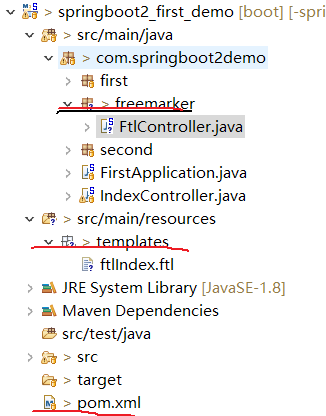
1 pom文件
<!-- spring-boot-starter-parent 整合第三方常用框架依赖信息(包含各种依赖信息) -->

  <parent>

      <groupId>org.springframework.boot</groupId>

      <artifactId>spring-boot-starter-parent</artifactId>

      <version>2.0.0.RELEASE</version>

  </parent>

  <!-- spring-boot-starter-web springboot整合springmvc web

      实现原理:maven依赖继承关系,相当于把第三方常用maven依赖信息,在parent项目中已封装

  -->

  <dependencies>

      <!-- 根据需要选择parent中封装的第三方框架 -->

      <dependency>

          <groupId>org.springframework.boot</groupId>

          <artifactId>spring-boot-starter-web</artifactId>

          <!-- 不需要写版本号,因为在parent中已封装好版本号 -->

      </dependency>

      <!-- freemarker依赖包 -->

      <dependency>

          <groupId>org.springframework.boot</groupId>

          <artifactId>spring-boot-starter-freemarker</artifactId>

      </dependency>

  </dependencies>
2创建controller类
@Controller //注意:不能使用@RestController(没有视图层),否则无法找到对应的ftl模板,类似jsp

public class FtlController {

    @RequestMapping("/ftlIndex")

    public String ftlIndex(Map<String, Object> map) {

        map.put("name", "test");//相当于request.setName()

        map.put("age", "2");

        return "ftlIndex";//自动查找对应的页面,类似jsp

    }

}
3创建ftl模板
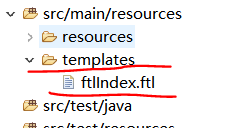
必须在templates目录下,且ftl文件名和controller类中的return "ftlIndex"名一致才能匹配。
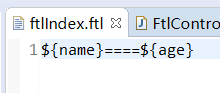
模板内容如下:${name}====${age}
4启动项目并访问:
http://localhost:8080/ftlIndex
页面显示:freemarker页面 test====2
springboot学习入门简易版四---springboot2.0静态资源访问及整合freemarker视图层的更多相关文章
- springboot学习入门简易版八---springboot2.0多环境配置、整合mybatis mysql8+(19-20)
2.11 SpringBoot多环境配置(19) application.properties中配置 Spring.profiles.active=prd 配置环境: Application-dev ...
- springboot学习入门简易版三---springboot2.0启动方式
2.4使用@componentscan方式启动 2.4.1 @EnableAutoConfiguration 默认只扫描当前类 @EnableAutoConfiguration 默认只扫描当前类,如果 ...
- springboot学习入门简易版二---springboot2.0项目创建
2 springboot项目创建(5) 环境要求:jdk1.8+ 项目结构: 2.1创建maven工程 Group id :com.springbootdemo Artifact id: spring ...
- springboot学习入门简易版六---springboot2.0整合全局捕获异常及log4j日志(12-13)
使用Aop实现 1创建异常请求 在原有项目基础上,jspController中创建一个可能发生异常的请求: /** * 全局捕获异常测试 * @param i * @return */ @Reques ...
- springboot学习入门简易版五---springboot2.0整合jsp(11)
springboot对jsp支持不友好,内部tomcat对jsp不支持,需要使用外部tomcat,且必须打包为war包. 1 创建maven项目 注意:必须为war类型,否则找不到页面. 且不要把js ...
- springboot学习入门简易版九---springboot2.0整合多数据源mybatis mysql8+(22)
一个项目中配置多个数据源(链接不同库jdbc),无限大,具体多少根据内存大小 项目中多数据源如何划分:分包名(业务)或注解方式.分包名方式类似多个不同的jar,同业务需求放一个包中. 分包方式配置多数 ...
- springboot学习入门简易版一---springboot2.0介绍
1.1为什么用springboot(2) 传统项目,整合ssm或ssh,配置文件,jar冲突,整合麻烦.Tomcat容器加载web.xml配置内容 springboot完全采用注解化(使用注解方式启动 ...
- springboot学习入门简易版七---springboot2.0使用@Async异步执行方法(17)
1启动类开启异步调用注解 @SpringBootApplication @EnableAsync //开启异步调用 public class StartApplication { 不开启则异步调用无效 ...
- SpringBoot 2.x 自定义拦截器并解决静态资源访问被拦截问题
自定义拦截器 /** * UserSecurityInterceptor * Created with IntelliJ IDEA. * Author: yangyongkang * Date: ...
随机推荐
- 阿里云服务器Svn-Server无法连接
总结:关于阿里云服务器Svn-Server无法连接,Svn-Server的配置问题 2018年07月09日 11:51:08 周同学的博客 阅读数:355 最近在使用阿里云服务器时,SQL SER ...
- ES6深入浅出-4 迭代器与生成器-4.总结
yield的值就是外面调用next得到的值 ES6给的新的语法,如果你给任何一个对象添加一个Symbol.interator的key,同时它的值是一个生成器. 下面选中的就是生成器.生成返回的东西是迭 ...
- Spring cloud微服务安全实战-3-2 第一个API及注入攻击防护
先来写一些用户的基础数据的管理的api.就是用户的基本的增删改查.用spring boot可以很容易的写出这种api 首先新建maven的项目 依赖关系 引入依赖.用最新的spring boot ht ...
- Nginx配置自定义的403页面
1.开启nginx的状态码,虚拟主机配置中加入下边一段 location /nginx_status{ stub_status on; access_log off; } 或着在nginx的http模 ...
- MySQL修改表名示例
首先,我们新建一个名为test_table的表: drop table if exists test_table; create table test_table select TABLE_SCHEM ...
- 利用VisualSVN修改配置库名称
相信大家都听说过SVN的大名,至于它的用途以及如何安装不在本文范围内,这里主要讲解如何利用VisualSVN来更改配置库的名称,前提是你的SVN服务必须用VisualSVN搭建,网上几乎没有这方面的文 ...
- Navicat Premium教程
介绍 Navicat premium是一款数据库管理工具,是一个可多重连线资料库的管理工具,它可以让你以单一程式同时连线到 MySQL.SQLite.Oracle 及 PostgreSQL 资料库,让 ...
- Django:使用模态框新增数据,成功后提示“提交成功”,并刷新表格bootstrap-table数据
废话不说先看图: 代码实现: 前台代码: {% load staticfiles %} <!DOCTYPE html> <html lang="en"> ...
- noVNC 安装、配置与使用
最近项目中使用到了远程终端操控,从各方找到了noVNC这个神奇的家伙,废话不多说,开始介绍它的安装配置与使用. 1. 下载noNVC 好多渠道可以下载到noVNC,可以直接访问noVNC的官方网页ht ...
- [Xamarin] - 连接 Mac Agent 显示 "couldn't connect to xxxx, please try again" 之解决
背景 在 VS 2017 的 Xamarin 项目中,配置 Mac Agent 连接到本地虚拟机中的 MacOS 失败. 1. MacOS 已启用远程登陆.2. SSH 可以登陆成功.3. 防火墙已关 ...