
使用ViewFlipper实现广告信息栏的上下翻滚效果
import android.os.Bundle;

import android.support.v7.app.AppCompatActivity;

import android.view.GestureDetector;

import android.view.View;

import android.widget.ViewFlipper;

public class MainActivity extends AppCompatActivity {

    ViewFlipper flipper;

    @Override

    protected void onCreate(Bundle savedInstanceState) {

        super.onCreate(savedInstanceState);

        setContentView(R.layout.activity_main);

        ViewFlipper vf = (ViewFlipper) findViewById(R.id.vf);

        vf.addView(View.inflate(this, R.layout.guanggao, null));

        vf.addView(View.inflate(this, R.layout.guanggao2, null));

        vf.addView(View.inflate(this, R.layout.guanggao3, null));

        vf.startFlipping();

    }

}
activity_main.xml
<?xml version="1.0" encoding="utf-8"?>

<RelativeLayout

    xmlns:android="http://schemas.android.com/apk/res/android"

    xmlns:tools="http://schemas.android.com/tools"

    android:id="@+id/activity_main"

    android:layout_width="match_parent"

    android:layout_height="match_parent"

    tools:context="com.loaderman.viewflipperdemo.MainActivity">

    <ViewFlipper

        android:id="@+id/vf"

        android:layout_width="match_parent"

        android:layout_height="wrap_content"

        android:autoStart="true"

        android:flipInterval="3000"

        android:inAnimation="@anim/anim_marque_in"

        android:outAnimation="@anim/anim_marque_out"

        />

</RelativeLayout>
guanggao.xml
<?xml version="1.0" encoding="utf-8"?>

<LinearLayout xmlns:android="http://schemas.android.com/apk/res/android"

              android:layout_width="match_parent"

              android:layout_height="match_parent"

              android:orientation="vertical">

    <LinearLayout

        android:layout_width="match_parent"

        android:layout_height="wrap_content"

        android:orientation="horizontal">

        <TextView

            android:layout_width="wrap_content"

            android:layout_height="wrap_content"

            android:layout_marginLeft="10dp"

            android:text="热议"

            android:textColor="#f00"

            android:textSize="18sp"/>

        <TextView

            android:textSize="18sp"

            android:layout_width="wrap_content"

            android:layout_height="wrap_content"

            android:layout_marginLeft="10dp"

            android:text="小米手机降价了"/>

    </LinearLayout>

</LinearLayout>
guanggao2.xml
<?xml version="1.0" encoding="utf-8"?>

<LinearLayout xmlns:android="http://schemas.android.com/apk/res/android"

              android:layout_width="match_parent"

              android:layout_height="match_parent"

              android:orientation="vertical">

    <LinearLayout

        android:layout_width="match_parent"

        android:layout_height="wrap_content"

        android:orientation="horizontal">

        <TextView

            android:layout_marginLeft="10dp"

            android:layout_width="wrap_content"

            android:layout_height="wrap_content"

            android:textSize="18sp"

            android:textColor="#00f"

            android:text="爆料"/>

        <TextView

            android:textSize="18sp"

            android:layout_marginLeft="10dp"

            android:layout_width="wrap_content"

            android:layout_height="wrap_content"

            android:text="小米手机降价了"/>

    </LinearLayout>

</LinearLayout>
guanggao3.xml
<?xml version="1.0" encoding="utf-8"?>

<LinearLayout xmlns:android="http://schemas.android.com/apk/res/android"

              android:layout_width="match_parent"

              android:layout_height="match_parent"

              android:orientation="vertical">

    <LinearLayout

        android:layout_width="match_parent"

        android:layout_height="wrap_content"

        android:orientation="horizontal">

        <TextView

            android:layout_marginLeft="10dp"

            android:layout_width="wrap_content"

            android:layout_height="wrap_content"

            android:textSize="18sp"

            android:textColor="#0f0"

            android:text="最新"/>

        <TextView

            android:textSize="18sp"

            android:layout_marginLeft="10dp"

            android:layout_width="wrap_content"

            android:layout_height="wrap_content"

            android:text="苹果手机发布了"/>

    </LinearLayout>

</LinearLayout>
在res/anim下创建anim_marque_in.xml
<?xml version="1.0" encoding="utf-8"?>

<set xmlns:android="http://schemas.android.com/apk/res/android"

     android:duration="1500">

    <!--anim_marque_in-->

    <translate

        android:fromYDelta="100%p"

        android:toYDelta="0"/>

    <alpha

        android:duration="300"

        android:fromAlpha="0.0"

        android:toAlpha="1.0" />

</set>
在res/anim下创建anim_marque_out.xml
<?xml version="1.0" encoding="utf-8"?>

<set xmlns:android="http://schemas.android.com/apk/res/android"

     android:duration="1500">

    <!--anim_marque_out-->

    <translate

        android:fromYDelta="0%p"

        android:toYDelta="-100%p"/>

    <alpha

        android:duration="300"

        android:fromAlpha="1.0"

        android:toAlpha="0.0" />

</set>
效果图:
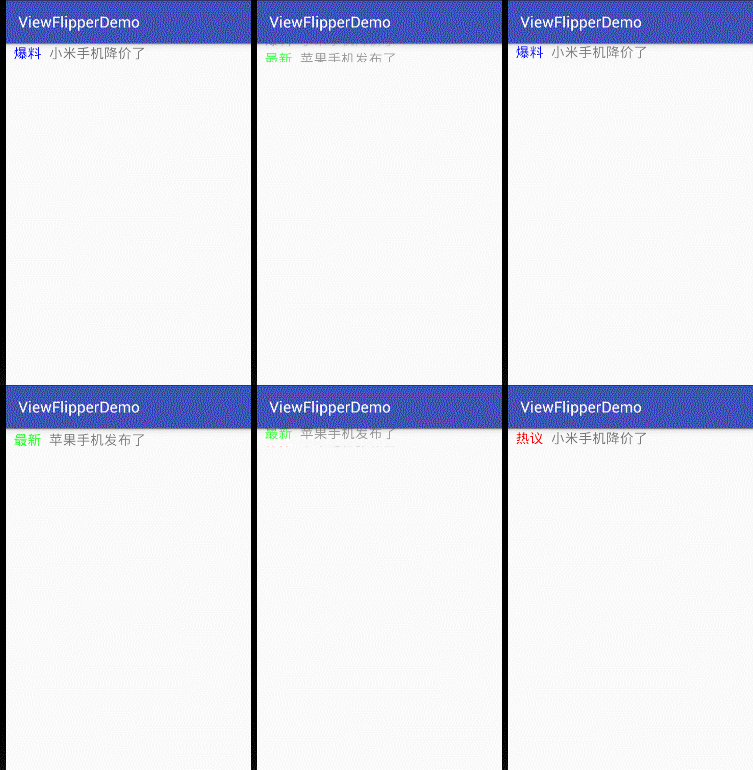
使用ViewFlipper实现广告信息栏的上下翻滚效果的更多相关文章
- fiddler工具条、状态栏、请求信息栏各按钮的作用
1.fiddler工具条 2.fiddler状态栏 3.请求信息栏
- Android 通过ViewFlipper实现广告轮播功能并可以通过手势滑动进行广告切换
为了实现广告轮播功能,在网上找了很多方法,有的效果很好,但是代码太麻烦,并且大多是用的viewpager,总之不是很满意. 于是看了一下sdk有个控件是ViewFlipper,使用比较方便,于是尝试了 ...
- 使用ViewFlipper实现广告图片的自动轮播的效果
轮播资源图片的实现 package com.loaderman.viewflipperdemo; import android.os.Bundle; import android.support.v7 ...
- leanote 信息栏显示笔记本和笔记类型
本文解决如下两个问题: 1. 在列表视图下使用搜索时,不知道搜出来的笔记属于哪个笔记本.(摘要视图下是有显示的) 2. 增加显示笔记类型(markdown 或 富文本) 修改resources\app ...
- 自定义有焦点的TextView实现广告信息左右一直滚动的跑马灯效果
import android.content.Context; import android.text.TextUtils; import android.util.AttributeSet; imp ...
- 仿知乎/途家导航栏渐变文字动画效果-b
demo.gif 效果图如上,简单分析下 1.导航栏一开始是隐藏的,随着scrollView滚动而渐变 2.导航栏左右两边的navigationItem是一直显示的 3.导航栏参考了途家app,使用了 ...
- ViewFlipper的简单使用实现图片轮播效果
/** * ViewFlipper: * 安卓系统自带的一个多页面管理控件,它可以实现子页面的自动切换 * 为ViewFlipper加入View: * (1)在layout布局文件静态导入子View ...
- 不可思议的纯CSS导航栏下划线跟随效果
先上张图,如何使用纯 CSS 制作如下效果? 在继续阅读下文之前,你可以先缓一缓.尝试思考一下上面的效果或者动手尝试一下,不借助 JS ,能否巧妙的实现上述效果. OK,继续.这个效果是我在业务开发的 ...
- 奇妙的CSS3—导航栏下划线跟随效果
先来看一下效果: 1.基本效果就是这样的 ,鼠标悬停,下划线划入.鼠标离开,下划线划出 2.下划线的划入是有方向的,从左侧划入悬停,下划线由左向右伸长.从右侧划入,下划线由又往左伸长 实现思路 1.导 ...
随机推荐
- dhcpd.conf例解
ddns-update-style interim; //设置dhcp互动更新模式 ignore client-updates; //忽略客户端更新 #子网声明 subnet 192.168.12 ...
- C语言的宏macro的使用
C's Macro Introduction 1.The Connect Macros: ## 这是一个预处理连接符,这个操作符主要用来将两个符号连接成为一个完整的宏符号.通过下面的代码,可以看到其具 ...
- js动态添加控件(输入框为例)
写在前面 昨天得到一个需求,需要在账户登记页面中动态添加输入框,经过半天的捣鼓,最终完美成型,写下来跟大家分享下, 供大家参考 开始复制代码了 如果复制了我所有代码的话,注意看js最后面方法的备注,最 ...
- NOIP2016 Day1 T2 天天爱跑步(树上差分,LCA)
原文链接 原题链接 题目描述 小c同学认为跑步非常有趣,于是决定制作一款叫做<天天爱跑步>的游戏.<天天爱跑步>是一个养成类游戏,需要玩家每天按时上线,完成打卡任务. 这个游戏 ...
- K nearest neighbor cs229
vectorized code 带来的好处. import numpy as np from sklearn.datasets import fetch_mldata import time impo ...
- 第一章 Vue介绍
5 MVC和MVVM的关系图解 MVVM是前端视图层的分层开发思想,主要把每个页面,分层了M.V和VM.其中,VM是MVVM思想的核心,因为VM是M和V之间的调度者 6 Vue基本代码和MVVM之间对 ...
- jenkins 中MultiJob Phase的使用,简单的pipeline可以用这个写
- CodeForces 788B - Weird journey [ 分类讨论 ] [ 欧拉通路 ]
题意: 给出无向图. good way : 仅有两条边只经过一次,余下边全经过两次的路 问你共有多少条不同的good way. 两条good way不同仅当它们所经过的边的集合中至少有一条不同 (很关 ...
- hdu 6049 Sdjpx Is Happy
题: OwO http://acm.hdu.edu.cn/showproblem.php?pid=6049 (2017 Multi-University Training Contest - Team ...
- 在java下面配置xml导致idea编译失败
1.今天遇到一个问题在java配置dao.xml的时候导致,idea编译失败 然后把pom.xml上面的 <build> <resources> <resource> ...