
Always run a program in administrator mode in Windows 10
From: https://www.cnet.com/how-to/always-run-a-program-in-administrator-mode-in-windows-10/
If you're sick of seeing those UAC pop-ups, you can get rid of them by setting programs to run in administrator mode by default.
Some of our Windows 10 tips involve tweaking the Registry (for example, this tip on how to get rid of default cloud service icons in File Explorer) or running a few lines of code in the Command Prompt or the Windows PowerShell.
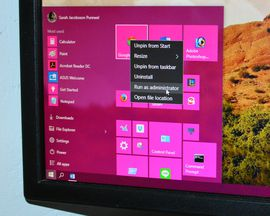
If you're beyond basic Windows 10 customization -- and comfortable working in the Registry or the Command Prompt -- you've probably noticed that you can't run programs as an administrator by default. Instead, you have to right-click on the shortcut in the Start menu, click Run as administrator, and then click Yes when the User Account Control (UAC) window pops up. This is the case even if you have an administrator's account. It's a minor inconvenience, but if you're in the middle of adjusting your system, it can get pretty annoying.
Here's how to set a program to always run in administrator mode, so you don't have to go through the UAC warning every time you want to use the Run command box. Remember -- the UAC warning is there to keep you from inadvertently making big changes to your system, so it's important that you only apply this tip to programs you're completely comfortable using.
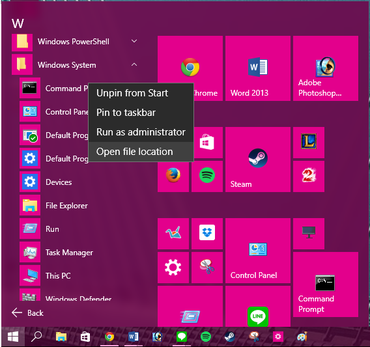
Step 1: Open the Start menu and click All apps. Find the program you want to always run in administrator mode and right-click on the shortcut. In the pop-up menu, click Open file location. Only desktop programs (not native Windows 10 apps) will have this option.

Step 2: A File Explorer window will open to the location of the program you want to access. Right-click on the program and click Properties from the pop-up menu.

Step 3: In the Properties window, click the Shortcut tab and then click Advanced...

Step 4: In the Advanced Properties window, check the box next to Run as administrator and click OK.
Step 5: The program will now open in administrator mode when you click the shortcut from the Start menu. You'll need to repeat these steps for each program you want to have this feature.
Pretty simple, right? There is a way to set all programs to always run in administrator mode without changing the properties for each individual app, but it's better to start slow (and it involves a Registry edit), so maybe we'll tackle that next week.
Always run a program in administrator mode in Windows 10的更多相关文章
- (转载)如何创建一个以管理员权限运行exe 的快捷方式? How To Create a Shortcut That Lets a Standard User Run An Application as Administrator
How To Create a Shortcut That Lets a Standard User Run An Application as Administrator by Chris Hoff ...
- JRE_HOME environment variable is not defined correctly This environment variableis needed to run this program
已经安装了JDK1.7 和对应JRE 安装了tomcat8 都是解压版 并设置了JAVA_HOME.JRE_HOME 但Tomcat在启动过程中找不到 错误: the JRE_HOME environ ...
- The "Run One Program Only" Phenomenon
As previously discussed,embedded devices normally embody the functionality they implement.In other w ...
- Tomcat启动报错:This file is needed to run this program
Tomcat版本为 8.5.29. 1.情景 kill调用tomcat进程后,重启tomcat报如下错误: Cannot find /usr/local/apache-tomcat-/bin/setc ...
- 解决VM提示:VMware Workstation cannot connect to the virtual machine. Make sure you have rights to run the program, access all directories the program uses, and access all directories for temporary files.
问题: 在开启虚拟机的时候报: VMware Workstation cannot connect to the virtual machine. Make sure you have rights ...
- linux下启动tomcat出现“This file is needed to run this program ”
使用sh startup.sh启动tomcat 出现This file is needed to run this program 原因.sh文件都不是可执行文件,于是找到命令: chmod +x * ...
- windows中修改catalina.sh上传到linux执行报错This file is needed to run this program解决
windows中修改catalina.sh上传到linux执行报错This file is needed to run this program解决 一.发现问题 由于tomcat内存溢出,在wind ...
- 开启虚拟机所报的错误:VMware Workstation cannot connect to the virtual machine. Make sure you have rights to run the program, access all directories the program uses, and access all directories for temporary fil
当我们开启虚拟机时出现错误: VMware Workstation cannot connect to the virtual machine. Make sure you have rights t ...
- 普通用户操作tomcat项目时报:Neither the JAVA_HOME nor the JRE_HOME environment variable is defined At least one of these environment variable is needed to run this program
在使用普通用户更新tomcat项目适合出现这个信息,Neither the JAVA_HOME nor the JRE_HOME environment variable is defined At ...
随机推荐
- LeetCode(42):接雨水
Hard! 题目描述: 给定 n 个非负整数表示每个宽度为 1 的柱子的高度图,计算按此排列的柱子,下雨之后能接多少雨水. 上面是由数组 [0,1,0,2,1,0,1,3,2,1,2,1] 表示的高度 ...
- 基于Linux平台的自动化运维Devops-----之自动化系统部署
一.自动化运维的背景网站业务上线,需要运维人员在短时间内完成几百台服务器部署,包括系统安装.系统初始化.软件的安装与配置.性能的监控......所谓运维自动化,即在最少的人工干预下,利用脚本与第三方工 ...
- for循环输出9~0
示例 for(var i = 9; i>-1;i--){ println(i) } function println(a) { document.write(a+"<br> ...
- Extjs MVC模式开发,循序渐进(一)
本文讲述extjs mvc的Helloworld,tabPanel,event,页面布局layout等内容. 本页包含:MVC模式案例(一)~MVC模式案例(六),从搭建extjs mvc到点击按钮生 ...
- Django的auto_now=True没有自动更新
auto_now=True自动更新,有一个条件,就是要通过django的model层. 如create或是save方法. 如果是filter之后update方法,则直接调用的是sql,不会通过mode ...
- 如何批量的在django中对url进行用户登陆限制
参考URL: https://blog.csdn.net/hanshengzhao/article/details/79540306?utm_source=blogxgwz0 1,首先定义一个内部有装 ...
- Spring之配置文件bean作用域的详细介绍
Spring的配置文件applicationContext.xml中bean作用域的详细介绍: 1:对象的创建:单例和多例 scope="singleton",默认值 ...
- 针对mysql delete删除表数据后占用空间不变小的问题
开发环境 Yii1版本 MySQL PHP5.6.27 前言 物流规则匹配日志表记录订单匹配规则相关日志信息,方便管理员维护和查阅不匹配的订单,四个月时间,该日志表数据就有174G,当前,这么大的数据 ...
- java爬虫抓取腾讯漫画评论
package com.eteclab.wodm.utils; import java.io.BufferedWriter; import java.io.File; import java.io.F ...
- AngularJS获取项目中定义的json文件
项目结构: 文件夹js位于根路径下 $http.get('js/app/contact/contacts.json').then(function (res) { /*下面就是获取到的数据*/ $sc ...