
springboot + mybatis 的项目,实现简单的CRUD
以前都是用Springboot+jdbcTemplate实现CRUD
但是趋势是用mybatis,今天稍微修改,创建springboot + mybatis 的项目,实现简单的CRUD
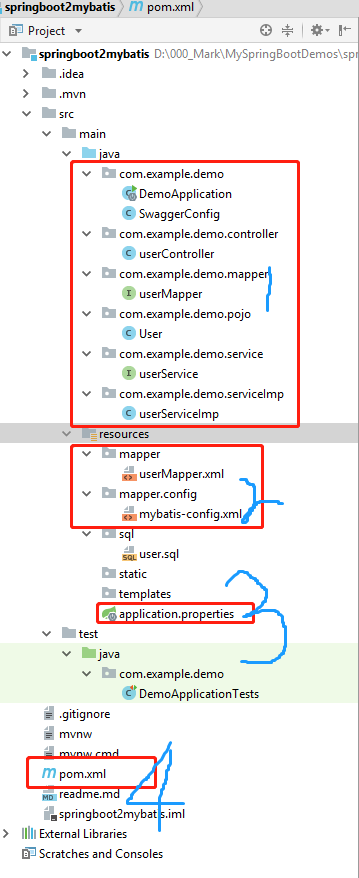
上图是项目的目录结构,创建一个user实体,包含id,姓名,手机,密码,flag等信息,然后对用户进行增删查改。
drop table if exists user;

CREATE TABLE `user` (

  id tinyint(4) NOT NULL AUTO_INCREMENT,

  name varchar(200) NOT NULL,

  age int(11) NOT NULL,、

  phone varchar(20) NOT NULL,

  password varchar(20) NOT NULL,

  flag int(4),

  PRIMARY KEY (`id`)

) ENGINE=InnoDB AUTO_INCREMENT=3 DEFAULT CHARSET=utf8;
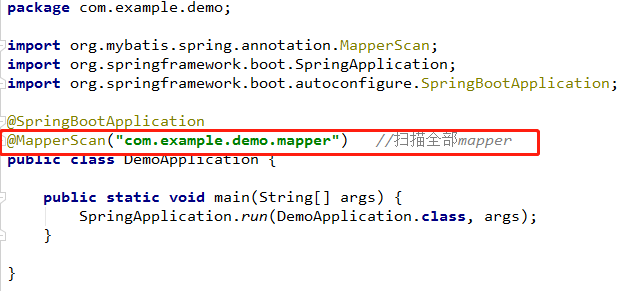
用Intellij IDEA进行开发,创建一个新的springboot项目,选中SQL中的mybaits,生成之后默认带有DemoApplication主函数启动类,最后启动的时候要在主函数上添加mapper扫描@MapperScan("com.example.demo.mapper") //扫描全部mapper
其他的代码依次如下: User
public class User implements Serializable {

	private Long id;

	private String name;

	private int age;

	private String phone;

	private String password;

	private boolean flag;

    省略了getter and setter

}
userService
package com.example.demo.service;

import com.example.demo.pojo.User;

import java.util.List;

public interface userService {

	List<User> findAll();

	List<User> selectAll();

	List<User> selectById(int id);

	int create(User user);

	int updateUserById(User user);

	int deleteUserById(int id);

}
userServiceImp
package com.example.demo.serviceImp;

import com.example.demo.mapper.userMapper;

import com.example.demo.pojo.User;

import com.example.demo.service.userService;

import org.springframework.beans.factory.annotation.Autowired;

import org.springframework.stereotype.Service;

import java.util.List;

@Service

public class userServiceImp implements userService {

	@Autowired

	private userMapper userMapper;

	public List<User> findAll() {

		System.err.println("查询所有用户接口");

		List<User> list = userMapper.findAll();

		return list;

	}

	@Override

	public List<User> selectAll() {

		List<User> list = userMapper.selectAll();

		return list;

	}

	@Override

	public List<User> selectById(int id) {

		List<User> list = userMapper.selectById(id);

		return list;

	}

	@Override

	public int create(User user) {

		int count = userMapper.create(user);

		return count;

	}

	@Override

	public int updateUserById(User user) {

		int count = userMapper.updateUserById(user);

		return count;

	}

	@Override

	public int deleteUserById(int id) {

		int count = userMapper.deleteUserById(id);

		return count;

	}

}
userMapper
package com.example.demo.mapper;

import com.example.demo.pojo.User;

import java.util.List;

public interface userMapper {

	List<User> findAll();

	List<User> selectAll();

	List<User> selectById(int id);

	int create(User user);

	int updateUserById(User user);

	int deleteUserById(int id);

}
userController
package com.example.demo.controller;

import com.example.demo.pojo.User;

import com.example.demo.serviceImp.userServiceImp;

import io.swagger.annotations.Api;

import io.swagger.annotations.ApiOperation;

import org.springframework.beans.factory.annotation.Autowired;

import org.springframework.stereotype.Controller;

import org.springframework.ui.Model;

import org.springframework.web.bind.annotation.PostMapping;

import org.springframework.web.bind.annotation.RequestMapping;

import org.springframework.web.bind.annotation.ResponseBody;

import org.springframework.web.servlet.ModelAndView;

import java.util.List;

@Api(tags = {"demo接口"})

@Controller

@RequestMapping("user")

public class userController {

	@Autowired

	private userServiceImp userService;

    @ApiOperation(value = "显示全部用户的信息倒序")

    @RequestMapping("userLists")

	@ResponseBody

	public List<User> showUsers() {

		List<User> list = userService.findAll();

		return list;

	}

    @ApiOperation(value = "显示全部用户的信息")

	@RequestMapping("selectAll")

	@ResponseBody

	public List<User> selectAll() {

		List<User> list = userService.selectAll();

		return list;

	}

    @ApiOperation(value = "根据ID查询用户的信息")

	@RequestMapping("selectById")

	@ResponseBody

	public List<User> selectById(int id) {

		List<User> list = userService.selectById(300);

		return list;

	}

    @ApiOperation(value = "创建新用户信息")

	@PostMapping("create")

	@ResponseBody

	public String create(User user) {

		int count = userService.create(user);

		System.out.println(count);

		if (count>0)

		return ("成功添加"+count+"条记录");

		else

			return "添加用户失败";

	}

    @ApiOperation(value = "根据ID更新用户信息")

    @PostMapping("updateUserById")

    @ResponseBody

    public String updateUserById(User user) {

        int count = userService.updateUserById(user);

        System.out.println(count);

        if (count>0)

            return ("成功更新"+count+"条记录");

        else

            return "更新用户失败";

    }

    @ApiOperation(value = "根据ID删除用户信息")

    @PostMapping("deleteUserById")

    @ResponseBody

    public String deleteUserById(int id) {

        int count = userService.deleteUserById(id);

        System.out.println(count);

        if (count>0)

            return ("成功删除"+count+"条记录");

        else

            return "删除用户失败";

    }

}
userMapper.xml 映射文件
<?xml version="1.0" encoding="UTF-8"?>

<!DOCTYPE mapper PUBLIC "-//mybatis.org//DTD Mapper 3.0//EN" "http://mybatis.org/dtd/mybatis-3-mapper.dtd">

<mapper namespace="com.example.demo.mapper.userMapper">

    <resultMap id="userResultMap" type="com.example.demo.pojo.User">

        <id column="id" property="id" jdbcType="BIGINT"/>

        <result column="name" property="name" jdbcType="VARCHAR"/>

        <result column="age" property="age" jdbcType="VARCHAR"/>

        <result column="phone" property="phone" jdbcType="VARCHAR"/>

        <result column="password" property="password" jdbcType="VARCHAR"/>

        <result column="flag" property="flag" jdbcType="BIGINT"/>

    </resultMap>

	<select id="findAll" resultMap="userResultMap">

     SELECT id,name,age,phone,password,flag FROM user order by id desc

	</select>

    <select id="selectById" parameterType ="int" resultMap="userResultMap">

        select * from user where id = #{id}

    </select>

    <select id="selectAll" resultMap="userResultMap">

        select * from user order by id desc

    </select>

    <insert id="create" parameterType="com.example.demo.pojo.User">

     insert into user(name,age,phone,password,flag)  values (#{name},#{age},#{phone},#{password},#{flag})

	</insert>

    <update  id="updateUserById" parameterType="com.example.demo.pojo.User">

        update user set name = #{name},age =#{age},phone =#{phone},password = #{password},flag = #{flag} where id = #{id}

    </update>

    <delete  id="deleteUserById" parameterType ="int">

        delete from user where id = #{id}

    </delete>

</mapper>
1. Mapper method 'com.example.demo.mapper.userMapper.create attempted to return null from a method with a primitive return type (int).] with root cause
是新增用户信息接口,发现用户信息已经成功插入数据库,但是页面提示

出错原因很简单,mapper.xml 映射文件中,新增记录应该用insert,我懒,直接复制了上面的select, 然后搓了很久。。
2. 找不到Bean
出错原因很简单,启动类主函数没有添加mapper扫描,需要添加@MapperScan("com.example.demo.mapper")
这个项目的github地址是https://github.com/JasmineQian/SpringDemo_2019/tree/master/springboot2mybatis
以前我管理github很乱,自己看到的代码,自己撸的代码,都随便网上塞,然后之后都不怎么回顾。然后就学过什么都忘记了。隐约记得遇到过,具体解决方法不知道。
就像《少林英雄》歌中常的那样,
练功必须顶大太阳 (哼)
晚上还要借月亮光(哈)
一日不练十日空(哼哈)
一日不撸十日空~~~撸代码,要像练功一样每日坚持!
springboot + mybatis 的项目,实现简单的CRUD的更多相关文章
- SpringBoot+Mybatis+MybatisPlus整合实现基本的CRUD操作
SpringBoot+Mybatis+MybatisPlus整合实现基本的CRUD操作 1> 数据准备 -- 创建测试表 CREATE TABLE `tb_user` ( `id` ) NOT ...
- 基于IDEA采用springboot+Mybatis搭建ssm框架简单demo项目的搭建配置流程
一.通过对比可以原始SSM搭建流程,spring boot省去了大量的配置,极大提高了开发者的效率.原始SSM框架搭建流程见博客: https://www.cnblogs.com/No2-explor ...
- springboot+mybatis+thymeleaf项目搭建及前后端交互
前言 spring boot简化了spring的开发, 开发人员在开发过程中省去了大量的配置, 方便开发人员后期维护. 使用spring boot可以快速的开发出restful风格微服务架构. 本文将 ...
- springboot+mybatis+shiro项目中使用shiro实现登录用户的权限验证。权限表、角色表、用户表。从不同的表中收集用户的权限、
要实现的目的:根据登录用户.查询出当前用户具有的所有权限.然后登录系统后.根据查询到的权限信息进行不同的操作. 以下的代码是在搭好的框架之下进行的编码. 文章目录 核心实现部分. 第一种是将用户表和角 ...
- Springboot项目搭建(1)-创建,整合mysql/oracle,druid配置,简单的CRUD
源码地址:https://github.com/VioletSY/article-base 1:创建一个基本项目:https://blog.csdn.net/mousede/article/detai ...
- Vue+SpringBoot+Mybatis的简单员工管理项目
本文项目参考自:https://github.com/boylegu/SpringBoot-vue 为了完成此项目你需要会springBoot,mybatis的一些基本操作 运行界面 第一步:搭建前端 ...
- SpringBoot+Mybatis+Freemark 最简单的例子
springboot-sample 实现最简单的 SpringBoot + Mybatis + Freemarker 网页增删改查功能,适合新接触 Java 和 SpringBoot 的同学参考 代码 ...
- springboot +mybatis 搭建完整项目
springboot + mybatis搭建完整项目 1.springboot整合mybatis注解版 转:https://blog.csdn.net/u013187139/article/detai ...
- SpringBoot+Mybatis多模块(module)项目搭建教程
一.前言 最近公司项目准备开始重构,框架选定为SpringBoot+Mybatis,本篇主要记录了在IDEA中搭建SpringBoot多模块项目的过程. 1.开发工具及系统环境 IDE:Intelli ...
随机推荐
- double类型的数值计算
package jiajian; public class jiajian { public static void main(String[] args) { System.out.println( ...
- log4j2笔记 #02# 启用异步日志
索引 参考 Making All Loggers Asynchronous 第一步,添加相应的disruptor库 第二步,设置系统属性log4j2.contextSelector 第三步,检验! 参 ...
- Eloquent JavaScript #03# functions
索引: let VS. var 定义函数的几种方式 more... 1.作者反复用的side effect side effect就是对世界造成的改变,例如说打印某些东西到屏幕,或者以某种方式改变机器 ...
- Centos6下给PHP安装Qconf扩展
一.下载Qconf的zip包 1.进入github地址:https://github.com/Qihoo360/QConf,下载zip包文件,并上传至服务器二.安装QConf unzip ...
- Git clone 报错 Unable to negotiate with xxx.xxx.xxx.xxx port 12345: no matching cipher found. Their offer: aes128-cbc,3des-cbc,blowfish-cbc
git clone 报错 Unable to negotiate with xxx.xxx.xxx.xxx. port 12345: no matching cipher found. Their o ...
- jQuery实现广告弹窗
首先设置一个固定的窗口位于右下角,效果如下: 代码: jQuery实现广告弹窗.html 之后将该窗口初始设为隐藏,通过代码实现3秒自动显示,5秒自动隐藏,其效果如下: <!DOCTYPE ht ...
- jquery .width和css("width", )区别
1.$.fn.width会根据是否是borderBox来计算新的宽度,如果是borderBox,会额外加上padding和border的宽度,计算时只是按照px来,用rem做单位会出错: 2.$.fn ...
- Spring Boot 2 (三):Spring Boot 2 相关开源软件
Spring Boot 2 (三):Spring Boot 2 相关开源软件 一.awesome-spring-boot Spring Boot 中文索引,这是一个专门收集 Spring Boot 相 ...
- 超详细 Nginx 极简教程,傻瓜一看也会!
什么是Nginx? Nginx (engine x) 是一款轻量级的Web 服务器 .反向代理服务器及电子邮件(IMAP/POP3)代理服务器. 什么是反向代理? 反向代理(Reverse Proxy ...
- hdu 4366 Successor - CDQ分治 - 线段树 - 树分块
Sean owns a company and he is the BOSS.The other Staff has one Superior.every staff has a loyalty an ...