
15. Spring boot CRUD
一、列表页 templates/emp/list.html
0、侧边栏链接:
<li class="nav-item">

    <a class="nav-link" href="#"  th:href="@{/emps}" th:class="${activeUrl == 'emps' ? 'nav-link active' : 'nav-link'}">

        <svg xmlns="http://www.w3.org/2000/svg" width="24" height="24" viewBox="0 0 24 24" fill="none" stroke="currentColor" stroke-width="2" stroke-linecap="round" stroke-linejoin="round" class="feather feather-users">

            <path d="M17 21v-2a4 4 0 0 0-4-4H5a4 4 0 0 0-4 4v2"></path>

            <circle cx="9" cy="7" r="4"></circle>

            <path d="M23 21v-2a4 4 0 0 0-3-3.87"></path>

            <path d="M16 3.13a4 4 0 0 1 0 7.75"></path>

        </svg>

        员工管理

    </a>

</li>
1、跳转映射请求
@GetMapping("/emps")

public String toEmpListPage(Model model) {

    return "emp/list";

}
2、列表页面源码
<div th:replace="commons/bar :: topBar"></div>

        <div class="container-fluid">

            <div class="row">

                <div th:replace="commons/bar :: sideBar(activeUrl=emps)"></div>

                <main role="main" class="col-md-9 ml-sm-auto col-lg-10 pt-3 px-4">

                    <h2><a class="btn btn-sm btn-success" href="emp" th:href="@{/emp}">员工添加</a></h2>

                        <div class="table-responsive">

                        <table class="table table-striped table-sm">

                            <thead>

                                <tr>

                                    <th>id</th>

                                    <th>姓氏</th>

                                    <th>邮箱</th>

                                    <th>性别</th>

                                    <th>部门</th>

                                    <th>生日</th>

                                    <th>操作</th>

                                </tr>

                            </thead>

                            <tbody>

                                <tr th:each="emp : ${emps}">

                                    <td th:text="${emp.id}"></td>

                                    <td th:text="${emp.lastName}">Lorem</td>

                                    <td  th:text="${emp.email}">ipsum</td>

                                    <td th:text="${emp.gender}">dolor</td>

                                    <td th:text="${emp.department.departmentName}">sit</td>

                                    <td th:text="${emp.birth}">sit</td>

                                    <td>

                                        <button class="btn btn-sm btn-primary" type="submit">编辑</button>

                                        <button class="btn btn-sm btn-danger" type="submit">删除</button>

                                    </td>

                                </tr>

                            </tbody>

                        </table>

                </main>

            </div>

        </div>
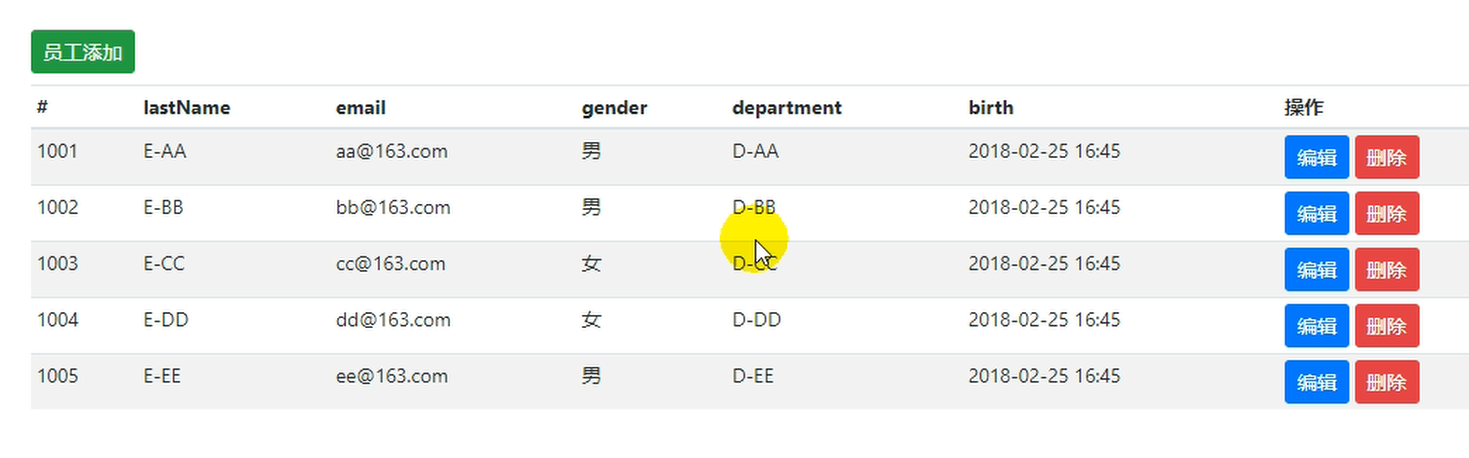
3、列表效果
二、添加页面
1.跳转链接请求
//跳转到员工添加页面

@GetMapping("/emp")

public String addEmpPage(Model model) {

    Collection<Department> departments = departmentDao.getDepartments();//部门信息

    model.addAttribute("depts", departments);

    return "emp/add";

}
2.添加页面
<!--引入抽取的topbar-->

<!--模板名:会使用thymeleaf的前后缀配置规则进行解析-->

<div th:replace="commons/bar::topbar"></div>

<div class="container-fluid">

    <div class="row">

        <!--引入侧边栏-->

        <div th:replace="commons/bar::#sidebar(activeUri='emps')"></div>

        <main role="main" class="col-md-9 ml-sm-auto col-lg-10 pt-3 px-4">

            <!--需要区分是员工修改还是添加;-->

            <form th:action="@{/emp}" method="post">

                <!--发送put请求修改员工数据-->

                <!--

                1、SpringMVC中配置HiddenHttpMethodFilter;(SpringBoot自动配置好的)

                2、页面创建一个post表单

                3、创建一个input项,name="_method";值就是我们指定的请求方式

                -->

                <input type="hidden" name="_method" value="put" th:if="${emp!=null}"/>

                <input type="hidden" name="id" th:if="${emp!=null}" th:value="${emp.id}">

                <div class="form-group">

                    <label>LastName</label>

                    <input name="lastName" type="text" class="form-control" placeholder="zhangsan" th:value="${emp!=null}?${emp.lastName}">

                </div>

                <div class="form-group">

                    <label>Email</label>

                    <input name="email" type="email" class="form-control" placeholder="zhangsan@atguigu.com" th:value="${emp!=null}?${emp.email}">

                </div>

                <div class="form-group">

                    <label>Gender</label><br/>

                    <div class="form-check form-check-inline">

                        <input class="form-check-input" type="radio" name="gender" value="1" th:checked="${emp!=null}?${emp.gender==1}">

                        <label class="form-check-label">男</label>

                    </div>

                    <div class="form-check form-check-inline">

                        <input class="form-check-input" type="radio" name="gender" value="0" th:checked="${emp!=null}?${emp.gender==0}">

                        <label class="form-check-label">女</label>

                    </div>

                </div>

                <div class="form-group">

                    <label>department</label>

                    <!--提交的是部门的id-->

                    <select class="form-control" name="department.id">

                        <option th:selected="${emp!=null}?${dept.id == emp.department.id}" th:value="${dept.id}" th:each="dept:${depts}" th:text="${dept.departmentName}">1</option>

                    </select>

                </div>

                <div class="form-group">

                    <label>Birth</label>

                    <input name="birth" type="text" class="form-control" placeholder="zhangsan" th:value="${emp!=null}?${#dates.format(emp.birth, 'yyyy-MM-dd HH:mm')}">

                </div>

                <button type="submit" class="btn btn-primary" th:text="${emp!=null}?'修改':'添加'">添加</button>

            </form>

        </main>

    </div>

</div>
3.添加功能
    //添加员工

    @PostMapping("/emp")

    public String addEmp(Employee emp) {

        System.out.println(emp);

        employeeDao.save(emp);

        //重定向防止表单重复提交

        return "redirect:/emps";

    }
4、关于日期的格式
提交的数据格式不对:生日:日期;
2017-12-12;2017/12/12;2017.12.12;
日期的格式化;SpringMVC将页面提交的值需要转换为指定的类型;
2017-12-12---Date; 类型转换,格式化;
默认日期是按照/的方式;
5、日期格式源码原理
public class WebMvcAutoConfiguration {

    @Configuration

    public static class EnableWebMvcConfiguration extends DelegatingWebMvcConfiguration {

        private final WebMvcProperties mvcProperties;

     //Spring 2.1.0的配置

        @Bean

        @Override

        public FormattingConversionService mvcConversionService() {

            WebConversionService conversionService = new WebConversionService(

                    this.mvcProperties.getDateFormat());

            addFormatters(conversionService);

            return conversionService;

        }

      //下面的是springBoot1.5版本的代码,给明了配置项名称
@Bean
@ConditionalOnProperty(prefix = "spring.mvc",name="date-format")
public Formatter<Date> dateFormatter() {return new DateFormatter(this.mvcProperties.getDateFormater())}
    }

}

@ConfigurationProperties(prefix = "spring.mvc")

public class WebMvcProperties {

    /**

     * Date format to use. For instance, `dd/MM/yyyy`.

     */

    private String dateFormat;

    public String getDateFormat() {

        return this.dateFormat;

    }

    public void setDateFormat(String dateFormat) {

        this.dateFormat = dateFormat;

    }

}
6、修改用户自己的日期格式
spring.mvc.date-format = yyyy-MM-dd HH:mm
三、编辑
1、将列表页面的【编辑】按钮改成<a>
<a class="btn btn-sm btn-primary" th:href="@{/emp/} + ${emp.id}">编辑</a>
2、跳转至修改页面请求
/**来到修改页面,查出当前员工,再页面回显*/

@GetMapping("/emp/{id}")

public String toEditEmpPage(@PathVariable("id") Integer id, Model model) {

    //员工信息

    Employee emp = employeeDao.get(id);

    model.addAttribute("emp",emp);

    //部门信息

    Collection<Department> departments = departmentDao.getDepartments();

    model.addAttribute("depts", departments);

    return "redirect:/emps";

}
3、公用add.html 添加页面判断 (新增/修改)逻辑
4、将请求方式由Post转换位PUT
共用<form method="post">的表单 ,
org.springframework.web.filter.HiddenHttpMethodFilter,这个Filter的作用就是将请求转换成我们指定的方式,所以我们要配置它。
spring Boot 源码中已经为我们自动配置了
class HiddenHttpMethodFilter {
/** Default method parameter: {@code _method} */
public static final String DEFAULT_METHOD_PARAM = "_method";
}

public class WebMvcAutoConfiguration {

    @Bean

    @ConditionalOnMissingBean(HiddenHttpMethodFilter.class)

    public OrderedHiddenHttpMethodFilter hiddenHttpMethodFilter() {

        return new OrderedHiddenHttpMethodFilter();

    }

}

public class OrderedHiddenHttpMethodFilter extends HiddenHttpMethodFilter implements Ordered {

    ......

}
5、修改页面添加如下隐藏项
<!--发送put请求修改员工数据-->

<!--

      1、SpringMVC中配置HiddenHttpMethodFilter;(SpringBoot自动配置好的)

      2、页面创建一个post表单

      3、创建一个input项,name="_method";值就是我们指定的请求方式

-->

<input type="hidden" name="_method" value="put" th:if="${emp!=null}"/>

<input type="hidden" name="id" th:if="${emp!=null}" th:value="${emp.id}">
6、修改员工信息
/**来到修改页面,查出当前员工,再页面回显*/

@PutMapping("/emp")

public String editEmp(Employee emp) {

    System.out.println(emp);

    //员工信息

    employeeDao.save(emp);

    return "emp/add";

}
四、删除员工信息
@DeleteMapping("/emp/{id}")

public String deleteEmp(@PathVariable Integer id) {

    System.out.println(id);

    //员工信息

    employeeDao.delete(id);

    return "emp/list";     //这种直接返回页面的方式,没有经过Controller方法,页面没有数据,不对
   return "forward:/emps";  //这种写法是错的,因为本方法中是DELETE请求,而 /emps是get请求,不兼容,不对
    return "redirect:/emps";  //这种写法是对的

}
1.删除按钮
<td>

    <a class="btn btn-sm btn-primary"  th:href="@{/emp/} + ${emp.id}">编辑</a>

    <form th:action="@{/emp/} + ${emp.id}" method="post" th:method="post">

        <button class="btn btn-sm btn-danger" type="submit">删除</button>

        <input type="hidden" name="_method" value="delete"/>

    </form>

</td>
但是这种form表单的html删除按钮写法太笨重,页面展现效果也不好。修改如下:
<td>

    <a class="btn btn-sm btn-primary"  th:href="@{/emp/} + ${emp.id}">编辑</a>

    <button th:attr="delete_uri=@{/emp/} + ${emp.id}" class="btn btn-sm btn-danger deleteBtn" type="submit">删除</button>
    <!-- delete_uri=@{}  这里一定要用@,用$会出错 -->

</td>
在遍历循环外的提交删除操作的 <form>表单
<form id="deleteEmpForm"  th:method="post">

    <input type="hidden" name="_method" value="delete"/>

</form>
<script>

    /**根据删除按钮的属性动态设置表单action地址*/

    $(".deleteBtn").click(function(){

        $("#deleteEmpForm").attr("action",$(this).attr("delete_uri")).submit();

        return false;

    });

</script>
15. Spring boot CRUD的更多相关文章
- Spring Boot CRUD+分页(基于Mybatis注解方式)
步骤一:关于Mybatis Mybatis 是用来进行数据库操作的框架.其中分页使用Mybatis中的PageHelper插件. Mybatis与hibernate对比: 1.hibernate是一个 ...
- 【spring boot】15.spring boot项目 采用Druid数据库连接池,并启用druid监控功能
在http://www.cnblogs.com/sxdcgaq8080/p/9039442.html的基础上,来看看spring boot项目中采用Druid连接池. GitHub地址:示例代码 == ...
- 【SpringBoot】15. Spring Boot核心注解
Spring Boot核心注解 1 @SpringBootApplication 代表是Spring Boot启动的类 2 @SpringBootConfiguration 通过bean对象来获取配置 ...
- Spring Boot CRUD+分页(基于JPA规范)
步骤一:JPA概念 JPA(Java Persistence API)是Sun官方提出的Java持久化规范,用来方便大家操作数据库. 真正干活的可能是Hibernate,TopLink等等实现了JPA ...
- 15 Spring Boot Shiro 验证码
1. <dependency> <groupId>com.github.axet</groupId> <artifactId>kaptcha</a ...
- Spring Boot 系列(二)单元测试&网络请求
实际开发中,Junit单元测试是必不可少的.在spring-boot 中可以通过测试模块(spring-boot-starter-test)快速使用单元测试功能. 开始 本示例在 spring boo ...
- 国内最全的Spring Boot系列之二
历史文章 <国内最全的Spring Boot系列之一> 视频&交流平台 SpringBoot视频:http://t.cn/R3QepWG Spring Cloud视频:http:/ ...
- Spring Boot 2.x 学习专栏
Spring Boot 2.0 入门指南 Spring Boot 2.0 返回JSP页面实战 Spring Boot 2.0 热部署指南 Spring Boot 2.0 整合FreeMarker模板引 ...
- Spring Boot 实战与原理分析视频课程
Spring Boot 实战与原理分析视频课程 链接:https://pan.baidu.com/share/init?surl=PeykcoeqZtd1d9lN9V_F-A 提取码: 关注公众号[G ...
随机推荐
- Oracle面试题(基础篇)
1. Oracle跟SQL Server 2005的区别? 宏观上: 1). 最大的区别在于平台,oracle可以运行在不同的平台上,sql server只能运行在windows平台上,由于windo ...
- codeforces472B
Design Tutorial: Learn from Life CodeForces - 472B One way to create a task is to learn from life. Y ...
- JTextPane或JTextPane设置了滚动条,文本增加后,滚动条自动下滑,追加文本的例子
http://zhizaibide1987.iteye.com/blog/1012955 https://zhidao.baidu.com/question/2116908942184706107.h ...
- GitHub && GitLab
1.github介绍 Git作为一个开源的分布式版本控制系统,已经被越来越多的人使用,随之需要的就是需要有个专门的地方存储.管理通过Git上传的项目,这就是gitHub gitHub是一个面向开源及私 ...
- Minimum Cost POJ - 2516 (模板题 spfa最小费用最大流)
题意: 人回家,一步一块钱,有x个人,y个房子,求能回家的最大人数且使之费用最小 解析: 就是....套模板,,,, 建图(⊙﹏⊙)...要仔细观察呐 对于人拆不拆都可以 都能过,,,,这里贴上拆开 ...
- day8 文件操作
文件基本操作 # 打开文件 f = open("小重山","r",encoding="utf-8") # readline 方法 只查看一行 ...
- jquery 取id模糊查询
[属性名称] 匹配包含给定属性的元素[att=value] 匹配包含给定属性的元素 (大小写区分)[att*=value] 模糊匹配[att!=value] 不能是这个值[att$=value] 结尾 ...
- MT【54】一道二次函数问题的几何意义
[Rather less, but better.]----卡尔·弗里德里希·高斯(1777-1855) (2016诸暨质检18)已知$f(x)=x^2-a|x-1|+b(a>0,b>-1 ...
- mysql中存储过程
存储过程procedure 存储过程,其本质还是函数——但其规定:不能有返回值: 定义形式: 说明: 1,in:用于设定该变量是用来“接收实参数据”的,即“传入”:默认不写,就是in 2,out:用于 ...
- 自学Linux Shell11.4-重定向输入输出
点击返回 自学Linux命令行与Shell脚本之路 11.4-重定向输入输出 Linux 命令默认从标准输入设备(stdin)获取输入,将结果输出到标准输出设备(stdout)显示.一般情况下,标准输 ...