
Unity3D学习笔记(三十二):Xlua(2)
print('开始执行LuaCallCSharpFunction1.lua')

--先实例化一个类对象

d = CS.Lesson.D()

--1、有一个参数

d:Func1("小明")

--2、有一个out类型的参数,out类型的参数不需要传递实参

--out的传出的值是通过返回值的形式传出的

rt = d:Func2()

print("rt: ", rt)

--3、有一个ref类型的参数

--ref修改的值也是通过返回值传出的

--ref需要传入实参

a = "lua"

rt = d:Func3(a)

print("a: ", a)

print("rt: ", rt)

--4、一个out参数,一个ref参数

--out不需要实参,所以函数值需要一个实参

--一个out一个ref,所以函数有两个返回值

a, b = d:Func4("ref")

print("a: ", a)

print("b: ", b)

--5、函数有返回值,一个out一个ref

a, b, c = d:Func5("ref")

print("a: ", a)

print("b: ", b)

print("c: ", c)

print('结束执行LuaCallCSharpFunction1.lua')
using System.Collections;

using System.Collections.Generic;

using UnityEngine;

using XLua;

public class LuaCallCSharpFunction1 : MonoBehaviour

{

    LuaEnv luaEnv = new LuaEnv();

    void Start()

    {

        luaEnv.DoString("require 'LuaCallCSharpFunction1' ");

    }

    private void OnDestroy()

    {

        luaEnv.Dispose();

    }

}

namespace Lesson

{

    public class D

    {

        public void Func1(string a)

        {

            Debug.Log("D -- Func1:" + a);

        }

        public void Func2(out string a)

        {

            a = "Func2";

            Debug.Log("D -- Func2:" + a);

        }

        public void Func3(ref string a)

        {

            Debug.Log("D -- Func3:" + a);

            a = "Func3";

        }

        public void Func4(out string a, ref string b)

        {

            a = "Func4";

            Debug.Log("D -- Func4:" + a + "---" + b);

        }

        public bool Func5(out string a, ref string b)

        {

            a = "Func5";

            Debug.Log("D -- Func5:" + a + "---" + b);

            return true;

        }

    }

}
print('开始执行LuaCallCSharpFunction1.lua')

--先实例化一个类对象

e = CS.Lesson.E()

--不传入参数

e:Func1()

--传入一个string类型的参数

e:Func1("小明")

--传入一个number类型的参数

e:Func1()

e:Func1(1.2)

--传入两个string类型的参数

e:Func1("小明", "小红")

--支持可变参数

e:Func2("", "", "小明")

--支持默认参数

e:Func3()

e:Func3()

print('结束执行LuaCallCSharpFunction1.lua')
using System.Collections;

using System.Collections.Generic;

using UnityEngine;

using XLua;

public class LuaCallCSharpFunction2 : MonoBehaviour

{

    LuaEnv luaEnv = new LuaEnv();

    // Use this for initialization

    void Start()

    {

        luaEnv.DoString("require 'LuaCallCSharpFunction2' ");

    }

    // Update is called once per frame

    void Update()

    {

    }

    private void OnDestroy()

    {

        luaEnv.Dispose();

    }

}

namespace Lesson

{

    public class E

    {

        //重载方法

        public void Func1(){    Debug.Log("无参数的重载Func1");}

        public void Func1(string str) { Debug.Log("有string参数的重载Func1"); }

        public void Func1(int a) { Debug.Log("有int参数的重载Func1"); }

        public void Func1(float a) { Debug.Log("有float参数的重载Func1"); }

        public void Func1(string str1, string str2) { Debug.Log("有两个string参数的重载Func1"); }

        //可变参数

        public void Func2(params string[] str_Arr)

        {

            foreach (var item in str_Arr)

            {

                Debug.Log("可变参数:" + item);

            }

        }

        //默认参数

        public void Func3(string a = "小明") { Debug.Log("a: " + a); }

        public void Func3(int b, string a = "小明", string c = "小红") { Debug.Log("b: " + b + "a: " + a + "c: " + c); }

    }

}
print('开始执行LuaCallCSharpEnum.lua')

--先实例化一个类对象

f = CS.Lesson.F()

--参数是一个枚举类型

f:Func1(CS.LessonEnum.Type1.type2)

--枚举与int或字符串相互转化

--自动转化

f:Func1()

--手动转化,数字的值可以任意,超过枚举项数,不会报错,字符串必须保证值存在

f:Func1(CS.LessonEnum.Type1.__CastFrom())

f:Func1(CS.LessonEnum.Type1.__CastFrom('小明'))

print('结束执行LuaCallCSharpEnum.lua')
using System.Collections;

using System.Collections.Generic;

using UnityEngine;

using XLua;

public class LuaCallCSharpEnum : MonoBehaviour {

    LuaEnv luaEnv = new LuaEnv();

    void Start()

    {

        luaEnv.DoString("require 'LuaCallCSharpEnum' ");

    }

    private void OnDestroy()

    {

        luaEnv.Dispose();

    }

}

namespace Lesson

{

    public class F

    {

        public void Func1(LessonEnum.Type1 type)

        {

            Debug.Log(type.ToString());

        }

    }

}

namespace LessonEnum

{

    public enum Type1

    {

        type1,

        type2,

        type3,

        小明,

    }

}
print('开始执行LuaCallCSharpDelegate.lua')

--lua对一个空委托进行赋值只能使用=,不能使用 a = a + b

CS.Lesson.G.del = CS.Lesson.G.Func1;

--lua可以对一个非空委托使用 a = a + b 的形式,把b添加到a里去

CS.Lesson.G.del = CS.Lesson.G.del + CS.Lesson.G.Func1;

--lua可以对一个非空委托使用 a = a - b 的形式,把b从到a里移除

CS.Lesson.G.del = CS.Lesson.G.del - CS.Lesson.G.Func1;

func1 = function()

    print("这是lua的方法")

end

--把一个lua的方法,添加到C#的委托里

CS.Lesson.G.del = CS.Lesson.G.del + func1

--委托的调用

CS.Lesson.G.del()

--非静态的委托

--先实例对象

g = CS.Lesson.G()

g.del1 = func1;

--把委托变为空

g.del1 = nil

if g.del1 then

    g.del1()

end

print('结束执行LuaCallCSharpDelegate.lua')
using System.Collections;

using System.Collections.Generic;

using UnityEngine;

using XLua;

public class LuaCallCSharpDelegate : MonoBehaviour {

    LuaEnv luaEnv = new LuaEnv();

    // Use this for initialization

    void Start()

    {

        luaEnv.DoString("require 'LuaCallCSharpDelegate' ");

    }

    private void OnDestroy()

    {

        luaEnv.Dispose();

    }

}

namespace Lesson

{

    public class G

    {

        public delegate void Del();

        public static Del del;

        public static void Func1()

        {

            Debug.Log("func1");

        }

        public Del del1;

    }

}
print('开始执行LuaCallCSharpEvent.lua')

--lua添加C#的事件的方法和C#是不一样的

--lua通过这种方式,把第二个参数添加到事件里

--静态事件:CS.命名空间.类名.事件名('+或-', 想要添加到事件里的方法名)

CS.Lesson.H.staticEvent('+', CS.Lesson.H.Func1)

--lua是可以把lua的方法添加到事件里去的

func1 = function()

    print("这是lua.func1的方法")

end

CS.Lesson.H.staticEvent('+', func1)

--调用

CS.Lesson.H.InvokeStaticEvent()

--成员的事件

--实例化对象

h = CS.Lesson.H()

--成员事件与静态事件的调用方式不一样

--成员事件:对象名:事件名('+或-', 方法名)

func2 = function()

    print("这是lua.func2的方法")

end

h:unStaticEvent('+', func2)

--添加C#里的成员事件

func3 = function()

    h:Func2()

end

h:unStaticEvent('+', func3)

--调用

h:InvokeUnStaticEvent()

--清空C#事件里的方法

CS.Lesson.H.staticEvent('-', CS.Lesson.H.Func1)

CS.Lesson.H.staticEvent('-', func1)

h:unStaticEvent('-', func2)

h:unStaticEvent('-', func3)

print('结束执行LuaCallCSharpEvent.lua')
using System.Collections;

using System.Collections.Generic;

using UnityEngine;

using XLua;

public class LuaCallCSharpEvent : MonoBehaviour {

    LuaEnv luaEnv = new LuaEnv();

    void Start () {

        luaEnv.DoString("require 'LuaCallCSharpEvent' ");

    }

    private void OnDestroy()

    {

        luaEnv.Dispose();

    }

}

namespace Lesson

{

    public class H

    {

        public delegate void Del();

        public static event Del staticEvent;

        public static void Func1()

        {

            Debug.Log("H Func1");

        }

        public static void InvokeStaticEvent()

        {

            if (staticEvent != null)

            {

                staticEvent();

            }

        }

        public event Del unStaticEvent;

        public void Func2()

        {

            Debug.Log("H Func2");

        }

        public void InvokeUnStaticEvent()

        {

            if (unStaticEvent != null)

            {

                unStaticEvent();

            }

        }

    }

}
UI案例
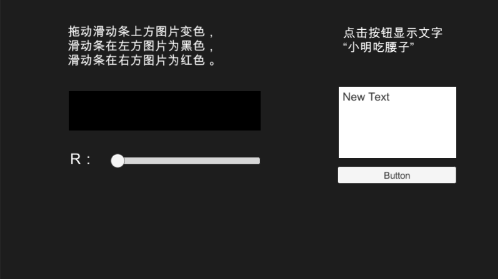
print('开始执行UI.lua')

Set = function(Self)

    uiLua = Self

end

Awake = function()

   --获取Button组件,typeof(CS.UnityEngine.UI.Button)获取Button类型

   button = uiLua.transform:Find("Button"):GetComponent(typeof(CS.UnityEngine.UI.Button));

   --把lua的方法添加到button的事件中去

   button.onClick:AddListener(ClickButton);

   --获取Text组件

   text = uiLua.transform:Find("Text"):GetComponent(typeof(CS.UnityEngine.UI.Text));

   --获取Slider组件

   slider = uiLua.transform:Find("Slider"):GetComponent(typeof(CS.UnityEngine.UI.Slider));

   --给Slider添加事件

   slider.onValueChanged:AddListener(SliderValueChanged);

   --获取Image组件

   image = uiLua.transform:Find("Image"):GetComponent(typeof(CS.UnityEngine.UI.Image));

end

Destroy = function()

   --把事件移除

   button.onClick:RemoveListener(ClickButton);

   button.onClick:Invoke()--删除瞬间,机器无法判断,需执行一次Invoke()

   slider.onValueChanged:RemoveListener(SliderValueChanged);

   slider.onValueChanged:Invoke()

end

ClickButton = function()

   text.text = "你好呀"

end

SliderValueChanged = function(value)

   image.color = CS.UnityEngine.Color(value, , );

end

print('结束执行UI.lua')
在Editor里添加AddCSharpCallLua类,给系统的UnityAction类添加[XLua.CSharpCallLua]特性
using System.Collections;

using System.Collections.Generic;

using UnityEngine;

public static class AddCSharpCallLua

{

    [XLua.CSharpCallLua]

    public static List<System.Type> list = new List<System.Type>()

    {

        typeof(UnityEngine.Events.UnityAction<float>),

        typeof(GameObject)

    };

}
using System.Collections;

using System.Collections.Generic;

using UnityEngine;

using XLua;

using UnityEngine.UI;

public class UILua : MonoBehaviour

{

    private LuaEnv luaEnv = new LuaEnv();

    [CSharpCallLua]

    private delegate void Del(UILua ui);

    private Del set;

    [CSharpCallLua]

    private delegate void Del1();

    private Del1 awake;

    private Del1 destroy;

    // Use this for initialization

    void Awake()

    {

        luaEnv.DoString("require 'UI' ");

        set = luaEnv.Global.Get<Del>("Set");

        set(this);

        awake = luaEnv.Global.Get<Del1>("Awake");

        if (awake != null)

        {

            awake();

        }

        destroy = luaEnv.Global.Get<Del1>("Destroy");

    }

    // Update is called once per frame

    void OnDestroy()

    {

        if (destroy != null)

        {

            destroy();

        }

        //虚拟机释放之前所有的委托映射的方法,全部设为null

        set = null;

        awake = null;

        destroy = null;

        luaEnv.Dispose();

    }

}
案列-MVC界面
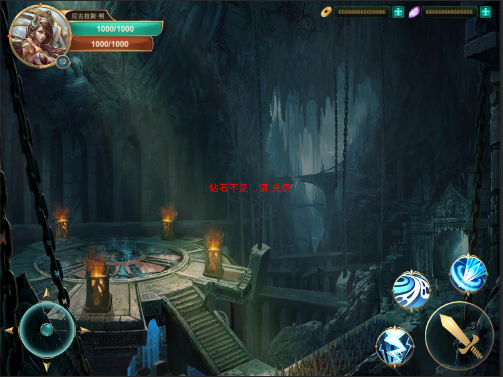
MVC.lua.txt
print("开始执行MVC")

Set = function(Self)

    panel = Self

end

Awake = function()

   --print("Awake")

   skill1Button = panel.transform:Find("Buttons/Skill1Button"):GetComponent(typeof(CS.UnityEngine.UI.Button));

   skill2Button = panel.transform:Find("Buttons/Skill2Button"):GetComponent(typeof(CS.UnityEngine.UI.Button));

   hpText = panel.transform:Find("Hand/HPSlider/Text"):GetComponent(typeof(CS.UnityEngine.UI.Text));

   hpSlider = panel.transform:Find("Hand/HPSlider"):GetComponent(typeof(CS.UnityEngine.UI.Slider));

   skill1Button.onClick:AddListener(Skill1Click);

   skill2Button.onClick:AddListener(Skill2Click);

   --当数据改变时,需要更新界面,把更新界面的方法添加到PlayerData的事件里去

   CS.PlayerData.Instance:updateEvent('+', UpdatePanel);

end

Start = function()

   --更新界面显示

   UpdatePanel()

end

Destroy = function()

   --print("Destroy")

   CS.PlayerData.Instance:updateEvent('-', UpdatePanel);

   skill1Button.onClick:RemoveListener(Skill1Click);

   skill1Button.onClick:Invoke()

   skill2Button.onClick:RemoveListener(Skill2Click);

   skill2Button.onClick:Invoke()

end

UpdatePanel = function()

   hpSlider.normalizedValue = CS.PlayerData.Instance.CurrentHP / CS.PlayerData.Instance.MaxHP;

   hpText.text = CS.PlayerData.Instance.CurrentIntHP .. "/" .. CS.PlayerData.Instance.MaxIntHP;

end

Skill1Click = function()

   --print("Skill1Click");

   CS.PlayerController.Instance:AddHPByGold();

end

Skill2Click = function()

   --print("Skill2Click");

   CS.PlayerController.Instance:Hit(, CallBack);

end

CallBack = function(str)

   print("CallBack: ", str)

end
using System.Collections;

using System.Collections.Generic;

using UnityEngine;

using XLua;

public class PanelLua : MonoBehaviour {

    private LuaEnv luaenv = new LuaEnv();

    [CSharpCallLua]

    private delegate void Del(PanelLua ui);

    private Del set;

    [CSharpCallLua]

    private delegate void Del1();

    private Del1 awake;

    private Del1 destroy;

    private Del1 start;

    // Use this for initialization

    void Awake () {

        luaenv.DoString("require 'MVC'");

        set = luaenv.Global.Get<Del>("Set");

        set(this);

        awake = luaenv.Global.Get<Del1>("Awake");

        if (awake != null)

        {

            awake();

        }

        start = luaenv.Global.Get<Del1>("Start");

        destroy = luaenv.Global.Get<Del1>("Destroy");

    }

    private void Start()

    {

        if (start != null)

        {

            start();

        }

    }

    private void OnDestroy()

    {

        if (destroy != null)

        {

            destroy();

        }

        //虚拟机释放之前所有的委托映射的方法,全部为null

        set = null;

        awake = null;

        destroy = null;

        start = null;

        luaenv.Dispose();

    }

}
Lua里面没有强制转化,Math.Ceil()向上取整也无法得到整数,可以使用如下方法在C#中返回整数
public float CurrentHP

{

    get

    {

        return currentHP;

    }

    set

    {

        if (currentHP != value)

        {

            currentHP = value;

            UpdatePanel();

        }

    }

}

public int CurrentIntHP

{

    get

    {

        return (int)currentHP;

    }

}
Unity3D学习笔记(三十二):Xlua(2)的更多相关文章
- PHP学习笔记三十二【Exception】
<?php // $fp=fopen("a.txt","r"); // echo "ok"; if(!file_exists(&quo ...
- Unity3D学习笔记(十二):2D模式和异步资源加载
2D模式和3D模式区别:背景纯色,摄像机2D,没有深度轴 精灵图片设置 Normal map,法线贴图,更有立体感 Sprite (2D and UI),2D精灵贴图,有两种用途 1.当做UI贴图 2 ...
- ObjectARX学习笔记(三十二)----怎样设置AcDbMText对齐方式
//_T("\\pxql;") 居左 //_T("\\pxqr;") 居右 //_T("\\pxqc;") 居中 //_T("\\ ...
- angular学习笔记(三十)-指令(2)-restrice,replace,template
本篇主要讲解指令中的 restrict属性, replace属性, template属性 这三个属性 一. restrict: 字符串.定义指令在视图中的使用方式,一共有四种使用方式: 1. 元素: ...
- VSTO 学习笔记(十二)自定义公式与Ribbon
原文:VSTO 学习笔记(十二)自定义公式与Ribbon 这几天工作中在开发一个Excel插件,包含自定义公式,根据条件从数据库中查询结果.这次我们来做一个简单的测试,达到类似的目的. 即在Excel ...
- angular学习笔记(三十)-指令(10)-require和controller
本篇介绍指令的最后两个属性,require和controller 当一个指令需要和父元素指令进行通信的时候,它们就会用到这两个属性,什么意思还是要看栗子: html: <outer‐direct ...
- angular学习笔记(三十)-指令(7)-compile和link(2)
继续上一篇:angular学习笔记(三十)-指令(7)-compile和link(1) 上一篇讲了compile函数的基本概念,接下来详细讲解compile和link的执行顺序. 看一段三个指令嵌套的 ...
- angular学习笔记(三十)-指令(7)-compile和link(1)
这篇主要讲解指令中的compile,以及它和link的微妙的关系. link函数在之前已经讲过了,而compile函数,它和link函数是不能共存的,如果定义了compile属性又定义link属性,那 ...
- angular学习笔记(三十)-指令(6)-transclude()方法(又称linker()方法)-模拟ng-repeat指令
在angular学习笔记(三十)-指令(4)-transclude文章的末尾提到了,如果在指令中需要反复使用被嵌套的那一坨,需要使用transclude()方法. 在angular学习笔记(三十)-指 ...
- angular学习笔记(三十)-指令(5)-link
这篇主要介绍angular指令中的link属性: link:function(scope,iEle,iAttrs,ctrl,linker){ .... } link属性值为一个函数,这个函数有五个参数 ...
随机推荐
- Linux 运维测试及第三应用及测试工具
一 .第三方应用及测试工具链接地址 https://pan.baidu.com/s/1rLQ5NCZvxcy93YQ4fGFaBQ 1.linux LSI系列raid卡监测工具 1)使用参数详解链接: ...
- 大数据是什么?它和Hadoop又有什么联系?
随着近几年计算机技术和互联网的发展,“大数据”这个名词越来越多进入我们的视野.大数据的快速发展也在无时无刻影响着我们的生活. 那大数据究竟是什么呢? 首先,看看专家是怎么解释大数据的: 大数据就是多, ...
- @Transactional noRollbackFor
网上查资料看的也是云里雾里的. 比如说: @Transactional(noRollbackFor=ProcessException.class) 那他是什么意思呢? 一句话,在你声明的这个事物里如果 ...
- 【JavaScript 6连载】五、继承的概念
<!DOCTYPE html><html lang="en"><head> <meta charset="UTF-8" ...
- 使用github管理Eclipse分布式项目开发
使用github管理Eclipse分布式项目开发 老关我在前面的博文(github管理iOS分布式项目开发)中介绍了github管理iOS分布式开发,今天老关将向大家介绍使用github管 理Ecli ...
- PHP使用http_build_query()构造URL字符串的方法(可将POST参数组转换拼接成GET请求链接)
<?php //parse_str与http_build_query的使用 //使用parse_str将url字符串转变为key=>value的数组 $str = "tn=mon ...
- 获取ip,获取客户端浏览器,获取客户端访问操作系统,获取客户端访问设备
/** * 获取ip */ public static function getIp() { if (getenv('HTTP_CLIENT_IP')) { $ip = getenv('HTTP_CL ...
- django ORM模型表的一对多、多对多关系、万能双下划线查询
一.外键使用 在 MySQL 中,如果使用InnoDB引擎,则支持外键约束.(另一种常用的MyIsam引擎不支持外键) 定义外键的语法为fieldname=models.ForeignKey(to_c ...
- SSL/TLS代理(termination proxy)
A TLS termination proxy (or SSL termination proxy) is a proxy server that is used by an institution ...
- 【题解】Luogu P1648 看守
原题传送门:P1648 看守 这题目让求得的是d维( d <=4 )空间中n个点( 2 <= N <= 1000000 )之间最大的哈曼顿距离 模拟,emm,能拿30分,不错 因为d ...