
配置httpd支持https
1、首先为192.168.108.159创建私有CA
#cd /etc/pki/CA
# (umask 077;openssl genrsa -out private/cakey.pem 2048)
#ls private/
#touch index.txt
#echo 01 > serial
2、在服务器上创建自签证书
#openssl req -new -x509 -key private/cakey.pem -out cacert.pem -days 7300
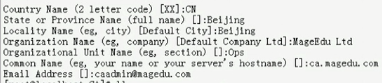
3、在web服务器上生成证书签署请求,在192.168.108.160虚拟机上
#cd /etc/httpd
#mkdir ssl
#cd ssl/
# (umask 077;openssl genrsa -out httpd.key 1024)//生成密钥
# openssl req -new -key httpd.key -out httpd.csr //生成证书签署请求
#scp httpd.csr root@192.168.108.159:/tmp/ //把httpd.csr放到服务器192.168.108.159的tmp目录下
4、在服务器上为wei服务器CA签证
#cd /etc/pki/CA
#openssl ca -in /tmp/httpd.csr -out certs/web1.magedu.com.crt -days 356
#ls newcerts/ 在这个目录下有01.pem
#ls certs/
#scp certs/web1.magedu.com.crt root@192.168.108.160:/etc/httpd/ssl/
5、接下来开始配置httpd服务可以支持https
#httpd -M | grep ssl //查看160主机即httpd服务器是否支持mod_ssl
#yum install mod_ssl //如果不存在就安装
#rpm -ql mod_ssl
/etc/httpd/conf.d/ssl.conf //主配置文件
/usr/lib64/httpd/modules/mod_ssl.so
/var/cache/mod_ssl
/var/cache/mod_ssl/scache.dir
/var/cache/mod_ssl/scache.pag
/var/cache/mod_ssl/scache.sem
#cd /etc/httpd/conf.d/
#cp ssl.conf{,.bak}//在修改配置文件之前应该先做备份
#vim /etc/httpd/conf.d/ssl.conf
修改<VirtualHost _default_:443>为<VirtualHost *:443>
DocumentRoot "/var/www/html"//需要开启,并对其做响应的修改,比如/vhosts/web1/htdocs
ServerName www.example.com:443// 服务器名字为web1.magedu.com
SSLEngine on这一项一定要开启
修改SSLCertificateFile /etc/pki/tls/certs/localhost.crt为SSLCertificateFile /etc/httpd/ssl/web1.magedu.com.crt//这个文件是当前httpd服务拿来给别的客户机验证的证书文件
修改SSLCertificateKeyFile /etc/pki/tls/private/localhost.key与上面匹配的私钥文件SSLCertificateKeyFile /etc/httpd/ssl/httpd.key
不应该验证客户端证书,因为客户端大多都没有证书
#ss -tnl //查看是否监听了443端口
测试基于https访问相应的主机;
# openssl s_client [-connect host:port] [-cert filename] [-CApath directory] [-CAfile filename]
#openssl s_client -connect 192.168.108.160:443 -CAfile /etc/pki/CA/cacert.pem
GET / HTTP/1.1
Host:web1.magedu.com回车两次,就可以看到请求的页面
配置httpd支持https的更多相关文章
- 配置nginx支持Https
配置nginx支持Https一定要先使用stop停止nginx然后重新代开不能使用reload 一:安装letsencrypt 1.从git上克隆下来git clone https://github. ...
- 安装配置ingress-nginx支持https访问
说明: 1.k8s版本:v1.23: 2.内网测试环境1台master,2台node节点,使用 DaemonSet+HostNetwork+nodeSelector 方式部署 ingress- ...
- Spring Mvc和Spring Boot配置Tomcat支持Https
SpringBoot配置支持https spring boot因为是使用内置的tomcat,所以只需要一些简单的配置即可. 1.首先打开命令行工具,比如cmd,输入以下命令 keytool -genk ...
- Springboot 配置 ssl 实现HTTPS 请求 & Tomcat配置SSL支持https请求
SSL(Secure Sockets Layer 安全套接层),及其继任者传输层安全(Transport Layer Security,TLS)是为网络通信提供安全及数据完整性的一种安全协议.TLS与 ...
- centos7配置Apache支持HTTPS
Apache版本2.4 安装mod_ssl yum install mod_ssl 建立文件夹,存放sslkey mkdir /etc/httpd/ssl/ 建立凭证档 openssl req -x5 ...
- Windows 下配置 Apache 支持 https
1.打开cmd ,输入 F: // 切换到Apache安装路径,我的Apache安装目录在 F盘 2.cd F:\Apache\bin 3.set "openssl_conf = F:\A ...
- CentOS 中 配置 Nginx 支持 https
一.基础设置: .yum -y update .yum -y install openssl* .cd /usr/local/nginx/conf .mkdir ./ssl .cd ./ssl # 在 ...
- apache环境下配置服务器支持https
SSL加密的意义在于保护服务器到客户端的信息或者是客户端到服务器的信息不被监听和篡改. 现在一些主流的网站都已经是通过 https访问了,搜索引擎对此类网站的收录也不存在问题了. 具体的配置流程大概是 ...
- Centos7.2下Nginx配置SSL支持https访问(站点是基于.Net Core2.0开发的WebApi)
准备工作 1.基于nginx部署好的站点(本文站点是基于.Net Core2.0开发的WebApi,有兴趣的同学可以跳http://www.cnblogs.com/GreedyL/p/7422796. ...
随机推荐
- vs实现数据库数据迁移
public ActionResult About() { List<ChangeData.Models.old.adsinfo> adsinfo_new = new List<Mo ...
- 【转】基于 Kylin 的推荐系统效果评价系统
OLAP(联机分析处理)是数据仓库的主要应用之一,通过设计维度.度量,我们可以构建星型模型或雪花模型,生成数据多维立方体Cube,基于Cube可以做钻取.切片.旋转等多维分析操作.早在十年前,SQL ...
- 复习loadRunner参数化
参数化: 为什么要用参数化? 如果是单一数据,那么会纯测试缓存. 如果是参数化,基本上大部分数据不会被缓存命中. 极端情况:所有的数据都不会被缓存命中,或者少量命中. 在loadrunner中,所有的 ...
- docker rmi 导致后面的命令不执行问题 Dockerfile设置时区问题
docker rmi 导致后面的命令不执行问题 把ca=`docker rmi sendemail-service` echo $ca改成docker rmi sendemail-service -f ...
- How to install john deere service advisor 4.2.005 on win 10 64bit
How to install john deere service advisor 4.2.005 with the February 2016 data base disks on a machin ...
- scanf,fscanf,sscanf的区别
scanf是从文件中读 sscanf是从字符串中读 scanf是从键盘输入中读 fread :以字节位计算长度,按照指定的长度和次数读取数据,遇到结尾或完成指定长度读取后停止.fscanf :格式 ...
- Hadoop学习笔记之四:HDFS客户端
HDFS的客户端核心是DFSClient类,所有使用HDFS的客户端都会持有一个DFSClient对象,或通过持有一个DistributedFileSystem对象间接使用DFSClient: DFS ...
- 高级架构进阶之HashMap源码就该这么学
引言--面试常见的问题 问:“你用过HashMap,你能跟我说说它吗?” “当然用过,HashMap是一种<key,value>的存储结构,能够快速将key的数据put方式存储起来,然后很 ...
- 远程图片转化为base64
远程图片转化为base64 <?php /* * * 第一种方法 * 远程图片转化为base64,只支持http(推荐使用) * */ public static function imgUrl ...
- P3804 【模板】后缀自动机
P3804 [模板]后缀自动机 后缀自动机模板 详情可见luogu题解板块 #include<iostream> #include<cstdio> #include<cs ...