
配置httpd支持https
1、首先为192.168.108.159创建私有CA
#cd /etc/pki/CA
# (umask 077;openssl genrsa -out private/cakey.pem 2048)
#ls private/
#touch index.txt
#echo 01 > serial
2、在服务器上创建自签证书
#openssl req -new -x509 -key private/cakey.pem -out cacert.pem -days 7300
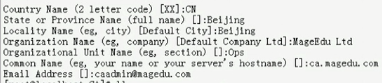
3、在web服务器上生成证书签署请求,在192.168.108.160虚拟机上
#cd /etc/httpd
#mkdir ssl
#cd ssl/
# (umask 077;openssl genrsa -out httpd.key 1024)//生成密钥
# openssl req -new -key httpd.key -out httpd.csr //生成证书签署请求
#scp httpd.csr root@192.168.108.159:/tmp/ //把httpd.csr放到服务器192.168.108.159的tmp目录下
4、在服务器上为wei服务器CA签证
#cd /etc/pki/CA
#openssl ca -in /tmp/httpd.csr -out certs/web1.magedu.com.crt -days 356
#ls newcerts/ 在这个目录下有01.pem
#ls certs/
#scp certs/web1.magedu.com.crt root@192.168.108.160:/etc/httpd/ssl/
5、接下来开始配置httpd服务可以支持https
#httpd -M | grep ssl //查看160主机即httpd服务器是否支持mod_ssl
#yum install mod_ssl //如果不存在就安装
#rpm -ql mod_ssl
/etc/httpd/conf.d/ssl.conf //主配置文件
/usr/lib64/httpd/modules/mod_ssl.so
/var/cache/mod_ssl
/var/cache/mod_ssl/scache.dir
/var/cache/mod_ssl/scache.pag
/var/cache/mod_ssl/scache.sem
#cd /etc/httpd/conf.d/
#cp ssl.conf{,.bak}//在修改配置文件之前应该先做备份
#vim /etc/httpd/conf.d/ssl.conf
修改<VirtualHost _default_:443>为<VirtualHost *:443>
DocumentRoot "/var/www/html"//需要开启,并对其做响应的修改,比如/vhosts/web1/htdocs
ServerName www.example.com:443// 服务器名字为web1.magedu.com
SSLEngine on这一项一定要开启
修改SSLCertificateFile /etc/pki/tls/certs/localhost.crt为SSLCertificateFile /etc/httpd/ssl/web1.magedu.com.crt//这个文件是当前httpd服务拿来给别的客户机验证的证书文件
修改SSLCertificateKeyFile /etc/pki/tls/private/localhost.key与上面匹配的私钥文件SSLCertificateKeyFile /etc/httpd/ssl/httpd.key
不应该验证客户端证书,因为客户端大多都没有证书
#ss -tnl //查看是否监听了443端口
测试基于https访问相应的主机;
# openssl s_client [-connect host:port] [-cert filename] [-CApath directory] [-CAfile filename]
#openssl s_client -connect 192.168.108.160:443 -CAfile /etc/pki/CA/cacert.pem
GET / HTTP/1.1
Host:web1.magedu.com回车两次,就可以看到请求的页面
配置httpd支持https的更多相关文章
- 配置nginx支持Https
配置nginx支持Https一定要先使用stop停止nginx然后重新代开不能使用reload 一:安装letsencrypt 1.从git上克隆下来git clone https://github. ...
- 安装配置ingress-nginx支持https访问
说明: 1.k8s版本:v1.23: 2.内网测试环境1台master,2台node节点,使用 DaemonSet+HostNetwork+nodeSelector 方式部署 ingress- ...
- Spring Mvc和Spring Boot配置Tomcat支持Https
SpringBoot配置支持https spring boot因为是使用内置的tomcat,所以只需要一些简单的配置即可. 1.首先打开命令行工具,比如cmd,输入以下命令 keytool -genk ...
- Springboot 配置 ssl 实现HTTPS 请求 & Tomcat配置SSL支持https请求
SSL(Secure Sockets Layer 安全套接层),及其继任者传输层安全(Transport Layer Security,TLS)是为网络通信提供安全及数据完整性的一种安全协议.TLS与 ...
- centos7配置Apache支持HTTPS
Apache版本2.4 安装mod_ssl yum install mod_ssl 建立文件夹,存放sslkey mkdir /etc/httpd/ssl/ 建立凭证档 openssl req -x5 ...
- Windows 下配置 Apache 支持 https
1.打开cmd ,输入 F: // 切换到Apache安装路径,我的Apache安装目录在 F盘 2.cd F:\Apache\bin 3.set "openssl_conf = F:\A ...
- CentOS 中 配置 Nginx 支持 https
一.基础设置: .yum -y update .yum -y install openssl* .cd /usr/local/nginx/conf .mkdir ./ssl .cd ./ssl # 在 ...
- apache环境下配置服务器支持https
SSL加密的意义在于保护服务器到客户端的信息或者是客户端到服务器的信息不被监听和篡改. 现在一些主流的网站都已经是通过 https访问了,搜索引擎对此类网站的收录也不存在问题了. 具体的配置流程大概是 ...
- Centos7.2下Nginx配置SSL支持https访问(站点是基于.Net Core2.0开发的WebApi)
准备工作 1.基于nginx部署好的站点(本文站点是基于.Net Core2.0开发的WebApi,有兴趣的同学可以跳http://www.cnblogs.com/GreedyL/p/7422796. ...
随机推荐
- python 读写json数据
json 模块提供了一种很简单的方式来编码和解码JSON 数据. 字符串操作 其中两个主要的函数是json.dumps() 和json.loads() ,要比其他序列化函数库如pickle 的接口少得 ...
- python mmap对象
----使用内存映射的原因 为了随机访问文件的内容,使用mmap将文件映射到内存中是一个高效和优雅的方法.例如,无需打开一个文件并执行大量的seek(),read(),write()调用,只需要简单的 ...
- 设计模式之Builder(建造者)(转)
Builder模式定义: 将一个复杂对象的构建与它的表示分离,使得同样的构建过程可以创建不同的表示. Builder模式是一步一步创建一个复杂的对象,它允许用户可以只通过指定复杂对象的类型和内容就可以 ...
- Vector集合——单列集合的“祖宗”类
是实现可增长的对象数组:所以底层也是数组: 与collection集合不同的是,vector是同步的,意味着是单线程的,意味着效率低,速度慢, 所以在jdk1.2版本之后被ArrayList集合所取代 ...
- ClassThree__HomeWork
作业一 使用类的静态字段和构造函数,可以跟踪某个类所创建对象的个数.请写一个类,在任何时候都可以向它查询“你已经创建了多少个对象?”. 代码 public class TestOne { ...
- 微信小程序制作家庭记账本之七
最后一天,程序完成的仍然不是很好,作品很简陋,不过还是可以记账的,没有购买域名,别人无法使用,下次我会完成的更好.
- PHP $_SERVER 及用户真实IP
$_SERVER 是一个包含了诸如头信息(header).路径(path).以及脚本位置(script locations)等等信息的数组.这个数组中的项目由 Web 服务器创建.不能保证每个服务器都 ...
- kibana添加ES索引403错误解决
kibana添加ES索引时发现kibana添加索引不生效,没有创建成功只是一闪而过 查看控制台发现报错403 解决办法: curl -XPUT -H "Content-Type: appli ...
- java加载配置文件信息
#基金数据存放根目录fund_save_root_path=E:/fundCrawling #龙虎榜数据存放根目录long_hu_root_path=E:/longHuCrawling #巨潮数据存放 ...
- word2010自定义的多级列表编号变成黑块的解决办法
首先,看图说话 是的,当我保存Word再打开之后,我辛辛苦苦(没错,小白有罪,调来调去真辛苦)搞得多级列表编号变成了黑块,默默无言,只有泪千行,还好有万能的Google. 解决办法: 将光标移到黑块的 ...