
Android:TextView控件
3.2.1 TextView
TextView 可以说是 Android 中最简单的一个控件了,你在前面其实也已经和它打过了一 些打交道。它主要用于在界面上显示一段文本信息,比如你在第一章看到的 Hello world!下 面我们就来看一看关于 TextView 的更多用法。
将 activity_main.xml 中的代码改成如下所示:
<LinearLayout xmlns:android="http://schemas.android.com/apk/res/android" android:layout_width="match_parent" android:layout_height="match_parent" android:orientation="vertical" >
<TextView android:id="@+id/text_view" android:layout_width="match_parent" android:layout_height="wrap_content" android:text="This is TextView" />
</LinearLayout>
外面的 LinearLayout 先忽略不看,在 TextView 中我们使用 android:id 给当前控件定义了 一个唯一标识符,这个属性在上一章中已经讲解过了。然后使用 android:layout_width 指定了 控件的宽度,使用 android:layout_height 指定了控件的高度。Android 中所有的控件都具有这 两个属性,可选值有三种 match_parent 、fill_parent 和 wrap_content,其中 match_parent 和 fill_parent 的意义相同,现在官方更加推荐使用 match_parent。match_parent 表示让当前控件的大小和父布局的大小一样,也就是由父布局来决定当前控件的大小。wrap_content 表示让当前控件的大小能够刚好包含住里面的内容,也就是由控件内容决定当前控件的大小。所以 上面的代码就表示让 TextView 的宽度和父布局一样宽,也就是手机屏幕的宽度,让 TextView 的高度足够包含住里面的内容就行。当然除了使用上述值,你也可以对控件的宽和高指定一 个固定的大小,但是这样做有时会在不同手机屏幕的适配方面出现问题。接下来我们通过 android:text 指定了 TextView 中显示的文本内容,现在运行程序,效果如图 3.1 所示。

图 3.1
虽然指定的文本内容是正常显示了,不过我们好像没看出来 TextView 的宽度是和屏幕 一样宽的。其实这是由于 TextView 中的文字默认是居左上角对齐的,虽然 TextView 的宽度 充满了整个屏幕,可是从效果上完全看不出来。现在我们修改 TextView 的文字对齐方式, 如下所示:
<LinearLayout xmlns:android="http://schemas.android.com/apk/res/android" android:layout_width="match_parent" android:layout_height="match_parent"
android:orientation="vertical" >
<TextView android:id="@+id/text_view" android:layout_width="match_parent" android:layout_height="wrap_content" android:gravity="center" android:text="This is TextView" />
</LinearLayout>
我们使用 android:gravity 来指定文字的对齐方式,可选值有 top、bottom、left、right、center 等 , 可 以 用 “ | ” 来 同 时 指 定 多 个 值 , 这 里 我 们 指 定 的 "center" , 效 果 等 同 于 "center_vertical|center_horizontal",表示文字在垂直和水平方向都居中对齐。现在重新运行程 序,效果如图 3.2 所示。
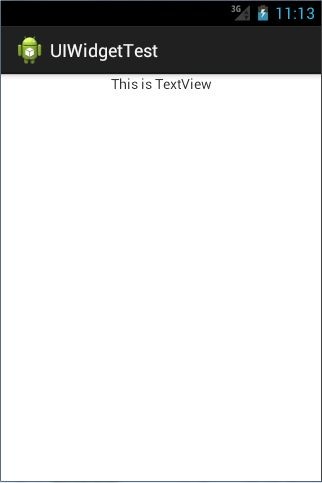
图 3.2
这也说明了,TextView 的宽度确实是和屏幕宽度一样的。 另外我们还可以对 TextView 中文字的大小和颜色进行修改,如下所示:
<LinearLayout xmlns:android="http://schemas.android.com/apk/res/android" android:layout_width="match_parent" android:layout_height="match_parent" android:orientation="vertical" >
<TextView android:id="@+id/text_view" android:layout_width="match_parent" android:layout_height="wrap_content" android:gravity="center" android:textSize="24sp" android:textColor="#00ff00" android:text="This is TextView" />
</LinearLayout>
通过 android:textSize 属性可以指定文字的大小,通过 android:textColor 属性可以指定文 字的颜色。重新运行程序,效果如图 3.3 所示。

图 3.3
当然 TextView 中还有很多其他的属性,这里我就不再一一介绍了,需要用到的时候去 查阅文档就可以了。
Android:TextView控件的更多相关文章
- 注意Android里TextView控件的一个小坑,用android:theme来设置样式时动态载入的layout会丢失该样式
注意Android里TextView控件的一个小坑,用android:theme来设置样式时动态载入的layout会丢失该样式 这个坑,必须要注意呀, 比如在用ListView的时候,如果在List_ ...
- android中的TextView控件
我以前是搞ssh开发的,现在在搞android开发,所以简单学习了一下,对于自己所了解的做一个记录,也算是一个笔记吧,如果有什么不对的,希望大家给予一定的指导. 一.TextView的基本使用 Te ...
- android课程第一节(TextView控件使用)
TextView控件使用 一.TextView基本使用(创建方式) 1.在程序中创建TextView对象 如下代码: @Override protected void onCreate(Bundle ...
- android软件开发之TextView控件常用属性
TextView控件 text属性,设置显示的文本 textColor:设置文本颜色 textSize:设置文本字体大小 autoLink:设置文本为电话,URL连接等的时候是否显示为可点击的链接 c ...
- 如何设置TextView控件的背景透明度和字体透明度
如何设置TextView控件的背景透明度和字体透明度 设计师给的标注都是类似这样的: 字号:26 颜色:#000000 透明度:80% 其实,程序上只要需要一个色值就OK了,那么这个色值我如何计算呢? ...
- 两个TextView控件居中显示
通过一个线性布局将两个TextView控件包装在一起,设置LinearLayout的layout_centerInParent属性为true即可.代码如下 <LinearLayout andro ...
- android 基础控件(EditView、SeekBar等)的属性及使用方法
android提供了大量的UI控件,本文将介绍TextView.ImageView.Button.EditView.ProgressBar.SeekBar.ScrollView.WebView ...
- Android基本控件之Menus
在我们的手机中有很多样式的菜单,比如:我们的短信界面,每条短信,我们长按都会出现一个菜单,还有很多的种类.那么现在,我们就来详细的讨论一下安卓中的菜单 Android的控件中就有这么一个,叫做Menu ...
- Android:控件布局(相对布局)RelativeLayout
RelativeLayout是相对布局控件:以控件之间相对位置或相对父容器位置进行排列. 相对布局常用属性: 子类控件相对子类控件:值是另外一个控件的id android:layout_above-- ...
随机推荐
- 常用adb操作命令详解
1. 查看当前运行的所有设备adb devices 返回当前设备列表 这个命令是查看当前连接的设备, 连接到计算机的android设备或者模拟器将会列出显示2. 安装软件adb install验证是否 ...
- Android 颜色透明度换算
每次开发的时候,UI在设计图中标注的颜色都是类似于#FF0000(红色),这倒没什么,但是呢后面却标注了30%的透明度,这下抓狂了,透明度怎么计算?不用着急,不用你算,收藏我这篇文章即可. 颜色简介 ...
- winform(记事本--保存和退出)
- Oracle 服务器结构
[学习目标] 作为一个数据库管理员(DBA),经常会遇到各种没有见过的问题.除了宝贵的经验外, 通过理论基础去对问题进行判断.解决是至关重要的.因此,Oracle 服务器的结构和组成 是学习Oracl ...
- [转] MachingLearning中的距离相似性计算以及python实现
参考:https://blog.csdn.net/gamer_gyt/article/details/75165842#t16 https://blog.csdn.net/ymlgrss/artic ...
- Linux mount 修改文件系统的读写属性
有时候要在某个文件夹下添加和删除文件时,显示 "read only filesystem",说明该文件系统是只读的不能修改.使用 mount –o remount,rw / 命令可 ...
- 利用反射创建User类的对象
package com.bjpowernode; public class User { private int age; public String name; public void m1() { ...
- JQuery编写自己的插件(七)
一:jQuery插件的编写基础1.插件的种类编写插件的目的是给一系列已经方法或函数做一个封装,以便在其他地方重复使用,方便后期维护和提高开发效率.常见的种类有以下三种:封装对象方法的插件
- ef 数据库连接字符串加密
public testContext() : base(GetConnection(), true) { } public static DbConnection GetConnection() { ...
- [转]数据类型和Json格式
作者: 阮一峰 日期: 2009年5月30日 1. 前几天,我才知道有一种简化的数据交换格式,叫做yaml. 我翻了一遍它的文档,看懂的地方不多,但是有一句话令我茅塞顿开. 它说,从结构上看,所有的数 ...