
ImageMagick、imagick和ghostscript三者的关联
http://467754239.blog.51cto.com/4878013/1602518/
一、功能概述
ImageMagick是第三方的图片处理软件,功能要比GD强大。建议两者都安装,并不冲突。
imagick是php的一个扩展模块,它调用ImageMagick提供的API来进行图片的操作。
Ghostscript是一套建基于Adobe、PostScript及可移植文档格式(PDF)的页面描述语言等而编译成的免费软件。
Ghostscript最初是以商业软件形式在PC市场上发售,并称之为“GoScript”。但由于速度太慢(半小时一版A4),销量极差。后来有心人买下了版权,并改在Linux上开发,成为了今日的Ghostscript。
已经从Linux版本移植到其他操作系统,如其他Unix、Mac OS X、VMS、Windows、OS/2和Mac OS classic。
ImageMagick无法直接实现pdf文档到图片的转换,需要借助于gostscript软件包
二、安装方式
1、编译安装ImageMagick
|
1
2
3
4
5
6
|
# tar xf ImageMagick-6.8.9-9.tar.gz# cd ImageMagick-6.8.9-9# ./configure --prefix=/usr/local/imagemagick# make && make install编译安装完成之后记得配置./convert的环境变量 |
2、编译安装imagick
|
1
2
3
4
5
|
# tar -xf imagick-3.2.0RC1.tgz# cd imagick-3.2.0RC1# /usr/local/php/bin/phpize# ./configure --with-php-config=/usr/local/php/bin/php-config --with-imagick=/usr/local/imagemagick# make && make install |
3、编译安装Ghostscript
|
1
2
3
4
5
6
7
|
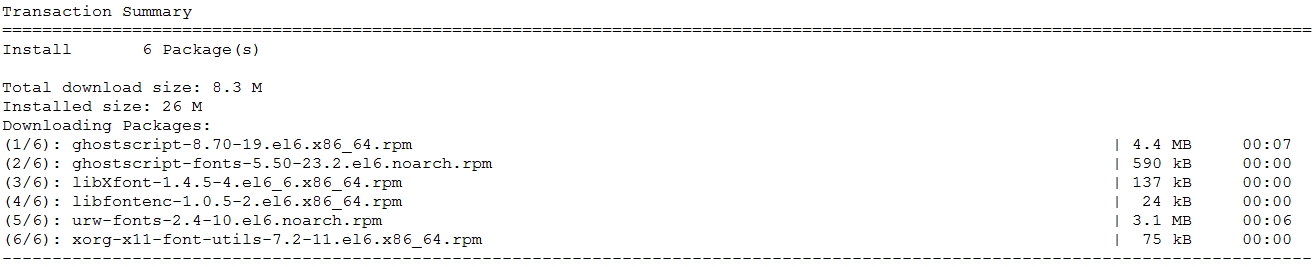
# tar xf ghostscript-9.02.tar.gz# cd ghostscript-9.02# ./configure# make && make install建议Ghostscript使用yum安装,因为安装的时候有一些字体库依赖包# yum -y install ghostscrip |
三、php加载imagick模块
1、php加载imagick动态模块
|
1
2
|
# echo 'extension="imagick.so"' >> /usr/locla/php/etc/php.ini# service php-fpm restart |
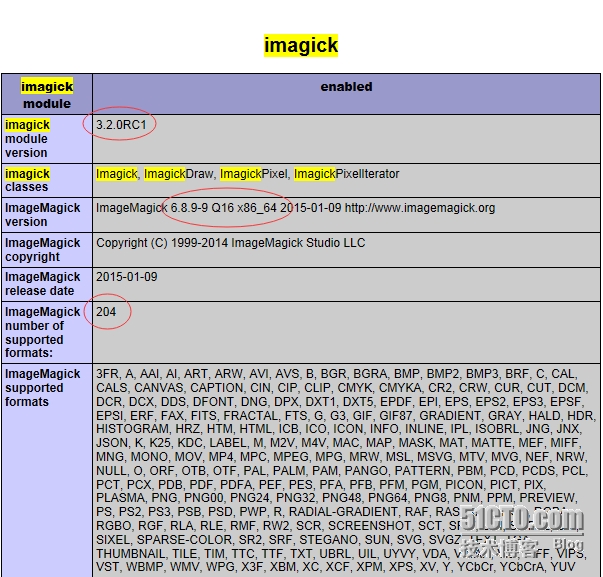
2、查看phpinfo页面
四、ImageMagick命令行的使用
注释:仅安装ImageMagick为安装GhostScript的效果
手动使用命令实现图片到图片、图片到pdf等等的转换;但是却无法实现pdf到图片的转换,命令如下:
|
1
2
3
4
5
6
7
8
9
|
[root@localhost opt]# lsdocument.pdf imagice.png[root@localhost opt]# /usr/local/imagemagick/bin/convert imagice.png nihao_tupian.jpg[root@localhost opt]# lsdocument.pdf imagice.png nihao_tupian.jpg[root@localhost opt]# /usr/local/imagemagick/bin/convert document.pdf nihao_wendang.pdfconvert: no images defined `nihao_wendang.pdf' @ error/convert.c/ConvertImageCommand/3210.[root@localhost opt]# lsdocument.pdf imagice.png nihao_tupian.jpg |
安装GhostScript后的效果
|
1
2
3
4
5
6
7
8
|
[root@localhost opt]# /usr/local/imagemagick/bin/convert document.pdf nihao_wendang.pdfconvert: no images defined `nihao_wendang.pdf' @ error/convert.c/ConvertImageCommand/3210[root@localhost opt]# yum -y install ghostscript[root@localhost opt]# /usr/local/imagemagick/bin/convert document.pdf nihao_wendang.pdf[root@localhost opt]# lsdocument.pdf imagice.png nihao_tupian.jpg nihao_wendang.pdf |
五、php程序之调用
1、php程序调用imagick程序
|
1
2
3
4
5
6
7
8
9
10
11
12
13
14
15
16
17
18
19
20
21
22
23
24
25
26
27
28
29
30
31
32
33
34
35
36
37
38
39
40
41
42
43
44
45
46
47
|
<?php $pdfFile=$_GET['pdf']; if(empty($pdfFile)){ $path='/www/111111.pdf'; var_dump(is_readable($path)); $pdfFile='111111.pdf'; }else{ $path='/www/yanjiuyuan/pdf/'.$pdfFile; } if(!file_exists($path)){ echo "no"; } $Return=array(); $filelen=strlen($pdfFile); $strFileName=substr($pdfFile,0,$filelen-4); $fp = @fopen ( "./pdf/".$strFileName.".txt", 'r' ); if ($fp) { $arr = unserialize ( fgets ( $fp ) ); $Return=$arr; fclose ( $fp ); }else{ $IM = new imagick(); $IM->setResolution(150,150); $IM->setCompressionQuality(180); $IM->readImage($path); foreach ($IM as $Key => $Var) { $Var->setImageFormat('png'); $Filename = '/www/yanjiuyuan/pdf/' . time() . uniqid() . '.png'; if ($Var->writeImage($Filename) == true) { // $Return[] = $Filename; array_push($Return,$Filename); } } $fp = fopen ("/www/yanjiuyuan/pdf/".$strFileName.".txt", 'w' ); fwrite ( $fp, serialize ( $Return ) ); fclose ( $fp ); } $imageHtml=array(); foreach($Return as $key=>$value){ $strNumber=strlen($value); $imPath=substr($value,$strNumber-27,$strNumber); $url='www/yanjiuyuan/pdf/'.$imPath; $imageHtml[]=$url; } print_r($imageHtml); ?> |
2、页面访问url

3、查看生成的图片

本文出自 “郑彦生” 博客,请务必保留此出处http://467754239.blog.51cto.com/4878013/1602518
ImageMagick、imagick和ghostscript三者的关联的更多相关文章
- imagemagick imagick
imagemagick#图像处理软件 安装解压 ./configure make make install imagick#是php图像扩展模块 调用imagemagick处理图像 安装解压/opt/ ...
- linux /proc/sys/fs/file-nr /proc/sys/fs/file-max /etc/security/limits.conf 三者的关联
ulimit -n 对应 /etc/security/limits.conf 文件设置 问题: Can’t open so many files 对于linux运维的同学们,相信都遇到过这个问题. 在 ...
- Centos 安装ImageMagick 与 imagick for php步骤详解
现在有很多朋友在使用安装ImageMagick imagick for php了,今天自己也想做但是不知道如何操作,下面我来给大家介绍Centos 安装ImageMagick imagick for ...
- php imagemagick 翻译目录
图像处理(ImageMagick) 介绍 安装/配置 要求 安装 运行时配置 资源类型 预定义常数 例子 基本用法 Imagick - Imagick课 Imagick :: adaptiveBlur ...
- backbone实例01
backbonejs往简单说,就是一前端MVC框架,适合用于单页面.复杂的前端逻辑. 直接上代码,里面都有相关注释,重点是理解清楚view.collection.model这三者如何关联调用. < ...
- Java魔法堂:URI、URL(含URL Protocol Handler)和URN
一.前言 过去一直搞不清什么是URI什么是URL,现在是时候好好弄清楚它们了!本文作为学习笔记,以便日后查询,若有纰漏请大家指正! 二.从URI说起 1. 概念 URI(Uniform Reso ...
- c++模板库(简介)
目 录 STL 简介 ......................................................................................... ...
- Java中的TreeMap、Comparable、Comparator
我们知道HashMap的存储位置是按照key这个对象的hashCode来存放的,而TreeMap则是不是按照hashCode来存放,他是按照实现的Comparable接口的compareTo这个方法来 ...
- [platform]linux platform device/driver(一)--Driver是如何找到对应的device
1.platform device是怎么"自动"关联到platform driver上的? 转向linux driver有些时间了,前段时间碰到个问题,在Linux kernel ...
随机推荐
- 修改Unity中Lua文件的默认打开程序
项目中引用了XLua,而Lua文件又是以txt文件结尾的,当修改系统的扩展脚本编辑器为vs后双击lua文件(xx.txt)默认也使用vs打开了,无提示的黑白文本编辑 昨办? -. 后来看到网上有写Un ...
- 4种事务的隔离级别,InnoDB怎样巧妙实现?
版权声明:本文为博主原创文章,未经博主同意不得转载. https://blog.csdn.net/z50L2O08e2u4afToR9A/article/details/82186189 事务ACID ...
- he canvas has been tainted by cross-origin data and tainted canvases may not be exported
来自: https://ourcodeworld.com/articles/read/182/the-canvas-has-been-tainted-by-cross-origin-data-and- ...
- 【POJ 3694】 Network(割边<桥>+LCA)
[POJ 3694] Network(割边+LCA) Network Time Limit: 5000MS Memory Limit: 65536K Total Submissions: 7971 ...
- Android中Bundle和Intent的区别
Bundle的作用,以及和Intent的区别: 一.Bundle: A mapping from String values to various Parcelable types 键值对的集合 类继 ...
- 微软BI SSIS 2012 ETL 控件与案例精讲面试 200 问(SSIS 面试题,ETL 面试题)
开篇介绍 本自测与面试题出自 微软BI SSIS 2012 ETL 控件与案例精讲 (http://www.hellobi.com/course/21) 课程,对于学完本课程的每一课时和阅读完相关辅助 ...
- 基于Python3.6使用Django框架连接mysql数据库的驱动模块安装解决办法
解决办法1 使用PyMySQL模块,直接使用pip install pymysql即可. 参考文章:https://www.cnblogs.com/wcwnina/p/8719482.html 原文内 ...
- 使用zlib库进行目录打包
代码很简单,具体过程就不写了. 关于加密压缩,可以看http://www.zlib.net/zlib_faq.html#faq38 中的描述,说是不支持的,但是创建的时候可以传入密码进去,不过我还没有 ...
- iOS 7设计备忘单
With the release of iOS 7, app designers and developers will need to adjust their visual language to ...
- 云主机IO性能测试
1:数据读取速度 ucloud云主机最低224.8MB/S,最高508.8MB/S,平均410.7MB/S 阿里云主机最低17.4MB/S, 最高189.6MB/S,平均170.6MB/S ...