
textfield reload issue and other things reload problem.===================================
https://github.com/flutter/flutter/issues/18828
https://blog.csdn.net/u011272795/article/details/83010974 <<<<<<<===============
https://medium.com/saugo360/flutter-my-futurebuilder-keeps-firing-6e774830bc2
Flutter: My FutureBuilder Keeps Firing!

If you’ve ever done any serious Flutter development, then you have definitely faced the problem in the title above. But don’t worry, You’re not alone!
What is the problem?
The FutureBuilder widget that Flutter provides us to create widgets based on the state of some future, keeps re-firing that future every time a rebuild happens! The problem is best manifested with this simple example:
void main() => runApp(MyApp());

class MyApp extends StatelessWidget {
  @override
  Widget build(BuildContext context) {
    return MaterialApp(
      home: HomeScreen()
    );
  }
}

class HomeScreen extends StatefulWidget {
  @override
  _HomeScreenState createState() => _HomeScreenState();
}

class _HomeScreenState extends State<HomeScreen> {

  bool _switchValue;

  @override
  void initState() {
    super.initState();
    this._switchValue = false;
  }

  @override
  Widget build(BuildContext context) {
    return Scaffold(
      body: Column(
        mainAxisAlignment: MainAxisAlignment.center,
        children: <Widget>[
          Switch(
            value: this._switchValue,
            onChanged: (newValue) {
              setState(() {
                this._switchValue = newValue;
              });
            },
          ),
          FutureBuilder(
              future: this._fetchData(),
              builder: (context, snapshot) {
                switch (snapshot.connectionState) {
                  case ConnectionState.none:
                  case ConnectionState.waiting:
                    return Center(
                      child: CircularProgressIndicator()
                    );
                  default:
                    return Center(
                      child: Text(snapshot.data)
                    );
                }
              }
          ),
        ],
      ),
    );
  }

  _fetchData() async {
    await Future.delayed(Duration(seconds: 2));
    return 'REMOTE DATA';
  }
}
- Our app displays a
HomeScreenon which we have oneSwitchwidget and oneFutureBuilderthat loads remote data and displays it on the screen. - The
FutureBuildersubscribes to the future returned from the function_fetchData. This function simulates a server that returns its result after two seconds. - When the user taps the switch, we update the member
_switchValue, which is then fed into the switch itself, to change its actual value.
If you run this app, the following happens:
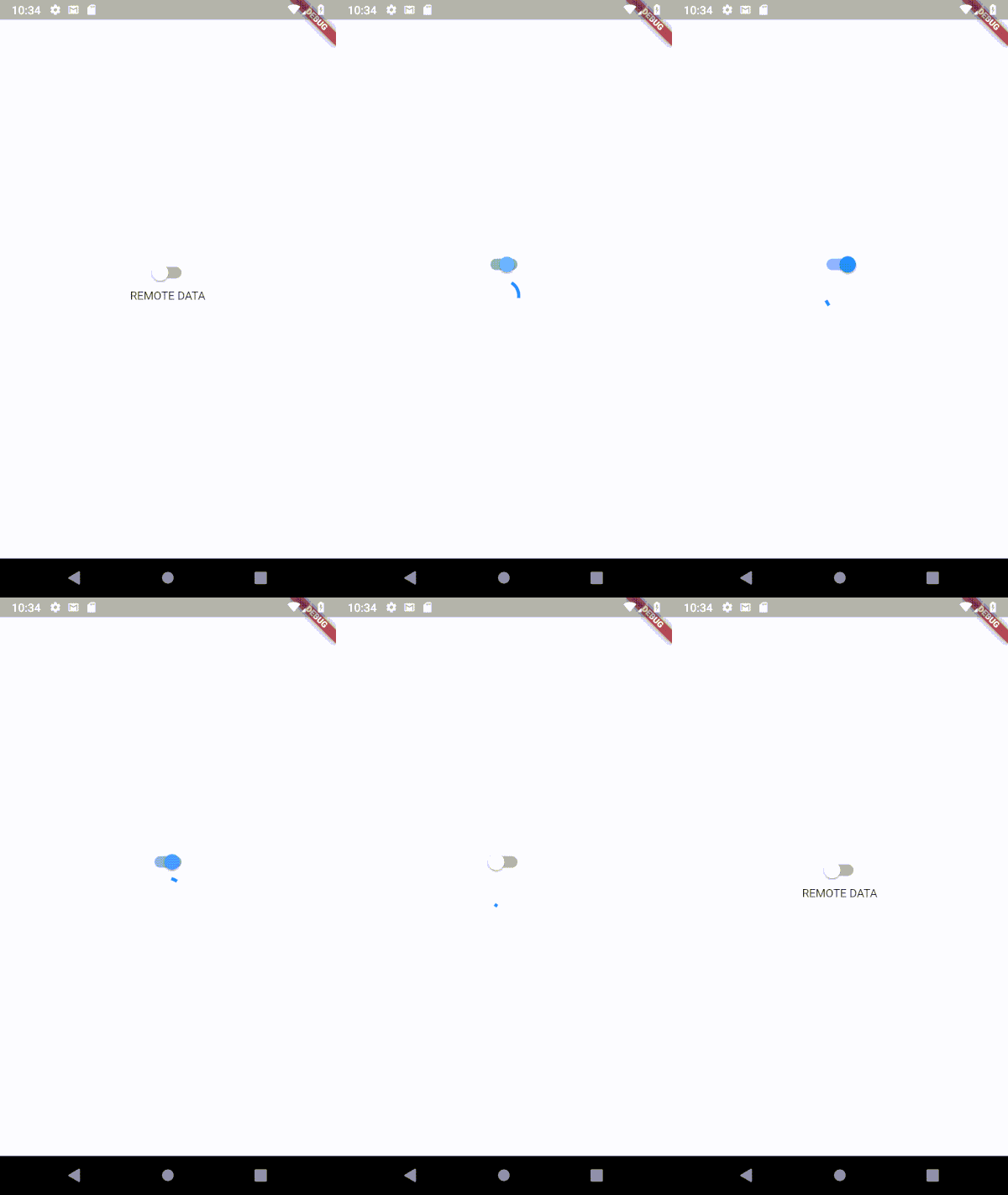
Flipping the switch affects the state of the FutureBuilder
Even though the switch and the FutureBuilder are not related in any form, every time we change the switch value (by calling setState), the FutureBuilder goes through its whole life-cycle again! It re-fetches the future, causing unneeded traffic, and shows the loading again, causing bad user experience.
This problem manifests itself in a variety of ways. In some cases it’s not even as obvious as the example above. For example:
- Network traffic being generated from pages that are not currently on screen
- Hot reloading not working properly
- Losing the Navigator state when updating values in some Inherited Widgets
- etc…
But what is the cause of all of this? And how can we solve it?
The didUpdateWidget problem
Note: In this section I will take a closer look at how FutureBuilder works. If you’re not interested in this, you can skip to the solution.
If we take a closer look at the code of FutureBuilder, we find that it is a StatefulWidget. As we know, StatefulWidgets maintain a long-livedStateobject. This state has a few methods that manage its life-cycle, like initState, build, and didUpdateWidget. initState is called only once when the state object is first created, and build is called every time we need to build the widget to display, but what what about didUpdateWidget? This method is called whenever the widget attached to this State object changes. When the widget is rebuilt with new inputs, the old widget is disposed, and a new widget is created and assigned to the State object, and didUpdateWidget is called to do anything we want to do before the rebuild. In case of FutureBuilder, this method looks like this:
@override
void didUpdateWidget(FutureBuilder<T> oldWidget) {
  super.didUpdateWidget(oldWidget);
  if (oldWidget.future != widget.future) {
    if (_activeCallbackIdentity != null) {
      _unsubscribe();
      _snapshot = _snapshot.inState(ConnectionState.none);
    }
    _subscribe();
  }
}
It’s basically saying: if, when rebuilt, the new widget has a different Future instance than the old one, then repeat everything: unsubscribe, and subscribe again.
Well, that’s the key! If we provide it with the same future, then it will not refire!
But aren’t we providing the same future? we’re calling the same function! well, it’s not the same future instance. Our function is doing exactly the same work, but then returning a new future, different from the old one.
So, what we want to do is to store or cache the output of the function the first time it is called, and then provide this same output whenever the function is called again. This process is known as memoization.
Solution: Memoize the future
Memoization is, in simple terms, caching the return value of a function, and reusing it when that function is called again. Memoization is mostly used in functional languages, where functions are deterministic (they always return the same output for the same inputs), but we can use simple memoization for our problem here, to make sure the FutureBuilder always receives the same future instance.
To do that, we will use Dart’s AsyncMemoizer. This memoizer does exactly what we want! It takes an asynchronous function, calls it the first time it is called, and caches its result. For all subsequent calls to the function, the memoizer returns the same previously calculated future.
Thus, to solve our problem, we start by creating an instance of AsyncMemoizerin our widget:
final AsyncMemoizer _memoizer = AsyncMemoizer();
Note: you shouldn’t instantiate the memoizer inside a StatelessWidget, because Flutter disposes of StatelessWidgets at every rebuild, which basically beats the purpose. You should instantiate it either in a StatefulWidget, or somewhere where it can persist.
Afterwards, we will modify our _fetchData function to use that memoizer:
_fetchData() {
  return this._memoizer.runOnce(() async {
    await Future.delayed(Duration(seconds: 2));
    return 'REMOTE DATA';
  });
}
- We wrapped our function with
AsyncMemoizer.runOncewhich does exactly what it sounds like; it runs the function only once, and when called again, returns the cached future.
And that’s it! Our FutureBuilder now only fires the first time around:
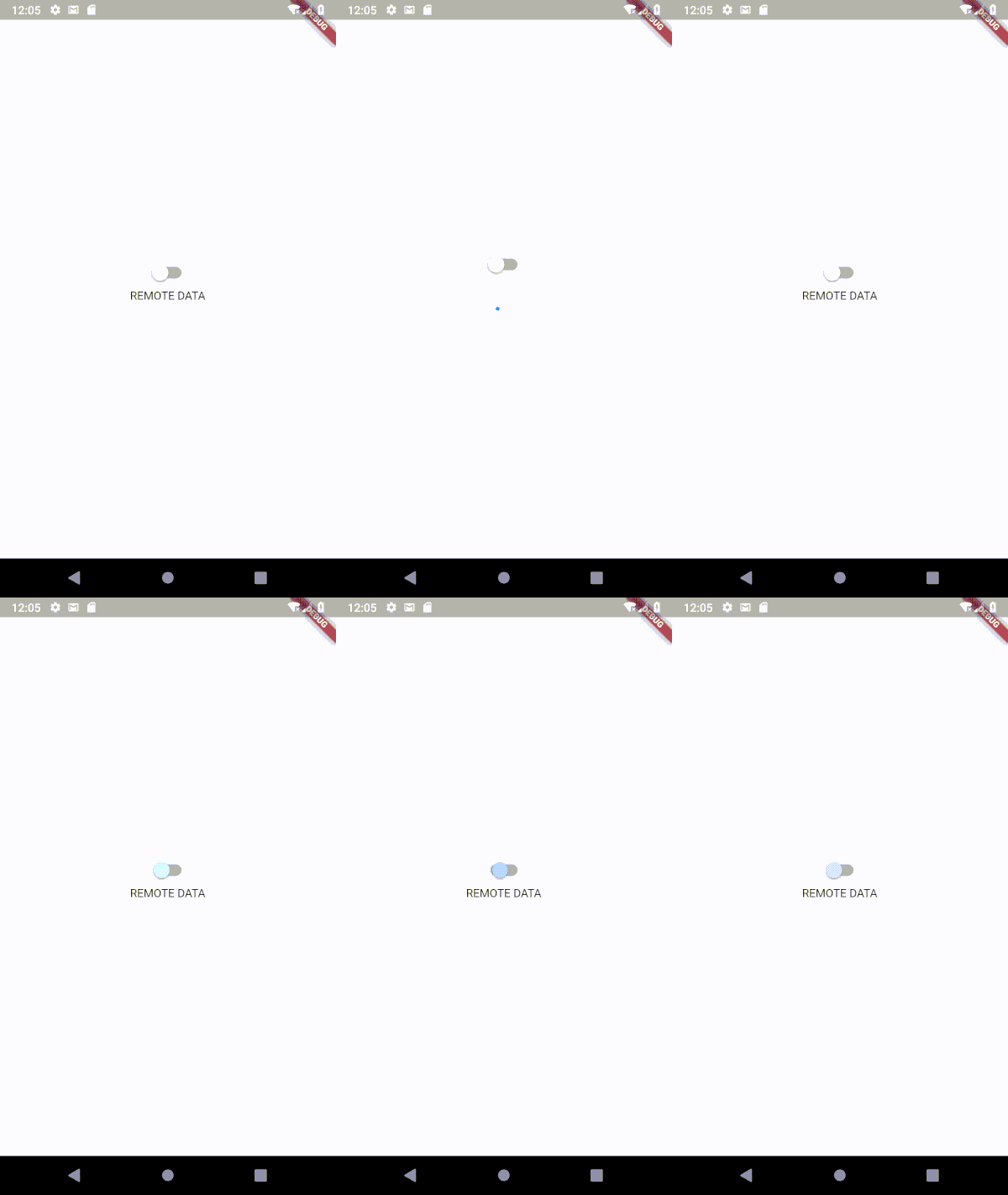
Thus, our FutureBuilder was getting confused, and thinking that a new future was passed to it, causing it to refire every time. To solve this, we used Dart’s AsyncMemoizer to pass the same future instance every time.
I hope this has been helpful! Let me know what you think!
textfield reload issue and other things reload problem.===================================的更多相关文章
- eclipse 打开是报错"reload maven project has encountered a problem"
不需要删除整个 .metadata 如果删除这个代价是重新导入全部项目 D:\eclipse-workspace\.metadata\.plugins\org.eclipse.e4.workbench ...
- 在IE浏览器中执行OpenFlashChart的reload方法时无法刷新的解决方法
由于项目需求,需要在网页上利用图表展示相关数据的统计信息,采用了OpenFlashChart技术.OpenFlashChart是一款开源的以Flash和Javascript为技术基础的免费图表,用它能 ...
- javascript 中的location.reload
location.reload()是什么意思 location.reload() 括号内有一个参数 true/false , 为空和false的效果一样. 如果该方法没有规定参数,或者参数是 fals ...
- 把Nginx加入系统服务 service nginx (start | stop | restart | reload)
vim /etc/init.d/nginx 1 #!/bin/bash 2 # nginx Startup script for the Nginx HTTP Server 3 # it is v ...
- 使用Tomcat的Reload提高开发速度(翻译)
欢迎转载http://www.cnblogs.com/coodream2009,有翻译的不太准确的地方请大家指出,我继续修改完善. 按照Java Servlet规范第四部分推荐的,Tomcat系统的实 ...
- layui table数据表格reload where参数保留问题
layui table数据表格reload where参数保留问题 在使用layui过程中多多少少会遇到些问题 table reload 有个坑:reload时where参数会保留上次的参数,如果用 ...
- javascript:location.reload()和location.replace()的区别,及对图片缓存的影响。
有段时间没有清理IE的临时文件(缓存文件),在我清理的时候,我突然发现一个问题. 我打开的一个网站,图片默认缓存一个月的,但我发现,当我上传图片或删除图片之后,图片重新缓存,也就意味着,在我上传新图片 ...
- Python中的reload函数
Python中的import语句可以导入module文件,但是import语句只是第一次导入的时候会执行module文件中的代码,然后就会把导入的模块文件存入到内存,当再次导入的时候,Python是直 ...
- python之reload用法
一.python2和python3的区别 python2中可以直接使用reload().python3中需要从库中导入,有两种方法: >>> from imp import relo ...
随机推荐
- jquery easyui datagrid 如何第一次点击列标题时是降序排列
使用 EasyUI的onBeforeLoad事件,在发回到服务器查询之前,修改排序和对应的图标样式. 1.配置回调函数 data-options='onBeforeLoad:fnOnBeforeLoa ...
- Myeclipse的使用技巧
1.1.MyEclipse自定义注释 一.修改进入路径: Window->Preference->Java->Code Style->Code Template-> ...
- js 重写alert 兼容iphone使得alert 不带src
<script> window.alert = function(name){ var iframe = document.createElement("IFRAME" ...
- awk 复习
awk 的再次学习!!!! awk 的一般模式 awk '{parttern + action }' {filename} , 提取/etc/passwd 的用户 awk -F ":&quo ...
- Linux下面使用命令如何运行.sh文件的两种解决办法
Linux下面用命令如何运行.sh文件的方法,有两种方法: 一.直接./加上文件名.sh,如运行hello.sh为./hello.sh[hello.sh必须有x权限] 二.直接sh 加上文件名.sh, ...
- 纯css3实现只适应的正方形
纯 CSS 实现自适应正方形 Table of Contents 方案一:CSS3 vw 单位 方案二:设置垂直方向的 padding 撑开容器 方案三:利用伪元素的 margin(padding)- ...
- 对Vuex的初步了解
文章转载于:http://www.cnblogs.com/wisewrong/p/6344390.html 在 Vue.js 的项目中,如果项目结构简单, 父子组件之间的数据传递可以使用 props ...
- JVM性能调优总结
引自其它博客 : https://www.cnblogs.com/donaldlee2008/p/5469685.html 注 : 该条同样适用于Tomcat调优 调优配置说明 堆大小设置JVM 中最 ...
- python迭代-如何对迭代器做切片操作
如何对迭代器做切片操作 问题举例 读取某个文件内容的100~300行内容,我们是否可以使用 类似列表切片的方式得到一个100~300行文件内容的生成器 分析 列表的切片操作其实是在重载方法__getI ...
- TypeError: Fetch argument 0.484375 has invalid type <class 'numpy.float32'>, must be a string or Tensor. (Can not convert a float32 into a Tensor or Operation.)
报错: TypeError: Fetch argument 0.484375 has invalid type <class 'numpy.float32'>, must be a str ...