
Spring Security 之API 项目安全验证(基于basic-authentication)
===================================
Basic Authorization 规范
===================================
Request 头部:
Authorization: Basic QWxpY2U6MTIzNDU2
其中 QWxpY2U6MTIzNDU2 是user:pwd做 base64 编码, 格式是 user:pwd
response 头部:
WWW-Authenticate: Basic realm="My Realm"
按照 RFC 规范, 相同的 realm(域) 下的web page 将共享同样的 credentials, 所以推荐 realm 取值为 application name. realm 大小写敏感, 可以包含空格.
===================================
Rest API 示例
===================================
功能:
1. 演示如何启用 Basic Authorization
2. 如何使用 RestTemplate 访问受保护的 API接口
-----------------------------------
SecurityConfig 代码
-----------------------------------
关键点有:
0. 对于 /api/** 需要 ROLE_ADMIN 角色的账号访问, 对于 /guest/** 路径允许匿名访问.
1. 使用 HttpSecurity.httpBasic() 启用 Basic Authorization.
2. 使用 HttpSecurity.httpBasic().realmName() 设置 realm.
3. 使用 HttpSecurity.httpBasic().authenticationEntryPoint() 设置 BasicAuthenticationEntryPoint 对象, 如果一个请求通过验证, 该对象会自动为web response设定 WWW-Authenticate header, 如果未通过, 该对象会自动将HttpStatus设置为UNAUTHORIZED.
4. 显式启用了 STATELESS session 管理机制, 经测试,Spring Security 在Basic Authorization模式下, session自动就处于了 STATELESS 状态.
5. 对于 HttpMethod.OPTIONS 请求, 允许匿名访问. API 项目应该开放 OPTIONS 查询权限.
@EnableWebSecurity

@EnableGlobalMethodSecurity(prePostEnabled = true)

public class SecurityConfig extends WebSecurityConfigurerAdapter {

    //@formatter:off

    @Override

    public void configure(AuthenticationManagerBuilder builder) throws Exception {

        builder.inMemoryAuthentication()

                .withUser("123").password("123").roles("USER")

                .and()

                .withUser("ADMIN").password("ADMIN").roles("ADMIN");

    }

    //@formatter:on

    private static String REALM = "MY SPRING SECURITY DEMO";

    // @formatter:off

    @Override

    protected void configure(HttpSecurity http) throws Exception {

        http

           .authorizeRequests()

               // 对于/api 路径下的访问需要有 ROLE_ADMIN 的权限

              .antMatchers("/api/**").hasRole("ADMIN")

               // 对于/guest 路径开放访问

              .antMatchers("/guest/**").permitAll()

               // 其他url路径之需要登陆即可.

              .anyRequest().authenticated()

              .and()

           //启用 basic authentication

          .httpBasic().realmName(REALM).authenticationEntryPoint(getBasicAuthenticationEntryPoint())

              .and()

           //不创建 session

          .sessionManagement().sessionCreationPolicy(SessionCreationPolicy.STATELESS);

    }

    // @formatter:on

    /**

     * 生成 BasicAuthenticationEntryPoint 对象, 在该对象的支持下, 通过验证的请求, 返回的response 将会自动加上

     * WWW-Authenticate Header.  在该对象的支持下, 未通过验证的请求, 返回的 response 为 UNAUTHORIZED 错误.

     *

     * @return

     */

    @Bean

    public BasicAuthenticationEntryPoint getBasicAuthenticationEntryPoint() {

        BasicAuthenticationEntryPoint entryPoint = new BasicAuthenticationEntryPoint();

        entryPoint.setRealmName(REALM);

        return entryPoint;

    }

    /*

     * 开放 Options 请求

     */

    @Override

    public void configure(WebSecurity web) throws Exception {

        // TODO Auto-generated method stub

        web.ignoring()

                .antMatchers(HttpMethod.OPTIONS, "/**");

    }

    @SuppressWarnings("deprecation")

    @Bean

    public NoOpPasswordEncoder passwordEncoder() {

        BasicAuthenticationEntryPoint a;

        return (NoOpPasswordEncoder) NoOpPasswordEncoder.getInstance();

    }

}
-----------------------------------
受控 API Rest 类
-----------------------------------
对于 /api/** url需要 ROLE_ADMIN 角色的账号访问, 这里的代码很简单.
/*

 * 需要进行 Basic Auth 的API

 */

@RestController

@RequestMapping("/api")

class ApiController {

    @GetMapping("/books")

    public String getBooks() {

        return "API book";

    }

}
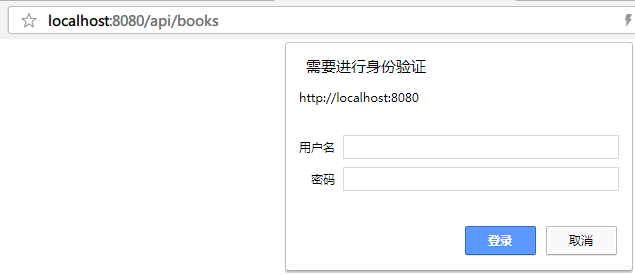
直接访问受控url, 弹出浏览器内置的登陆框, 见下图, 符合预期.
-----------------------------------
RestTemplate 访问 Basic Authorization的API
-----------------------------------
关键点:
使用了 restTemplateBuilder.basicAuthorization(user,pwd).build() 来构建 RestTemplate, 这样的 RestTemplate 会自动在Request上加 Authorization Header.
/*

 * RestTemplate 访问 Basic Authorization的API的示例

 */

@RestController

@RequestMapping("/guest")

class DefaultController {

    @GetMapping("/mybooks")

    @ResponseBody

    public String getMyBook() {

        return "My Book";

    }

    private RestTemplate restTemplate;

    @Autowired

    private RestTemplateBuilder restTemplateBuilder;

    @Autowired

    void setRestTemplate(RestTemplateBuilder restTemplateBuilder) {

         restTemplate = restTemplateBuilder.basicAuthorization("ADMIN", "ADMIN")

         .build();

    }

    @GetMapping("/apibooks")

    @ResponseBody

    public String getApiBooks() {

        return restTemplate.getForObject("http://localhost:8080/api/books", String.class);

    }

}
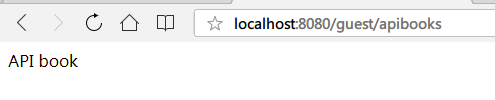
访问 http://localhost:8080/guest/apibooks 地址, 无需登陆即可得到 api 结果, 见下图, 符合预期.
===================================
参考
===================================
http://websystique.com/spring-security/secure-spring-rest-api-using-basic-authentication/
http://www.bytestree.com/spring/restful-web-services-authentication-authorization/
https://www.baeldung.com/spring-security-basic-authentication
Spring Security 之API 项目安全验证(基于basic-authentication)的更多相关文章
- spring security +MySQL + BCryptPasswordEncoder 单向加密验证 + 权限拦截 --- 心得
1.前言 前面学习了 security的登录与登出 , 但是用户信息 是 application 配置 或内存直接注入进去的 ,不具有实用性,实际上的使用还需要权限管理,有些 访问接口需要某些权限才可 ...
- 使用Spring MVC测试Spring Security Oauth2 API
不是因为看到希望了才去坚持,而坚持了才知道没有希望. 前言 在Spring Security源码分析十一:Spring Security OAuth2整合JWT和Spring Boot 2.0 整合 ...
- Spring Security(十五):5.6 Authentication
Thus far we have only taken a look at the most basic authentication configuration. Let’s take a look ...
- Spring Security 入门(3-11)Spring Security 的使用-自定义登录验证和回调地址
配置文件 security-ns.xml <?xml version="1.0" encoding="UTF-8"?> <beans xmln ...
- Spring Security构建Rest服务-0700-SpringSecurity开发基于表单的认证
自定义用户认证逻辑: 1,处理用户信息获取,2,用户校验,3密码的加密解密 新建:MyUserDetailService类,实现UserDetailsService接口. UserDetailsSer ...
- Secure Spring REST API using Basic Authentication
What is Basic Authentication? Traditional authentication approaches like login pages or session iden ...
- 【项目实践】一文带你搞定Spring Security + JWT
以项目驱动学习,以实践检验真知 前言 关于认证和授权,R之前已经写了两篇文章: [项目实践]在用安全框架前,我想先让你手撸一个登陆认证 [项目实践]一文带你搞定页面权限.按钮权限以及数据权限 在这两篇 ...
- JAVA WEB快速入门之从编写一个基于SpringBoot+Mybatis快速创建的REST API项目了解SpringBoot、SpringMVC REST API、Mybatis等相关知识
JAVA WEB快速入门系列之前的相关文章如下:(文章全部本人[梦在旅途原创],文中内容可能部份图片.代码参照网上资源) 第一篇:JAVA WEB快速入门之环境搭建 第二篇:JAVA WEB快速入门之 ...
- spring security 一个能够为基于Spring的企业应用系统提供声明式的安全访问控制解决方案的安全框架
Spring Security是一个能够为基于Spring的企业应用系统提供声明式的安全访问控制解决方案的安全框架.它提供了一组可以在Spring应用上下文中 配置的Bean,充分利用了Spring ...
随机推荐
- 【Python 14】分形树绘制2.0(重复五角星+Turtle库文档)
1.案例描述 加入循环操作绘制重复不同大小的图形 2.案例分析 3.turtle库补充 # 画笔控制函数 turtle.penup() # 抬起画笔,之后移动画笔不绘制图形 turtle.pendow ...
- ORACLE跨数据库查询的方法
原文地址:http://blog.csdn.net/huzhenwei/article/details/2533869 本文简述了通过创建database link实现Oracle跨数据库查询的方法 ...
- IIS出现The specified module could not be found的解决方法
1.打开IIS 信息服务,在左侧找到自己的计算机,点右键,选择属性,在主属性中选编辑,打开“目录安全性”选项卡,单击“匿名访问和验证控制”里的“编辑”按钮,在弹出的对话框中确保只选中了“匿名访问 ...
- Node、TS、Koa学习笔记
这样定义可以轻松拿到gender属性 这样定义,函数内显示没有gender 这种方法能得到gender但是函数内部没有gender 这种方式能到gender 但是在函数里施symbel属性,外部不能访 ...
- 苹果手机连接Wifi认证机制
Wifi状态保持方法和nas设备 https://patents.google.com/patent/CN106793171A/zh 基于ios终端的离线wifi热点认证方法和认证系统 https:/ ...
- 设计模式之Template Method模式
作用:将具体的处理交给子类 什么是Template Method模式? Template Method模式是指带有模板功能的模式,组成模板的方法被定义在父类中,且这些方法为抽象方法.子类去实现父类中的 ...
- Nvidia和Google的AI芯片战火蔓延至边缘端
AI 的热潮还在持续,AI 的战火自然也在升级.英伟达作为这一波 AI 浪潮中最受关注的公司之一,在很大程度上影响着 AI 的战局.上周在美国举行的 GTC 2019 上,黄仁勋大篇幅介绍了英伟达在 ...
- KVM架构及模块简介
1.简介 2.架构 3.KVM模块及QEMU 一.简介 KVM(Kernel Virtual Machine)基于内核的虚拟机.阿维·齐维迪(Avi Kivity)在一家名为Qumranet的初创企业 ...
- SQL SERVER数据库修改是否区分大小写(转载)
昨天去客户,发现程序无法应用,跟踪错误提示,提示的大致意思是“数据库表名和数据库字段名不存在”.查询后发现是SQL Server数据库设置了区分大小写的缘故(一般安装时,Oracle的正确安装下是默认 ...
- android_模拟器调试
找到adb_server adb_server connect