
Spring Security构建Rest服务-0700-SpringSecurity开发基于表单的认证
自定义用户认证逻辑:
1,处理用户信息获取,2,用户校验,3密码的加密解密
新建:MyUserDetailService类,实现UserDetailsService接口。
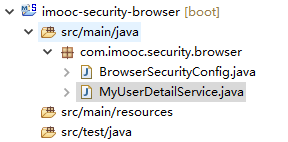
UserDetailsService接口代码:只有一个方法,通过用户名获取用户信息,返回UserDetail
public interface UserDetailsService {

    UserDetails loadUserByUsername(String username) throws UsernameNotFoundException;

}
UserDetail:记录了 账户是否启用、账户是否过期、密码是否过期、账户是否锁定、权限集合信息
public interface UserDetails extends Serializable {

    // ~ Methods

    // ========================================================================================================

    /**

     * Returns the authorities granted to the user. Cannot return <code>null</code>.

     *

     * @return the authorities, sorted by natural key (never <code>null</code>)

     */

    Collection<? extends GrantedAuthority> getAuthorities();

    /**

     * Returns the password used to authenticate the user.

     *

     * @return the password

     */

    String getPassword();

    /**

     * Returns the username used to authenticate the user. Cannot return <code>null</code>

     * .

     *

     * @return the username (never <code>null</code>)

     */

    String getUsername();

    /**

     * Indicates whether the user's account has expired. An expired account cannot be

     * authenticated.

     *

     * @return <code>true</code> if the user's account is valid (ie non-expired),

     * <code>false</code> if no longer valid (ie expired)

     */

    boolean isAccountNonExpired();

    /**

     * Indicates whether the user is locked or unlocked. A locked user cannot be

     * authenticated.

     *

     * @return <code>true</code> if the user is not locked, <code>false</code> otherwise

     */

    boolean isAccountNonLocked();

    /**

     * Indicates whether the user's credentials (password) has expired. Expired

     * credentials prevent authentication.

     *

     * @return <code>true</code> if the user's credentials are valid (ie non-expired),

     * <code>false</code> if no longer valid (ie expired)

     */

    boolean isCredentialsNonExpired();

    /**

     * Indicates whether the user is enabled or disabled. A disabled user cannot be

     * authenticated.

     *

     * @return <code>true</code> if the user is enabled, <code>false</code> otherwise

     */

    boolean isEnabled();

}
MyUserDetailService:
package com.imooc.security.browser;

import org.slf4j.Logger;

import org.slf4j.LoggerFactory;

import org.springframework.beans.factory.annotation.Autowired;

import org.springframework.security.core.authority.AuthorityUtils;

import org.springframework.security.core.userdetails.User;

import org.springframework.security.core.userdetails.UserDetails;

import org.springframework.security.core.userdetails.UserDetailsService;

import org.springframework.security.core.userdetails.UsernameNotFoundException;

import org.springframework.security.crypto.password.PasswordEncoder;

import org.springframework.stereotype.Component;

/**

 * UserDetailsService是SpringSecurity的一个接口,

 * 只有一个方法:根据用户名获取用户详情

 * ClassName: MyUserDetailService

 * @Description: TODO

 * @author lihaoyang

 * @date 2018年2月28日

 */

@Component

public class MyUserDetailService implements UserDetailsService{

    private Logger logger = LoggerFactory.getLogger(getClass());

    @Autowired

    private PasswordEncoder passwordEncoder;

    /**

     * UserDetails接口,实际可以自己实现这个接口,返回自己的实现类

     */

    @Override

    public UserDetails loadUserByUsername(String username) throws UsernameNotFoundException {

        logger.info("登录用户名:"+username);

        //根据用户名查询用户信息

        //User:springsecurity 对 UserDetails的一个实现

        //为了演示在这里用passwordEncoder加密一下密码,实际中在注册时就加密,此处直接拿出密码

        String password = passwordEncoder.encode("123456");

        System.err.println("加密后密码:  "+password);

        //参数:用户名|密码|是否启用|账户是否过期|密码是否过期|账户是否锁定|权限集合

        return new User(username,password,true,true,true,true,AuthorityUtils.commaSeparatedStringToAuthorityList("admin"));

    }

}
在BrowserSecurityConfig里配置PasswordEncoder,用来加密密码的一个接口:
@Configuration //这是一个配置

public class BrowserSecurityConfig extends WebSecurityConfigurerAdapter{

    //注意是org.springframework.security.crypto.password.PasswordEncoder

    @Bean

    public PasswordEncoder passwordencoder(){

        //BCryptPasswordEncoder implements PasswordEncoder

        return new BCryptPasswordEncoder();

    }

    @Override

    protected void configure(HttpSecurity http) throws Exception {

        //实现需要认证的接口跳转表单登录,安全=认证+授权

        //http.httpBasic() //这个就是默认的弹框认证

        http.formLogin() //表单认证

            .and()

            .authorizeRequests() //下边的都是授权的配置

            .anyRequest()        //任何请求

            .authenticated();    //都需要身份认证

    }

}
PasswordEncoder代码:一个加密方法,一个匹配方法,注意是org.springframework.security.crypto.password包里的接口,这个接口的实现类会给加密的密码随机加盐,所以一样的密码每次加密出来是不一样的,更安全。如123456加密2次:
加密后密码: $2a$10$BChH.C4.X8MYuI1mHFoOkefWhOsad7SvhZedHFt1OG4vjSu.z9weC
加密后密码: $2a$10$YUbz.miE5C0aAcuU1FnHSu/U.Qm/BujTNw6X7S5i4/6AhjyDc6suK
package org.springframework.security.crypto.password;

/**

 * Service interface for encoding passwords.

 *

 * The preferred implementation is {@code BCryptPasswordEncoder}.

 *

 * @author Keith Donald

 */

public interface PasswordEncoder {

    /**

     * Encode the raw password. Generally, a good encoding algorithm applies a SHA-1 or

     * greater hash combined with an 8-byte or greater randomly generated salt.

     */

    String encode(CharSequence rawPassword);

    /**

     * Verify the encoded password obtained from storage matches the submitted raw

     * password after it too is encoded. Returns true if the passwords match, false if

     * they do not. The stored password itself is never decoded.

     *

     * @param rawPassword the raw password to encode and match

     * @param encodedPassword the encoded password from storage to compare with

     * @return true if the raw password, after encoding, matches the encoded password from

     * storage

     */

    boolean matches(CharSequence rawPassword, String encodedPassword);

}
访问:http://localhost:8080/user
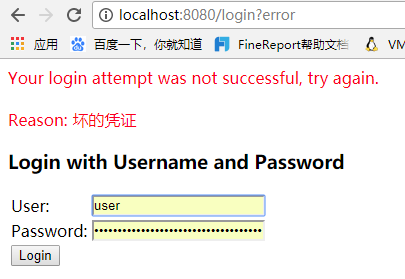
输入正确的密码123456:可以访问user查询服务

完整代码GitHub:https://github.com/lhy1234/spring-security
Spring Security构建Rest服务-0700-SpringSecurity开发基于表单的认证的更多相关文章
- Spring Security构建Rest服务-0102-Spring Social开发第三方登录之qq登录
图一 基于SpringSocial实现qq登录,要走一个OAuth流程,拿到服务提供商qq返回的用户信息. 由上篇介绍的可知,用户信息被封装在了Connection里,所以最终要拿到Connectio ...
- Spring Security构建Rest服务-1001-spring social开发第三方登录之spring social基本原理
OAuth协议是一个授权协议,目的是让用户在不将服务提供商的用户名密码交给第三方应用的条件下,让第三方应用可以有权限访问用户存在服务提供商上的资源. 接着上一篇说的,在第三方应用获取到用户资源后,如果 ...
- Spring Security构建Rest服务-1200-SpringSecurity OAuth开发APP认证框架
基于服务器Session的认证方式: 前边说的用户名密码登录.短信登录.第三方登录,都是普通的登录,是基于服务器Session保存用户信息的登录方式.登录信息都是存在服务器的session(服务器的一 ...
- Cola Cloud 基于 Spring Boot, Spring Cloud 构建微服务架构企业级开发平台
Cola Cloud 基于 Spring Boot, Spring Cloud 构建微服务架构企业级开发平台: https://gitee.com/leecho/cola-cloud
- Spring Security构建Rest服务-1300-Spring Security OAuth开发APP认证框架之JWT实现单点登录
基于JWT实现SSO 在淘宝( https://www.taobao.com )上点击登录,已经跳到了 https://login.taobao.com,这是又一个服务器.只要在淘宝登录了,就能直接访 ...
- Spring Security构建Rest服务-1202-Spring Security OAuth开发APP认证框架之重构3种登录方式
SpringSecurityOAuth核心源码解析 蓝色表示接口,绿色表示类 1,TokenEndpoint 整个入口点,相当于一个controller,不同的授权模式获取token的地址都是 /oa ...
- Spring Security构建Rest服务-1203-Spring Security OAuth开发APP认证框架之短信验证码登录
浏览器模式下验证码存储策略 浏览器模式下,生成的短信验证码或者图形验证码是存在session里的,用户接收到验证码后携带过来做校验. APP模式下验证码存储策略 在app场景下里是没有cookie信息 ...
- Spring Security构建Rest服务-1205-Spring Security OAuth开发APP认证框架之Token处理
token处理之二使用JWT替换默认的token JWT(Json Web Token) 特点: 1,自包含:jwt token包含有意义的信息 spring security oauth默认生成的t ...
- Spring Security构建Rest服务-1204-Spring Security OAuth开发APP认证框架之Token处理
token处理之一基本参数配置 处理token时间.存储策略,客户端配置等 以前的都是spring security oauth默认的token生成策略,token默认在org.springframe ...
随机推荐
- centos6.5(64位)离线安装scalr
1.下载scalr-server安装备包: 下载地址:http://pan.baidu.com/s/1eSA3dom scalr-server-5.1.0.oss-nightly.2015013004 ...
- Java 原始类型JComboBox的成员JComboBox(E())的调用 未经过检查
问题描述: 根据书上的代码 ,编译时候出现以下问题 自定义了一个字符数组: private String[] grades = {"1","2","3 ...
- cxf maven依赖
<dependency> <groupId>org.apache.cxf</groupId> <artifactId>cxf-rt-front ...
- HDU1237 简单计算器 2016-07-24 13:34 193人阅读 评论(0) 收藏
简单计算器 Problem Description 读入一个只包含 +, -, *, / 的非负整数计算表达式,计算该表达式的值. Input 测试输入包含若干测试用例,每个测试用例占一行,每行不超过 ...
- RxJava2 源码分析
前言 很多项目使用流行的Rxjava2 + Retrofit搭建网络框架,Rxjava现在已经发展到Rxjava2,之前一直都只是再用Rxjava,但从来没有了解下Rxjava的内部实现,接下来一步步 ...
- python 几种方法实现随机生成8位同时包含数字、大写字符、小写字符密码的小程序
python 实现随机生成包8位包含大写字母.小写字母和数字的密码的程序.要求:1用户输入多少次就生成多少条密码,2要求密码必须同时包含大写字母.小写字母和数字,长度8位,不能重复代码如下: impo ...
- JAVA 从头开始<六>
一.静态代码块 静态代码块不需要创建对象才执行,比对象数据优先存在于内存中 二.静态函数 三.单例设计模式 1.饿汉单例模式 缺点:一声明就创建一个对象,没有使用的话就浪费了. 2.懒汉单例模式 1. ...
- C# RSA加解密和MD5加密
1.RSA加密 /// <summary> /// 加密处理 /// </summary> /// <param name="content"> ...
- div水平垂直居中方法及优缺点
代码: <div class="father"> <div class="son"> </div></div> ...
- jsp的九大内置对象(查询资料,搬砖所得)
此笔记大部分摘自大神https://www.cnblogs.com/SimonHu1993/,部分通过网上搜寻补充. 1.Request内置对象(类型:HttpServletRequest 表示 ...