
VS2008,System.Runtime.InteropServices.COMException (0x800401F3): Invalid class string (Exception from HRESULT: 0x800401F3 (CO_E_CLASSSTRING))
在VS2008环境中编译调试运行不报错,但在发布的exe文件运行就报错
System.Runtime.InteropServices.COMException (0x800401F3): Invalid class string (Exception from HRESULT: 0x800401F3 (CO_E_CLASSSTRING)),不得其解。
See the end of this message for details on invoking
just-in-time (JIT) debugging instead of this dialog box.
************** Exception Text **************
System.Runtime.InteropServices.COMException (0x800401F3): Invalid class string (Exception from HRESULT: 0x800401F3 (CO_E_CLASSSTRING))
at OPCAutomation.OPCServerClass.Connect(String ProgID, Object Node)
at PlantAdminForPierburg.MainForm.ConnectToOPC(String OPCServerName, String OPCServerNode) in C:\Users\user\Desktop\IPCForPIERBURGSUV2018\PlantAdminForPIERBURG\MainForm.vb:line 1908
at PlantAdminForPierburg.MainForm.MainForm_Load(Object sender, EventArgs e) in C:\Users\user\Desktop\IPCForPIERBURGSUV2018\PlantAdminForPIERBURG\MainForm.vb:line 64
at System.EventHandler.Invoke(Object sender, EventArgs e)
at System.Windows.Forms.Form.OnLoad(EventArgs e)
at System.Windows.Forms.Form.OnCreateControl()
at System.Windows.Forms.Control.CreateControl(Boolean fIgnoreVisible)
at System.Windows.Forms.Control.CreateControl()
at System.Windows.Forms.Control.WmShowWindow(Message& m)
at System.Windows.Forms.Control.WndProc(Message& m)
at System.Windows.Forms.ScrollableControl.WndProc(Message& m)
at System.Windows.Forms.ContainerControl.WndProc(Message& m)
at System.Windows.Forms.Form.WmShowWindow(Message& m)
at System.Windows.Forms.Form.WndProc(Message& m)
at System.Windows.Forms.Control.ControlNativeWindow.OnMessage(Message& m)
at System.Windows.Forms.Control.ControlNativeWindow.WndProc(Message& m)
at System.Windows.Forms.NativeWindow.Callback(IntPtr hWnd, Int32 msg, IntPtr wparam, IntPtr lparam)
************** Loaded Assemblies **************
mscorlib
Assembly Version: 2.0.0.0
Win32 Version: 2.0.50727.8784 (QFE.050727-8700)
CodeBase: file:///C:/Windows/Microsoft.NET/Framework/v2.0.50727/mscorlib.dll
----------------------------------------
PlantAdminForPierburg
Assembly Version: 1.0.0.0
Win32 Version: 1.0.0.0
CodeBase: file:///C:/Users/user/Desktop/IPCForPIERBURGSUV2018/PlantAdminForPIERBURG/bin/Release/PlantAdminForPierburg.exe
----------------------------------------
Microsoft.VisualBasic
Assembly Version: 8.0.0.0
Win32 Version: 8.0.50727.5483 (Win7SP1GDR.050727-5400)
CodeBase: file:///C:/Windows/assembly/GAC_MSIL/Microsoft.VisualBasic/8.0.0.0__b03f5f7f11d50a3a/Microsoft.VisualBasic.dll
----------------------------------------
System
Assembly Version: 2.0.0.0
Win32 Version: 2.0.50727.8770 (QFE.050727-8700)
CodeBase: file:///C:/Windows/assembly/GAC_MSIL/System/2.0.0.0__b77a5c561934e089/System.dll
----------------------------------------
System.Windows.Forms
Assembly Version: 2.0.0.0
Win32 Version: 2.0.50727.5491 (Win7SP1GDR.050727-5400)
CodeBase: file:///C:/Windows/assembly/GAC_MSIL/System.Windows.Forms/2.0.0.0__b77a5c561934e089/System.Windows.Forms.dll
----------------------------------------
System.Drawing
Assembly Version: 2.0.0.0
Win32 Version: 2.0.50727.5495 (Win7SP1GDR.050727-5400)
CodeBase: file:///C:/Windows/assembly/GAC_MSIL/System.Drawing/2.0.0.0__b03f5f7f11d50a3a/System.Drawing.dll
----------------------------------------
System.Configuration
Assembly Version: 2.0.0.0
Win32 Version: 2.0.50727.5483 (Win7SP1GDR.050727-5400)
CodeBase: file:///C:/Windows/assembly/GAC_MSIL/System.Configuration/2.0.0.0__b03f5f7f11d50a3a/System.Configuration.dll
----------------------------------------
System.Xml
Assembly Version: 2.0.0.0
Win32 Version: 2.0.50727.8773 (QFE.050727-8700)
CodeBase: file:///C:/Windows/assembly/GAC_MSIL/System.Xml/2.0.0.0__b77a5c561934e089/System.Xml.dll
----------------------------------------
System.Runtime.Remoting
Assembly Version: 2.0.0.0
Win32 Version: 2.0.50727.8771 (QFE.050727-8700)
CodeBase: file:///C:/Windows/assembly/GAC_MSIL/System.Runtime.Remoting/2.0.0.0__b77a5c561934e089/System.Runtime.Remoting.dll
----------------------------------------
System.Data
Assembly Version: 2.0.0.0
Win32 Version: 2.0.50727.8762 (QFE.050727-8700)
CodeBase: file:///C:/Windows/assembly/GAC_32/System.Data/2.0.0.0__b77a5c561934e089/System.Data.dll
----------------------------------------
Interop.OPCAutomation
Assembly Version: 1.0.0.0
Win32 Version: 1.0.0.0
CodeBase: file:///C:/Users/user/Desktop/IPCForPIERBURGSUV2018/PlantAdminForPIERBURG/bin/Release/Interop.OPCAutomation.DLL
----------------------------------------
************** JIT Debugging **************
To enable just-in-time (JIT) debugging, the .config file for this
application or computer (machine.config) must have the
jitDebugging value set in the system.windows.forms section.
The application must also be compiled with debugging
enabled.
For example:
<configuration>
<system.windows.forms jitDebugging="true" />
</configuration>
When JIT debugging is enabled, any unhandled exception
will be sent to the JIT debugger registered on the computer
rather than be handled by this dialog box.
如下图所示,在app.config里配置一行即可。
<system.windows.forms jitDebugging="true" />
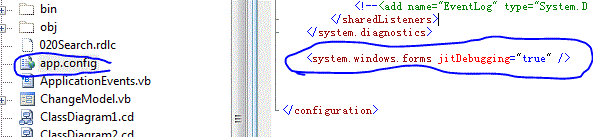
加完这个记录后就正常了。。。。
VS2008,System.Runtime.InteropServices.COMException (0x800401F3): Invalid class string (Exception from HRESULT: 0x800401F3 (CO_E_CLASSSTRING))的更多相关文章
- System.Runtime.InteropServices.COMException: Exception from HRESULT: 0x800AC472
更新至服务器后运行出错: System.Runtime.InteropServices.COMException: Exception from HRESULT: 0x800AC472 解决方法 注册 ...
- System.Runtime.InteropServices.COMException (0x800706BA) 解决方法
提示“操作失败:无法获取MAC地址.”错误的解决方法. .NET 获取 MAC地址可能会遇到 System.Runtime.InteropServices.COMException (0x8007 ...
- Visual Studio 2008 – ASP.NET “System.Runtime.InteropServices.COMException”
The Issue When openning an existing ASP.NET project for the first time in Visual Studio 2008 it retu ...
- System.Runtime.InteropServices.COMException (0x800A03EC): 无法访问文件
使用Microsoft.Office.Interop.Excel 操作 今天在服务器部署,操作程序csv文件转xsl文件的时候,遇到一下问题: System.Runtime.InteropServic ...
- System.Runtime.InteropServices.COMException 检索COM类工厂中CLSID{xxxxxxxxx}的组件时失败解决方法
iis7.5中设定应用程序池中<进程模型>中<标识>为localSystem 提示:System.Runtime.InteropServices.COMException: 命 ...
- excel System.Runtime.InteropServices.COMException (0x80010105): 服务器出现意外情况。 (异常来自 HRESULT:0x80010105 (RPC_E
System.Runtime.InteropServices.COMException (0x80010105): 服务器出现意外情况. (异常来自 HRESULT:0x80010105 (RPC_E ...
- “System.Runtime.InteropServices.COMException”类型的第一次机会异常在 System.Windows.Forms.dll 中发生
最近做一个winform项目,在里面用了webbrowser控件进行html文档打印,遇到了标题所示问题.根据查到的一些资料,在调试>异常>查找中输入“System.Runtime.Int ...
- “System.Runtime.InteropServices.COMException (0x80070422): 无法启动服务”解决方法
应用程序中发生了无法处理的异常.如果单击“退出”,应用程序将立即关闭.无法启动服务,原因可能是已被禁用或其相关联设备没有启动.(异常来自HRESULT:0X80070422).点击详细内容:有关调用实 ...
- System.Runtime.InteropServices.COMException
System.Runtime.InteropServices.COMException (0x80040154): Retrieving the COM class factory for compo ...
随机推荐
- Matlab怎么修改显示数值格式/精度/小数位数
参考:https://jingyan.baidu.com/article/7f41ecec1ad029593c095c70.html
- [物理学与PDEs]第5章习题2 Jacobian 的物质导数
验证 (3. 6) 式, 即证明 $$\bex \cfrac{\rd J}{\rd t}=J\Div_y {\bf v}. \eex$$ 证明: $$\beex \bea \cfrac{\rd J}{ ...
- 【webpack】中file-loader和url-loader使用方法
file-loader 可以指定要复制和放置资源文件的位置,以及如何使用版本哈希命名以获得更好的缓存.此外,这意味着 你可以就近管理图片文件,可以使用相对路径而不用担心部署时 URL 的问题.使用正确 ...
- Django详细流程
一.设计表结构 我们以学生管理系统为例,讲解一下Django的基本操作.首先要设计一下表的结构,这里就不多解释 班级表结构: 表名:grades 字段:班级名称 gname 成立时间 gdate 女生 ...
- cas单点登录防止登出退出后刷新后退ticket失效报500错
https://www.cnblogs.com/wangyang108/p/5844447.html
- MinGW GCC 8.1.0 2018年5月2日 出炉啦
MSYS_MinGW-w64_GCC_810_x86-x64.7z for x86 x64 59.0 MB发布日期: 2018-05-04 下载地址:https://sourceforge.net/p ...
- Linux -- Xshell ,Xftp远程连接中文乱码怎么解决?
### 这几天开始捣鼓lnmp的环境搭建,很多东西还是得自己去经历,才会印象深刻,有所体会,有所收获与成长! 但是,偶尔会遇到一些意想不到问题! Xshell ,Xftp 远程连接的时候出现中文乱码的 ...
- 【原创】大叔经验分享(18)hive2.0以后通过beeline执行sql没有进度信息
一 问题 在hive1.2中使用hive或者beeline执行sql都有进度信息,但是升级到hive2.0以后,只有hive执行sql还有进度信息,beeline执行sql完全silence,在等待结 ...
- 《剑指offer》把数组排成最小的数
本题来自<剑指offer> 反转链表 题目: 思路: C++ Code: Python Code: 总结:
- 《剑指offer》二叉搜索树和双向链表
本题来自<剑指offer> 反转链表 题目: 思路: C++ Code: Python Code: 总结: