
QT 自定义模态对话框
新建一个MsgBox类
msgbox.h 代码
#ifndef MSGBOX_H

#define MSGBOX_H

#include <QDialog>

#include <QPushButton>

#include <QLabel>

#include <QMouseEvent>

#include <QFont>

#include <QPixmap>

#include <QPainter>

#include<QBitmap>

class MsgBox : public QDialog

{

    Q_OBJECT

public:

    MsgBox(QWidget *parent = );

    ~MsgBox();

public:

    QPushButton *ok_button;

    QPushButton *close_button;

    QPushButton *cancel_button;

    QLabel *ask_label;

    QLabel *msg_label;

    QLabel *title_label;

    QString ok_text;

    QString cancel_text;

public:

    void setInfo(QString title_info, QString info,QPixmap pixmap, bool is_ok_hidden,QString language);

protected:

    QPoint move_point;

    bool mouse_press;

    void paintEvent(QPaintEvent *);

    void mousePressEvent( QMouseEvent * event );

    void mouseReleaseEvent( QMouseEvent *);

    void mouseMoveEvent(QMouseEvent *event);

public slots:

    void okOperate();

    void cancelOperate();

    void closeOperate();

};

#endif // MSGBOX_H
msgbox.cpp 代码
#include "msgbox.h"

MsgBox::MsgBox(QWidget *parent)

    : QDialog(parent)

{

      this->resize(, );

      //获取主界面的宽度

      int width = this->width();

      int height = this->height();

      //初始化为未按下鼠标左键

      mouse_press = false;

      //设置标题栏隐藏

      this->setWindowFlags(Qt::FramelessWindowHint | Qt::Dialog);

      close_button = new QPushButton(this);

      //close_button->loadPixmap(":/image/images/bg.png");

      close_button->setGeometry(width-,, , );

      close_button->setStyleSheet("border-image:url(:/image/images/closeBtn.png);");

      //设置标题

      title_label = new QLabel(this);

      title_label->setObjectName(QString::fromUtf8("labelOne"));

      QFont font = title_label->font();

      font.setBold(true);

      title_label->setFont(font);

      title_label->setGeometry(, , width-, );

      //设置提示图片

      msg_label = new QLabel(this);

      msg_label->setGeometry(, , , );

      msg_label->setScaledContents(true);

      //设置提示信息,让QLabel能够自动判断并换行显示:

      ask_label = new QLabel(this);

      ask_label->setGeometry(, , width-, *);

      ask_label->setWordWrap(true);

      ask_label->setAlignment(Qt::AlignTop);

      cancel_button = new QPushButton(this);

      cancel_button->resize(, );

      cancel_button->move(width - cancel_button->width() - , height - );

      ok_button = new QPushButton(this);

      ok_button->resize(, );

      ok_button->move(width - ok_button->width() - cancel_button->width() - , height - );

      ok_button->setObjectName(QString::fromUtf8("pushButtonTwo"));

      cancel_button->setObjectName(QString::fromUtf8("pushButtonTwo"));

      QObject::connect(ok_button, SIGNAL(clicked()), this, SLOT(okOperate()));

      QObject::connect(close_button, SIGNAL(clicked()), this, SLOT(closeOperate()));

      QObject::connect(cancel_button, SIGNAL(clicked()), this, SLOT(cancelOperate()));

}

MsgBox::~MsgBox()

{

}

//设置对话框信息

void MsgBox::setInfo(QString title_info, QString info,QPixmap pixmap,bool is_ok_hidden,QString language)

{

  title_label->setText(QString("  ") + title_info);

  //设置提示信息

  ask_label->setText(info);

  msg_label->setPixmap(pixmap);

  //是否隐藏确定按钮

  ok_button->setHidden(is_ok_hidden);

  if(is_ok_hidden)

  {

      if(language == "中文")

      {

          cancel_button->setText(tr("确定"));

      }

      else if(language == "英文")

      {

          cancel_button->setText(tr("OK"));

      }

      else if(language == "泰文")

      {

          cancel_button->setText(tr("แน่ใจว่า"));

      }

  }

  else

  {

      if(language == "中文")

      {

          ok_button->setText(tr("确定"));

          cancel_button->setText(tr("取消"));

      }

      else if(language == "英文")

      {

          ok_button->setText(tr("OK"));

          cancel_button->setText(tr("Cancel"));

      }

      else if(language == "泰文")

      {

          ok_button->setText(tr("แน่ใจว่า"));

          cancel_button->setText(tr("การยกเลิก"));

      }

  }

  //设置默认按钮为取消按钮

  cancel_button->setFocus();

}

void MsgBox::paintEvent(QPaintEvent *)

{

  QPainter painter(this);

  painter.drawPixmap(rect(), QPixmap(":/image/images/close.png"));

  QBitmap bitmap(this->size());

  QPainter painter2(&bitmap);

  painter2.fillRect(bitmap.rect(), Qt::white);

  painter2.setBrush(QColor(, , ));

  painter2.drawRoundedRect(rect(), , );

  setMask(bitmap);

}

void MsgBox::mousePressEvent( QMouseEvent * event )

{

  //只能是鼠标左键移动和改变大小

  if(event->button() == Qt::LeftButton)

  {

    mouse_press = true;

  }

  //窗口移动距离

  move_point = event->globalPos() - pos();

}

void MsgBox::mouseReleaseEvent( QMouseEvent *)

{

  mouse_press = false;

}

void MsgBox::mouseMoveEvent(QMouseEvent *event)

{

  //移动窗口

  if(mouse_press)

  {

    QPoint move_pos = event->globalPos();

    move(move_pos - move_point);

  }

}

//确认操作

void MsgBox::okOperate()

{

  this->accept();

}

//取消操作

void MsgBox::cancelOperate()

{

  this->reject();

}

//关闭窗体操作

void MsgBox::closeOperate()

{

    close();

}
主函数调用代码:
#include "msgbox.h"

#include <QApplication>

int main(int argc, char *argv[])

{

    QApplication a(argc, argv);

    MsgBox w;

    w.setInfo(QString("提示:"),QString("是否关机?"),QPixmap(":/image/images/tip.png"),false,QString("中文"));

    w.show();

    return a.exec();

}
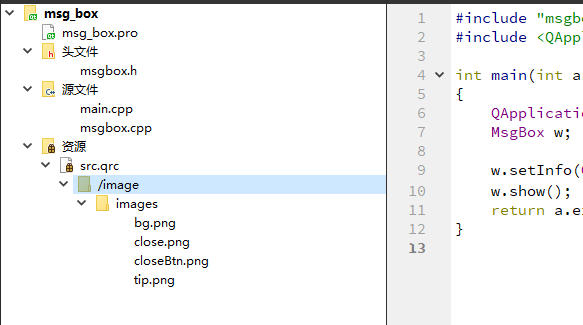
目录构建图:
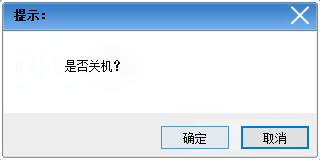
实现效果图:
QT 自定义模态对话框的更多相关文章
- QT创建模态对话框阻塞整个应用程序和非模态对话框唯一性约束的简单示例
QT创建模态对话框阻塞整个应用程序和非模态对话框唯一性约束的简单示例 部分代码: // 创建模态对话框阻塞整个应用程序和非模态对话框唯一性约束 QMenu *pDialog = mBar->ad ...
- C/C++ Qt 自定义Dialog对话框组件应用
在上一篇博文 <C/C++ Qt 标准Dialog对话框组件应用> 中我给大家演示了如何使用Qt中内置的标准对话框组件实现基本的数据输入功能. 但有时候我们需要一次性修改多个数据,使用默认 ...
- Qt的模态对话框和非模态对话框 经常使用setAttribute (Qt::WA_DeleteOnClose)
模态对话框就是指在子对话框弹出时,焦点被强行集中于该子对话框,子对话框不关闭,用户将无法操作其他的窗口.非模态相反,用户仍然可以操作其他的窗口,包括该子对话框的父对话框. 如果从线程角度来讲,模态对话 ...
- 微信小程序 - 自定义模态对话框
更新日期:2018-11-5 微信bug: 在for循环中使用组件时,遮罩层成黑层. 更新时间 2018-9-30 2018-9-30 1.在电脑上调试input超出输入框范围会出现文字模糊以及位移现 ...
- jQuery查找标签--选择器,筛选器,模态对话框, 左侧菜单栏
查找标签 选择器: 基本选择器(同css) id选择器 $("#id") 标签选择器 $('tagName') class选择器 $(".className") ...
- QT模态对话框用法(在UI文件中设置Widget背景图,这个图是一个带阴影边框的图片——酷)
QT弹出模态对话框做法: 1.新建UI文件时,一定要选择基类是QDialog的,我的选择是:Dialog without Buttons(),如下图: 2.然后在使用的时候: MyDialog dlg ...
- QT模态对话框及非模态对话框
QT模态对话框及非模态对话框 模态对话框(Modal Dialog)与非模态对话框(Modeless Dialog)的概念不是Qt所独有的,在各种不同的平台下都存在.又有叫法是称为模式对话框,无模式对 ...
- QT+模态对话框与非模态对话框
#include "mainwindow.h" #include <QMenuBar> #include <QMenu> #include <QAct ...
- QT笔记之模态对话框及非模态对话框
模态对话框(Modal Dialog)与非模态对话框(Modeless Dialog)的概念不是Qt所独有的,在各种不同的平台下都存在.又有叫法是称为模式对话框,无模式对话框等.所谓模态对话框就是在其 ...
随机推荐
- Java_循环
遍历数组: 一个栗子: public class Test01 { public static void main(String[] args) { int[] aa = {19,92,12,03,4 ...
- [LeetCode] Maximize Distance to Closest Person 离最近的人的最大距离
In a row of seats, 1 represents a person sitting in that seat, and 0 represents that the seat is emp ...
- python语法_模块
方便调用的分组函数文件,一个py模块就是一个模块,模块分三类 python标准库 第三方模块 应程序自定义模块 模块的掉用: 可以把多个功能(函数)包含在一个模块文件里,调用时直接使用import 就 ...
- 玩转vue前进刷新,后退不刷新and按需刷新
大白萝卜小课堂开讲了!带你玩转vue前进后退按需刷新! 用vue做后台管理项目,特别是有列表页.列表数据详情页.列表数据修改页功能的码友们,几乎都被vue前进后退都刷新的逻辑坑过,本萝卜更是! 萝卜的 ...
- 基于js的数据结构与算法-数组
Given an array of integers, return indices of the two numbers such that they add up to a specific ta ...
- webpack 4.0 中 clean-webpack-plugin 的使用
其实 clean-webpack-plugin 很容易知道它的作用,就是来清除文件的. 一般这个插件是配合 webpack -p 这条命令来使用,就是说在为生产环境编译文件的时候,先把 build或d ...
- Dubbo工作原理,集群容错,负载均衡
Remoting:网络通信框架,实现了sync-over-async和request-response消息机制. RPC:一个远程过程调用的抽象,支持负载均衡.容灾和集群功能. Registry:服务 ...
- 利用Python实现对Web服务器的目录探测
今天是一篇提升技能的干货分享,操作性较强,适用于中级水平的小伙伴,文章阅读用时约3分钟. PART 1/Python Python是一种解释型.面向对象.动态数据类型的高级程序设计语言. Python ...
- Python程序员为什么一定要掌握Linux?
不少Python新手经常问到学Python到底需不需要学习Linux? Python不是支持Windows和Linux操作系统吗?能在Windows下开发为什么还要学习Linux? 问这样的问题的朋友 ...
- 如何在 Linux 上复制文件/文件夹到远程系统?
从一个服务器复制文件到另一个服务器,或者从本地到远程复制是 Linux 管理员的日常任务之一. 我觉得不会有人不同意,因为无论在哪里这都是你的日常操作之一.有很多办法都能处理这个任务,我们试着加以概括 ...