
CSS3 Flex布局
Flex 用于使页面上的内容自适应屏幕
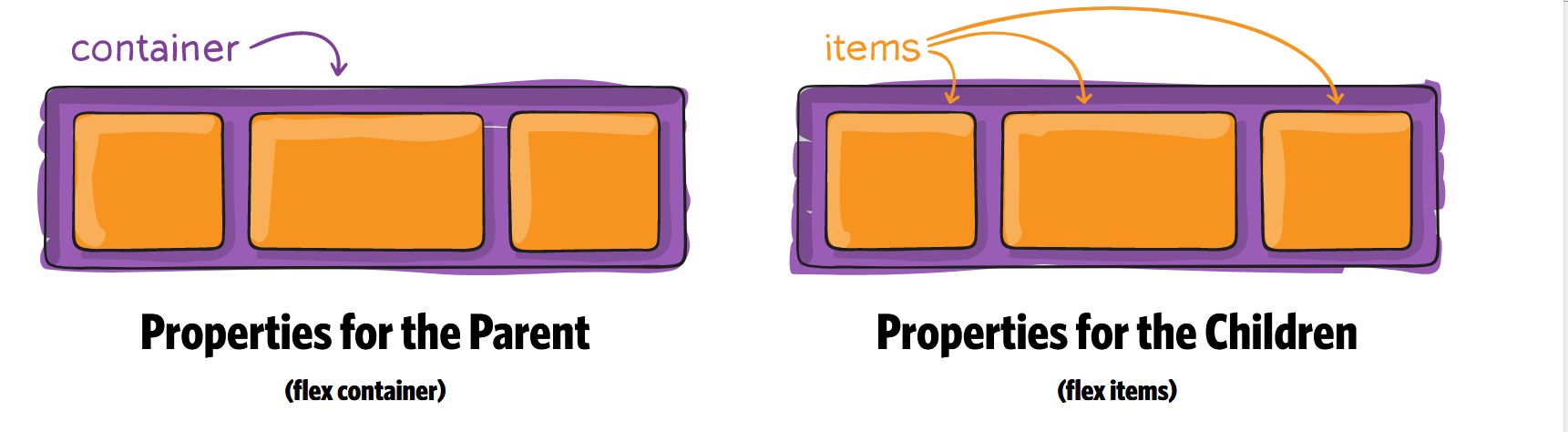
首先,在网页代码的头部,加入一行viewport元标签。
<meta name=”viewport” content=”width=device-width, initial-scale=1″ />
viewport是网页默认的宽度和高度,上面这行代码的意思是,网页宽度默认等于屏幕宽度(width=device-width),原始缩放比例(initial-scale=1)为1.0,即网页初始大小占屏幕面积的100%。
HTML 代码
<div class="container">

    <div class="item"></div>

    <div class="item"></div>

    <div class="item order"></div>

    <div class="item"></div>

    <div class="item"></div>

</div>
Container CSS 代码
1. flex
要使用flex必须在container上加上display:flex 和 display: -webkit-flex; /_ Safari _/
.container {

  display: flex; /* or inline-flex */
  display: -webkit-flex; /_ Safari _/
}
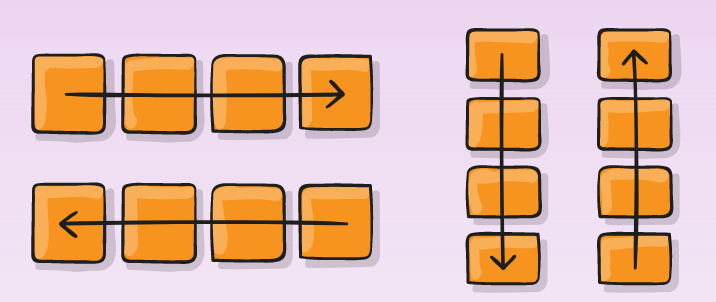
2. flex-direction
.container {

  -webkit-flex-direction: row | row-reverse | column | column-reverse;

  flex-direction: row | row-reverse | column | column-reverse;

}
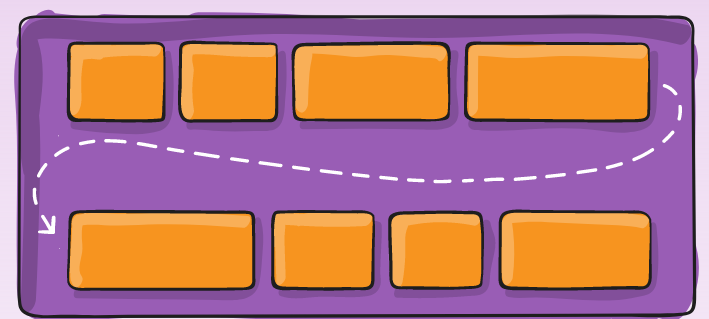
3. flex-wrap
.container{
  -webkit-flex-wrap: nowrap | wrap | wrap-reverse;

  flex-wrap: nowrap | wrap | wrap-reverse;

}
4. flex-flow
This property is a shorthand for setting the flex-direction and flex-wrap properties.
flex-flow: <‘flex-direction’> || <‘flex-wrap’>
.container {

  -webkit-flex-flow:  row nowrap;

  flex-flow:  row nowrap ;

}
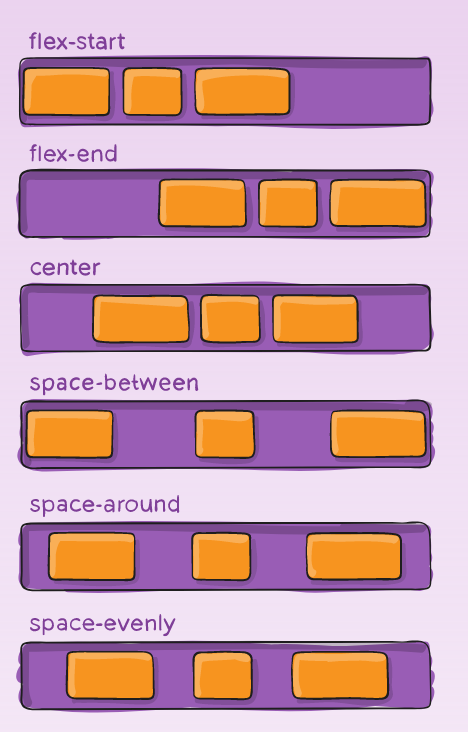
5. justify-content
Value : flex-start | flex-end | center | space-between | space-around | space-evenly;
.container {

  -webkit-justify-content: flex-start; /_ Safari _/

  justify-content:         flex-start;

}
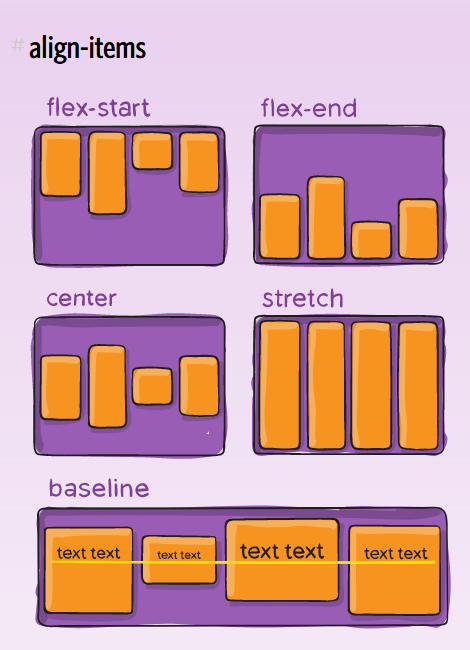
6. align-items
Value : flex-start | flex-end | center | baseline | stretch;
.container {

  -webkit-align-items: stretch; /_ Safari _/

  align-items:         stretch;

}
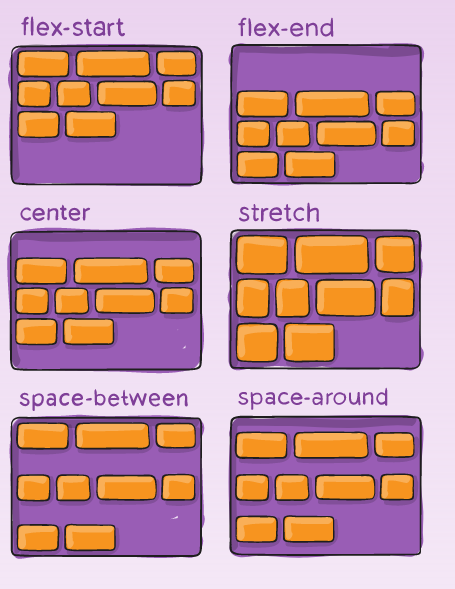
7. align-content
Value : flex-start | flex-end | center | space-between | space-around | stretch;
.container {

  -webkit-align-content: stretch; /_ Safari _/

  align-content:         stretch;

}
Item CSS 代码
1. Order
默认值为0,数值越小,排列越靠前.
.item.order {

  -webkit-order: 1; /_ Safari _/

  order:         1;

}
2. flex-grow
属性定义项目的放大比例,默认为0,即如果存在剩余空间,也不放大。
.item {

  -webkit-flex-grow: 0; /_ Safari _/

  flex-grow:         0;

}
3. flex-shrink
属性定义了项目的缩小比例,默认为1,即如果空间不足,该项目将缩小。
.item {

  flex-shrink: 1;

}
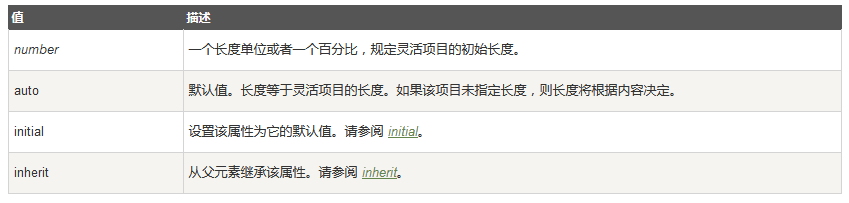
4. flex-basis
This property takes the same values as the width and height properties, and specifies the initial main size of the flex item, before free space is distributed according to the flex factors.
.item {

  -webkit-flex-basis: auto; /_ Safari _/

  flex-basis:         auto;

}
5. flex
This property is the shorthand for the flex-grow, flex-shrink and flex-basis properties. Among other values it also can be set to auto (1 1 auto) and none (0 0 auto).
Default value: 0 1 auto
.item {

  -webkit-flex: 0 1 auto; /_ Safari _/

  flex: 0 1 auto;

}
6. align-self
align-self属性允许单个项目有与其他项目不一样的对齐方式,可覆盖align-items属性。默认值为auto,表示继承父元素的align-items属性,如果没有父元素,则等同于stretch。
Value : auto | flex-start | flex-end | center | baseline | stretch;
.item {

  -webkit-align-self: auto; /_ Safari _/

  align-self:         auto;

}
https://developer.mozilla.org/en-US/docs/Web/CSS/CSS_Flexible_Box_Layout
https://css-tricks.com/snippets/css/a-guide-to-flexbox/
https://scotch.io/tutorials/a-visual-guide-to-css3-flexbox-properties
http://www.ruanyifeng.com/blog/2015/07/flex-grammar.html?utm_source=tuicool)
CSS3 Flex布局的更多相关文章
- CSS3 Flex布局整理(三)-项目属性
一.Flex布局中 Flex Item属性控制,可以指定显示顺序.剩余空间的放大,缩小.交叉轴的排列 1.order:定义项目的排列顺序,数值越小,排列越靠前,默认为0.类似z-index 2.fle ...
- CSS3 Flex布局整理(二)-容器属性
一.Flex容器属性介绍 1.flex-flow :水平或垂直方向上的流动方式,包裹处理,其中包括了flex-direction属性和flex-wrap属性. 2.justify-content:定义 ...
- CSS3 Flex布局整理(一)
一.说明 1.在以往的布局方案中,都是基于盒装模型,依赖display属性+position属性+float属性等. 他对于那些特殊布局非常不方便,比如,垂直居中等. 并且不同浏览器的盒模型还有些差异 ...
- CSS3 Flex布局(伸缩布局盒模型)学习
CSS3 Flex布局(伸缩布局盒模型)学习 转自:http://www.xifengxx.com/web-front-end/1408.html CSS2定义了四种布局:块布局.行内布局.表格布局盒 ...
- CSS3 Flex布局(项目)
一.order属性 order属性定义项目的排列顺序.数值越小,排列越靠前,默认为0. 二.flex-grow属性 flex-grow属性定义项目的放大比例,默认为0,即如果存在剩余空间,也不放大. ...
- CSS3 Flex布局(容器)
一.flex-direction属性 row(默认值):主轴为水平方向,起点在左端. row-reverse:主轴为水平方向,起点在右端. column:主轴为垂直方向,起点在上沿. column-r ...
- CSS3 Flex 布局教程
网页布局(layout)是 CSS 的一个重点应用. 布局的传统解决方案,基于盒状模型,依赖 display 属性 + position属性 + float属性.它对于那些特殊布局非常不方便,比如,垂 ...
- css3 flex 布局
今天做一个小实战,需要让一个登录框始终保持水平和垂直居中,第一个想到的就是通过定位(要想让一个div居中,采用定位可以解决,示例), 然后开始接触flex布局,学完感觉真的好用,现把知识点记录一下,以 ...
- css3 flex布局结合transform生成一个3D骰子
预览地址: https://zhaohh.github.io/flex-dice/index.html 1 Flex 布局 首先聊聊Flex 布局,Flex 布局又称"弹性布局", ...
- css3 flex布局/grid布局
1.CSS3 Flexbox 布局完全指南(图解 Flexbox 布局详细教程) 2.CSS Grid 布局完全指南(图解 Grid 详细教程)
随机推荐
- 江苏省选2019Round2游记
JSOI2019R2过去了. 翻盘变翻车... Day 0 打板子.写了几棵主席树. 然后啃CF 331D3.啃不动 Day 1 开T1.这什么玩意啊...换换换 开T2.一眼\(10\)分的状压,码 ...
- java接口测试入门
一.什么是接口 接口是前端和后端的数据通道 二.如何获取接口 1.开发不提供接口文档,通过抓包工具比如fiddler进行抓取,如下: 步骤一:设置浏览器(比如火狐)代理 步骤二:设置url过滤器,进入 ...
- ora-14400:插入的分区关键字未映射到任何分区
参考:https://blog.csdn.net/rubychen410/article/details/5317553 出现该问题是由于: 1.为表设置了根据时间进行分区(PARTITION),而每 ...
- 简述layui前端ui框架的使用
官方网址:https://www.layui.com/demo/upload.html
- Go语言里的slice
1.切片是基于数组做的一层封装,灵活能够自动扩容. 2.切片的初始化方法 ①直接创建 ②基于已有的数组或切片 ③使用make来创建一个切片 第一个5是切片的大小 第二个5是切片的容量 3.基本操作 ① ...
- Educational Codeforces Round 63 Div. 2
A:找到两个相邻字符使后者小于前者即可. #include<bits/stdc++.h> using namespace std; #define ll long long #define ...
- flutter - 01 基础介绍以及ListView
这篇主要讲flutter最基本的操作.我们从一个实例入手,先不需要知道它里面的每一行是什么意思,我会慢慢说. main.dart import 'package:flutter/material.da ...
- LeetCode--689_Maximum_Sum_of_3_NonOverlapping_Subarrays
原题链接:点击这里 一道很水很水的背包问题? 大概算不上背包吧QAQ 自己的dp 真的是太差劲啦,以后每天一道LeetCode 备战秋招! package leetcode; public class ...
- 3d
http://jokerwang.com/diy-3d%E6%89%93%E5%8D%B0%E6%9C%BA1-%E7%A1%AC%E4%BB%B6%E7%AF%87/
- STS搭建SpringBoot项目
开发工具:推荐IDEA . Spring Tool Suit 虽然很简单,但还是记录一下,图个热闹. 开始 >>> 1. File --> New --> Spring ...