
Google FireBase - fcm 推送 (Cloud Messaging)
要将 Firebase 添加到您的应用,您需要有一个 Firebase 项目以及适用于您的应用的 Firebase 配置文件。
- 如果您还没有 Firebase 项目,请在 Firebase 控制台中创建一个。如果您已经有与自己的移动应用相关联的现有 Google 项目,请点击导入 Google 项目。如果没有,请点击添加项目。
- 点击将 Firebase 添加到您的 Android 应用,然后按设置步骤操作。如果您是导入现有 Google 项目,系统可能会自动执行这些操作,您只需下载配置文件即可。
- 出现提示时,输入应用的软件包名称。请务必输入应用在使用的软件包名称;只有在将应用添加到 Firebase 项目时您才能进行此设置。
- 最后,您要下载一个
google-services.json文件。您可以随时重新下载此文件。 - 如果尚未将此文件复制到项目的模块文件夹(通常是
app/),请执行此操作。
在“根级别”的build.gradle文件添加一条规则。以包含Google服务插件:
 buildscript {

     repositories {

         jcenter()

     }

     dependencies {

         classpath 'com.android.tools.build:gradle:2.3.3'

         classpath 'com.google.gms:google-services:3.2.0'

     }

 }

 allprojects {

     repositories {

         maven { url 'https://maven.google.com' }

         mavenCentral()

         jcenter()

     }

 }
然后在模块Gradle文件中(比如app模块下),底部添加apply plugin行,以启用 Gradle 插件:
 apply plugin: 'com.android.application'

 android {

      // ...

 }

 dependencies {

     // ...

     compile 'com.google.android.gms:play-services-base:11.4.0'

     // Google Firebase cloud messaging

     compile 'com.google.firebase:firebase-messaging:11.4.0'

 }

 apply plugin: 'com.google.gms.google-services'
ECFCMMSGService 继承 FirebaseMessagingService , 重写onMessageReceived方法接收通知消息弹通知栏http请求:
https://fcm.googleapis.com/fcm/send Content-Type:application/json
Authorization:key= App Key
{
"notification" : {
"body" : "You have a new message",
"title" : "",
"icon" : "app icon"
},
"to" : "user token"
}
 http请求:

 https://fcm.googleapis.com/fcm/send

 Content-Type:application/json

 Authorization:key= App Key

 {

     "data" : {

       "request" : "1",

       "xxx" : "xxx"

     },

     "to" : "user token"

 }
(3)Messages with both notification and data payload:
这种消息是在Notification Message的基础上加入一些数据,在用户点击通知栏的时候启动对应的activity并传入intent。
 public class ECFCMMSGService extends FirebaseMessagingService {

     // 它主要用于处理接收 App 正在运行的时候,接收到的推送

     private static final String TAG = "ECFCMMSGService";

     @Override

     public void onMessageReceived(RemoteMessage remoteMessage) {

         super.onMessageReceived(remoteMessage);

         // Check if message contains a data payload.

         if (remoteMessage.getData().size() > 0) {

             Log.d(TAG, "Message data payload: " + remoteMessage.getData());

         }

         // Check if message contains a notification payload.

         if (remoteMessage.getNotification() != null) {

             Log.d(TAG, "Message Notification Body: " + remoteMessage.getNotification().getBody());

             sendNotification(remoteMessage.getNotification().getBody());

         }

     }

     private void sendNotification(String messageBody) {

         Intent intent = new Intent(this, MainActivity.class);

         intent.putExtra("key", messageBody);

         intent.addFlags(Intent.FLAG_ACTIVITY_CLEAR_TOP);

         PendingIntent pendingIntent = PendingIntent.getActivity(this, 0 /* Request code */, intent,

                 PendingIntent.FLAG_ONE_SHOT);

         Bitmap icon2 = BitmapFactory.decodeResource(getResources(),

                 R.mipmap.app_logo);

         Uri defaultSoundUri = RingtoneManager.getDefaultUri(RingtoneManager.TYPE_NOTIFICATION);

         NotificationCompat.Builder notificationBuilder = new NotificationCompat.Builder(this)

                 .setSmallIcon(R.mipmap.app_logo)

                 .setContentTitle("You have a new message.")

                 .setContentText(messageBody)

                 .setAutoCancel(true)

                 .setLargeIcon(icon2)

                 .setSound(defaultSoundUri)

                 .setContentIntent(pendingIntent);

         NotificationManager notificationManager =

                 (NotificationManager) getSystemService(Context.NOTIFICATION_SERVICE);

         notificationManager.notify(new Random().nextInt() /* ID of notification */, notificationBuilder.build());

     }

 }
自定义 ECFCMTokenRefreshService 集成 FirebaseInstanceIdService.
用户token的创建,转换和更新,在onTokenRefresh()方法中获取token并上传到服务器。
 public class ECFCMTokenRefreshService extends FirebaseInstanceIdService {

     // 它主要用于管理 FCM 的注册令牌(下文简称 FCM_TOKEN ),以及更改等。它可以获取到用户设备唯一的一个 FCM_TOKEN ,向单个用户推送消息的时候使用

     private static final String TAG = "FCMTokenRefreshService";

     private ApiService mService;

     private float mRequestTime = 0;

     private int mErrorCount = 0;

     private int REQUEST_ERROR_MAX = 10;

     private TreeMap<String, Object> mParams;

     @Override

     public void onCreate() {

         super.onCreate();

         if (PreferencesUtils.getInstance().isFCMTokenSendServiceSuccess()) {

             return;

         }

         String token = PreferencesUtils.getInstance().getFcmToken();

         if (TextUtils.isEmpty(token)) {

             token = FirebaseInstanceId.getInstance().getToken();

         }

         sendFCMTokenToServer(token);

     }

     @Override

     public void onTokenRefresh() {

         super.onTokenRefresh();

         PreferencesUtils.getInstance().saveFCMTokenSendServiceSuccess(false);

         String token = FirebaseInstanceId.getInstance().getToken();

         Log.i(TAG, "onTokenRefresh: " + token);

         // Important, send the fcm token to the server

         sendFCMTokenToServer(token);

     }

     // http://ebike-test.zriot.net/shop-app/push/token

     private void sendFCMTokenToServer(final String token) {

         if (TextUtils.isEmpty(token)) {

             return;

         }

         if (mService == null) {

             mService = RetrofitHelper.getInstance().getApiService(ApiService.class);

         }

         PreferencesUtils.getInstance().saveFCMToken(token);

         if (!AccountManager.getInstance().isUserLogin()) {

             return;

         }

         if (mParams == null) {

             mParams = new TreeMap<>();

         }

         if (mParams.size() == 0) {

             mParams.put("uid", AccountManager.getInstance().getUserId());

             mParams.put("token", AccountManager.getInstance().getToken());

             mParams.put("fcmToken", token);

             mParams.put("osType", "1"); // 1: android 2 : ios         }

         mService.sendFCMTokenToServer(mParams)

                 .subscribeOn(Schedulers.io())

                 .unsubscribeOn(Schedulers.io())

                 .observeOn(AndroidSchedulers.mainThread())

                 .subscribeWith(new DisposableObserverCallBack<BaseResponse>() {

                     @Override

                     public void onNext(@NonNull BaseResponse response) {

                         if (response == null) {

                             return;

                         }

                         if (response.isRequestSuccess()) {

                             PreferencesUtils.getInstance().saveFCMTokenSendServiceSuccess(true);

                         }

                         mErrorCount = 0;

                     }

                     @Override

                     public void onError(Throwable e) {

                         super.onError(e);

                         if (mErrorCount >= REQUEST_ERROR_MAX) {

                             return;

                         }

                         if (!allowRequest()) {

                             return;

                         }

                         sendFCMTokenToServer(token);

                         mErrorCount += 1;

                     }

                 });

     }

     private boolean allowRequest() {

         if (mRequestTime == 0) {

             mRequestTime = System.currentTimeMillis();

             return true;

         }

         if (System.currentTimeMillis() - mRequestTime < 3000) {

             return false;

         } else {

             mRequestTime = System.currentTimeMillis();

             return true;

         }

     }

 }
在android清单文件中:注册service:
      <service android:name=".fcm.ECFCMMSGService"

             android:stopWithTask="false">

             <intent-filter>

                 <action android:name="com.google.firebase.MESSAGING_EVENT" />

             </intent-filter>

         </service>

         <service android:name=".fcm.ECFCMTokenRefreshService"

             android:stopWithTask="false">

             <intent-filter>

                 <action android:name="com.google.firebase.INSTANCE_ID_EVENT" />

             </intent-filter>

         </service>
注意:
App 是否运行,决定了推送走的两条线路
App 在运行的时候,推送如果有 Notification ,一般也是我们自己去控制的,所以最终它点击后的效果,我们是可以通过 PendingIntent 做部分定制的。
但是如果是在 App 没有运行的情况下,就完全归 FCM 服务帮你完成这一系列的操作,它点击后的效果,只能将你的 App 调起,并且把你需要的参数传递到你的 SplashActivity(Action 为 android.intent.action.MAIN 的 Activity) 上。
推送服务的 icon 和 字体颜色
FCM 的推送通知,可以配置 icon 以及 App 名称的颜色。对 icon 和 字体颜色的配置,需要在 AndroidManifest.xml 中进行。
还有一点需要注意,通常我们 App 的 Icon 都做的非常的精美,但是这种 Icon 是无法直接使用在 FCM 的推送上的。需要额外的定制,以及对应的尺寸。
FCM Icon 的标准:背景透明,以白色图案填充。(实际上,展开后的效果会将icon 进行着色,所以任何颜色最终都会被着色成我们配置的颜色,不配置默认是个浅灰色)。

当然,它和图标的适配一样,不一定需要全套,只需要配置我们需要的尺寸即可。
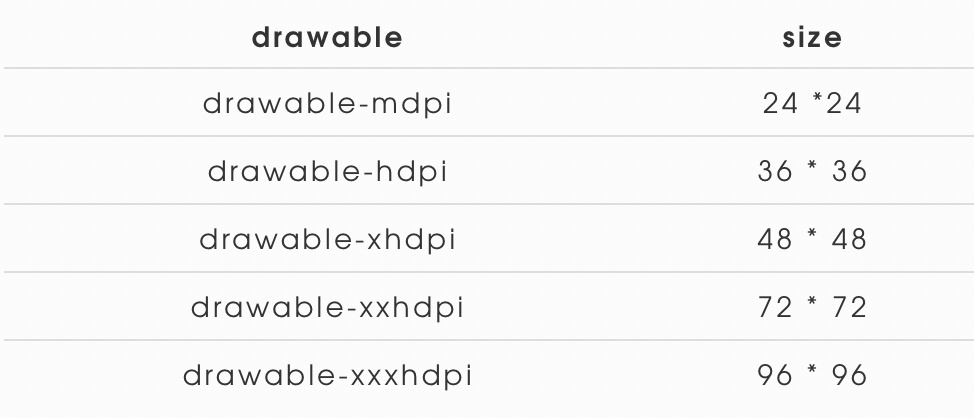
将以下代码行添加到 application 标记内,以设置自定义默认图标和app 名称的自定义颜色:
<!-- Set custom default icon. This is used when no icon is set for incoming notification messages.

     See README(https://goo.gl/l4GJaQ) for more. -->

<meta-data

 android:name="com.google.firebase.messaging.default_notification_icon"

    android:resource="@drawable/ic_stat_ic_notification" />

<!-- Set color used with incoming notification messages. This is used when no color is set for the incoming

     notification message. See README(https://goo.gl/6BKBk7) for more. -->

<meta-data

 android:name="com.google.firebase.messaging.default_notification_color"

    android:resource="@color/colorAccent" />

AndroidManifest.xml
如果配置好这些,依然得到的是一个白色的小块,可以尝试升级一下 FCM 的版本,低版本好像是有这个 Bug ,在新版已经解决了。
问题:
- Firebase API initialization failure.
- Android app not receiving Firebase Notification when app is stopped from multi-task tray
- Push notification works incorrectly when app is on background or not running
- Push not received when app is killed
Firebase控制台测试只能发送Notification Message,测试的时候把App从最近列表划掉之后能收到,而且是在没翻墙的情况下都能收到。当然当进程被完全杀死就收不到了。
Data Message则需要通过server api调用,前台后台都能收到透传消息。
Android Push Notifications using Firebase Cloud Messaging FCM & PHP
Google FireBase - fcm 推送 (Cloud Messaging)的更多相关文章
- google fcm 推送的流程
总结:1.给一个人推,能成功,2.给多个人推,有两种,一种是给组推,一种是给主题推,之前用的是组推,但是不成功,这里换成主题推: <?phpnamespace App\Http\Controll ...
- google的GCM推送使用简介
pom <!-- https://mvnrepository.com/artifact/com.google.gcm/gcm-server --> <dependency> & ...
- 使用GCM服务(Google Cloud Messaging)实现Android消息推送
最近在网上查了关于很多Android消息推送的资料,其中主要有四种方法. 1) 使用GCM服务(Google Cloud Messaging) 2) 使用XMPP协议(Openfire + Spark ...
- 海外 App 的推送服务,试试 FCM 吧!!!
> **版权声明:** > > **本账号发布文章均来自公众号,承香墨影(cxmyDev),版权归承香墨影所有.** > > **每周会统一更新到这里,如果喜欢,可关注公 ...
- PWA 推送实践
PWA 推送实践 最近公司内录任务的系统总是忘记录任务,而那个系统又没有通知,所以想要实现一个浏览器的通知功能,免得自己忘记录入任务. 前端实现通知的几种方式 想要实现通知,我们就需要有个客户端,对于 ...
- Android、iOS和Windows Phone中的推送技术
推送并不是什么新技术,这种技术在互联网时代就已经很流行了.只是随着进入移动互联网时代,推送技术显得更加重要.因为在智能手机中,推送从某种程度上,可以取代使用多年的短信,而且与短信相比,还可以向用户展示 ...
- 【Android应用开发】 推送原理解析 极光推送使用详解 (零基础精通推送)
作者 : octopus_truth 转载请注明出处 : http://blog.csdn.net/shulianghan/article/details/45046283 推送技术产生场景 : -- ...
- Android P正式版即将到来:后台应用保活、消息推送的真正噩梦
1.前言 对于广大Android开发者来说,Android O(即Android 8.0)还没玩热,Andriod P(即Andriod 9.0)又要来了. 下图上谷歌官方公布的Android P ...
- android系统和ios系统是如何实现推送的,ios为什么没有后台推送
ios系统为什么没有后台推送? iOS 为了真正地为用户体验负责,不允许应用在后台活动.有了这个限制,但是对于终端设备,应用又是有必要“通知”到达用户的,随时与用户主动沟通起来的(典型的如聊天应用). ...
随机推荐
- windows 双网卡同时上专网(内网)和外网
本操作是用网线做专网(内网),无线网卡用于外网 1. 记录有线网卡的网络的网关,例如10.103.14.1 2. 有线网卡必须是手动指定的ip地址,把网关清掉,例如 3. 删除0.0.0.0 路由 r ...
- 关于HashMap put元素的原理
HashMap集合put元素的原理:(1)计算key的hashCode(2)将key的hashCode作为计算因子,通过哈希算法计算HashMap的数组下标index(3)如果index下标的数组元素 ...
- java中几种加/解密API
如基本的单向加密算法: BASE64 严格地说,属于编码格式,而非加密算法 MD5(Message Digest algorithm 5,信息摘要算法) SHA(Secure Hash Algorit ...
- easyui datagrid使用按钮
$('#datagrid').datagrid({ border:false, fitColumns:true, singleSelect: true, url:url, columns:[[ {fi ...
- grep、awk、sed的巩固练习
作者:邓聪聪 提取日志或文本中的关键内容 Apr :: localhost NetworkManager[]: <info> (eno16777736): Activation: star ...
- 微软推荐的.net命名规范
许多命名约定都与标识符的大小写有关.值得注意的是,公共语言运行库 (CLR) 支持区分大小写和不区分大小写的语言.本主题中描述的大小写约定可帮助开发人员理解和使用库. 大小写样式 下列术语描述了标识符 ...
- 题解 P4705 【玩游戏】
这题是真的神仙啊...居然用的 stl 来卡常? 话说 998244353 真的可以一眼 NTT ? noteskey 所以说只要推柿子就好了但是有的地方的推导根本就想不到... 我们令第 t 个答案 ...
- Razor Page 文件
Razor Pages 所有的Razor文件都以 .cshtml 结尾.大部分Razor文件都是可浏览的,包含客户端代码和服务器端代码的混合,处理后会将HTML发送到浏览器.这些页面通常被称为“内容页 ...
- Mac 小功能
Safari 安装扩展 https://safari-extensions.apple.com/?category=translation 关闭第三方验证 有时候打开自己下载的安装包会提示 ...
- 2018-2019-2 网络对抗技术 20165206 Exp6 信息搜集与漏洞扫描
- 2018-2019-2 网络对抗技术 20165206 Exp6 信息搜集与漏洞扫描 - 实验任务 (1)各种搜索技巧的应用 (2)DNS IP注册信息的查询 (3)基本的扫描技术:主机发现.端口 ...