
Autofac的基本使用---4、使用Config配置
准备
使用的表是Student,创建相关的IDAL、DAL、IBLL、BLL层。
使用EF,创建一个Model层,存放edmx文件。
创建一个Infrastructure层,基础设施项目,使用泛型类型。

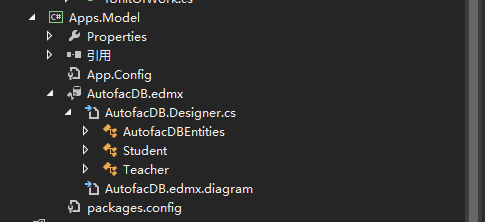
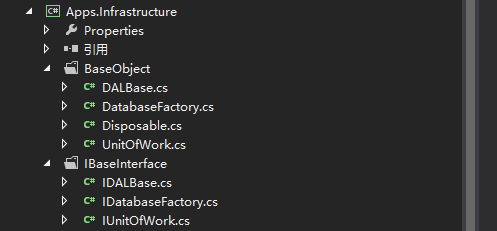
普通类型的使用
1.APP.Config 配置信息
此处有个需要注意的地方:configSections节点必须要放在configuration节点的最上面,否则运行会报错。这个在MSDN上有说明。
<?xml version="1.0" encoding="utf-8"?>
<configuration>
<configSections>
<section name="autofac" type="Autofac.Configuration.SectionHandler,Autofac.Configuration"></section>
</configSections>
<autofac configSource="XmlConfig\autofac.config" />
<connectionStrings>
<add name="AutofacDBEntities" connectionString="metadata=res://*/AutofacDB.csdl|res://*/AutofacDB.ssdl|res://*/AutofacDB.msl;provider=System.Data.SqlClient;provider connection string="data source=.;initial catalog=AutofacDB;user id=sa;password=123456;MultipleActiveResultSets=True;App=EntityFramework"" providerName="System.Data.EntityClient" />
</connectionStrings>
<startup>
<supportedRuntime version="v4.0" sku=".NETFramework,Version=v4.5" />
</startup>
<runtime>
<assemblyBinding xmlns="urn:schemas-microsoft-com:asm.v1">
<dependentAssembly>
<assemblyIdentity name="Autofac" publicKeyToken="17863af14b0044da" culture="neutral" />
<bindingRedirect oldVersion="0.0.0.0-3.5.0.0" newVersion="3.5.0.0" />
</dependentAssembly>
</assemblyBinding>
</runtime>
</configuration>
2.Autofac.config配置信息
<?xml version="1.0" encoding="utf-8"?>

<autofac>

  <components>

    <!--普通类型Student-->

    <component type="Apps.DAL.StudentDAL,Apps.DAL" service="Apps.IDAL.IStudentDAL,Apps.IDAL" />

    <component type="Apps.BLL.StudentBLL,Apps.BLL" service="Apps.IBLL.IStudentBLL,Apps.IBLL" />

  </components>

</autofac>
3.控制台程序代码
using System;

using System.Collections.Generic;

using System.Linq;

using System.Text;

using System.Threading.Tasks;

using Apps.BLL;

using Apps.DAL;

using Apps.IBLL;

using Apps.IDAL;

using Apps.Infrastructure.BaseObject;

using Apps.Infrastructure.IBaseInterface;

using Apps.Model;

using Autofac;

using Autofac.Configuration;

namespace Apps.Con

{

    class Program

    {

        static void Main(string[] args)

        {

            #region 普通类型---Student---Config获取配置

            var builder = new ContainerBuilder();

            builder.RegisterModule(new ConfigurationSettingsReader("autofac"));

            // 编译容器完成注册且准备对象解析

            var container = builder.Build();

            // 现在你可以使用 Autofac 解析服务. 例如,这行将执行注册的lambda表达式对于 IConfigReader 服务.

            //但是我们不推荐直接操作容器,这会导致内存泄漏。

            //当我们解析出一个组件时,依赖于我们定义的lifetime scope,一个新的对象实例会被创建。

            using (var scope = container.BeginLifetimeScope())

            {

                //从容器中解析需要使用的组件

                var iStudentBLL = scope.Resolve<IStudentBLL>();

                //调用解析后的组件中的方法

                List<Student> list = iStudentBLL.GetList().ToList();

                Console.WriteLine("List中的数据行:" + list.Count);

            }

            #endregion

            Console.ReadKey();

        }

    }

}
(1)使用流程
a.参见Autofac管理注册类的容器实例
var builder = new ContainerBuilder();
b.下面就需要为这个容器注册它可以管理的类型
builder.RegisterType<StudentDAL>().As<IStudentDAL>();
c.注册泛型,这个地方需要把泛型进行注册,否则无法正常执行
builder.RegisterGeneric(typeof(UnitOfWork<>)).As(typeof(IUnitOfWork<>)).SingleInstance();
或
builder.RegisterType<UnitOfWork<AutofacDBEntities>>().As<IUnitOfWork<AutofacDBEntities>>().SingleInstance();
d.生成具体的实例
var container = builder.Build();
e.在应用运行期间,你需要从容器生命周期域中解析出组件实例来使用它们。
using (var scope = container.BeginLifetimeScope()) { }
f.从容器中解析需要使用的组件
var iStudentBLL = scope.Resolve<IStudentBLL>();
g.调用解析出来的组件的方法
List<Student> list = iStudentBLL.GetList().ToList();
(2)中间碰到的问题。
在官方文档,http://docs.autofac.org/en/latest/configuration/xml.html#configuring-with-application-configuration-legacy-pre-4-0
其中的配置示例,component节点中。
type属性,是 类完整命名空间(包括类名),类的命名空间(不包括类名)
service属性,是 类完整命名空间(包括类名)
与示例中的区别就是,示例中的service属性值 与type保持一致,均有","逗号 后加类的命名空间。而官方文档中却没有。
当示例也这么编写时,运行就报错了。
<autofac defaultAssembly="Autofac.Example.Calculator.Api">

    <components>

        <component

            type="Autofac.Example.Calculator.Addition.Add, Autofac.Example.Calculator.Addition"

            service="Autofac.Example.Calculator.Api.IOperation" />

        <component

            type="Autofac.Example.Calculator.Division.Divide, Autofac.Example.Calculator.Division"

            service="Autofac.Example.Calculator.Api.IOperation" >

            <parameters>

                <parameter name="places" value="4" />

            </parameters>

        </component>

  </components>

</autofac>
泛型类型的使用
当在autofac.config配置文件中,如此配置。
泛型类型的配置失败,无法正常运行,随之放弃。
不知道如何进行泛型类型的配置设置。
<?xml version="1.0" encoding="utf-8"?>

<autofac>

  <components>

    <!--普通类型Student-->

    <!--<component type="Apps.DAL.StudentDAL,Apps.DAL" service="Apps.IDAL.IStudentDAL,Apps.IDAL" />

    <component type="Apps.BLL.StudentBLL,Apps.BLL" service="Apps.IBLL.IStudentBLL,Apps.IBLL" />-->

    <!--泛型类型Teacher-->

    <component

      type="Apps.Infrastructure.BaseObject.UnitOfWork,Apps.Infrastructure.BaseObject"

      service="Apps.Infrastructure.IBaseObject.IUnitOfWork,Apps.Infrastructure.IBaseObject" />

    <component

      type="Apps.Infrastructure.BaseObject.DatabaseFactory, Apps.Infrastructure.BaseObject"

      service="Apps.Infrastructure.IBaseObject.IDatabaseFactory,Apps.Infrastructure.IBaseObject" />

    <component type="Apps.DAL.TeacherDAL,Apps.DAL" service="Apps.IDAL.ITeacherDAL" />

    <component type="Apps.BLL.TeacherBLL,Apps.BLL" service="Apps.IBLL.ITeacherBLL" />

  </components>

</autofac>
Autofac的基本使用---4、使用Config配置的更多相关文章
- Web.config配置数据库连接
web.config配置数据库连接 第一种:取连接字符串 string connString = System.Web.Configuration.WebConfigurationManager. ...
- Asp.net Web.Config - 配置元素 caching
Asp.net Web.Config - 配置元素 caching 记得之前在写缓存DEMO的时候,好像配置过这个元素,好像这个元素还有点常用. 一.caching元素列表 元素 说明 cache ...
- asp.net中web.config配置节点大全详解
最近网上找了一些关于Web.config配置节点的文章,发现很多都写的都比较零散,而且很少有说明各个配置节点的作用和用法.搜索了一下发现有一篇写的不错,这里引用一下 原文地址 http://www.c ...
- 十五天精通WCF——第二天 告别烦恼的config配置
经常搞wcf的基友们肯定会知道,当你的应用程序有很多的“服务引用”的时候,是不是有一种疯狂的感觉...从一个环境迁移到另外一个环境,你需要改变的 endpoint会超级tmd的多,简直就是搞死了人.. ...
- web.config配置详细说明
(一).Web.Config是以XML文件规范存储,配置文件分为以下格式 1.配置节处理程序声明 特点:位于配置文件的顶部,包含在<configSections>标志中. 2.特定应 ...
- EF连接MySQL数据Web.Config配置
EF连接MySQL数据Web.Config配置 <?xml version="1.0" encoding="utf-8"?> <configu ...
- app.config 配置多项 配置集合 自定义配置(3)
再说说利用app.config配置多个自定义的方法.先看这个例子:美国家庭Simpson的家里有父亲母亲和三个儿女,而中国的老王只有独生子女.结构如下: <?xml version=" ...
- springcloud之config配置中心-Finchley.SR2版
本篇和大家分享的是springcloud-config配置中心搭建,写到这里突然想起自己曾今开源过基于Redis发布订阅编写的一个配置中心,刚看了git星数有点少哈哈,这里顺势发个连接欢迎大侠们点赞: ...
- iis设置默认文档,提示web.config配置xml格式不正确
网站上传后,配置默认文档,提示web.config配置xml格式不正确,几经尝试,发现是sqlserver密码中的“&”符号惹的祸,web.config文件中不能使用该字符.分享出来,大家遇到 ...
随机推荐
- P3619 魔法
考虑两个任务 \(1\) 和 \(2\),当前时间为 \(T\),两个任务都要完成. 先完成任务 \(1\) 的条件是 \(T>t_1\) 且 \(T+b_1>t_2\),先完成任务 \( ...
- 【初等数论】裴蜀定理&扩展欧几里得算法
裴蜀定理: 对于\(a,b\in N^*, x, y\in Z\),方程\(ax+by=k\)当且仅当\(gcd(a, b)|k\)时有解. 证明: 必要性显然. 充分性:只需证明当\(k=gcd(a ...
- Gin + 七牛云对象存储
配置七牛云存储 创建存储空间 拿到密钥 安装七牛云对象存储SDK 推荐go.mod安装 // 将下面地址复制到go.mod,然后执行go mod download github.com/qiniu/a ...
- Pytest自动化测试 - 完美结合Allure
简介 Allure Framework是一种灵活的.轻量级.多语言测试报告工具. 不仅可以以简洁的网络报告形式非常简洁地显示已测试的内容, 而且还允许参与开发过程的每个人从日常执行中提取最大程度的有用 ...
- VM15 Ubuntu18.04下固定IP
输入su 进入root用户 为下面修改文件内容提供权限 1.查看自己网卡名称:输入命令: ifconfig -a 或者 ip link 或者 ip addr 所以我的网卡名称是:ens33 2. 然后 ...
- Android动画系列之属性动画
原文首发于微信公众号:jzman-blog,欢迎关注交流! 属性动画相较帧动画和补间动画更强大,帧动画和补间动画只能应用于 View 及其子类,而属性动画可以修改任何对象的属性值,属性值可在指定的一段 ...
- Python中使用f字符串进行字符串格式化的方法
在<第3.10节 Python强大的字符串格式化新功能:使用format字符串格式化>介绍了使用format进行字符串格式化的方法,在Python 3.6中,如果格式化字符串中的关键字参数 ...
- 第8章 Python类中常用的特殊变量和方法目录
第8章 Python类中常用的特殊变量和方法 第8.1节 Python类的构造方法__init__深入剖析:语法释义 第8.2节 Python类的__init__方法深入剖析:构造方法案例详解 第8. ...
- PyQt(Python+Qt)学习随笔:树型部件QTreeWidget的itemAbove、itemBelow方法作用探究
老猿Python博文目录 专栏:使用PyQt开发图形界面Python应用 老猿Python博客地址 在QTreeWidget的方法中,对于itemBelow.itemAbove方法,官网文档介绍非常简 ...
- PyQt(Python+Qt)学习随笔:Qt Designer中QAbstractButton派生按钮部件的icon属性和iconSize属性
icon属性 icon属性保存按钮上展示的图标,图标的缺省大小由图形界面的样式决定,但可以通过 iconSize 属性进行调整. 图标的几种子属性状态的含义与QWidget的windowIcon属性相 ...