
React.createClass vs. ES6 Class Components
1
1
1
https://www.fullstackreact.com/articles/react-create-class-vs-es6-class-components/
React.createClass vs. ES6 Class Components
New React developers are often confused when they encounter two different styles for declaring React components. The React ecosystem is currently split between the
React.createClasscomponent declaration:const MyComponent = React.createClass({
render() {
return(<p>I am a component!</p>);
}
});
And the ES6 class component declaration:
class MyComponent extends React.Component {

  render() {

    return(<p>I am a component, too!</p>);

  }

}
Have you been wondering what the difference is between
React.createClassand ES6 class components? And why they both exist? And which you should use? Read on ...First, a little history...
As a prototypical language, JavaScript didn't have classes for much of its existence. ES6, the latest version of JavaScript finalized in June 2015, introduced classes as "syntactic sugar." From MDN:
The class syntax is not introducing a new object-oriented inheritance model to JavaScript. JavaScript classes provide a much simpler and clearer syntax to create objects and deal with inheritance.
Because JavaScript didn't have classes, React included its own class system.
React.createClassallows you to generate component "classes." Under the hood, your component class is using a bespoke class system implemented by React.With ES6, React allows you to implement component classes that use ES6 JavaScript classes. The end result is the same -- you have a component class. But the style is different. And one is using a "custom" JavaScript class system (
createClass) while the other is using a "native" JavaScript class system.In 2015, when we broke ground for our book, it felt like the community was still largely mixed. Key figures from Facebook were stating that the
React.createClassstyle was just fine. We felt it was easier to understand given that developers were still adopting ES6.Since then, the community has been shifting towards ES6 class components. This is for good reason. React used
createClassbecause JavaScript didn't have a built-in class system. But ES6 has enjoyed swift adoption. And with ES6, instead of reinventing the wheel React can use a plain ES6 JavaScript class. This is more idiomatic and less opaque than the custom class generated bycreateClass.So, responding to the momentum, we decided to move over to ES6 class components in the book.
For the developer, the differences between components created with ES6 classes and
createClassare fortunately minimal. If you've learned how to write React components withcreateClass, should you ever want to use ES6 classes you'll find the transition easy.Creating components with
createClass()To compare the two component styles, let's implement a checkbox as a React component.
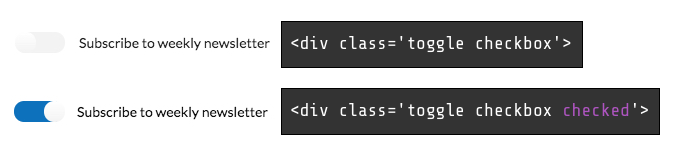
In the CSS framework we're using, we can toggle whether or not a checkbox is checked by changing the class on a div:
When using React's
createClass()method, we pass in an object as an argument. So we can write a component usingcreateClassthat looks like this:const ToggleCheckbox = React.createClass({
getInitialState() {
return {
checked: false,
};
}, toggleChecked() {
this.setState({
checked: !this.state.checked,
});
}, render() {
const className = this.state.checked ?
'toggle checkbox checked' : 'toggle checkbox';
return (
<div className={className}>
<input
type='checkbox'
name='public'
onClick={this.toggleChecked}
>
<label>Subscribe to weekly newsletter</label>
</div>
);
}
});
Using an ES6 class to write the same component is a little different. Instead of using a method from the
reactlibrary, we extend an ES6 class that the library defines,Component.Let's write a first draft of this ES6 class component. We won't define
toggleCheckedjust yet:class ToggleCheckbox extends React.Component {
constructor(props, context) {
super(props, context); this.state = {
checked: false,
};
} render() {
// ... same as component above
}
}
constructor()is a special function in a JavaScript class. JavaScript invokesconstructor()whenever an object is created via a class. If you've never worked with an object-oriented language before, it's sufficient to know that React invokesconstructor()first thing when initializing our component. React invokesconstructor()with the component'spropsandcontext.Whereas before we used the special React API method
getInitialState()to setup our state, with ES6 classes we can setthis.statedirectly here in the constructor. Note that this is the only time we'll ever usethis.state = Xin the lifetime of our component. Beyond initializing the state we must callthis.setState()to modify the state.We invoke
super()at the top ofconstructor(). This invokes theconstructor()function defined byReact.Componentwhich executes some necessary setup code for our component. It's important to callsuper()whenever we define aconstructor()function. Furthermore, it's good practice to call it on the first line.Because our component doesn't use
propsorcontext, it's OK to not pass those along:class ToggleCheckbox extends React.Component {
constructor() {
super();
// ...
}
}
Now let's add
toggleChecked. The implementation of the method is the same as before:class ToggleCheckbox extends React.Component { // ... toggleChecked() {
this.setState({
checked: !this.state.checked,
});
} // ...
}
Except, this wouldn't work as expected. Here's the odd part: Inside both
render()andconstructor(), we've witnessed thatthisis always bound to the component. But inside our custom component methodtoggleChecked(),thisis actuallynull.In JavaScript, the special
thisvariable has a different binding depending on the context. For instance, insiderender()we say thatthisis "bound" to the component. Put another way,this"references" the component.Understanding the binding of
thisis one of the trickiest parts of learning JavaScript programming. Given this, it's fine for a beginner React programmer to not understand all the nuances at first.In short, we want
thisinsidetoggleChecked()to reference the component, just like it does insiderender(). But why doesthisinsiderender()andconstructor()reference the component whilethisinsidetoggleChecked()does not?For the functions that are part of the standard React component API like
render(), React bindsthisto the component for us.Indeed, this is why we had no issues when using
createClassto define our component. When usingcreateClass, React binds every method to the component. That's one of the biggest differences betweencreateClasscomponents and ES6 class components: Any time we define our own custom component methods for an ES6 class component, we have to manually bindthisto the component ourselves.There's a few patterns that we can use to do so. One popular approach is binding the method to the component in the
constructor(), like this:class ToggleCheckbox extends React.Component {
constructor(props, context) {
super(props, context); this.state = {
checked: false,
}; // We bind it here:
this.toggleChecked = this.toggleChecked.bind(this);
} toggleChecked() {
// ...
} render() {
// ...
}
}
Function's
bind()method allows you to specify what thethisvariable inside a function body should be set to. What we're doing here is a common JavaScript pattern. We're redefining the component methodtoggleChecked(), setting it to the same function but bound tothis(the component). Now, whenevertoggleChecked()executes,thiswill reference the component as opposed tonull.At this point, both of our components will behave exactly the same. While the implementation details under the hood are different, on the surface the variance is relatively minimal.
The "binding" quirk for ES6 class components is a little perplexing. You'd be right to ask: React aside, why doesn't
thisinside an ES6 class method reference the instantiated object?We think this answer on Reddit sums it up nicely:
Because ES6 classes are mostly syntactic sugar for the existing Javascript prototype inheritance behavior, per this example:
function MyFunction() {

    this.a = 42

}

MyFunction.prototype.someMethod = function() {

    console.log("A: ", this.a);

}

var theInstance = new MyFunction();

theInstance.someMethod(); // "42"

var functionByItself = theInstance.someMethod;

functionByItself(); // undefined
In the same way, a function defined as part of a class doesn't get
thisauto-bound by default - it's based on whether you're calling it with the dot syntax, or passing around a standalone reference.An alternative ES6 class component style using property intializers
Because of this, ES6 class components come with this bit of extra ceremony. In our own projects, we use an experimental JavaScript feature called property initializers. While not yet ratified for JavaScript adoption, the proposed syntax is compelling. It provides a terser syntax for both initializing state and ensuring custom component methods are bound to the component. To give you an idea of why this experimental feature is popular among React developers, here's what our component would look like re-written using property initializers:
class ToggleCheckbox extends React.Component {

  // state initialized outside constructor

  state = {

    checked: false,

  };

  // Using an *arrow* function ensures `this` bound to component

  toggleChecked = () => {

    this.setState({

      checked: !this.state.checked,

    });

  }

  render() {

    // ...

  }

}
We'll discuss property initializers -- and how to use them in your projects -- in further detail in a subsequent blog post.
EDIT: That blog post is live!
Which should you use?
Ultimately, which component declaration method you use is up to you and your team. While the community is moving towards ES6 class components, if you're already using
createClasswidely there's no need nor rush to upgrade. And should you decide to change to ES6 class components in the future, there are automated tools to help you do this easily likereact-codemod. (If there's enough demand, we'll write a blog post about this process, too)If you'd like to read more about binding and ES6 classes, check out these two links:
- Why aren't methods of an object created with class bound to it in ES6? (Stack Overflow)
- Binding Methods to Class Instance Objects (Pony Foo)
Because you found this post helpful, you'll love our book — it's packed with over 800 pages of content and over a dozen projects, including chapters on React fundamentals, Redux, Relay, GraphQL, and more.
1
1
1
1
1
1
1
1
React.createClass vs. ES6 Class Components的更多相关文章
- React.createClass和extends Component的区别
React.createClass和extends Component的区别主要在于: 语法区别 propType 和 getDefaultProps 状态的区别 this区别 Mixins 语法区别 ...
- 转载 React.createClass 对决 extends React.Component
先给出结论,这其实是殊途同归的两种方式.过去我们一般都会使用 React.createClass 方法来创建组件,但基于 ES6 的小小语法糖,我们还可以通过 extends React.Compon ...
- react native 中es6语法解析
react native是直接使用es6来编写代码,许多新语法能提高我们的工作效率 解构赋值 var { StyleSheet, Text, View } = React; 这句代码是ES6 中新增的 ...
- react ES5 与ES6的写法
ES5var React = require('react'); var ReactDOM = require('react-dom'); // 定义组件 var HelloMessage = Rea ...
- [ES6]react中使用es6语法
前言 不论是React还是React-native,facebook官方都推荐使用ES6的语法,没在项目中使用过的话,突然转换过来会遇到一些问题,如果还没有时间系统的学习下ES6那么注意一些常见的写法 ...
- [react 基础篇]——React.createClass()方法同时创建多个组件类
react 组件 React 允许将代码封装成组件(component),然后像插入普通 HTML 标签一样,在网页中插入这个组件.React.createClass 方法就用于生成一个组件类 一个组 ...
- React.createClass 、React.createElement、Component
react里面有几个需要区别开的函数 React.createClass .React.createElement.Component 首选看一下在浏览器的下面写法: <div id=" ...
- React ES5 (createClass) 和 ES6 (class)
https://www.w3cplus.com/react/react-es5-createclass-vs-es6-classes.html http://blog.csdn.net/shaleil ...
- React相关:npm,ES6,
1.NPM: 参考:npm使用入门 npm 学习笔记整理 2.ES6参考:ES6 let命令:ES6新增了let命令,用来声明变量.它的用法类似于var,但是所声明的变量,只在let命令所在的代码块 ...
随机推荐
- ADB命令连接逍遥模拟器
注:打开模拟器开发者模式 ->USB调试模式 1.先进入逍遥模拟器安装目录(MEmu文件夹下),如:D:\Program Files\Microvirt\MEmu 2.在CMD下输入:adb c ...
- UDP flood UDP Port Denial-of-Service Attack
https://baike.baidu.com/item/UDP%20flood/5504851 UDPFlood是日渐猖厥的流量型DoS攻击,原理也很简单.常见的情况是利用大量UDP小包冲击DNS服 ...
- spring boot 启动 开启注解 加载 bean
业务描述:创建一个cache类然后交给spring 管理. @Component @Scope("singleton") public class Cache { public C ...
- 「一本通 1.3 例 5」weight]
「一本通 1.3 例 5」weight 题面 给定原数列 \(a_1,a_2,a_n\) ,给定每个数的前缀和以及后缀和,并且打乱顺序. 给出一个集合 \(S\) 要求从集合 \(S\) 中找到合适的 ...
- 一文打尽端口复用 VS Haproxy端口复用
出品|MS08067实验室(www.ms08067.com) 本文作者:Spark(Ms08067内网安全小组成员) 1.概述 Haproxy是一个使用c语言开发的高性能负载均衡代理软件,提供tc ...
- 31.FTP简介
1.FTP 是一种在互联网中进行文件传输的协议,基于客户端/服务器模式,默认使用20.21号端口,其中端口20(数据端口)用于进行数据传输,端口21(命令端口)用于接受客户端发出的相关FTP 命令与参 ...
- sql如何查询数据库最后10条记录并正序输出
select * from (select * from 表名 order by 字段 desc limit 10) 临时表 order by 字段
- 【疯狂挖坑】linux服务器尝试中的问题(nohup等)
实验环境:Ubuntu 16.0.4 首当其冲: 1. nohup使用及究极重要事项 我们用服务器肯定都是想在服务器存点什么.让服务器帮我们干点什么,这时候就需要nohup(no hang up)提供 ...
- 2019牛客暑期多校训练营(第十场)B-Coffee Chicken
>传送门< 题意:S(1)="COFFEE",S(2)="CHICKEN" ,S(n) = S(n−2)+S(n−1),请输出 S(n) 中从第 k ...
- AtCoder Beginner Contest 179
比赛链接:https://atcoder.jp/contests/abc179/tasks A - Plural Form 题意 给出一个由小写字母组成的单词,如果单词以 $s$ 结尾,在单词的末尾加 ...