
Android实例-设置消息提醒(XE8+小米2)
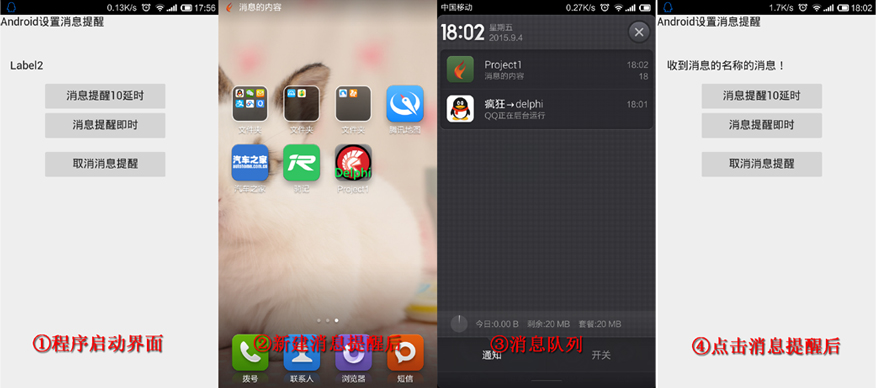
相关资料:
1.官网实例:http://docwiki.embarcadero.com/RADStudio/XE5/en/Mobile_Tutorial:_Using_the_Notification_Center_(iOS_and_Android)
结果:
1.二个按钮可以新建消息提醒,最小化也是新建消息提醒。
2.程序必须最小化后才能点击消息提醒Label2才会有反映。
实例代码:
 unit Unit1;

 interface

 uses

   System.SysUtils, System.Types, System.UITypes, System.Classes, System.Variants,

   FMX.Types, FMX.Controls, FMX.Forms, FMX.Graphics, FMX.Dialogs,

   FMX.Notification, FMX.Controls.Presentation, FMX.StdCtrls,

   FMX.Platform;//需要引入

 type

   TForm1 = class(TForm)

     NotificationCenter1: TNotificationCenter;

     Button1: TButton;

     Button2: TButton;

     Label1: TLabel;

     Label2: TLabel;

     Button3: TButton;

     procedure Button1Click(Sender: TObject);

     procedure Button2Click(Sender: TObject);

     procedure Button3Click(Sender: TObject);

     procedure FormCreate(Sender: TObject);

     procedure NotificationCenter1ReceiveLocalNotification(Sender: TObject;

       ANotification: TNotification);

   private

     flag: Boolean;

     function HandleAppEvent(AAppEvent: TApplicationEvent; AContext: TObject): Boolean;

     { Private declarations }

   public

     { Public declarations }

   end;

 var

   Form1: TForm1;

 implementation

 {$R *.fmx}

 {$R *.NmXhdpiPh.fmx ANDROID}

 //延时新建一个消息提醒

 procedure TForm1.Button1Click(Sender: TObject);

 var

   MyNotification: TNotification;

 begin

   //通过消息中心创建消息

   MyNotification := NotificationCenter1.CreateNotification;

   try

     MyNotification.Name := '消息的名称'; //设置消息的名称

     MyNotification.AlertBody := '消息的内容'; //设置消息的内容

     MyNotification.Number := ;//设置图标标号

     MyNotification.FireDate := Now + EncodeTime(,, , ); //设置 10 秒后触发消息

     //将消息提交消息中心,并于指定时间触发

     NotificationCenter1.ScheduleNotification(MyNotification);

     Label2.Text := '';

   finally

     MyNotification.DisposeOf; //释放消息接口

   end;

 end;

 //即时新建消息提醒

 procedure TForm1.Button2Click(Sender: TObject);

 var

   MyNotification: TNotification;

 begin

   MyNotification :=NotificationCenter1.CreateNotification; //通过消息中心创建消息

   try

     MyNotification.Name:= '消息的名称'; //设置消息的名称

     MyNotification.AlertBody := '消息的内容'; //设置消息的内容

     MyNotification.Number := ;//设置图标标号

     MyNotification.EnableSound := True;//有提示音

     NotificationCenter1.PresentNotification(MyNotification);  //将消息提交消息中心

     Label2.Text := '';

   finally

     MyNotification.DisposeOf; //释放消息接口

   end;

 end;

 //取消消息提醒

 procedure TForm1.Button3Click(Sender: TObject);

 begin

   NotificationCenter1.CancelNotification('消息的名称');

 end;

 //主要是为程序挂接事件

 procedure TForm1.FormCreate(Sender: TObject);

 var

   aFMXApplicationEventService: IFMXApplicationEventService;

 begin

   flag := True;

   if TPlatformServices.Current.SupportsPlatformService(IFMXApplicationEventService, IInterface(aFMXApplicationEventService)) then

     aFMXApplicationEventService.SetApplicationEventHandler(HandleAppEvent)

   else

   flag := False;

 end;

 //将要挂接在程序上的事件,此事件是最小化时新建一个消息提醒

 function TForm1.HandleAppEvent(AAppEvent: TApplicationEvent;

   AContext: TObject): Boolean;

 var

   MyNotification: TNotification;

 begin

   if flag = False then

     Exit;

   case AAppEvent of

     TApplicationEvent.aeEnteredBackground://监测,当程序后台运行时执行以下事件

     begin

       //通过消息中心创建消息

       MyNotification := NotificationCenter1.CreateNotification;

       try

         MyNotification.Name :='消息的名称'; //设置消息的名称

         //设置消息的内容

         MyNotification.AlertBody := '消息的内容';

         MyNotification.Number := ; //设置图标标号

         MyNotification.EnableSound := True;

         NotificationCenter1.PresentNotification(MyNotification); //将消息提交消息中心

         Label2.Text := '';

       finally

         MyNotification.DisposeOf; //释放消息接口

       end;

     end;

   end;

   Result := True;

 end;

 //程序最小化后,点消提醒时,发生此事件

 procedure TForm1.NotificationCenter1ReceiveLocalNotification(Sender: TObject;

   ANotification: TNotification);

 begin

   //收到消息后程序的操作

   Label2.Text := '收到' + ANotification.Name + '的消息!';

 end;

 end.
Android实例-设置消息提醒(XE8+小米2)的更多相关文章
- Android实例-读取设备联系人(XE8+小米2)
相关资料: http://www.colabug.com/thread-1071065-1-1.html 结果: 1.将权限打开Read contacts设置为True,不然报图一的错误. 2.搜索空 ...
- Android实例-OrientationSensor方向传感器(XE8+小米2)
相关资料: <修复 XE8 for Android 方向传感器 headingX,Y,Z 不会动的问题>:http://www.cnblogs.com/onechen/p/4497282. ...
- Android实例-TTabControl的使用(XE8+小米2)
结果: 1.如果直接改变Tab的TabIndex,那样是没有动态效果的.如果想要动态效果需要用到ChangeTabAction1; 2.ChangeTabAction1可以直接为按钮指定Action ...
- Android实例-闪光灯的控制(XE8+小米2)
unit Unit1; interface uses System.SysUtils, System.Types, System.UITypes, System.Classes, System.Var ...
- Android实例-消息框(XE8+小米2)
方法一支持. 方法二与方法三都是三方单元,功能相同. 方法4与方法5报错,提示平台不支持. 第三方单元一: unit Android.JNI.Toast; // Java bridge class i ...
- Android实例-调用系统APP(XE10+小米2)
相关资料:群号383675978 实例源码: unit Unit1; interface uses System.SysUtils, System.Types, System.UITypes, Sys ...
- Android实例-获取程序版本号(XE10+小米2)
相关资料: 383675978群号 实例源码: unit Unit1; interface uses System.SysUtils, System.Types, System.UITypes, Sy ...
- Android实例-红外线操作(XE10.2+小米5)
相关资料: http://blog.csdn.net/qq_21752153/article/details/50244717https://developer.xamarin.com/api/typ ...
- Android 图标添加消息提醒
实现方法: 1. 在对应的布局放置TextView或者ImageView. 2. 用Canvas在原来Icon的bitmap基础上进行绘制 3. 利用开源项目ViewBadger进行添加,很方便,而且 ...
随机推荐
- SpringMVC ResponseBody返回中文乱码解决方案
@RequestMapping(value = "/getForm") @ResponseBody public List<String> getForm(String ...
- IText PdfPTable表格 单元的居中显示
昨晚寻找了网上很多关于IText表格居中问题,他们其中的有些代码我即使复制上去生成的doc表格的文字都是不居中的,后来我自己找出了一种居中方式: 为PdfPCell对象添加paragraph对象,并将 ...
- git 命令整理
记录一些git 命令,以便自己以后查阅 基本命令 1.git add (保存工作区的变动到暂存区) git add . 和git add -A把整个工作区添加到暂存区 2.git commit ( ...
- Android中如何取消调转界面后EditText默认获取聚焦问题
最近在做一个项目,当我点击跳转至一个带有EditText的界面后,模拟器中的软键盘会自动弹出,严重影响了用户体验.在网上找了资料,现总结如下. 我们知道,EditText有一个 android:foc ...
- utf-8转换为ansi和修改文件名的批处理(可解决source insight中文注释乱码问题)
source insight中文乱码有两个原因,一个是source insight的设置不正确.另外一个原因是源文件是utf-8格式的. 最近在工作中用source insight 查看jsp文件.j ...
- kali2.0 系统自带截图功能
(1)点击左下角的[显示应用程序] (2)在上面搜索栏输入关键字“screen” (3)进入截图选项页面
- linux netcat命令
netcat是网络工具中的“瑞士军刀”,它能通过TCP和UDP在网络中读写数据.通过与其他工具结合和重定向,你可以在脚本中以多种方式使用它.使用netcat命令所能完成的事情令人惊讶. netcat所 ...
- Linux C/C++ 编程练手 --- 大数相加和大数相乘
最近写了一个大数相乘和相加的程序,结果看起来是对的.不过期间的效率可能不是最好的,有些地方也是临时为了解决问题而直接写出来的. 可以大概说一下相乘和相加的解决思路(当然,大数操作基本就是两个字符串的操 ...
- Linux kernel Makefile for ctags
/********************************************************************** * Linux kernel Makefile for ...
- I.MX6 Android i2c-tools porting
/************************************************************************** * I.MX6 Android i2c-tool ...