
Android UI学习 - FrameLayou和布局优化(viewstub)
FrameLayout
- <?xml version="1.0" encoding="utf-8"?>
- <FrameLayout
- xmlns:android="http://schemas.android.com/apk/res/android"
- android:layout_width="fill_parent"
- android:layout_height="fill_parent" >
- <ImageView
- android:id="@+id/image"
- android:layout_width="fill_parent"
- android:layout_height="fill_parent"
- android:scaleType="center"
- android:src="@drawable/candle"
- />
- <TextView
- android:id="@+id/text1"
- android:layout_width="wrap_content"
- android:layout_height="wrap_content"
- android:layout_gravity="center"
- android:textColor="#00ff00"
- android:text="@string/hello"
- />
- <Button
- android:id="@+id/start"
- android:layout_width="wrap_content"
- android:layout_height="wrap_content"
- android:layout_gravity="bottom"
- android:text="Start"
- />
- </FrameLayout>

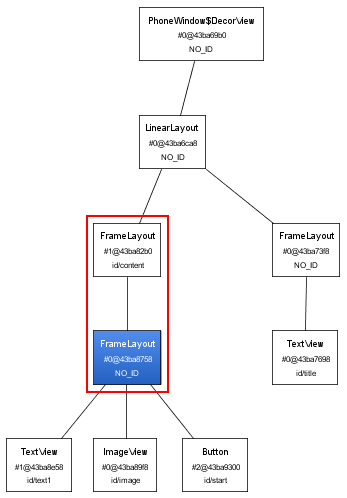
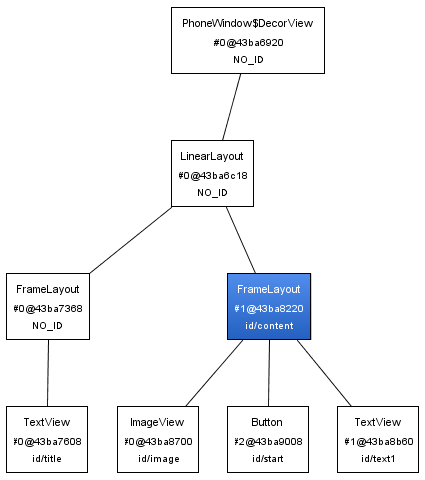
布局优化
- <?xml version="1.0" encoding="utf-8"?>
- <merge xmlns:android="http://schemas.android.com/apk/res/android">
- <ImageView
- android:id="@+id/image"
- android:layout_width="fill_parent"
- android:layout_height="fill_parent"
- android:scaleType="center"
- android:src="@drawable/candle"
- />
- <TextView
- android:id="@+id/text1"
- android:layout_width="wrap_content"
- android:layout_height="wrap_content"
- android:layout_gravity="center"
- android:textColor="#00ff00"
- android:text="@string/hello"
- />
- <Button
- android:id="@+id/start"
- android:layout_width="wrap_content"
- android:layout_height="wrap_content"
- android:layout_gravity="bottom"
- android:text="Start"
- />
- </merge>
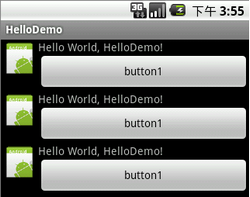
- <?xml version="1.0" encoding="utf-8"?>
- <LinearLayout xmlns:android="http://schemas.android.com/apk/res/android"
- android:orientation="vertical"
- android:layout_width="fill_parent"
- android:layout_height="fill_parent">
- <include android:id="@+id/layout1" layout="@layout/relative" />
- <include android:id="@+id/layout2" layout="@layout/relative" />
- <include android:id="@+id/layout3" layout="@layout/relative" />
- </LinearLayout>
- <ViewStub android:id="@+id/stub"
- android:inflatedId="@+id/subTree"
- android:layout="@layout/mySubTree"
- android:layout_width="120dip"
- android:layout_height="40dip" />
- ViewStub stub = (ViewStub) findViewById(R.id.stub);
- View inflated = stub.inflate();
本文出自 “学习Android” 博客,请务必保留此出处http://android.blog.51cto.com/268543/308090
Android UI学习 - FrameLayou和布局优化(viewstub)的更多相关文章
- Android UI 学习 自定义的布局 平滑移动 VelocityTracker()
/** * Helper for tracking the velocity of touch events, for implementing * flinging and other such ...
- Android 性能优化 三 布局优化ViewStub标签的使用
小黑与小白的故事,通过虚拟这两个人物进行一问一答的形式来共同学习ViewStub的使用 小白:Hi,小黑,ViewStub是什么?听说能够用来进行布局优化. 小黑:ViewStub 是一个隐藏的,不占 ...
- Android实习生 —— 屏幕适配及布局优化
为什么要进行屏幕适配.对哪些设备进行适配?在近几年的发展当中,安卓设备数量逐渐增长,由于安卓设备的开放性,导致安卓设备的屏幕尺寸大小碎片化极为严重.从[友盟+]2016年手机生态发展报告H1中看截止1 ...
- Android UI基础之五大布局
Android UI基础之五大布局 Android的界面是有布局和组件协同完成的,布局好比是建筑里的框架,而组件则相当于建筑里的砖瓦.组件按照布局的要求依次排列,就组成了用户所看见的界面.Andro ...
- Android UI学习 - ListView (android.R.layout.simple_list_item_1是个什么东西)
Android UI学习 - ListView -- :: 标签:Android UI 移动开发 ListView ListActivity 原创作品,允许转载,转载时请务必以超链接形式标明文章 原始 ...
- Android开发学习之路--性能优化之布局优化
Android性能优化方面也有很多文章了,这里就做一个总结,从原理到方法,工具等做一个简单的了解,从而可以慢慢地改变编码风格,从而提高性能. 一.Android系统是如何处理UI组件的更新操作的 ...
- android菜鸟学习笔记6----android布局(一)
Android应用的UI组件都是继承自View类,View类表示的就是一个空白的矩形区域.常用的组件如TextView.Button.EditText等都直接或间接继承自View. 此外,View还有 ...
- Android UI学习前言:Android UI系统的知识结构
Android UI系统的知识结构如下图所示: 对于 一个GUI系统地使用,首先是由应用程序来控制屏幕上元素的外观和行为,这在各个GUI系统中是不相同的,但是也具有相通性.Android系统在这方面, ...
- Android UI学习组件概述
Android的UI组件繁多,如果学习的时候不能自己总结和分类而是学一个记一个不去思考和学习他们内在的联系那真的是只有做Farmer的命了.为了向注定成为Farmer的命运抗争,在学习Android的 ...
随机推荐
- 常见的装置与其在Linux当中的档名
需要特别留意的是硬盘机(不论是IDE/SCSI/U盘都一样),每个磁碟机的磁盘分区(partition)不同时, 其磁碟档名还会改变呢!下一小节我们会介绍磁盘分区的相关概念啦!需要特别注意的是磁带机的 ...
- Highcharts-3.0.6
Highcharts-3.0.6 报表插件
- 项目中的libevent
单线程libevent模式 项目里面是多线程版的,我先理解下单线程的. //client .调用NGP::init() bool NGP::init(NGPcontext context) { _co ...
- GhostDoc:生成.NET API文档的工具 (帮忙文档)
在 Sandcastle:生成.NET API文档的工具 (帮忙文档) 后提供另一个生成API文档的工具. 1) 准备工作 安装GhostDoc Proc. 收费的哦.... 这个工具的优势是不像 ...
- redis 资料链接
redis 资料链接 http://blog.nosqlfan.com/html/3537.html
- java基础知识回顾之---java StringBuffer,Stringbuilder与String的区别
public class StringBuilderTest { /** * StringBuffer和Stringbuilder :使用与内容可以被修改的字符串 * 与String的区别:Strin ...
- ***常见复杂SQL语句(含统计类SQL)
1.SQL统计某字段的出现次数 比如统计某个表中,姓名出现的次数:select name,count(*) from biao group by name having count(*) > 2 ...
- chmod命令详细用法
指令名称 : chmod 使用权限 : 所有使用者 使用方式 : chmod [-cfvR] [--help] [--version] mode file... 说明 : Linux/Unix 的档案 ...
- Session过期,跳出iframe等框架
//在你想控制跳转的页面,如login.jsp中的<head>与</head>之间加入以下代码: if(window != top){ //解决Sessio ...
- 套题T3
秋实大哥与线段树 Time Limit: 3000/1000MS (Java/Others) Memory Limit: 65535/65535KB (Java/Others) Submit ...