
android菜鸟学习笔记6----android布局(一)
Android应用的UI组件都是继承自View类,View类表示的就是一个空白的矩形区域。常用的组件如TextView、Button、EditText等都直接或间接继承自View。
此外,View还有一个重要的子类ViewGroup,该类可以用来包含多个View组件,本身也可以当做一个View组件被其他的ViewGroup所包含,由此,可以构建出非常复杂的UI界面。
常用的布局管理器如FrameLayout、LinearLayout、RelativeLayout等都直接继承自ViewGroup。
在Android应用中,Activity就相当于传统桌面开发中的Form,刚创建出来就是一个空白的屏幕,因此,要显示UI界面时,就需要调用setContentView()方法传入要显示的视图实例或者布局资源。
如:
传入一个布局资源:
setContentView(R.layout.main);
传入一个View实例:
TextView myTv = new TextView(this);
setContentView(myTv);
myTv.setText(“hello, world”);
因为setContentView()只能接受一个View实例,要显示复杂的UI界面,就需要用到ViewGroup来包含多个多个View实例,然后将ViewGroup实例传给setContentView。ViewGroup是个抽象类,一般直接使用的都是它的子类,被称之为布局管理器。
Android有两种方式编写UI界面,一种是在xml布局资源文件中,另一种是直接在代码中编写,如上面的传入一个View实例的做法就是直接在代码中编写,这是传统的Form编程的做法。现在比较推荐的是在xml布局资源文件中编写UI界面,这样一来就可以将应用表示层与逻辑层相分离,无需修改代码就可以修改表示层。
要编写复杂的UI界面,需要掌握android中常用的布局管理器。主要有:
AbsoluteLayout:绝对布局
FrameLayout:帧布局
LinearLayout:线性布局
RelativeLayout:相对布局
TableLayout:表格布局
GridLayou:网格布局(Android 4.0添加的新的布局管理器)
1.LinearLayout 线性布局
线性布局就是放在其中的View组件将进行线性对齐排列,可以设置是垂直排列还是水平排列。
新建一个布局资源文件的方法:
右击res/layout,然后在弹出的菜单中选择new,然后选择Android Xml File,要新建LinearLayout布局文件,就选择LinearLayout作为其根节点即可。
linear_layout.xml代码如下:
 <?xml version="1.0" encoding="utf-8"?>

 <LinearLayout xmlns:android="http://schemas.android.com/apk/res/android"

     android:layout_width="match_parent"

     android:layout_height="match_parent"

     android:orientation="vertical">

     <Button

         android:layout_width="match_parent"

         android:layout_height="wrap_content"

         android:text="aaaaaa"

         />

     <Button

         android:layout_width="match_parent"

         android:layout_height="wrap_content"

         android:text="bbbbbb"

         />

     <Button

         android:layout_width="match_parent"

         android:layout_height="wrap_content"

         android:text="cccccc"

         />

     <Button

         android:layout_width="match_parent"

         android:layout_height="wrap_content"

         android:text="dddddd"

         />

 </LinearLayout>
activity中代码如下:
 protected void onCreate(Bundle savedInstanceState) {

            // TODO Auto-generated method stub

            super.onCreate(savedInstanceState);

            setContentView(R.layout.linear_layout);

 }
显示效果:

常用的几个属性:
1)orientation属性:设置LinearLayout中组件的排列方式,可以取值vertical或者horizontal表示垂直排成一列或者水平排成一行。
上面代码中,如果把orientation设置为horizontal。显示则变为:

因为只显示一行,而第一个Button的宽度就是充满父元素,所以只显示出来了第一个Button。
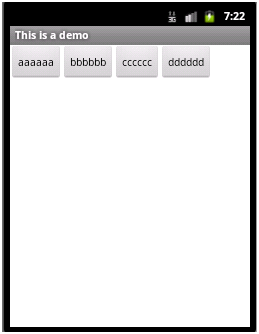
2)layout_width属性:设置在父元素中该组件的宽度,可以取值wrap_content、match_parent或者fill_parent。其中wrap_content表示宽度能够包裹该组件中的内容即可,fill_parent和match_parent含义相同表示宽度充满父元素,现在,更常使用match_parent,而很少用fill_parent。
如上面代码中把所有的Button的layout_width都设置为wrap_content,则显示效果如下:
3)layout_height属性:设置在父元素中该组件的宽度,取值同layout_width。
4)grativity属性:设置该容器内组件的对齐方式。
如在LinearLayout节点中添加属性:android:gravity="center_vertical"
则显示效果如下:
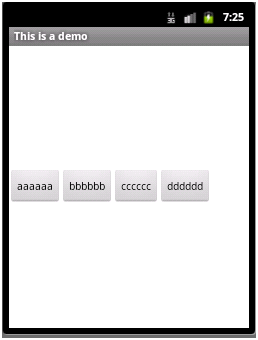
该属性的取值可以是:top、bottom、left、right、center、center_vertical、center_horizontal等值,或者这些值相或(即位或运算 | )
如:android:gravity="bottom|right" 显示效果

5)layout_gravity属性:当前控件在父元素的位置。
如将aaaaaa那个Button中layout_gravity设置为”center”,其效果将会与其所处容器即LinearLayout中的gravity属性效果进行叠加,显示如下:

垂直上进行了居中,水平上还是排在bbbbbb的左边
6)layout_weight属性:在子控件中设置父元素中多出来的额外空间的分配权重。

此时,如果只在aaaaaa这个button中设置layout_weight属性,可以设置为任意值,习惯设置为1。则aaaaaa这个button会拉伸占据剩下的空间,显示如下:

如果同时在aaaaaa和dddddd两个button中都设置layout_weight属性,且第一个设置为1,第二个设置为2,则之前多出来的剩余空间会分给aaaaaa 1/3,分给dddddd 2/3,即各自的权重值/总的权重值,即为各自所分得的剩余空间的比例,显示如下:

7)weightSum属性:设置容器中剩余空间的总的权重值,这个属性是LinearLayout中的属性,而layout_weight是各个子控件中的属性,若不设置,则默认为各个子控件layout_weight属性值的总和。
若如上面aaaaaa的layout_weight值为1,dddddd的layout_weight的值为2,同时在LinearLayout中设置weightSum值为6,则仍会有一半的剩余空间,aaaaaa只分得原来剩余空间的1/6,dddddd分得2/6,显示如下:

8)visibility属性:控制是否显示,取值可以是invisible、visible、gone。visible表示显示出来,invisible和gone不显示出来,其中invisible不显示,但控件仍然存在,占用着空间,而gone表示控件不存在了,也就不占用空间了。
如:cccccc设置visibility属性为gone,显示如下:

若改为invisible:

LinearLayout设置invisible:

2.RelativeLayout:相对布局
顾名思义,即根据各控件的相对位置进行布局,相对位置,可以是子控件A相对父控件的位置,也可以是子控件A相对于子控件B的位置。
右击res/layout,然后在弹出的菜单中选择new,然后选择Android Xml File,要新建RelativeLayout布局文件,就选择RelativeLayout作为其根节点即可。文件名为relative_layout.xml。
代码如下:
 <?xml version="1.0" encoding="utf-8"?>

 <RelativeLayout xmlns:android="http://schemas.android.com/apk/res/android"

     android:layout_width="match_parent"

     android:layout_height="match_parent" >

     <Button

         android:id="@+id/aa"

         android:layout_width="wrap_content"

         android:layout_height="wrap_content"

         android:layout_centerInParent="true"

         android:text="aaaaaa"

         />

     <Button

         android:id="@+id/bb"

         android:layout_width="wrap_content"

         android:layout_height="wrap_content"

         android:layout_toRightOf="@id/aa"

         android:layout_alignTop="@id/aa"

         android:text="bbbbbb"

         />

     <Button

         android:id="@+id/cc"

         android:layout_width="wrap_content"

         android:layout_height="wrap_content"

         android:layout_toLeftOf="@id/aa"

         android:layout_alignBottom="@id/aa"

         android:text="cccccc"

         />

     <Button

         android:id="@+id/dd"

         android:layout_width="wrap_content"

         android:layout_height="wrap_content"

         android:layout_above="@id/aa"

         android:layout_alignLeft="@id/aa"

         android:text="dddddd"

         />

     <Button

         android:id="@+id/ee"

         android:layout_width="wrap_content"

         android:layout_height="wrap_content"

         android:layout_below="@id/aa"

         android:layout_alignLeft="@id/aa"

         android:text="eeeeee"

         />

 </RelativeLayout>
修改FirstActivity中setContentView(R.layout.relative_layout);
显示效果:

aaaaaa在父容器中居中显示
bbbbbb在aaaaaa的右边显示,并且与aaaaaa顶部对齐
ccccccc在aaaaaa的左边显示,并且与aaaaaa顶部对齐
dddddd在aaaaaa的上面显示,并且与aaaaaa左对齐
eeeeee在aaaaaa的下面显示,并且与aaaaaa左对齐
主要属性:均为设置父子相对位置,或者子控件与子控件的相对位置
android:layout_toRightOf 在指定控件的右边
android:layout_toLeftOf 在指定控件的左边
android:layout_above 在指定控件的上边
android:layout_below 在指定控件的下边
android:layout_alignBaseline 跟指定控件水平对齐
android:layout_alignLeft 跟指定控件左对齐
android:layout_alignRight 跟指定控件右对齐
android:layout_alignTop 跟指定控件顶部对齐
android:layout_alignBottom 跟指定控件底部对齐
android:layout_alignParentLeft 是否跟父布局左对齐
android:layout_alignParentTop 是否跟父布局顶部对齐
android:layout_alignParentRight 是否跟父布局右对齐
android:layout_alignParentBottom 是否跟父布局底部对齐
android:layout_centerVertical 在父布局中垂直居中
android:layout_centerHorizontal 在父布局中水平居中
android:layout_centerInParent 在父布局中居中
android菜鸟学习笔记6----android布局(一)的更多相关文章
- android菜鸟学习笔记7----android布局(二)
3.FrameLayout:帧布局 如同Flash或者photoshop中图层的概念,在上面的图层遮盖下面的图层,没被遮到的地方仍然显示出来. 右击res/layout,然后在弹出的菜单中选择new, ...
- Android Studio 学习笔记(二):布局简介和xmlns说明
初学Android Studio,是在b站看的教程视频,这里的笔记也是以其为基础的,个人强烈安利: [天哥]Android开发视频教程最新版 Android Studio开发 Android 布局简介 ...
- android菜鸟学习笔记30----Android使用百度地图API(一)准备工作及在应用中显示地图
1.准备工作: 百度地图API是免费开放的,但是需要申请API Key: 1)先注册一个百度开发者帐号 2)进入百度开放服务平台http://developer.baidu.com/ 3)进入LBS云 ...
- android菜鸟学习笔记29----Android应用向用户发送提示信息的方式总结
常见的向用户发送提示信息的方式有3种,分别为: 1)发送Toast信息 2)弹出对话框 3)发送通知 总结如下: 方式1:发送Toast信息: 这种方式最简单,在之前的学习中多次使用过.Toast是在 ...
- android菜鸟学习笔记24----与服务器端交互(一)使用HttpURLConnection和HttpClient请求服务端数据
主要是基于HTTP协议与服务端进行交互. 涉及到的类和接口有:URL.HttpURLConnection.HttpClient等 URL: 使用一个String类型的url构造一个URL对象,如: U ...
- android菜鸟学习笔记31----Android使用百度地图API(二)获取地理位置及地图控制器的简单使用
1.获取当前地理位置: Android中提供了一个LocationManager的类,用于管理地理位置.不能通过构造函数获取该类的实例,而是通过Context的getSystemService(): ...
- android菜鸟学习笔记28----Android中的Service生命周期及本地和远程服务绑定的实现
Service是Android中长期在后台运行的没有界面的组件,使用服务的优势在于:能够提高进程的优先级,系统不容易回收掉进程,即便回收了,内存充足的时候,会把进程重新创建. 1.服务的简单使用示例: ...
- android菜鸟学习笔记21----ContentProvider(一)ContentProvider的简单使用
ContentProvider是Android四大组件之一,它用来封装数据,并通过ContentResolver接口将数据提供给其他应用.只有当需要在多个应用之间共享数据时才会用到ContentPro ...
- android菜鸟学习笔记14----Android控件(三) ListView的简单使用
MVC模式: MVC的基本原理就是通过Controller连接View和Model.当View中所显示的数据发生变化时,会通知Controller,然后由Controller调用Model中的相关方法 ...
- android菜鸟学习笔记12----Android控件(一) 几个常用的简单控件
主要参考<第一行代码> 1.TextView: 功能与传统的桌面应用开发中的Label控件相似,用于显示文本信息 如: <TextView android:layout_width= ...
随机推荐
- 洛谷——P1119 灾后重建
P1119 灾后重建 题目背景 B地区在地震过后,所有村庄都造成了一定的损毁,而这场地震却没对公路造成什么影响.但是在村庄重建好之前,所有与未重建完成的村庄的公路均无法通车.换句话说,只有连接着两个重 ...
- 暂停时间 以及dict 循环
暂停时间 #!/usr/bin/python # -*- coding: UTF-8 -*- import time myD = {1: 'a', 2: 'b'} for key, value in ...
- Topcoder SRM 663 DIV 1
ABBADiv1 题意: 规定两种操作,一种是在字符串的末尾添加A,另一种是在末尾添加B然后反转字符串.现在给你一个起始串,一个终点串,然后问你是否能够通过以上两种操作,从起始串变为终点串. 题解: ...
- noip2017集训测试赛(四)Problem A: fibonacci
题目大意 给你一个序列\(a_1, a_2, ..., a_n\). 我们令函数\(f(n)\)表示斐波那契数列第\(n\)项的值. 总共\(m\)个操作, 分为以下两种: 将\(x \in [L, ...
- Nginx 初探
Nginx简介 Nginx(engine X)是一个开源.轻量级.高性能的HTTP和反向代理服务器,可以代理HTTP. IMAP/POP3/SMTP和TCP/UDP协议:其特点是占用内存少,并发能力强 ...
- Jenkins配置git进行构建失败:Error cloning remote repo 'origin'的解决思路
说明:这个没有实际的解决方法,只提供一个思路去解决. 操作系统:windows 背景:在配置的节点之后,由于是windows的系统,运行git克隆地址,使用的是SSH协议地址.出现如下的错误: Err ...
- Displaying Modal Window Messages in Oracle Forms Using Show_Alert
You can display modal windows in Oracle Forms to display normal messages, error message or asking fo ...
- grep 精确匹配
使用grep实现精确过滤的五种方法 (1)当被过滤的内容占据一行时 [root@MySQL scripts]# cat oldboy.log 200 0200 2000 [root@My ...
- hdu5417(BC)
题目链接:点这儿 Victor and Machine Time Limit: 2000/1000 MS (Java/Others) Memory Limit: 131072/65536 K ( ...
- mysql经常使用查询:group by,左连接,子查询,having where
前几天去了两个比較牛的互联网公司面试.在sql这块都遇到问题了,哎.可惜呀,先把简单的梳理一下 成绩表 score 1.group by 使用 按某一个维度进行分组 比如: 求每一个同学的总分 SEL ...