
Look into Bitmap images
What's a Bitmap image?
I'm not going to explain the differences between raster and vector images, nor the difference between bitmap image with extension .bmp and jpg/png images. Herein, the bitmap refers to raster images with .bmp extension only.
Bitmap is uncompressed, and the image is represented with arrays, namely, RGB arrays.
What's the storage of a bitmap
File structure of a bitmap
- The bitmaps stored on the physical devices contains serval parts:
- BITMAPINFO
1. BITMAPINFOHEADER
2. RGBQUAD
2. The stored data in array
A bitmap file is composed with
- BITMAPFILEHEADER
- BITMAPINFOHEADER
- Data array
The definition are
typedef struct tagBITMAPFILEHEADER {

    WORD  bfType;		// 2 bytes

    DWORD bfSize;		// 4 bytes

    WORD  bfReserved1;	// 2 bytes

    WORD  bfReserved2;  // 2 bytes

    DWORD bfOffBits;    // 4 bytes

} BITMAPFILEHEADER, *LPBITMAPFILEHEADER, *PBITMAPFILEHEADER;
typedef struct tagBITMAPINFO {

    BITMAPINFOHEADER bmiHeader;

    RGBQUAD          bmiColors[1];		// the '1' here is pretty tricky

} BITMAPINFO, *LPBITMAPINFO, *PBITMAPINFO;
typedef struct tagBITMAPINFOHEADER {

    DWORD biSize;			 // 8 bytes

    LONG  biWidth;			// 4 bytes

    LONG  biHeight;			// 4 bytes

    WORD  biPlanes;			//

    WORD  biBitCount;

    DWORD biCompression;

    DWORD biSizeImage;

    LONG  biXPelsPerMeter;

    LONG  biYPelsPerMeter;

    DWORD biClrUsed;

    DWORD biClrImportant;

} BITMAPINFOHEADER, *PBITMAPINFOHEADER;
typedef struct tagRGBQUAD {

    BYTE rgbBlue;

    BYTE rgbGreen;

    BYTE rgbRed;

    BYTE rgbReserved;

} RGBQUAD;
Let's use Lena.bmp as an illustration:

(Well, this blog doesn;t support BMP image, please see the attach file)
Open it with a hex editor, such as WinHex, and it shows
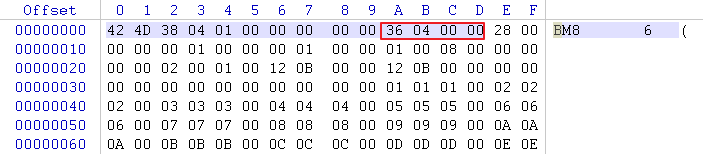
The highlighted 14 bytes are BITMAPFILEHEADER,
WORD bfType -> 0x4D42
DWORD bfSize -> 0x00010438 = 66616
WORD bfReserved1 -> 0x0000 = 0
WORD bfReserved2 -> 0x0000 = 0
DWORD bfOffBits -> 0x00000436 = 1078
bfTypeshows that this file is a bitmap file;bfSizeis the file size, as we can see below, the file sis 66,614 bytes;bfReserved1andbfReserved2must be zerosbfOffBitsis the offset, in bytes, from the beginning of the BITMAPFILEHEADER structure to the bitmap bits.
e:\temp\code\MFC_PICTURE_TEST\Look into Bitmap images.assets\1566902617332.png
And this is the start of array data,

seen what I mean?
The next is BITMAPINFOHEADER, and the data are highlighted in different colors,
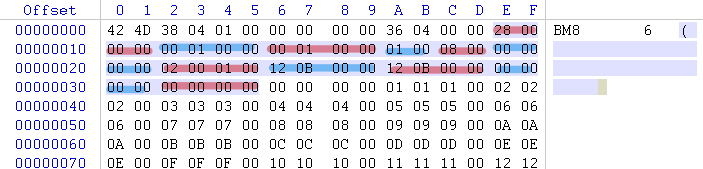
and these values can be calculated as
DWORD biSize = 0x00000028 = 40
LONG biWidth = 0x00000100 = 256
LONG biHeight = 0x00000100 = 256
WORD biPlanes = 0x0001 = 1
WORD biBitCount = 0x0008 = 8
DWORD biCompression = 0x00000000 = 0
DWORD biSizeImage = 0x00010002 = 65,538
LONG biXPelsPerMeter = 0x00000B12 = 2,834
LONG biYPelsPerMeter = 0x00000B12 = 2,834
DWORD biClrUsed = 0x000000 = 0
DWORD biClrImportant = 0x000000 = 0
And we can see,
0x0436 + 0x00010002 = 0x00010438
1,078 + 65,538 = 66,616
i.e.
data_start_offset + data_length = file_end
It's the start of data, however, since Lena.bmp is a gray image, all the three channels are same, you can find a pure red/blue image, you will find that, the bitmap is stored in [B, G, R, reserved] order, therefore, if you want to interpret in RGB mode, you should be careful with it.
[C++]Read Bitmap File
The following code are mainly from this website, slightly modified.
typedef unsigned int Uint8;

Uint8* datBuff[2] = { nullptr, nullptr }; // Header buffers

Uint8* pixels = nullptr; // Pixels

BITMAPFILEHEADER* bmpHeader = nullptr; // Header

BITMAPINFOHEADER* bmpInfo = nullptr; // Info

// The file... We open it with it's constructor

std::ifstream file(_T("Lena.bmp"), std::ios::binary);

if (!file){

std::cout << "Failure to open bitmap file.\n";

return 1;

}

// Allocate byte memory that will hold the two headers

datBuff[0] = new Uint8[sizeof(BITMAPFILEHEADER)];

datBuff[1] = new Uint8[sizeof(BITMAPINFOHEADER)];

file.read((char*)datBuff[0], sizeof(BITMAPFILEHEADER));

file.read((char*)datBuff[1], sizeof(BITMAPINFOHEADER));

// Construct the values from the buffers

bmpHeader = (BITMAPFILEHEADER*)datBuff[0];

bmpInfo = (BITMAPINFOHEADER*)datBuff[1];

// Check if the file is an actual BMP file

if (bmpHeader->bfType != 0x4D42){

std::cout << "File isn't a bitmap file\n";

return 2;

}

// First allocate pixel memory

pixels = new Uint8[bmpInfo->biSizeImage];

// Go to where image data starts, then read in image data

file.seekg(bmpHeader->bfOffBits);

file.read((char*)pixels, bmpInfo->biSizeImage);

// First allocate pixel memory

pixels = new Uint8[bmpInfo->biSizeImage];

// Go to where image data starts, then read in image data

file.seekg(bmpHeader->bfOffBits);

file.read((char*)pixels, bmpInfo->biSizeImage);

// Set width and height to the values loaded from the file

int w = bmpInfo->biWidth;

int h = bmpInfo->biHeight;

// We're almost done. We have our image loaded, however it's not in the right format.

// .bmp files store image data in the BGR format, and we have to convert it to RGB.

// Since we have the value in bytes, this shouldn't be to hard to accomplish

Uint8 tmpRGB = 0; // Swap buffer

for (unsigned long i = 0; i < bmpInfo->biSizeImage; i += 3){

    tmpRGB        = pixels[i];

    pixels[i]     = pixels[i + 2];

    pixels[i + 2] = tmpRGB;

}

delete[] datBuff[0];

delete[] datBuff[1];

delete[] pixels;
Create Bitmap Image in memory, and draw on screen
The code is mainly from this webpage, slightly modified.
Again, the reference are given:
void CChildView::OnPaint()

{

	CPaintDC dc(this); // device context for painting

	HDC hdc = dc.m_hDC;

	int nWidth = 100;

	int nHeight = 100;

	int nChannels = 3;

	int nImages = 3;	// three images in a row, presented in a column

	auto nSize = nWidth * nHeight * nChannels * nImages;

	unsigned char* data = new unsigned char[nSize] {0};

	//memset(data, 0xFF, nSize);

	long split = nWidth * nHeight / 4,

		nPixel = nWidth * nHeight;		// Pixels in an image

	// Fill the different images for differnt channels

	unsigned char* dat = data;

	for (int i = 0; i < nPixel; ++i, dat += 3)		// Image 0

		dat[0] = (i / nWidth) * (255.0 / nHeight);

	for (int i = 0; i < nPixel; ++i, dat += 3)		// Image 1

		dat[1] = (i / nWidth) * (255.0 / nHeight);

	for (int i = 0; i < nPixel; ++i, dat += 3)		// Image 2

		dat[2] = (i / nWidth) * (255.0 / nHeight);

	// Allocate enough memory for the BITMAPINFOHEADER and 256 RGBQUAD palette entries

	// NOTE: the pallet bytes are ONLY NEEDED for color LUT images ...

	// not needed here

	int nColors = 0;		// In BI_RGB image, the look-up-table isn't used, so the size can be zero

	LPBITMAPINFO lpbi = (LPBITMAPINFO) new BYTE[sizeof(BITMAPINFOHEADER)+ (nColors * sizeof(RGBQUAD))];

	// These are all the members of the bitmap header struct

	lpbi->bmiHeader.biSize   = sizeof(BITMAPINFOHEADER); // bytes

	lpbi->bmiHeader.biWidth  = nWidth;                   // pixels units

	lpbi->bmiHeader.biHeight = -nHeight * 3;             // negative =  = top down; pos =

	// origin LLeft

	lpbi->bmiHeader.biPlanes = 1;    // must be 1

	lpbi->bmiHeader.biBitCount = 24; // can be 32 for 4-byte pixels

	// (Upper byte ignored)

	lpbi->bmiHeader.biCompression = BI_RGB; // BI_RGB means uncompressed

	lpbi->bmiHeader.biSizeImage = 0;        // size of img in bytes; 0 okay

	// for BI_RGB

	lpbi->bmiHeader.biXPelsPerMeter = 0;	// physical device information unavailable

	lpbi->bmiHeader.biYPelsPerMeter = 0;    // physical device information unavailable

	lpbi->bmiHeader.biClrUsed       = 0;	// Look-Up-Tables (LUT) only

	lpbi->bmiHeader.biClrImportant  = 0;	// LUTs only

	// Draw the image into the CRT device

	::SetDIBitsToDevice(

		hdc,                 // handle to DC

		0, 0,                // x-y-coord of destination upper-left corner

		nWidth, nHeight * 3, // width-height of source rectangle

			                 // three images present in one column

		0, 0,                // x-y-coord of source upper-left corner

		0,                   // uStartScan,                                // first scan line in array

		nHeight * 3,         // number of scan lines ...

		data,                // array of DIB bits

		lpbi,                // bitmap information

		DIB_RGB_COLORS);     // RGB vs. palette indexes ... RGB means raw

	delete[] data;

	delete[] lpbi;

}

As we can see from the result, the array is stored in [B, G, R] sequence, and no more reserved byte is need.
Besides, if you uncomment the memset(data, 0xFF, nSize); at the 12th line, which means you set all the other values to be 255, you'll get a more beautiful image as

If you are a Chinese, this blog may help you.
The source code can be found in: 链接: https://pan.baidu.com/s/12NCP1tQjtLOdDccODOwpEg 提取码: 4uka 复制这段内容后打开百度网盘手机App,操作更方便哦
Look into Bitmap images的更多相关文章
- [翻译]开发文档:android Bitmap的高效使用
内容概述 本文内容来自开发文档"Traning > Displaying Bitmaps Efficiently",包括大尺寸Bitmap的高效加载,图片的异步加载和数据缓存 ...
- 【开源毕设】一款精美的家校互动APP分享——爱吖校推 [你关注的,我们才推](持续开源更新3)附高效动态压缩Bitmap
一.写在前面 爱吖校推如同它的名字一样,是一款校园类信息推送交流平台,这么多的家校互动类软件,你选择了我,这是我的幸运.从第一次在博客园上写博客到现在,我一次一次地提高博文的质量和代码的可读性,都是为 ...
- Android Bitmap 和 ByteArray的互相转换
Android Bitmap 和 ByteArray的互相转换 移动平台图像处理,需要将图像传给native处理,如何传递?将bitmap转换成一个 byte[] 方便传递也方便cpp代码直接处理图像 ...
- Android-Drawable、Bitmap、byte[]、资源文件相互转换
我们在Android的开发中,经常可以遇到图片的处理,当中,有很多是 Bitmap.Drawable.byte[]和资源文件它们直接相互转换. 今天就此总结一下: 1.资源文件转为Drawable 2 ...
- bitmap对海量无重复的整数排序--转
原文地址:http://blog.csdn.net/u013074465/article/details/46956295 现在有n个无重复的正整数(n 小于10的7次方),如果内存限制在1.5M以内 ...
- 基于位图(Bitmap、BitmapData)的图片处理方法(C#)
目前操作位图的主流方法有三种: 1.基于Bitmap像素的处理方法,以GetPixel()和SetPixel()方法为主.方法调用简单,但是效率偏低. 2.基于内存的像素操作方法,以System.Ru ...
- android:布局、绘制、内存泄露、响应速度、listview和bitmap、线程优化以及一些优化的建议!
1.布局优化 首先删除布局中无用的控件和层级,其次有选择地使用性能较低的viewgroup,比如布局中既可以使用RelativeLayout和LinearLayout,那我们就采用LinearLayo ...
- 获取View的截图-将View转换为Bitmap对象
开发中,有时候需要获取View的截图来做动画来达到动画流程的目的 原理:将View的内容画到一个Bitmap画布上,然后取出 下面封装了一个从View生成Bitmap的工具类 /** * 将View转 ...
- bitmap解码
#include <stdio.h> #include <stdlib.h> #include <string.h> #define BYTE unsigned c ...
- Bitmap转换成BitmapImage
public BitmapImage BitmapToBitmapImage(System.Drawing.Bitmap bitmap) { MemoryStream ms = new MemoryS ...
随机推荐
- [JOYOI1510] 专家复仇 - Floyd
题目限制 时间限制 内存限制 评测方式 题目来源 1000ms 131072KiB 标准比较器 Local 题目背景 外星人完成对S国的考察后,准备返回,可他们的飞碟已经没燃料了……S国的专家暗自窃喜 ...
- java集合之ArrayList链表基础
ArrayList可变数组 : arrayList继承AbstractList抽象类,实现list接口,底层基于数组实现.可存放null,除了非同步的之外,大致等同Vector.适用快速访问,复制.序 ...
- 详解AJAX工作原理以及实例讲解(通俗易懂)
什么是 AJAX ? AJAX = 异步 JavaScript 和 XML. AJAX 是一种用于创建快速动态网页的技术. 通过在后台与服务器进行少量数据交换,AJAX 可以使网页实现异步更新.这意味 ...
- python编程系列---多个装饰器装饰一个函数的执行流程
首先看一个例子 ''' 多个装饰器装饰一个函数 ''' # 定义第一个装饰器 def set_func1(func): def wrapper1(*args,**kwargs): print('装饰内 ...
- ThingJS和传统3D开发的区别
物联网3D可视化开发已经辐射到各行各业,无论车间还是消防,城市还是粮仓,亦或是地铁.科技园,物联网可视化是科技的进步,也是行业的进步.而传统的3D可视化开发实施起来并不那么乐观.如果使用ThingJS ...
- Leetcode(10)正则表达式匹配
Leetcode(10)正则表达式匹配 [题目表述]: 给定一个字符串 (s) 和一个字符模式 (p).实现支持 '.' 和 '*' 的正则表达式匹配. '.' 匹配任意单个字符. '*' 匹配零个或 ...
- 一文理解java对象初始化顺序
例子 Talk is cheap, Show you the code! public class ParentClass { static int parentStaticField = 1; ...
- mp-vue拖拽组件的实现
作为一个效率还不错的小前端,自己的任务做完之后真的好闲啊,千盼万盼终于盼来了业务的新需求,他要我多加一个排序题,然后用户通过拖拽来排序,项目经理看我是个实习生,说有点复杂做不出来就算了,我这么闲的一个 ...
- Spring MVC(2)Spring MVC 组件开发
一.控制器接收各类请求参数 代码测试环境: 接收各类参数的控制器--ParamsController package com.ssm.chapter15.controller; @Controller ...
- unity image 设置图片
从任意文件目录下读取文件并在unity中显示: 1)读取目标文件 byte[] imageByte = File.ReadAllBytes(imagePath); 2)转换成纹理 texture.Lo ...