
macOS平台下Qt应用程序菜单翻译及调整
一、翻译
在macOS平台上,系统会为应用程序菜单添加一些额外的菜单项。先来看一些典型的例子:
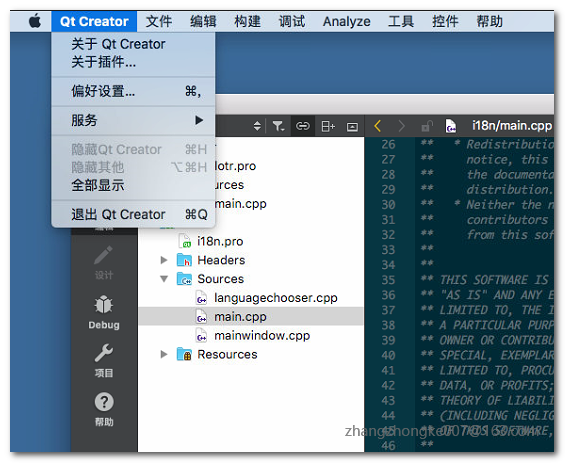
这个是Qt Creator的菜单,系统为应用程序菜单添加了一些桌面显示操作相关的菜单项;
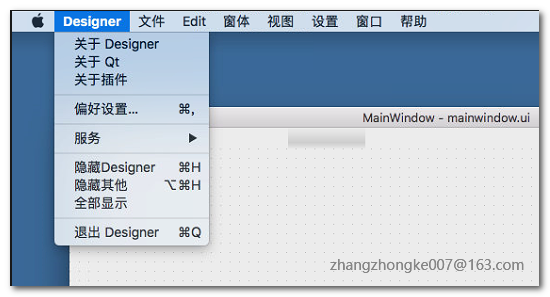
这个是Qt Designer的应用程序菜单,也添加了一些额外的菜单项。并且我们可以注意到,这些菜单项在中文语言环境是翻译好的。那么我们自己的应用程序,怎么去让它们也翻译好呢?
Qt应用程序的国际化都是通过ts文件来做翻译的。通过lupdate程序扫描源代码中被tr()宏包裹的字符串,得到需要翻译的字符串。但是这些系统添加的字符串,并没有存在我们的源码当中。这个应该如何处理嗯?通过网上的一番搜寻发现,有一个直接且简单的方法,直接在ts文件里面添加这些字符串并做好翻译即可。如下所示:
 <?xml version="1.0" encoding="utf-8"?>

 <!DOCTYPE TS>

 <TS version="2.1" language="zh_CN">

 <context>

     <name>demoMainWindow</name>

     <message>

         <location filename="../mainwindow.ui" line="14"/>

         <source>MainWindow</source>

         <translation>主窗口</translation>

     </message>

     <message>

         <location filename="../mainwindow.ui" line="28"/>

         <source>File</source>

         <translation>文件</translation>

     </message>

     <message>

         <location filename="../mainwindow.ui" line="40"/>

         <source>Edit</source>

         <translation>编辑</translation>

     </message>

     <message>

         <location filename="../mainwindow.ui" line="50"/>

         <source>View</source>

         <translation>视图</translation>

     </message>

     <message>

         <location filename="../mainwindow.ui" line="57"/>

         <source>Settings</source>

         <translation>设置</translation>

     </message>

     <message>

         <location filename="../mainwindow.ui" line="65"/>

         <source>Help</source>

         <translation>帮助</translation>

     </message>

     <message>

         <location filename="../mainwindow.ui" line="81"/>

         <source>Open File</source>

         <translation>打开文件</translation>

     </message>

     <message>

         <location filename="../mainwindow.ui" line="86"/>

         <source>Open Project</source>

         <translation>打开工程</translation>

     </message>

     <message>

         <location filename="../mainwindow.ui" line="91"/>

         <source>Open Folder</source>

         <translation>打开文件夹</translation>

     </message>

     <message>

         <location filename="../mainwindow.ui" line="96"/>

         <source>Recent</source>

         <translation>最近文件</translation>

     </message>

     <message>

         <location filename="../mainwindow.ui" line="101"/>

         <source>Save</source>

         <translation>保存</translation>

     </message>

     <message>

         <location filename="../mainwindow.ui" line="106"/>

         <source>Quit</source>

         <translation>退出</translation>

     </message>

     <message>

         <location filename="../mainwindow.ui" line="111"/>

         <source>Redo</source>

         <translation>重做</translation>

     </message>

     <message>

         <location filename="../mainwindow.ui" line="116"/>

         <source>Undo</source>

         <translation>撤销</translation>

     </message>

     <message>

         <location filename="../mainwindow.ui" line="121"/>

         <source>Cut</source>

         <translation>剪切</translation>

     </message>

     <message>

         <location filename="../mainwindow.ui" line="126"/>

         <source>Paste</source>

         <translation>粘贴</translation>

     </message>

     <message>

         <location filename="../mainwindow.ui" line="131"/>

         <source>Delete</source>

         <translation>删除</translation>

     </message>

     <message>

         <location filename="../mainwindow.ui" line="136"/>

         <source>Tile</source>

         <translation>平铺</translation>

     </message>

     <message>

         <location filename="../mainwindow.ui" line="141"/>

         <source>Stack</source>

         <translation>堆叠</translation>

     </message>

     <message>

         <location filename="../mainwindow.ui" line="146"/>

         <source>Preference</source>

         <translation>偏好设置</translation>

     </message>

     <message>

         <location filename="../mainwindow.ui" line="151"/>

         <source>Log</source>

         <translation>日志</translation>

     </message>

     <message>

         <location filename="../mainwindow.ui" line="156"/>

         <source>Tools</source>

         <translation>工具</translation>

     </message>

     <message>

         <location filename="../mainwindow.ui" line="161"/>

         <source>About Demo</source>

         <translation>关于Demo</translation>

     </message>

     <message>

         <location filename="../mainwindow.ui" line="166"/>

         <source>Check for updates</source>

         <translation>检查更新</translation>

     </message>

     <message>

         <location filename="../mainwindow.ui" line="171"/>

         <source>Website</source>

         <translation>官网</translation>

     </message>

     <message>

         <location filename="../mainwindow.ui" line="176"/>

         <source>Tutorial</source>

         <translation>教程</translation>

     </message>

 </context>

 <context>

     <name>MAC_APPLICATION_MENU</name>

     <message>

         <source>Services</source>

         <translation>服务</translation>

     </message>

     <message>

         <source>Hide %1</source>

         <translation>隐藏 %1</translation>

     </message>

     <message>

         <source>Hide Others</source>

         <translation>隐藏其他</translation>

     </message>

     <message>

         <source>Show All</source>

         <translation>显示所有</translation>

     </message>

     <message>

         <source>Preferences...</source>

         <translation>偏好设置…</translation>

     </message>

     <message>

         <source>Quit %1</source>

         <translation>退出 %1</translation>

     </message>

     <message>

         <source>About %1</source>

         <translation>关于 %1</translation>

     </message>

 </context>

 </TS>
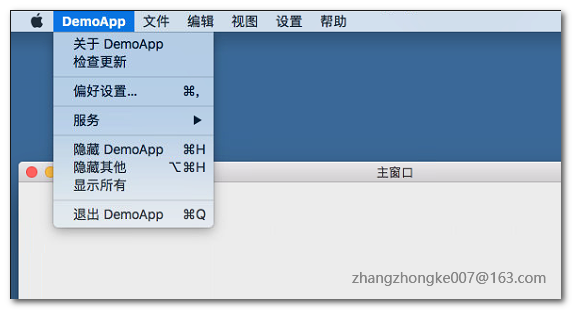
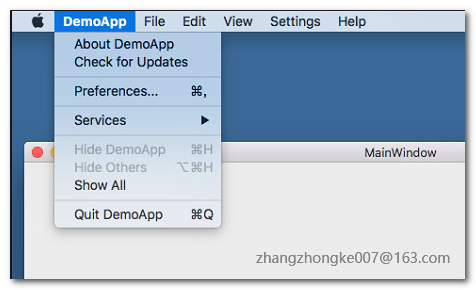
手动添加一个context,并在该context下面添加翻译。然后用lupdate更新ts文件即可。这样,我们自己的应用程序也可以翻译好了:
二、菜单项重排
为了契合不同平台的使用习惯,Qt给菜单添加了Menu Role这样一个定义。通过定义不同的Menu Role,mac系统会调整应用程序的位置,以保证平台习惯的统一。Qt库本身已经定义了几个常用的Role:
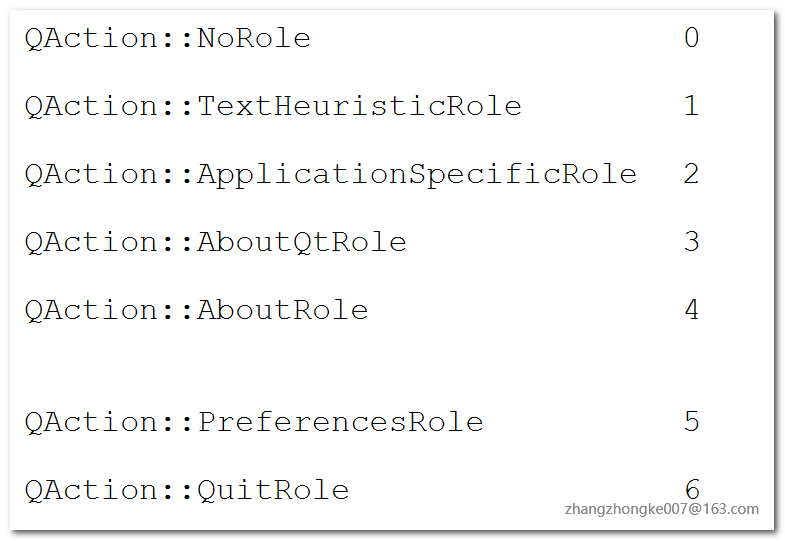
这些Role类型的菜单项都会被系统重新调整位置到应用菜单里。如果我们还有一些其他的菜单项,也想放到应用菜单里面,应该怎么做呢?其实也非常简单,直接将菜单的Role设置为ApplicationSpecificRole即可。按照设置顺序,各个菜单项将依次出现在应用菜单中。比如说上面截图中的Check for Updates菜单项,就是通过设置ApplicationSpecificRole定义来实现的。
macOS平台下Qt应用程序菜单翻译及调整的更多相关文章
- 在Windows平台下Qt的exe报错问题排查步骤
在Windows平台下Qt的exe报错问题排查步骤 工具介绍: 1. Dependency Worker Dependency Worker是一个免费的用具用来扫描任何的32bit 或者64bit 的 ...
- Windows平台下Qt QOpenGL中glutSolidSphere()方法未定义的解决方法
Windows平台下Qt中glut库的使用 用Qt中的QGLWidget窗体类中是不包括glut工具库的,难怪在myGLWidget(在我的程序中是QGLWidget的派生类)中绘制实心球体是 ...
- [修正] Firemonkey Windows & macOS 平台下 Edit & Memo 中文输入后会取消原选取文字的 BUG
问题:Firemonkey Windows & macOS 平台下 Edit & Memo 中文输入后会取消原选取文字的 BUG 适用版本:Delphi 10.1.2 & 10 ...
- macOS上实现Qt应用程序做文件关联打开
一.背景介绍 用Qt开发的应用程序要实现文件关联,双击时用默认关联的程序打开文件,在Windows上这个功能非常容易实现.Windows应用程序在安装的时候可以在注册表中写入相关的键值对.打开文件的时 ...
- Windows平台下Qt中glut库的使用
用Qt中的QGLWidget窗体类中是不包括glut工具库的,难怪在myGLWidget(在我的程序中是QGLWidget的派生类)中绘制实心球体是说“glutSolidSphere”: 找不到标识符 ...
- Windows平台下Qt开发环境的搭建
Qt 是采用开源和商用双协议发布的开放源代码的图形开发类库,现在很多图形化的开源软件都使用了Qt. 下载地址:http://qt-project.org/downloads 1. 下载安装包 你可以从 ...
- MacOS平台下@rpath在动态链接库中的应用
一.背景介绍 公司开发的一个底层库被用在了Mac平台的多个产品中.在开发这个底层库的初期,对于Mac OSX下的Install name 并没有过多的了解.对于XCode中的install name项 ...
- WINCE平台下C#应用程序中使用看门狗
看门狗定时器(WDT,Watch Dog Timer)是单片机的一个组成部分,它实际上是一个计数器,一般给看门狗一个大数,程序开始运行后看门狗开始倒计数.如果程序运行正常,过一段时间CPU应发出指令让 ...
- freecplus框架,Linux平台下C/C++程序员提高开发效率的利器
目录 一.freecplus框架简介 二.freecplus开源许可协议 三.freecplus框架内容 字符串操作 2.xml解析 3.日期时间 4.目录操作 5.文件操作 6.日志文件 7.参数文 ...
随机推荐
- python整形及浮点型求余数的区别
1.代码如下 a=7.0b=4.0c=7e=4 #整形求余print("%d/%d=%d" %(c,e,c/e)) #将浮点型强制转换为整形,余数用浮点型表示print(" ...
- 记一次idea问题—performing vcs refresh...
01.前言 本人出现该场景是,我把本地SVN A项目删了,而A项目与B项目同在一个SVN目录下,当我修改B项目且提交代码时,出现了该问题. idea不是很懂操作,就搜索了一下得出了三种答案,但只有其一 ...
- 【有容云干货-容器系列】Kubernetes调度核心解密:从Google Borg说起
在之前“容器生态圈脑图大放送”文章中我们根据容器生态圈脑图,从下至上从左至右,依次介绍了容器生态圈中8个组件,其中也提到Kubernetes ,是一个以 Google Borg 为原型的开源项目.可实 ...
- AppBoxFuture: 123挨个站-数据按序存储
最近几天在优化存储的编码规则,顺带把之前设计了但未实现的倒排序一并实现了.由于所有数据(元数据.实体.索引等)都映射至RocksDB的Key-Value存储,所以必须扩展RocksDB的自定义比较 ...
- centos yum 安装 mariadb
1. 在 /etc/yum.repos.d/ 下建立 MariaDB.repo,输入内容 [mariadb] name=MariaDB baseurl=http://yum.mariadb.org/1 ...
- IBM实习工作(一)
2019.1.21 今天的任务是完成会计是否在岗配置表格增加操作记录,任务描述:1. [会计是否在岗配置] 查询结果界面: 修改人编码/修改人/修改时间 字段:2. 字段取值为[会计是否在 ...
- Unity的赛车游戏实现思路
unity目前版本实现赛车的技术方案主要有3种: 1.wheelCollider,设置motorTorque.brakeTorque.steerAngle来实现车子的推动和转弯,优点是上手简单,而且很 ...
- windwos环境下安装python2和python3
一 python安装 下载地址: https://www.python.org/downloads/ 环境变量:Path中添加C:\Python27\Scripts\;C:\Python27\; C: ...
- react-native-gesture-handler报错
安装React Native第三方组件出现Task :react-native-gesture-handler:compileDebugJavaWithJavac FAILED报错,则使用jetifi ...
- powerdesign进军(三)--mysql驱动配置
目录 资源下载 powerdesign配置 总结 第二节我们已经安装了oracle的驱动,但是企业中还有一个重头数据库(mysql),今天来安装mysql驱动.mysql相较oracle比较简单. 资 ...