
Spring Boot 2 读取配置文件
开发环境:IntelliJ IDEA 2019.2.2
Spring Boot版本:2.1.8
新建一个名称为demo的Spring Boot项目。
一、默认配置文件
Spring Boot会读取名称application.properties(yml)的配置文件。
如果有多个同名文件,默认情况下,按照下面顺序读取:
(1)项目根目录的config目录
(2)项目根目录
(3)项目classpath下的config目录
(4)项目classpath根目录
如果同一个配置项出现在多份配置文件中,后面读取的值不会覆盖前面的。
测试:
在项目的4个位置各建立application.properties,内容如下:
(1)config/application.properties
test = config/application.properties

test1 = test1
(2)application.properties
test = application.properties

test2 = test2
(3)src/main/resources/config/application.properties
test = src/main/resources/config/application.properties

test3 = test3
(4)src/main/resources/application.properties
test = src/main/resources/application.properties

test4 = test4
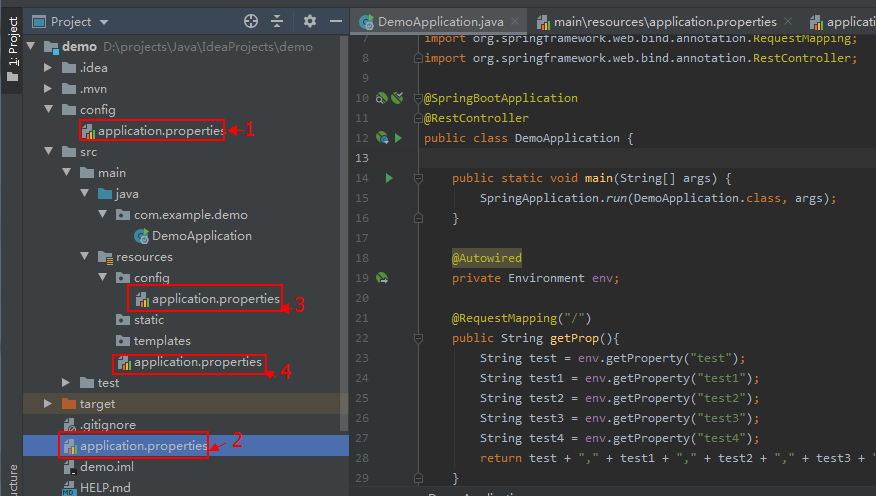
修改默认生成的启动类 DemoApplication.java 代码:
package com.example.demo;

import org.springframework.beans.factory.annotation.Autowired;

import org.springframework.boot.SpringApplication;

import org.springframework.boot.autoconfigure.SpringBootApplication;

import org.springframework.core.env.Environment;

import org.springframework.web.bind.annotation.RequestMapping;

import org.springframework.web.bind.annotation.RestController;

@SpringBootApplication

@RestController

public class DemoApplication {

    public static void main(String[] args) {

        SpringApplication.run(DemoApplication.class, args);

    }

    @Autowired

    private Environment env;

    @RequestMapping("/")

    public String getProp(){

        String test = env.getProperty("test");

        String test1 = env.getProperty("test1");

        String test2 = env.getProperty("test2");

        String test3 = env.getProperty("test3");

        String test4 = env.getProperty("test4");

        return test + "," + test1 + "," + test2 + "," + test3 + "," + test4;

    }

}
访问 http://localhost:8080/
输出:config/application.properties,test1,test2,test3,test4
二、指定配置文件
读取指定的配置文件,不使用默认的application.properties。
测试:
(1)src/main/resources/application.properties 内容:
test1 = application.properties
(2)在项目的src/main/resources新建目录config,新建配置文件myConfig.properties,内容:
test2= myConfig.properties
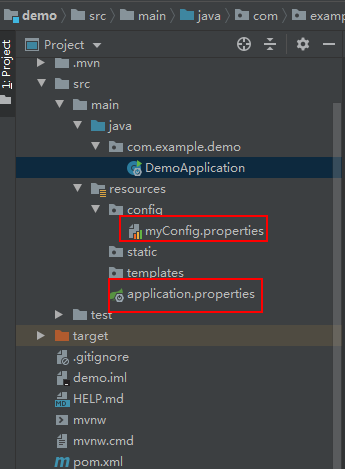
修改默认生成的启动类 DemoApplication.java 代码:
package com.example.demo;

import org.springframework.beans.factory.annotation.Autowired;

import org.springframework.boot.SpringApplication;

import org.springframework.boot.autoconfigure.SpringBootApplication;

import org.springframework.boot.builder.SpringApplicationBuilder;

import org.springframework.core.env.Environment;

import org.springframework.web.bind.annotation.RequestMapping;

import org.springframework.web.bind.annotation.RestController;

@SpringBootApplication

@RestController

public class DemoApplication {

    public static void main(String[] args) {

        //SpringApplication.run(DemoApplication.class, args);

        new SpringApplicationBuilder(DemoApplication.class).properties(

                "spring.config.location=classpath:/config/myConfig.properties"

        ).run(args);

    }

    @Autowired

    private Environment env;

    @RequestMapping("/")

    public String getProp(){

        String test1 = env.getProperty("test1");

        String test2 = env.getProperty("test2");

        return test1 + "," + test2;

    }

}
访问 http://localhost:8080/
输出:null,myConfig.properties
可见application.properties已读取不到,成功读取到配置文件myConfig.properties。
也可以使用spring.config.name指定配置文件的名称,如下面代码指定了myConfig,Spring Boot会到classpath下寻找myConfig.properties(yml)。
    public static void main(String[] args) {

        //SpringApplication.run(DemoApplication.class, args);

        /*new SpringApplicationBuilder(DemoApplication.class).properties(

                "spring.config.location=classpath:/config/myConfig.properties"

        ).run(args);*/

        new SpringApplicationBuilder(DemoApplication.class).properties(

                "spring.config.name=myConfig").run(args);

    }
三、使用profile指定配置
使用profile可以根据特定的环境来激活不同的配置。
src/main/resources/application.yml 内容如下:
spring:

  profiles: mysql

jdbc:

  driver:

    com.mysql.jdbc.Driver

---

spring:

  profiles: oracle

jdbc:

  driver:

    oracle.jdbc.driver.OracleDriver
修改默认生成的启动类 DemoApplication.java 代码:
package com.example.demo;

import org.springframework.beans.factory.annotation.Autowired;

import org.springframework.boot.SpringApplication;

import org.springframework.boot.autoconfigure.SpringBootApplication;

import org.springframework.boot.builder.SpringApplicationBuilder;

import org.springframework.core.env.Environment;

import org.springframework.web.bind.annotation.RequestMapping;

import org.springframework.web.bind.annotation.RestController;

import java.util.Scanner;

@SpringBootApplication

@RestController

public class DemoApplication {

    public static void main(String[] args) {

        //SpringApplication.run(DemoApplication.class, args);

        Scanner scan = new Scanner(System.in);

        String profile = scan.nextLine();

        new SpringApplicationBuilder(DemoApplication.class).properties(

                "spring.config.location=classpath:/application.yml"

        ).profiles(profile).run(args);

    }

    @Autowired

    private Environment env;

    @RequestMapping("/")

    public String getProp(){

        String res = env.getProperty("jdbc.driver");

        return res;

    }

}
在IDEA中点击Run按钮后,在控制台先敲回车再输入oracle,
访问 http://localhost:8080/ 输出:oracle.jdbc.driver.OracleDriver
重新Run,在控制台先敲回车再输入mysql,
访问 http://localhost:8080/ 输出:com.mysql.jdbc.Driver
还可以通过不同配置文件的名称来设置profile,创建下面3个文件。
(1)src/main/resources/application.yml 内容:
spring:

  profiles:

    active: oracle
(2)src/main/resources/application-mysql.yml 内容:
jdbc:

  driver:

    com.mysql.jdbc.Driver
(3)src/main/resources/application-oracle.yml 内容:
jdbc:

  driver:

    oracle.jdbc.driver.OracleDriver
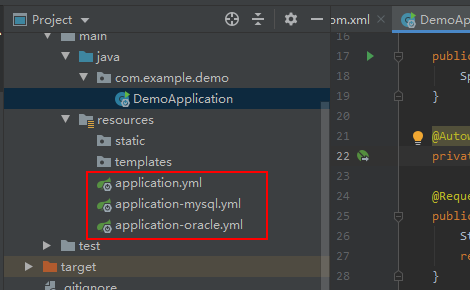
修改默认生成的启动类 DemoApplication.java 代码:
package com.example.demo;

import org.springframework.beans.factory.annotation.Autowired;

import org.springframework.boot.SpringApplication;

import org.springframework.boot.autoconfigure.SpringBootApplication;

import org.springframework.boot.builder.SpringApplicationBuilder;

import org.springframework.core.env.Environment;

import org.springframework.web.bind.annotation.RequestMapping;

import org.springframework.web.bind.annotation.RestController;

import java.util.Scanner;

@SpringBootApplication

@RestController

public class DemoApplication {

    public static void main(String[] args) {

        SpringApplication.run(DemoApplication.class, args);

    }

    @Autowired

    private Environment env;

    @RequestMapping("/")

    public String getProp(){

        String res = env.getProperty("jdbc.driver");

        return res;

    }

}
访问 http://localhost:8080/ 输出:oracle.jdbc.driver.OracleDriver
Spring Boot 2 读取配置文件的更多相关文章
- 【转】spring boot mybatis 读取配置文件
spring boot mybatis 配置整理 一.加载mybatis的配置 1.手写配置,写死在代码里 import java.io.IOException; import java.util.P ...
- spring boot中读取配置文件的两种方式
application.properties test.name=测试 test.url=www.test.com 1.@Value注解 在controller里可以这样直接调用 @Value(&qu ...
- spring boot 项目从配置文件中读取maven 的pom.xml 文件标签的内容。
需求: 将pom.xml 文件中的版本号读取到配置文件并打印到日志中. 第一步: 在pom.xml 中添加以下标签. 第二步: 将version 标签的值读取到配置文件中 这里使用 @@ 而不是 ...
- spring boot 无法读取application.properties问题
spring boot 无法读取application.properties问题 https://bbs.csdn.net/topics/392374488 Spring Boot 之注解@Compo ...
- # spring boot + mybatis 读取数据库
spring boot + mybatis 读取数据库 创建数据库 use testdb; drop table if exists t_city; create table t_city( id i ...
- Spring Boot 的核心配置文件有哪几个?它们的区别是什么?
Spring Boot 的核心配置文件是 application 和 bootstrap 配置文件.application 配置文件这个容易理解,主要用于 Spring Boot 项目的自动化配置.b ...
- Spring Boot的properties配置文件读取
我在自己写点东西玩的时候需要读配置文件,又不想引包,于是打算扣点Spring Boot读取配置文件的代码出来,当然只是读配置文件没必要这么麻烦,不过反正闲着也是闲着,扣着玩了.具体启动过程以前的博客写 ...
- 解决Spring boot中读取属性配置文件出现中文乱码的问题
问题描述: 在配置文件application.properties中写了 server.port=8081 server.servlet.context-path=/boy name=张三 age=2 ...
- Spring Boot 获取yaml配置文件信息
Spring boot 项目启动过程中: org.springframework.boot.SpringApplication#prepareEnvironment 当程序步入listeners.en ...
随机推荐
- GIS面试小知识点
1.什么是地理信息系统?简述其基本功能 它是随着地理科学.计算机技术.遥感技术和信息科学的发展而产生的一门科学.就应用而言,是对空间数据进行 组织.管理.分析.显示 的系统.其实本质上它探讨的就是 ...
- 利用Azure虚拟机安装Dynamics 365 Customer Engagement之六:安装后端服务器
我是微软Dynamics 365 & Power Platform方面的工程师罗勇,也是2015年7月到2018年6月连续三年Dynamics CRM/Business Solutions方面 ...
- Nmap参数详解(含扫描参数原理解释)
语法结构:nmap [Scan Type(s)] [Options] {target specification} 端口状态介绍 open:确定端口开放,可达 closed :关闭的端口对于nmap也 ...
- PyQt5内嵌浏览器
import sys from PyQt5.QtCore import * from PyQt5.QtGui import * from PyQt5.QtWidgets import * from P ...
- MyBatis映射文件 相关操作
一.MyBatis映射文件 1.简介 MyBatis 的真正强大在于它的映射语句,也是它的魔力所在.由于它的异常强大,映射器的 XML 文件就显得相对简单.如果拿它跟具有相同功能的 JDBC 代码进行 ...
- CSS入门(css简介与样式汇总、CSS的使用方式和特征、CSS基础选择器和复杂选择器、边框阴影)
一.CSS的作用 1.以统一的方式实现样式的定义 2.提高页面样式的可重用性和可维护性 3.实现了内容(HTML)和表示(CSS)的分离 HTML和CSS之间有什么关系? HTML:构建网页的结构 C ...
- JS---DOM---总结获取元素的方式
总结获取元素的方式 1. 根据id属性的值获取元素,返回来的是一个元素对象 document.getElementById("id属性的值"); document.getEleme ...
- C编程小结1
1. ‘\0’表示字符串结束符 2. 变量之间互相赋值一定要考虑他们的数据类型,要强制转换匹配上了或者进行一些处理才能赋值,同时读程序的时候也要注意这一点,否则可能看不懂.如: sData[0]=wD ...
- python判断文件的访问权限
os.access(file, mode)判断文件的访问权限file为文件mode为操作模式,有这么几种:os.F_OK: 检查文件是否存在;os.R_OK: 检查文件是否可读;os.W_OK: 检查 ...
- python 基础学习笔记(5)--文件操作
**python 的文件操作** - [ ] 使用python来读写文件是非常简单的操作,我们使用open()来打开一个文件,获取到文件的语柄,然后通过文件语柄就可以进行各种各样的操作了. - [ ] ...