
Spring Boot 获取yaml配置文件信息
Spring boot 项目启动过程中:
org.springframework.boot.SpringApplication#prepareEnvironment
当程序步入listeners.environmentPrepared(environment);这里后,就会读取配置文件中信息。
private ConfigurableEnvironment prepareEnvironment(SpringApplicationRunListeners listeners,

            ApplicationArguments applicationArguments) {

        // Create and configure the environment

        ConfigurableEnvironment environment = getOrCreateEnvironment();

        configureEnvironment(environment, applicationArguments.getSourceArgs());

        listeners.environmentPrepared(environment);

        bindToSpringApplication(environment);

        if (!this.isCustomEnvironment) {

            environment = new EnvironmentConverter(getClassLoader()).convertEnvironmentIfNecessary(environment,

                    deduceEnvironmentClass());

        }

        ConfigurationPropertySources.attach(environment);

        return environment;

    }
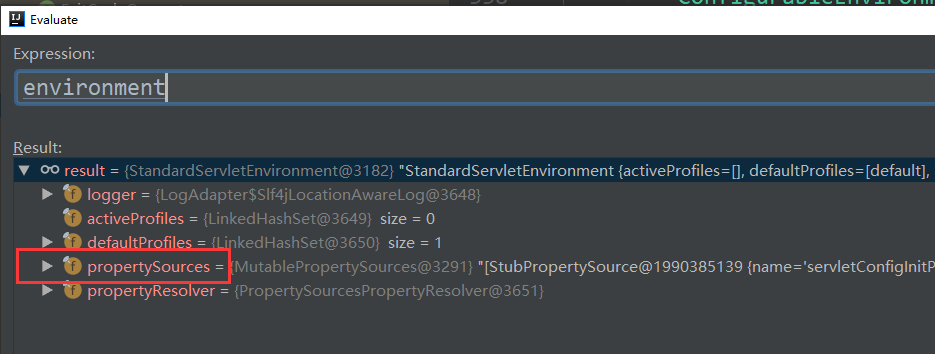
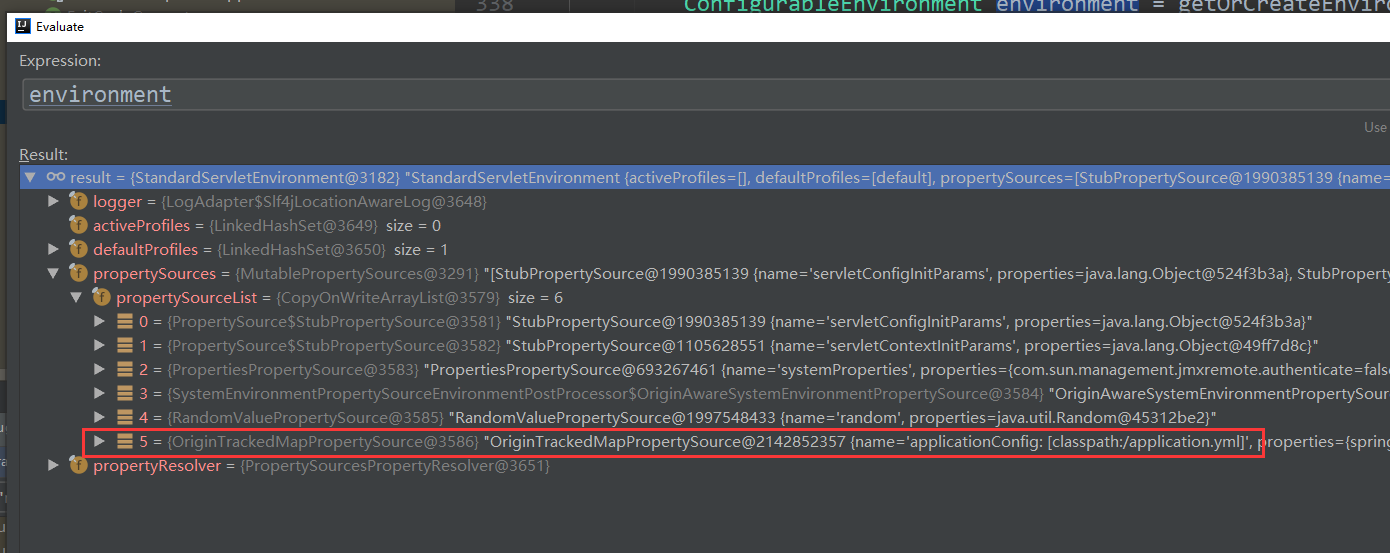
这句代码不好调试listeners.environmentPrepared(environment);
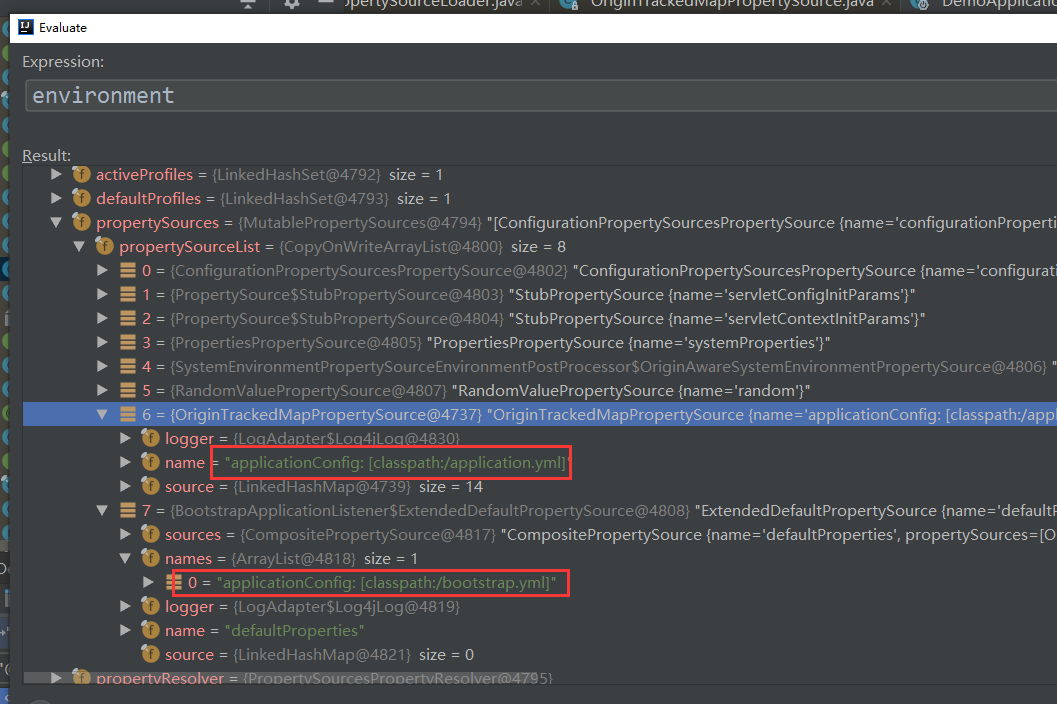
但可以换一种方式,找到上图中的这个类:org.springframework.boot.env.OriginTrackedMapPropertySource

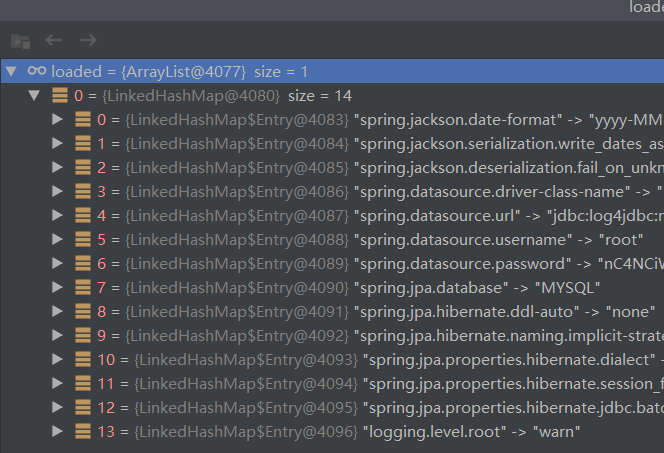
在断点处打上断点,就可以看到系统是如何运行的:下面是堆栈信息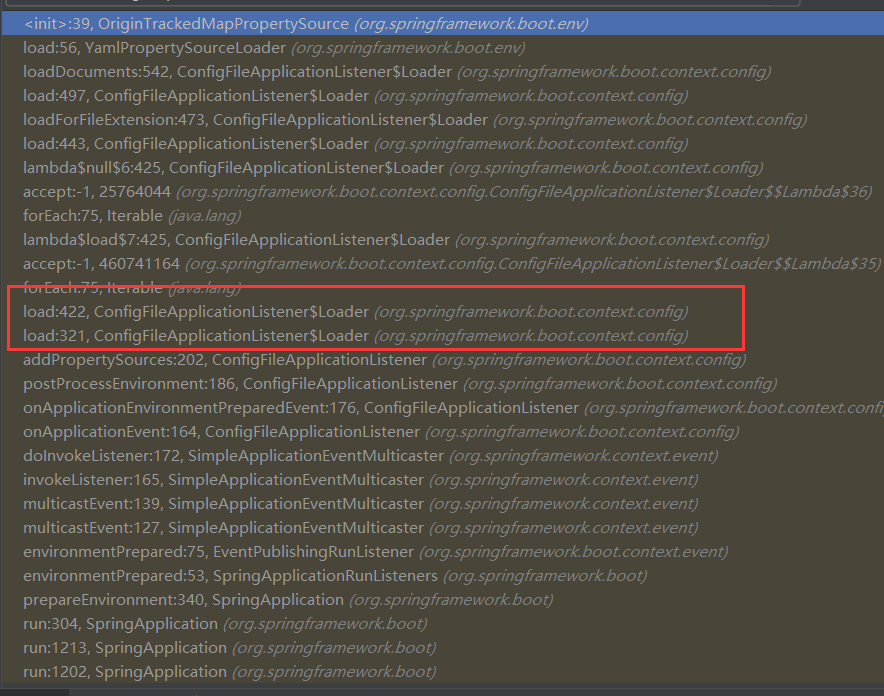
在堆栈信息中,可以看到这个类:org.springframework.boot.context.config.ConfigFileApplicationListener
这个类里面的包含一些配置信息:
private static final String DEFAULT_PROPERTIES = "defaultProperties";

    // Note the order is from least to most specific (last one wins)

    private static final String DEFAULT_SEARCH_LOCATIONS = "classpath:/,classpath:/config/,file:./,file:./config/";

    private static final String DEFAULT_NAMES = "application";

    private static final Set<String> NO_SEARCH_NAMES = Collections.singleton(null);

    private static final Bindable<String[]> STRING_ARRAY = Bindable.of(String[].class);

    /**

     * The "active profiles" property name.

     */

    public static final String ACTIVE_PROFILES_PROPERTY = "spring.profiles.active";

    /**

     * The "includes profiles" property name.

     */

    public static final String INCLUDE_PROFILES_PROPERTY = "spring.profiles.include";

    /**

     * The "config name" property name.

     */

    public static final String CONFIG_NAME_PROPERTY = "spring.config.name";

    /**

     * The "config location" property name.

     */

    public static final String CONFIG_LOCATION_PROPERTY = "spring.config.location";
一个properties. 一个yaml配置sourceloader
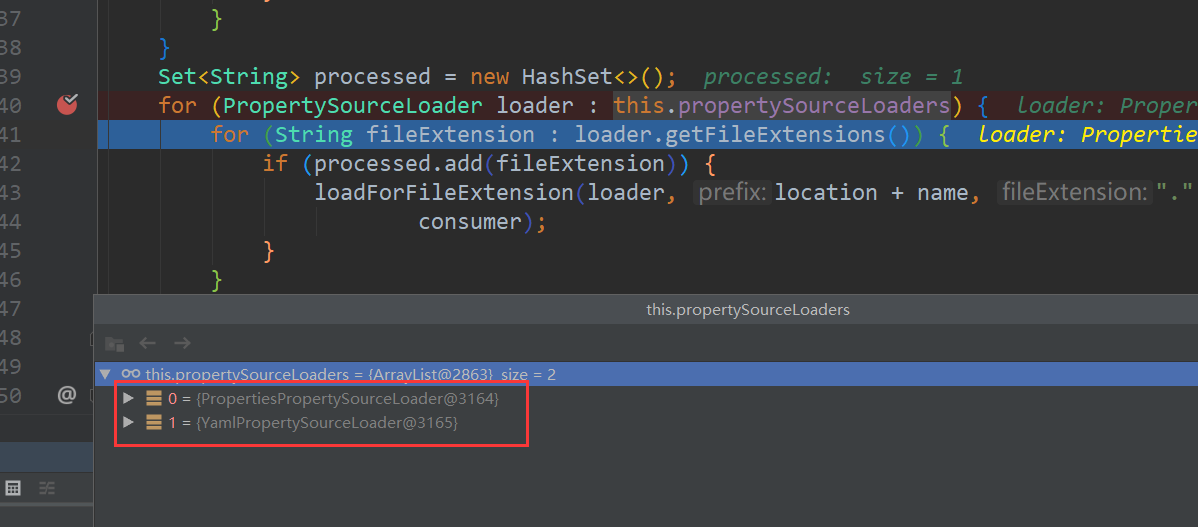
加载yaml文件的类是YamlPropertySourceLoader
public class YamlPropertySourceLoader implements PropertySourceLoader {

    @Override

    public String[] getFileExtensions() {

        return new String[] { "yml", "yaml" };

    }

    @Override

    public List<PropertySource<?>> load(String name, Resource resource) throws IOException {

        if (!ClassUtils.isPresent("org.yaml.snakeyaml.Yaml", null)) {

            throw new IllegalStateException(

                    "Attempted to load " + name + " but snakeyaml was not found on the classpath");

        }

        List<Map<String, Object>> loaded = new OriginTrackedYamlLoader(resource).load();

        if (loaded.isEmpty()) {

            return Collections.emptyList();

        }

        List<PropertySource<?>> propertySources = new ArrayList<>(loaded.size());

        for (int i = 0; i < loaded.size(); i++) {

            String documentNumber = (loaded.size() != 1) ? " (document #" + i + ")" : "";

            propertySources.add(new OriginTrackedMapPropertySource(name + documentNumber, loaded.get(i)));

        }

        return propertySources;

    }

}
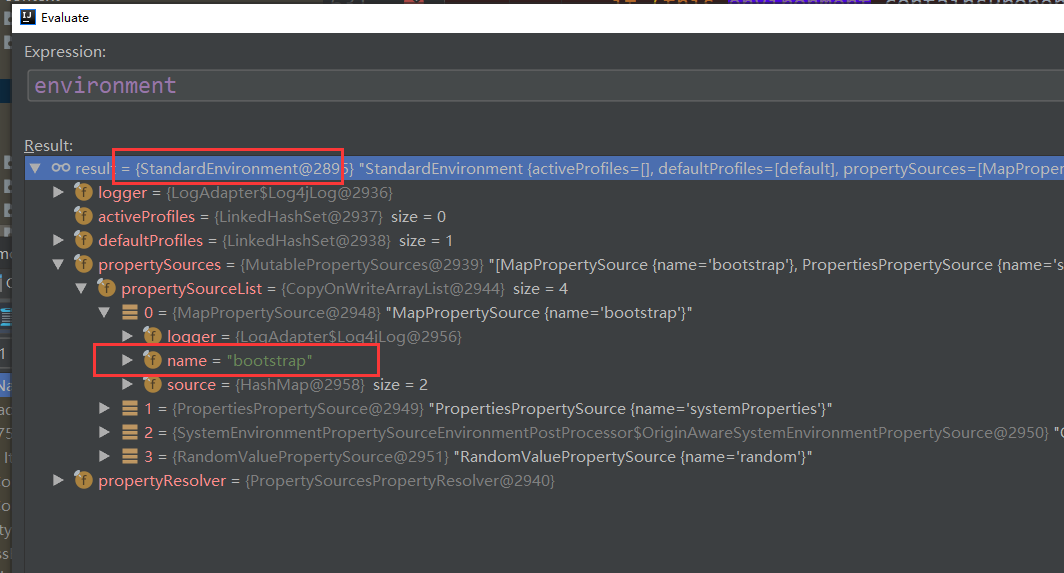
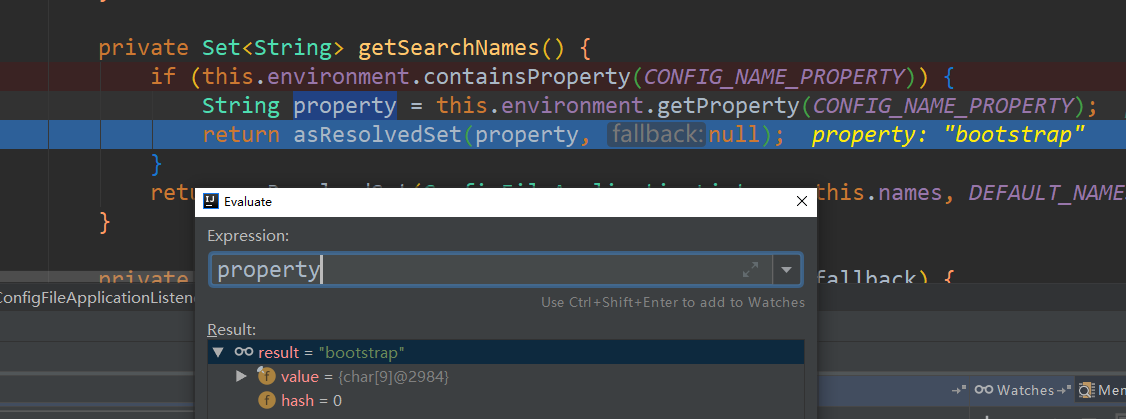
注如果是云环境,则首先加载的是bootstrap.yml, environment也是StandardEnvironment,非servlet环境。这是和Spring boot有很大的不同,加载完成后,再嵌套一StandardServletEnvironment.
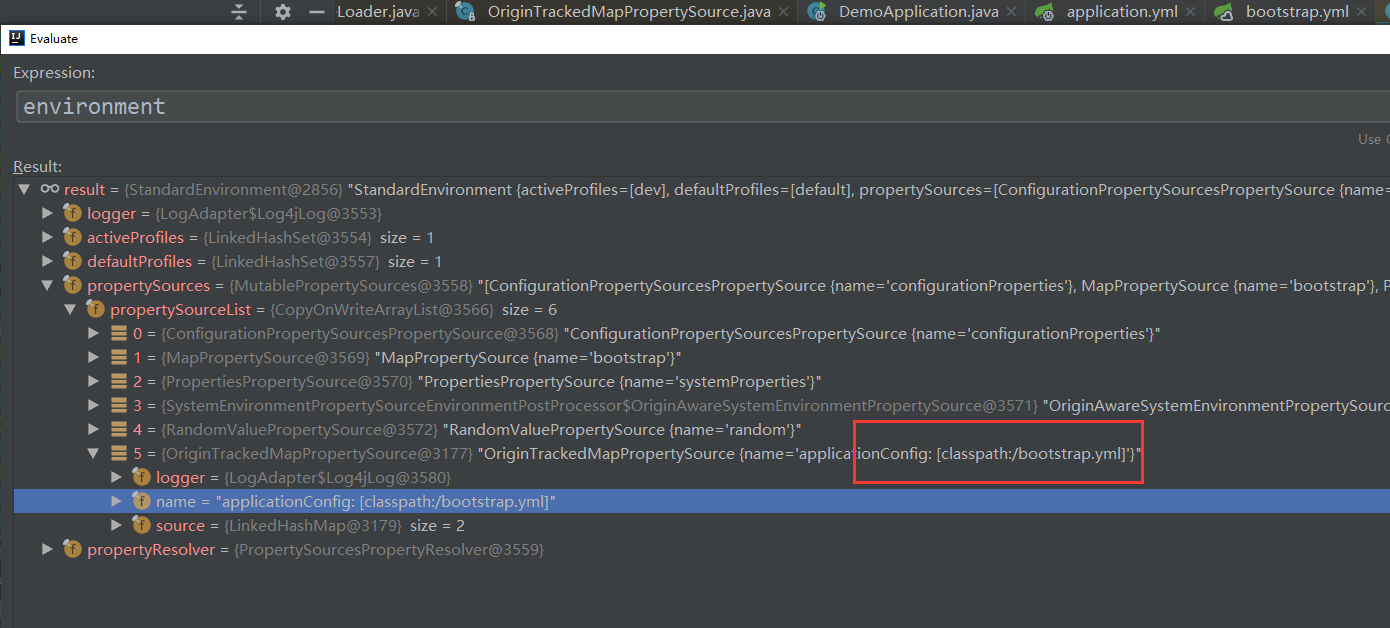
加载完成后,再嵌套一StandardServletEnvironment.
Spring Boot 获取yaml配置文件信息的更多相关文章
- Spring Boot 的核心配置文件有哪几个?它们的区别是什么?
Spring Boot 的核心配置文件是 application 和 bootstrap 配置文件.application 配置文件这个容易理解,主要用于 Spring Boot 项目的自动化配置.b ...
- Java 获取到配置文件信息
Java程序将数据库或者服务器IP写入到代码中,难免缺少灵活性. 如果写入到配置文件,部署到不通服务器上,只需要修改配置文 件即可. Java怎么读取配置文件 /** * 获取到配置文件信息 * @p ...
- Spring Boot获取前端页面参数的几种方式总结
Spring Boot的一个好处就是通过注解可以轻松获取前端页面的参数,之后可以将参数经过一系列处理传送到后台数据库. 获得的方式有很多种,这里稍微总结一下,大致分为以下几种: 1.指定前端url请求 ...
- Spring Boot 获取 java resources 下文件
Spring Boot 获取 java resources 下文件 Spring Boot 获取 resources 目录下的目录(例:获取 resources 目录下的 template 目录): ...
- spring boot 项目从配置文件中读取maven 的pom.xml 文件标签的内容。
需求: 将pom.xml 文件中的版本号读取到配置文件并打印到日志中. 第一步: 在pom.xml 中添加以下标签. 第二步: 将version 标签的值读取到配置文件中 这里使用 @@ 而不是 ...
- Spring Boot - 获取所有的Bean信息
前言 Spring Boot启动的时候需要加载许多Bean实现最小化配置,本文将尝试找出Spring启动后加载的所有Bean信息: 通过ApplicationContext 去获取所有的Bean 通过 ...
- Spring Boot 2.4 配置文件将加载机制大变化
Spring Boot 2.4.0.M2 刚刚发布,它对 application.properties 和 application.yml 文件的加载方式进行重构.如果应用程序仅使用单个 applic ...
- 利用神器BTrace 追踪线上 Spring Boot应用运行时信息
概述 生产环境中的服务可能会出现各种问题,但总不能让服务下线来专门排查错误,这时候最好有一些手段来获取程序运行时信息,比如 接口方法参数/返回值.外部调用情况 以及 函数执行时间等信息以便定位问题.传 ...
- 【spring Boot】spring boot获取资源文件的三种方式【两种情况下】
首先声明一点,springboot获取资源文件,需要看是 1>从spring boot默认的application.properties资源文件中获取 2>还是从自定义的资源文件中获取 带 ...
随机推荐
- TCP层recvmsg系统调用的实现分析
概述 recvmsg系统调用在tcp层的实现是tcp_recvmsg函数,该函数完成从接收队列中读取数据复制到用户空间的任务:函数在执行过程中会锁定控制块,避免软中断在tcp层的影响:函数会涉及从接收 ...
- LeetCode 75. 颜色分类(Sort Colors)
题目描述 给定一个包含红色.白色和蓝色,一共 n 个元素的数组,原地对它们进行排序,使得相同颜色的元素相邻,并按照红色.白色.蓝色顺序排列. 此题中,我们使用整数 0. 1 和 2 分别表示红色.白色 ...
- LeetCode 82. 删除排序链表中的重复元素 II(Remove Duplicates from Sorted List II)
题目描述 给定一个排序链表,删除所有含有重复数字的节点,只保留原始链表中 没有重复出现 的数字. 示例 1: 输入: 1->2->3->3->4->4->5 输出: ...
- 解释HTTP中Get和Post。它们有什么区别,哪个使用时更加安全?
Get和Post都是浏览器向网页服务器提交数据的方法. Get把要提交的数据编码在url中,比如/workinfo.jsp/mianshiti?key1=value1&key2=value2中 ...
- python 装饰器 (test = submit(test))
两层的装饰器,这里对于register不需要进行输入 usename, passwd = 'alex', 'abc123' def register(func): def wrapper(*args, ...
- RN性能优化(重新探索react吧)
最近做RN遇到了一些性能瓶颈,逼着自己不得不做一些优化 已经做过,或者尝试过得优化方案: 1.点击效果防止重复点击. 2.左右两边分别用两个异步栈进行更新,这样能让右边的缓慢不影响左边的更新. 3.I ...
- YJango的卷积神经网络——介绍
原文地址:https://zhuanlan.zhihu.com/p/27642620 如果要提出一个新的神经网络结构,首先就需要引入像循环神经网络中“时间共享”这样的先验知识,降低学习所需要的训练数据 ...
- 从phpMyAdmin批量导入Excel内容到MySQL(亲测非常简洁有效)
今天做项目遇到需要用phpMyAdmin批量导入Excel内容到MySQL数据库.分析了我的踏坑经历并且总结一最便捷的一套导入数据的方法,非常实用简洁: 1.修改Excel表的数据,使得Excel中的 ...
- pandas之DataFrame创建、索引、切片等基础操作
知识点 Series只有行索引,而DataFrame对象既有行索引,也有列索引 行索引,表明不同行,横向索引,叫index,0轴,axis=0 列索引,表明不同列,纵向索引,叫columns,1轴,a ...
- iOS实现渐变颜色
下面是我的两种实现: 1.直接图片展示,注意图片的变形问题; 2.用CAGradientLayer渐变颜色实现; 代码如下: // // ViewController.m // ImageStrenc ...