
带新手玩转MVC——不讲道理就是干(上)
带新手玩转MVC——不讲道理就是干(上)
前言:这几天更新了几篇博客,都是关于Servlet、JSP的理解,后来又写了两种Web开发模式,发现阅读量还可以,说明JSP还是受关注的,之前有朋友评论说JSP都过时了,谁还学这些东西,甚至还有朋友说学Servlet没用。。。。。。好吧,首先,我觉得任何东西存在就有价值,不说那些知识有没有过时,就算是有新的东西,大家都喜欢用新的技术,比如说SpringBoot,用起来很方便,上手也很快,还能跟别人吹吹牛逼啥的,但是这玩意一旦出现问题,你就无从下手,不知道如何去解决。最主要的是你要知道,这些新的框架新的技术都是从那些底层的知识一步一步封装改变来的,万变不离其宗,说技术新,那它新在哪,说技术过时了, 那它为什么过时了,这些都需要你自己亲身去体验,形成自己的知识体系,这样你才能提升。还有那些说学Servlet没用的朋友,项目里面的controller层难道不是servlet吗?天天跟servlet打交道,却说Servlet没用,我竟无言以对。
案例前言:
此案例是我整合Servlet,JSP,以及MVC模式,做的完整的案例,我觉得对刚学完Servlet和JSP以及理解MVC模式 的新手朋友很适合,新手缺练,但想练的时候却没有适合的案例,有的案例很复杂,不利于新手理解,此案例专为新手打造,希望对有需求的朋友有所帮助。
案例简介
这是一个Web注册登录案例,用MVC设计模式实现Web案例,我把此篇案例分为上下两篇,上篇实现注册功能,下篇实现登录功能。
案例(上)演示
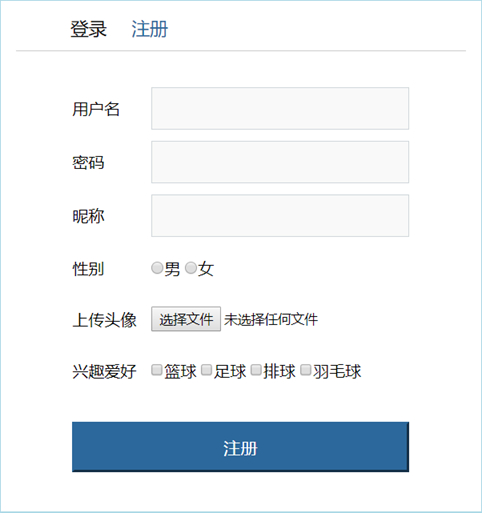
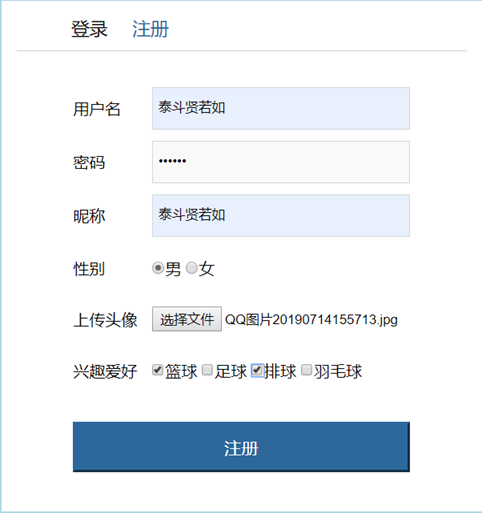


注:此篇只实现注册板块,下篇实现登录板块。
案例准备和结构
环境准备
我用的开发工具是IDEA,如果有不会用IDEA的朋友可以看之前写过的博客《IDEA新手使用教程》https://www.cnblogs.com/zyx110/p/10666082.html,我建的这是一个Maven项目,如果有朋友不知道Maven,可以先看一下我之前写的介绍Maven的博客《Maven》https://www.cnblogs.com/zyx110/p/10619148.html,不知道如何配置Maven环境的可以看《Maven的安装与配置》https://www.cnblogs.com/zyx110/p/10801666.html不知道如何在IDEA中建Maven项目的朋友可以看《IDEA为新手专业打造》https://www.cnblogs.com/zyx110/p/10802098.html,此案例还会用到Tomcat,同样,不会在IDEA中配置Tomcat的朋友可以看《IDEA为新手专业打造》https://www.cnblogs.com/zyx110/p/10802098.html,好,完成这些,就可以开始敲代码了。
案例结构

案例代码
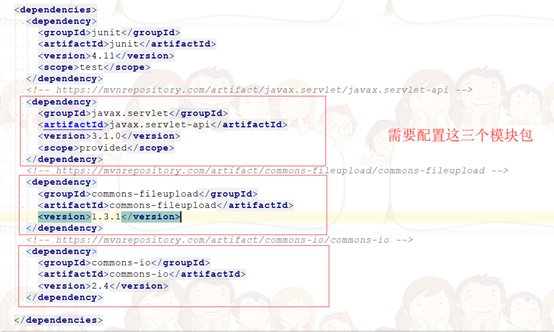
pom.xml
<dependencies>

  <dependency>

    <groupId>junit</groupId>

    <artifactId>junit</artifactId>

    <version>4.11</version>

    <scope>test</scope>

  </dependency>

  <!-- https://mvnrepository.com/artifact/javax.servlet/javax.servlet-api -->

  <dependency>

    <groupId>javax.servlet</groupId>

    <artifactId>javax.servlet-api</artifactId>

    <version>3.1.0</version>

    <scope>provided</scope>

  </dependency>

  <!-- https://mvnrepository.com/artifact/commons-fileupload/commons-fileupload -->

  <dependency>

    <groupId>commons-fileupload</groupId>

    <artifactId>commons-fileupload</artifactId>

    <version>1.3.1</version>

  </dependency>

  <!-- https://mvnrepository.com/artifact/commons-io/commons-io -->

  <dependency>

    <groupId>commons-io</groupId>

    <artifactId>commons-io</artifactId>

    <version>2.4</version>

  </dependency>

</dependencies>
实体类
package domain;

/*

* 用户的实体类

* */

public class User {

    private String username;//用户名

    private String password;//密码

    private String nickname;//昵称

    private String sex;//性别

    private String hobby;//爱好

    private String path;//路径

    @Override

    public String toString() {

        return "User{" +

                "username='" + username + '\'' +

                ", password='" + password + '\'' +

                ", nickname='" + nickname + '\'' +

                ", sex='" + sex + '\'' +

                ", hobby='" + hobby + '\'' +

                ", path='" + path + '\'' +

                '}';

    }

    public String getUsername() {

        return username;

    }

    public void setUsername(String username) {

        this.username = username;

    }

    public String getPassword() {

        return password;

    }

    public void setPassword(String password) {

        this.password = password;

    }

    public String getNickname() {

        return nickname;

    }

    public void setNickname(String nickname) {

        this.nickname = nickname;

    }

    public String getSex() {

        return sex;

    }

    public void setSex(String sex) {

        this.sex = sex;

    }

    public String getHobby() {

        return hobby;

    }

    public void setHobby(String hobby) {

        this.hobby = hobby;

    }

    public String getPath() {

        return path;

    }

    public void setPath(String path) {

        this.path = path;

    }

}
InitServlet类
简介:我在这用集合来模拟数据库,把用户注册的信息保存到ServletContext中,这个类的作用就是开了服务器后先访问这个InitServlet执行它里面的init()方法,加载init()里面的集合。
package servlet;

import domain.User;

import javax.servlet.ServletException;

import javax.servlet.annotation.WebServlet;

import javax.servlet.http.HttpServlet;

import javax.servlet.http.HttpServletRequest;

import javax.servlet.http.HttpServletResponse;

import java.io.IOException;

import java.util.ArrayList;

import java.util.List;

@WebServlet("/initServlet")

public class InitServlet extends HttpServlet {

    @Override

    public void init() throws ServletException {

        //创建一个List集合用于保存用户注册的信息

        List<User> list = new ArrayList<User>();

        //讲list保存到ServletContext域中

        this.getServletContext().setAttribute("list",list);

        System.out.println("init启动了");

    }

    @Override

    protected void doGet(HttpServletRequest req, HttpServletResponse resp) throws ServletException, IOException {

        resp.setCharacterEncoding("utf-8");

        resp.setContentType("text/html");

        resp.getWriter().println("初始化完成");

    }

}
RegistServlet类
简介:这里面的难点在于有文件上传项,提交表单信息后不能再像以前那样用request.getParameter()接收参数了,想要实现文件上传,就要用第三方文件上传的一个组件fileupload,用fileupload里面的一些方法来接收表单的参数。
 package servlet;

 import domain.User;

 import org.apache.commons.fileupload.FileItem;

 import org.apache.commons.fileupload.FileUploadException;

 import org.apache.commons.fileupload.disk.DiskFileItemFactory;

 import org.apache.commons.fileupload.servlet.ServletFileUpload;

 import utils.UploadUtils;

 import javax.naming.Name;

 import javax.servlet.ServletContext;

 import javax.servlet.ServletException;

 import javax.servlet.annotation.WebServlet;

 import javax.servlet.http.HttpServlet;

 import javax.servlet.http.HttpServletRequest;

 import javax.servlet.http.HttpServletResponse;

 import java.io.FileOutputStream;

 import java.io.IOException;

 import java.io.InputStream;

 import java.io.OutputStream;

 import java.util.ArrayList;

 import java.util.HashMap;

 import java.util.List;

 import java.util.Map;

 @WebServlet("/registServlet")

 public class RegistServlet extends HttpServlet {

     /*

     * 用户注册的Servlet

     * */

     @Override

     protected void doGet(HttpServletRequest req, HttpServletResponse resp) throws ServletException, IOException {

         //数据的接收

         //文件上传基本操作

         try {

             //定义一个Map集合用于保存接收到的数据

             Map<String,String> map = new HashMap<String, String>();

             //1、创建一个磁盘文件项工厂对象

             DiskFileItemFactory diskFileItemFactory = new DiskFileItemFactory();

             //2、创建一个核心解析类

             ServletFileUpload servletFileUpload = new ServletFileUpload(diskFileItemFactory);

             //3、解析request请求,返回的是List集合, List集合中存放的是FileItem对象

             List<FileItem> list = servletFileUpload.parseRequest(req);

             //定义一个List集合,用于保存兴趣爱好数据

             List<String> hobbyList = new ArrayList<String>();

             //4、遍历集合,获得每个FileItem,判断是表单项还是文件上传项

             String url = null;

             for (FileItem fileItem:list){

                 //判断是表单项还是文件上传项

                 if (fileItem.isFormField()){

                     //普通表单项

                     //接收表单项参数的值

                     String name = fileItem.getFieldName();//获得表单项name属性的值

                     String value = fileItem.getString("utf-8");//获得表单项的值

                     System.out.println(name+"   "+value);

                     //接收复选框的数据

                     if ("hobby".equals(name)){

                         String hobbyValue = fileItem.getString("utf-8");

                         //接收到一个值,将值存入到hobbyList中

                         hobbyList.add(hobbyValue);

                         hobbyValue = hobbyList.toString().substring(1,hobbyList.toString().length()-1);

                         System.out.println(name +"  "+hobbyValue);

                         //将爱好的数据存入到Map集合中

                         map.put(name,hobbyValue);

                     }else {

                         //将数据存入到Map集合中

                         map.put(name,value);

                     }

                 }else {

                     //文件上传项

                     //文件上传功能

                     //获得文件上传的名称

                     String fileName = fileItem.getName();

                     if (fileName!=null&&!"".equals(fileName)){

                         //通过工具类获得唯一文件名

                         String uuidFileName = UploadUtils.getUUIDFileName(fileName);

                         //获得文件上传的数据

                         InputStream is = fileItem.getInputStream();

                         //获得文件上传的路径

                         String path = this.getServletContext().getRealPath("/img");

                         //将输入流对接到输出流就可以了

                         url = path+"//"+uuidFileName;

                         OutputStream os = new FileOutputStream(url);

                         int len = 0;

                         byte[] b = new byte[1024];

                         while ((len=is.read(b))!=-1){

                             os.write(b,0,len);

                         }

                         is.close();

                         os.close();

                     }

                 }

             }

             System.out.println(map);

             //获得ServletContext对象

             ServletContext servletContext = this.getServletContext();

             List<User> userList = (List<User>) servletContext.getAttribute("list");

             //校验用户名:

             for (User u:userList){

                 if (u.getUsername().equals(map.get("username"))){

                     req.setAttribute("msg","用户名已经存在!");

                     req.getRequestDispatcher("/regist.jsp").forward(req,resp);

                 }

             }

             //封装数据到User中

             User user = new User();

             user.setUsername(map.get("username"));

             user.setPassword(map.get("password"));

             user.setSex(map.get("sex"));

             user.setNickname(map.get("nickname"));

             user.setHobby(map.get("hobby"));

             user.setPath(url);

             //将注册用户的信息存入到List集合中

             userList.add(user);

             for (User u : userList){

                 System.out.println(u);

             }

             servletContext.setAttribute("list",userList);

             //注册成功,跳转到登录页面

             req.getSession().setAttribute("username",user.getUsername());

             resp.sendRedirect(req.getContextPath()+"/login.jsp");

         } catch (FileUploadException e) {

             e.printStackTrace();

         }

     }

     @Override

     protected void doPost(HttpServletRequest req, HttpServletResponse resp) throws ServletException, IOException {

         doGet(req, resp);

     }

 }
文件上传的工具类UploadUtils
package utils;

import java.util.UUID;

/*

* 文件上传的工具类

* */

public class UploadUtils {

    /*

    * 生成唯一的文件名

    * */

    public static String getUUIDFileName(String fileName){

        int idx = fileName.lastIndexOf(".");

        String extention = fileName.substring(idx);

        String uuidFileName = UUID.randomUUID().toString().replace("-","")+extention;

        return uuidFileName;

    }

//    public static void main(String[] args) {

//        System.out.println(getUUIDFileName("1.jpg"));

//    }

}
页面显示部分
regist.jsp
 <%@ page language="java" contentType="text/html; charset=UTF-8"

    pageEncoding="UTF-8"%>

 <!DOCTYPE html>

 <html>

 <head>

 <meta charset="UTF-8">

 <title>注册</title>

 <link rel="stylesheet" href="./css/reg.css">

 </head>

 <body>

    <div class="reg">

       <div class="header">

          <h1>

             <a href="/login.jsp">登录</a> <a href="/regist.jsp">注册</a>

          </h1>

       </div>

       <!--

          文件上传的条件

          * 表单必须是post提交方式

          * 表单中必须有文件上传项,文件上传项必须有name属性和值

          * 表单的enctype属性必须设置为multipart/form-data

        -->

       <%

          String msg = "";

          if(request.getAttribute("msg")!=null){

             msg = (String)request.getAttribute("msg");

          }

       %>

       <h3><%= msg %></h3>

       <form action="/registServlet" method="post" enctype="multipart/form-data">

          <table>

             <tr>

                <td class="td1">用户名</td>

                <td><input type="text" class="input1" name="username"></td>

             </tr>

             <tr>

                <td class="td1">密码</td>

                <td><input type="password" class="input1" name="password"></td>

             </tr>

             <tr>

                <td class="td1">昵称</td>

                <td><input type="text" class="input1" name="nickname"></td>

             </tr>

             <tr>

                <td class="td1">性别</td>

                <td>

                   <input type="radio" name="sex" value="man">男

                   <input type="radio" name="sex" value="women">女

                </td>

             </tr>

             <tr>

                <td class="td1">上传头像</td>

                <td><input type="file" id="photo" name="upload"></td>

             </tr>

             <tr>

                <td class="td1">兴趣爱好</td>

                <td><label>

                   <input type="checkbox" name="hobby" value="篮球">篮球

                   <input type="checkbox" name="hobby" value="足球">足球

                   <input type="checkbox" name="hobby" value="排球">排球

                   <input type="checkbox" name="hobby" value="羽毛球">羽毛球

                </label></td>

             </tr>

             <tr>

                <td colspan="2">

                   <div class="btn-red">

                      <input type="submit" value="注册" id="reg-btn">

                   </div>

                </td>

             </tr>

          </table>

       </form>

    </div>

 </body>

 </html>
login.jsp
 <%@page import="utils.CookieUtils"%>

 <%@ page language="java" contentType="text/html; charset=UTF-8"

    pageEncoding="UTF-8"%>

 <!DOCTYPE html>

 <html>

 <head>

 <meta charset="UTF-8">

 <title>登录页面</title>

 <link rel="stylesheet" href="./css/login.css">

 </head>

 <body>

    <div class="login">

       <div class="header">

          <h1>

             <a href="/login.jsp">登录</a> <a href="/regist.jsp">注册</a>

          </h1>

       </div>

       <%

          String username="";

          // 获得从客户端携带过来的所有的Cookie

 //       Cookie[] cookies = request.getCookies();

 //       // 从Cookie的数组中查找指定名称的Cookie

 //       Cookie cookie = CookieUtils.findCookie(cookies, "username");

 //       if(cookie != null){

 //          username = cookie.getValue();

 //       }

          if(session.getAttribute("username")!=null){

             username = (String)session.getAttribute("username");

          }

          String msg = "";

          if(request.getAttribute("msg")!=null){

             msg = (String)request.getAttribute("msg");

          }

       %>

       <h3><%=msg %></h3>

       <form action="/reg_login/LoginServlet" method="post">

          <table>

             <tr>

                <td class="td1">用户名</td>

                <td><input type="text" class="input1" name="username" value="<%=username %>"></td>

             </tr>

             <tr>

             <td class="td1">密码</td>

             <td><input type="password" class="input1" name="password"></td>

             </tr>

             <tr>

             <td class="td1" colspan="2">

                <input type="checkbox" name="remember" value="true" checked="checked">记住用户名</td>

             </tr>

             <tr>

                <td colspan="2">

                   <div class="btn-red">

                      <input type="submit" value="登录" id="login-btn">

                   </div>

                </td>

             </tr>

          </table>

       </form>

    </div>

 </body>

 </html>
CSS
login.css
 *{

            margin:0px;

            padding:0px;

        }

        a{

            text-decoration: none;

        }

        ul{

            list-style: none;

        }

        body{

            background:rgba(238,238,238,0.5);

            position:relative;

            font-family: 微软雅黑;

            background-color: lightblue;

        }

        img{

            width:225px;height:220px;

        }

        .content{

            width: 240px;

            height: 270px;

            background-color:burlywood;

            margin-left: 105px;

            margin-top: 20px;

        }

        .login{

            width:450px;

            height:380px;

            background: white;

            position:absolute;

            top:50%;

            left:50%;

            margin-left:-225px;

            /*margin-top:-225px;*/

            margin-top:100px;

            padding:5px 15px;

        }

        .login>.header{

            width:100%;

            padding:10px 0px;

            border-bottom: 1px solid #ccc;

            overflow: hidden;

        }

        .login>.header>h1{

            font-size:18px;

            font-weight: normal;

            float:left;

        }

        .login>.header>h1>a{

            padding:5px;

            margin-left:10px;

            color:black;

        }

        .login>.header>h1>a:first-child{

            margin-left:50px;

            color:#2C689B;

        }

        .div1{

            width: 100px;

        }

        .login>form{

            margin-top:30px;

            padding:0 50px;

        }

        .input1{

            width:250px;

            height:40;

            line-height: 40px;

            padding-left: 5px;

            border:1px solid #d0d6d9;

            background: #F9F9F9;

        }

        .td1{

            height: 40px;

            width: 100px;

        }

        table{

            padding: 0px;

            margin:0px;

        }

        td{

            padding:5px;

            margin:10px;

        }

        .login>form>div>p{

            width:350px;

            height:25px;

            line-height: 25px;

            font-size: 12px;

        }

        .login>form>div.idcode>input{

            width:150px;

            margin-right:30px;

            float: left

        }

        .login>form>div.idcode>span{

            float:right;

            width:80px;

            height:30px;

            margin-top:10px;

            border:1px solid #ccc;

        }

        .login>form>div.idcode>a{

            float: right;

            color: black;

            font-size: 12px;

            margin-top:25px;

            margin-left: 5px;

        }

        .clear{

            clear:both;

        }

        .login>form>.autoLogin{

            margin-top:20px;

            font-size:14px;

            line-height:15px;

            color:#999;

            height: 15px;

        }

        .login>form>.autoLogin>label>input{

            margin-right:5px;

        }

        .login>form>.autoLogin>label{

            float:left;

        }

        .login>form>.autoLogin>a{

            float:right;

            color:#666;

            font-size:14px;

        }

        .btn-red{

            margin:20px 0px;

        }

        #login-btn{

            width:100%;

            height:50px;

            background:#2C689B;

            border-color:#2C689B;

            text-align: center;

            line-height:50px;

            color:#fff;

            font-size: 17px;

        }

        #login-btn:hover{

            cursor:pointer;

        }
reg.css
 *{

            margin:0px;

            padding:0px;

        }

        a{

            text-decoration: none;

        }

        ul{

            list-style: none;

        }

        body{

            background:rgba(238,238,238,0.5);

            position:relative;

            font-family: 微软雅黑;

            background-color: lightblue;

        }

        .input1{

            width:250px;

            height:40;

            line-height: 40px;

            padding-left: 5px;

            border:1px solid #d0d6d9;

            background: #F9F9F9;

        }

        .td1{

            height: 40px;

            width: 100px;

        }

        table{

            padding: 0px;

            margin:0px;

        }

        td{

            padding:5px;

            margin:10px;

        }

        .reg{

            width:450px;

            height:500px;

            background: white;

            position:absolute;

            top:50%;

            left:50%;

            margin-left:-225px;

            /*margin-top:-225px;*/

            margin-top:100px;

            padding:5px 15px;

        }

        .reg>.header{

            width:100%;

            padding:10px 0px;

            border-bottom: 1px solid #ccc;

            overflow: hidden;

        }

        .reg>.header>h1{

            font-size:18px;

            font-weight: normal;

            float:left;

        }

        .reg>.header>h1>a{

            padding:5px;

            margin-left:10px;

            color:black;

        }

        .reg>.header>h1>a:first-child{

            margin-left:50px;

        }

          .reg>.header>h1>a:last-child{

            color:#2C689B;

        }

        .reg>form{

            margin-top:30px;

            padding:0 50px;

        }

        .reg>form>div>input{

            width:350px;

            height:40;

            line-height: 40px;

            padding-left: 5px;

            border:1px solid #d0d6d9;

            background: #F9F9F9;

        }

        .reg>form>div>p{

            width:350px;

            height:25px;

            line-height: 25px;

            font-size: 12px;

        }

        .reg>form>div.idcode>input{

            width:150px;

            margin-right:30px;

            float: left

        }

        .reg>form>div.idcode>span{

            float:right;

            width:80px;

            height:30px;

            margin-top:10px;

            border:1px solid #ccc;

        }

        .reg>form>div.idcode>a{

            float: right;

            color: black;

            font-size: 12px;

            margin-top:25px;

            margin-left: 5px;

        }

        .clear{

            clear:both;

        }

        .btn-red{

            margin:20px 0px;

        }

        #reg-btn{

            width:100%;

            height:50px;

            background:#2C689B;

            border-color:#2C689B;

            text-align: center;

            line-height:50px;

            color:#fff;

            font-size: 17px;

        }

        #reg-btn:hover{

            cursor:pointer;

        }
img

案例结束
此篇为实现注册功能,欲知登录如何,请看下回案例。
*****************************************************************************************************
我的博客园地址:https://www.cnblogs.com/zyx110/
带新手玩转MVC——不讲道理就是干(上)的更多相关文章
- 带新手玩转MVC——不讲道理就是干(下)
带新手玩转MVC——不讲道理就是干(下) 前言:废话不多说,直接开干 完整案例演示 案例代码 LoginServlet package servlet; import domain.User; imp ...
- iOS开发——高级UI&带你玩转UITableView
带你玩装UITableView 在实际iOS开发中UITableView是使用最多,也是最重要的一个控件,如果你不会用它,那别说什么大神了,菜鸟都不如. 其实关于UItableView事非常简单的,实 ...
- 带你玩转Visual Studio
带你玩转Visual Studio 带你新建一个工程 工程目录下各文件的含义 解决方案与工程 在这之前先了解一个概念:解决方案与工程. 解决方案(Solution):一个大型项目的整体的工作环境: 工 ...
- 来吧!带你玩转 Excel VBA
来吧!带你玩转 Excel VBA 从错失良机到艰辛的DOS征程,从坎坷购机自学路到转机起程,从爱好到事业,他从一个完全不懂电脑的人到VBA高级应用者,一切全是自学…… 我是罗刚君,来自四川的一个小县 ...
- 转: 带你玩转Visual Studio——带你理解多字节编码与Unicode码
上一篇文章带你玩转Visual Studio——带你跳出坑爹的Runtime Library坑帮我们理解了Windows中的各种类型C/C++运行时库及它的来龙去脉,这是C++开发中特别容易误入歧途的 ...
- acdream 瑶瑶带你玩激光坦克 (模拟)
瑶瑶带你玩激光坦克 Time Limit: 2000/1000MS (Java/Others) Memory Limit: 256000/128000KB (Java/Others) Submi ...
- Android SurfaceView实战 带你玩转flabby bird (下)
转载请标明出处:http://blog.csdn.net/lmj623565791/article/details/43063331,本文出自:[张鸿洋的博客] 1.概述 在Android Surfa ...
- B - 瑶瑶带你玩激光坦克
B - 瑶瑶带你玩激光坦克 Time Limit: 2000/1000MS (Java/Others) Memory Limit: 256000/128000KB (Java/Others) S ...
- 分分钟带你玩转 Web Services【2】CXF
在实践中一直在使用 JAX-WS 构建 WebService 服务,服务还是非常稳定.高效的. 但还是比较好奇其他的 WebService 开源框架,比如:CXF/Axis2/Spring WS等. ...
随机推荐
- SilverlightMVVM模式中的数据校验
silverlight的数据校验大体分成3种类型: 数据是非必填的但是需要满足相应数据格式的 数据是必填的且可能需要进行数据格式校验的 其他(如数据的联动校验) 以下的数据校验方式针对第二种: 在相应 ...
- 在本地安装RabbitMQ Server教程以及可能遇到的问题及解决办法
1. Download latest erlang OTP platform from : erlang:http://www.erlang.org/download.html (The latest ...
- java关键字之synchronized
1.synchronized可以用了修饰一个普通方法,或者代码块,这个时候synchronized锁定的是当前对象,只要有一个线程在访问对应的方法或代码块,其他线程必须等待.2.synchronize ...
- WebGL场景的两种地面构造方法
总述:大部分3D编程都涉及到地面元素,在场景中我们使用地面作为其他物体的承载基础,同时也用地面限制场景使用者的移动范围,还可以在通过设置地块的属性为场景的不同位置设置对应的计算规则.本文在WebGL平 ...
- Fabric1.4源码解析: 链码容器启动过程
想写点东西记录一下最近看的一些Fabric源码,本文使用的是fabric1.4的版本,所以对于其他版本的fabric,内容可能会有所不同. 本文想针对Fabric中链码容器的启动过程进行源码的解析.这 ...
- Python自学day-7
一.静态方法(@staticmethod) class Dog(object): def __init__(self): pass @staticmethod def talk(): #静态方法 pa ...
- mysql的配置和启动命令
一.mysql配置文件在linux系统下的位置 使用命令查询位置: 1.找到安装位置 which mysql -> /usr/bin/mysql 2.接下来就可以针对这个目录通过一些命令查看配 ...
- 简单的python多线程实例
今天抽时间又学了一下python的多线程,理解的又多了一些,为了利于理解,写了一段很简单的代码,如下: import threading from time import sleep def task ...
- 谈谈NOSQL
从MongoDB引到NOSQL 要讲MongoDB之前,首先要提到一个概念NOSQL(NoSQL = Not Only SQL ) 很大一部分数据是由关系型数据库管理系统(RDMBSs)来处理的,关系 ...
- Go - Map 集合
目录 概述 声明 Map 生成 JSON 编辑和删除 推荐阅读 概述 Map 集合是无序的 key-value 数据结构. Map 集合中的 key / value 可以是任意类型,但所有的 key ...