
Spring Boot整合Mybatis配置详解
首先,你得有个Spring Boot项目。
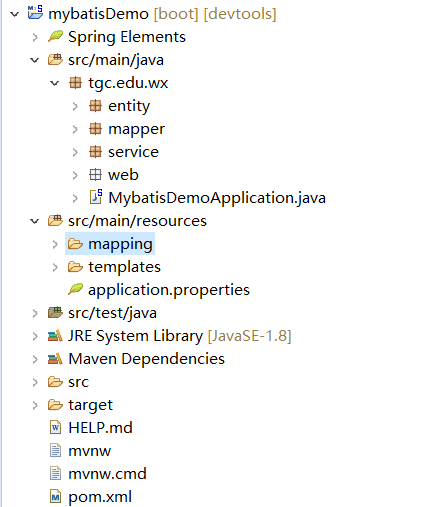
平时开发常用的repository包在mybatis里被替换成了mapper。
配置:
1.引入依赖:
<dependency>

  <groupId>org.mybatis.spring.boot</groupId>

   <artifactId>mybatis-spring-boot-starter</artifactId>

   <version>1.1.1</version>

</dependency>
2.编辑 application.properties
spring.datasource.url=jdbc:mysql://localhost:3306/test?useSSL=true&serverTimezone=GMT

spring.datasource.username=root

spring.datasource.password=root

spring.datasource.driver-class-name=com.mysql.jdbc.Driver

spring.servlet.multipart.max-request-size=2050MB

spring.servlet.multipart.max-file-size=2048MB

spring.jpa.hibernate.use-new-id-generator-mappings=false

server.port=8080

server.servlet.context-path=/mybatisDemo

spring.jmx.enabled=false

mybatis.type-aliases-package=tgc.edu.wx.entity

mybatis.mapperLocations=classpath:mapping/*.xml
这里要注意mybatis的两个相关配置,一是扫描的包,二是映射文件的地址。
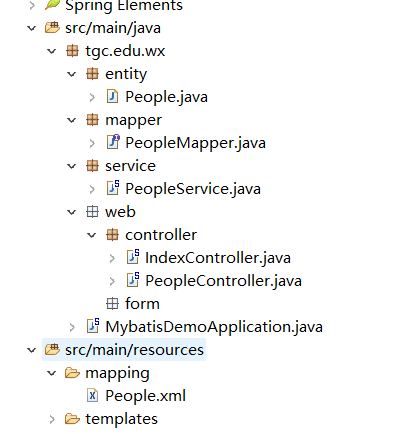
3.建立构建web项目所需的类,以及在数据库建立实体类对应的表,完成后如下图:
PeopleMapper.java
package tgc.edu.wx.mapper;

import java.util.List;

import org.apache.ibatis.annotations.Mapper;

import tgc.edu.wx.entity.People;

@Mapper

public interface PeopleMapper {

    public List<People> findAll();

}
此文件注解为@Mapper而不再是@Repository。
PeopleService.java
package tgc.edu.wx.service;

import java.util.List;

import org.springframework.beans.factory.annotation.Autowired;

import org.springframework.stereotype.Service;

import tgc.edu.wx.entity.People;

import tgc.edu.wx.mapper.PeopleMapper;

@Service

public class PeopleService {

    @Autowired

    private PeopleMapper peopleDAO;

    public List<People> findAll() {

     return    peopleDAO.findAll();

    }

}
PeopleController.java
package tgc.edu.wx.web.controller;

import java.util.List;

import org.springframework.beans.factory.annotation.Autowired;

import org.springframework.stereotype.Controller;

import org.springframework.ui.ModelMap;

import org.springframework.web.bind.annotation.RequestMapping;

import tgc.edu.wx.entity.People;

import tgc.edu.wx.service.PeopleService;

@Controller

@RequestMapping("/people")

public class PeopleController {

    @Autowired

    private PeopleService peopleService;

    @RequestMapping("/list")

    public String list(ModelMap map) {

         List<People> peoples = peopleService.findAll();

        map.put("peoples", peoples);

        return "peopleList";

    }

}
数据库:
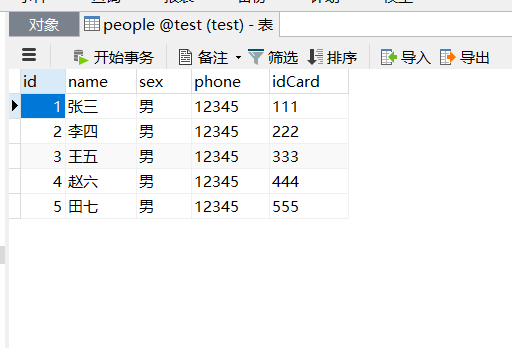
4.依照 application.properties 中编写的地址在对应目录下创建xml格式的mybatis映射文件。
<?xml version="1.0" encoding="UTF-8"?>

<!DOCTYPE mapper PUBLIC "-//mybatis.org//DTD Mapper 3.0//EN" "http://mybatis.org/dtd/mybatis-3-mapper.dtd">

<mapper namespace="tgc.edu.wx.mapper.PeopleMapper">

<select id="findAll" resultType="tgc.edu.wx.entity.People">

SELECT * FROM people

</select>

</mapper>
其中<select>标签内的 id 对应的是dao层内的方法名,resultType对应的是查询返回结果集的类型,select内填写对应方法的语句即可。
5.最后,在启动类里加上注解用于给出需要扫描的mapper文件路径
package tgc.edu.wx;

import org.mybatis.spring.annotation.MapperScan;

import org.springframework.boot.SpringApplication;

import org.springframework.boot.autoconfigure.SpringBootApplication;

@SpringBootApplication

@MapperScan("tgc.edu.wx.mapper")

public class MybatisDemoApplication {

    public static void main(String[] args) {

        SpringApplication.run(MybatisDemoApplication.class, args);

    }

}
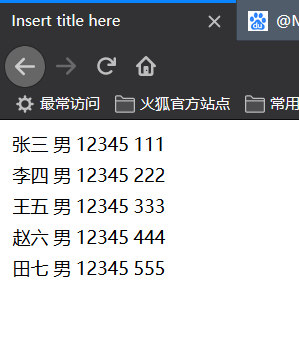
启动项目测试一下:
以上。

Spring Boot整合Mybatis配置详解的更多相关文章
- spring boot application properties配置详解
# =================================================================== # COMMON SPRING BOOT PROPERTIE ...
- (转)Spring boot——logback.xml 配置详解(四)<filter>
文章转载自:http://aub.iteye.com/blog/1101260,在此对作者的辛苦表示感谢! 1 filter的使用 <filter>: Logback的过滤器基于三值逻辑( ...
- (转)Spring boot——logback.xml 配置详解(二)
文章转载自:http://aub.iteye.com/blog/1101260,在此对作者的辛苦表示感谢! 1 根节点<configuration>包含的属性 scan: 当此属性设置为t ...
- Spring boot——logback.xml 配置详解(四)<filter>
阅读目录 1 filter的使用 2 常用的过滤器 文章转载自:http://aub.iteye.com/blog/1101260,在此对作者的辛苦表示感谢! 回到顶部 1 filter的使用 < ...
- Spring boot——logback.xml 配置详解(二)
阅读目录 1 根节点包含的属性 2 根节点的子节点 文章转载自:http://aub.iteye.com/blog/1101260,在此对作者的辛苦表示感谢! 回到顶部 1 根节点<config ...
- (转)Spring boot——logback.xml 配置详解(三)<appender>
文章转载自:http://aub.iteye.com/blog/1101260,在此对作者的辛苦表示感谢! 1 appender <appender>是<configuration& ...
- Spring boot——logback.xml 配置详解(三)<appender>
阅读目录 1 appender 2 encoder 文章转载自:http://aub.iteye.com/blog/1101260,在此对作者的辛苦表示感谢! 回到顶部 1 appender < ...
- 转载 Spring、Spring MVC、MyBatis整合文件配置详解
Spring.Spring MVC.MyBatis整合文件配置详解 使用SSM框架做了几个小项目了,感觉还不错是时候总结一下了.先总结一下SSM整合的文件配置.其实具体的用法最好还是看官方文档. ...
- Spring MVC、MyBatis整合文件配置详解
Spring:http://spring.io/docs MyBatis:http://mybatis.github.io/mybatis-3/ Building a RESTful Web Serv ...
随机推荐
- js获取当前日期,包括星期几
function getCurrentDate() { var myDate = new Date(); var year = myDate.getFullYear(); // ...
- CSS3 动画--- CSS3 animation
动画是CSS3中具有颠覆性的特征之一,可通过设置多个节点来精确控制一个或一组动画,常用来实现复杂的动画效果. 语法格式: animation:动画名称 花费时间 运动曲线 何时开始 播放次数 是否反方 ...
- export default和export的使用
export default和export都是用来向外暴露成员 export default 向外暴露的成员可以使用任意的变量来接收,在一个模块中,export default只允许向外暴露一次,可以 ...
- GBT22239-2008-等保1.0三级要求
第三级基本要求 7.1 技术要求 7.1.1 物理安全 7.1.1.1 物理位置的选择(G3) 本项要求包括: a) 机房和办公场地应选择在具有防震.防风和防雨等能力的建筑内: b) 机房场地 ...
- ICMP重定向 Redirect netwox libpcap netwag
搭建环境 两台虚拟机. 攻击者:192.168.1.8 被攻击者:192.168.1.9 网络配置 主机均采用DHCP 如果没有路由器,可以使用NAT模式来做 攻击者配置 打开转发数据包功能 # su ...
- (转载)林轩田机器学习基石课程学习笔记1 — The Learning Problem
(转载)林轩田机器学习基石课程学习笔记1 - The Learning Problem When Can Machine Learn? Why Can Machine Learn? How Can M ...
- linux用户管理-用户的基本操作
目录 linux用户管理-用户的基本操作 用户相关的命令 linux用户管理-用户的基本操作 什么是用户 用户指能够正常登录linux或windows系统 区别 本质都是登录系统的,只不过Linux支 ...
- Shell—三剑客(grep、sed、awk)
grep命令详解 文本搜索工具,根据用户指定的“模式(pattern)”对目标文本进行过滤,显示被模式匹配到的行. 命令格式:grep [options] pattern filename.gr ...
- Python入门基础学习(函数)
Python基础学习笔记(三) 函数的概念: 所谓函数,就是把具有独立功能的代码块组织为一个小模块,在需要的时候调用 函数的使用包含两个步骤: 1.定义函数 --封装独立的功能 2.调用函数 --享受 ...
- CountDownLatch/CyclicBarrier/Semaphore 使用过吗?
CountDownLatch/CyclicBarrier/Semaphore 使用过吗?下面详细介绍用法: 一,(等待多线程完成的)CountDownLatch 背景; countDownLatch ...