
Spring Security 解析(四) ——短信登录开发
Spring Security 解析(四) —— 短信登录开发
在学习Spring Cloud 时,遇到了授权服务oauth 相关内容时,总是一知半解,因此决定先把Spring Security 、Spring Security Oauth2 等权限、认证相关的内容、原理及设计学习并整理一遍。本系列文章就是在学习的过程中加强印象和理解所撰写的,如有侵权请告知。
项目环境:
- JDK1.8
- Spring boot 2.x
- Spring Security 5.x
一、如何在Security的基础上实现短信登录功能?
回顾下Security实现表单登录的过程:
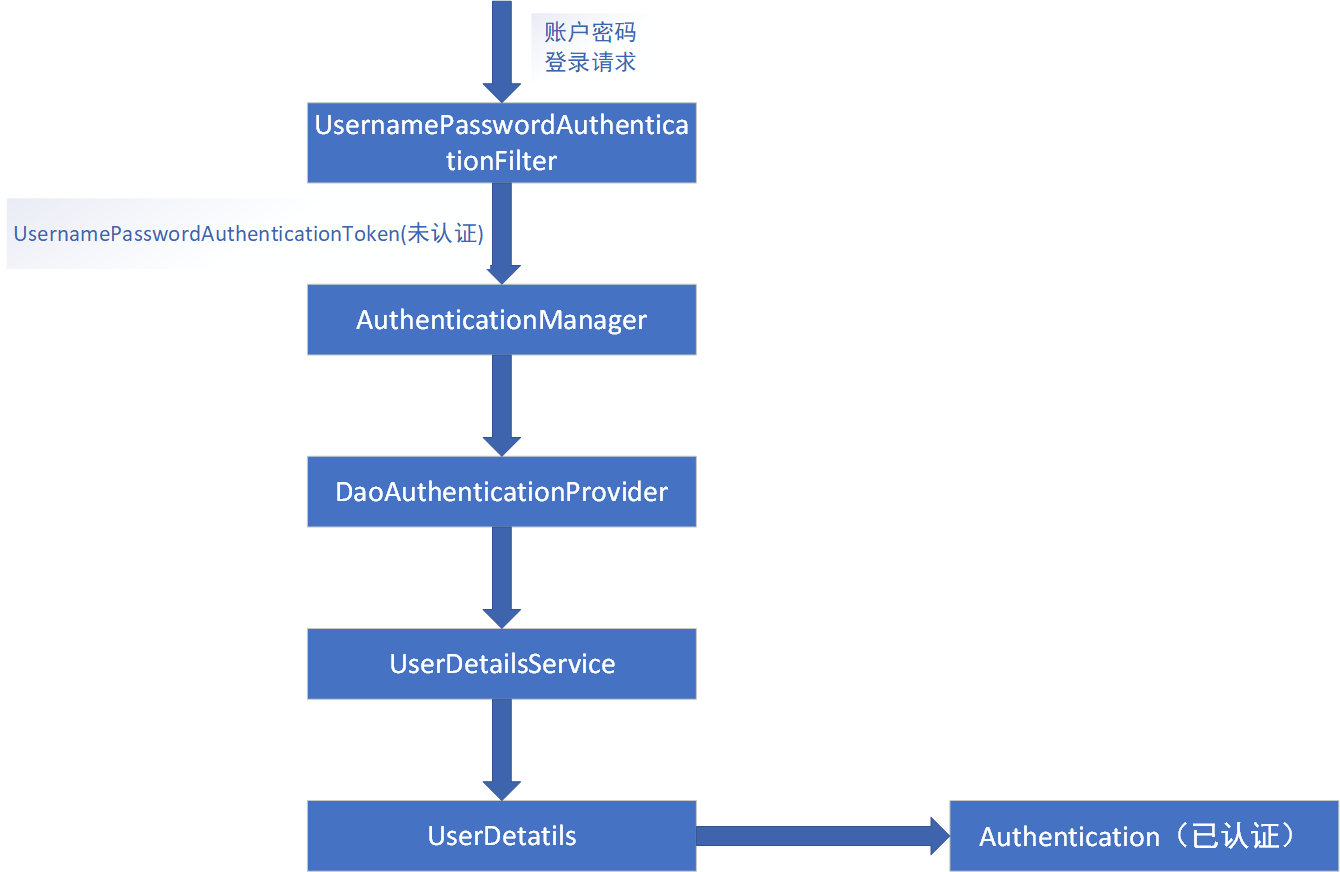
从流程中我们发现其在登录过程中存在特殊处理或者说拥有其他姊妹实现子类的
:
- AuthenticationFilter:用于拦截登录请求;
- 未认证的Authentication 对象,作为认证方法的入参;
- AuthenticationProvider 进行认证处理。
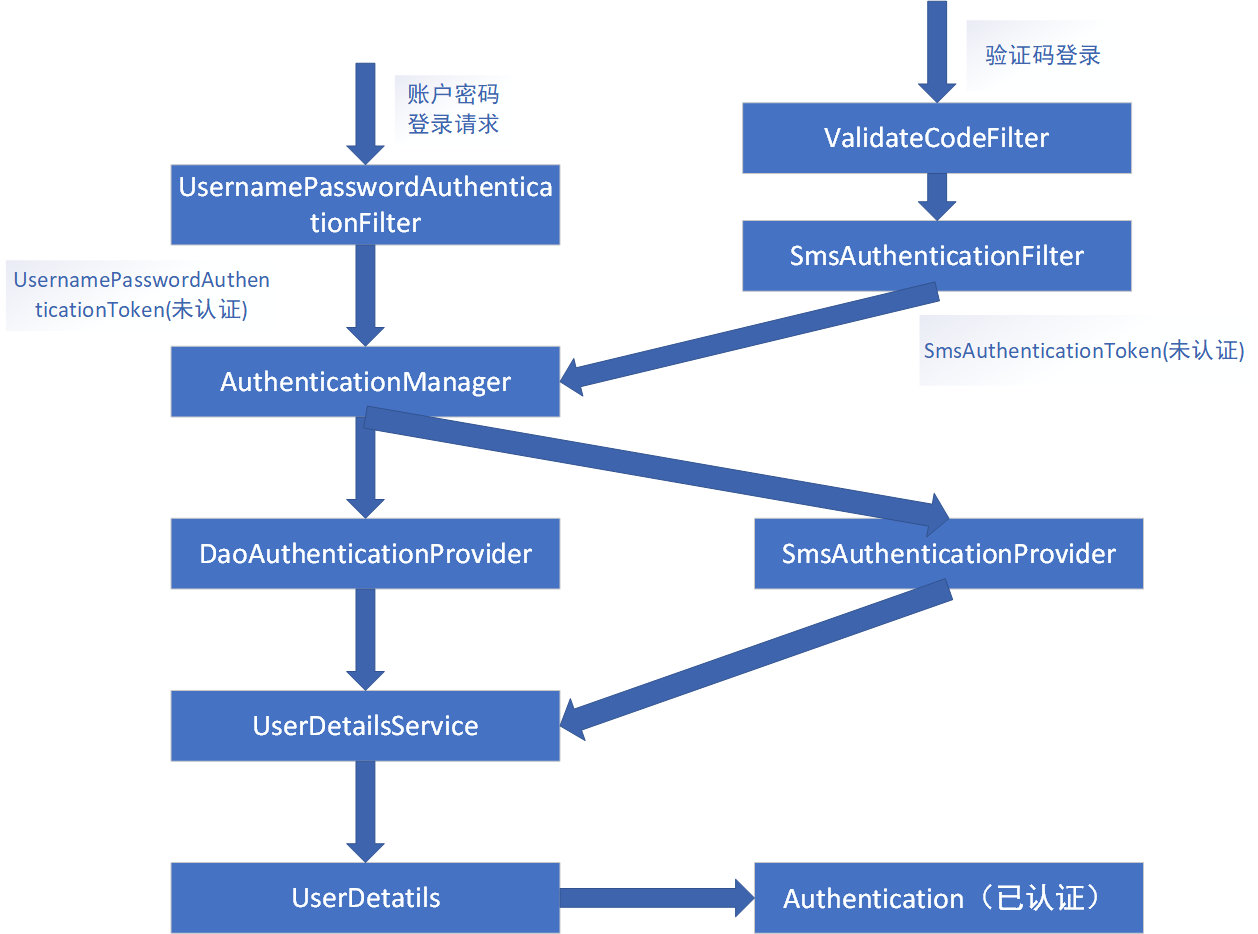
因此我们可以完全通过自定义 一个 SmsAuthenticationFilter 进行拦截 ,一个 SmsAuthenticationToken 来进行传输认证数据,一个 SmsAuthenticationProvider 进行认证业务处理。由于我们知道 UsernamePasswordAuthenticationFilter 的 doFilter 是通过 AbstractAuthenticationProcessingFilter 来实现的,而 UsernamePasswordAuthenticationFilter 本身只实现了attemptAuthentication() 方法。按照这样的设计,我们的 SmsAuthenticationFilter 也 只实现 attemptAuthentication() 方法,那么如何进行验证码的验证呢?这时我们需要在 SmsAuthenticationFilter 前 调用 一个 实现验证码的验证过滤 filter :ValidateCodeFilter。整理实现过后的流程如下图:
二、短信登录认证开发
(一) SmsAuthenticationFilter 实现
模拟UsernamePasswordAuthenticationFilter实现SmsAuthenticationFilter后其代码如下:
@EqualsAndHashCode(callSuper = true)

@Data

public class SmsCodeAuthenticationFilter extends AbstractAuthenticationProcessingFilter {

    // 获取request中传递手机号的参数名

    private String mobileParameter = SecurityConstants.DEFAULT_PARAMETER_NAME_MOBILE;

    private boolean postOnly = true;

    // 构造函数,主要配置其拦截器要拦截的请求地址url

    public SmsCodeAuthenticationFilter() {

        super(new AntPathRequestMatcher(SecurityConstants.DEFAULT_LOGIN_PROCESSING_URL_MOBILE, "POST"));

    }

    @Override

    public Authentication attemptAuthentication(HttpServletRequest request, HttpServletResponse response) throws AuthenticationException, IOException, ServletException {

        // 判断请求是否为 POST 方式

        if (postOnly && !request.getMethod().equals("POST")) {

            throw new AuthenticationServiceException("Authentication method not supported: " + request.getMethod());

        }

        // 调用 obtainMobile 方法从request中获取手机号

        String mobile = obtainMobile(request);

        if (mobile == null) {

            mobile = "";

        }

        mobile = mobile.trim();

        // 创建 未认证的  SmsCodeAuthenticationToken  对象

        SmsCodeAuthenticationToken authRequest = new SmsCodeAuthenticationToken(mobile);

        setDetails(request, authRequest);

        // 调用 认证方法

        return this.getAuthenticationManager().authenticate(authRequest);

    }

    /**

     * 获取手机号

     */

    protected String obtainMobile(HttpServletRequest request) {

        return request.getParameter(mobileParameter);

    }

    /**

     * 原封不动照搬UsernamePasswordAuthenticationFilter 的实现 (注意这里是 SmsCodeAuthenticationToken  )

     */

    protected void setDetails(HttpServletRequest request, SmsCodeAuthenticationToken authRequest) {

        authRequest.setDetails(authenticationDetailsSource.buildDetails(request));

    }

    /**

     * 开放设置 RemmemberMeServices 的set方法

     */

    @Override

    public void setRememberMeServices(RememberMeServices rememberMeServices) {

        super.setRememberMeServices(rememberMeServices);

    }

}
其内部实现主要有几个注意点:
- 设置传输手机号的参数属性
- 构造方法调用父类的有参构造方法,主要用于设置其要拦截的url
- 照搬UsernamePasswordAuthenticationFilter 的 attemptAuthentication() 的实现 ,其内部需要改造有2点:1、 obtainMobile 获取 手机号信息 2、创建 SmsCodeAuthenticationToken 对象
- 为了实现短信登录也拥有记住我的功能,这里开放 setRememberMeServices() 方法用于设置 rememberMeServices 。
(二) SmsAuthenticationToken 实现
一样的我们模拟UsernamePasswordAuthenticationToken实现SmsAuthenticationToken:
public class SmsCodeAuthenticationToken extends AbstractAuthenticationToken {

    private static final long serialVersionUID = SpringSecurityCoreVersion.SERIAL_VERSION_UID;

    private final Object principal;

    /**

     * 未认证时,内容为手机号

     * @param mobile

     */

    public SmsCodeAuthenticationToken(String mobile) {

        super(null);

        this.principal = mobile;

        setAuthenticated(false);

    }

    /**

     *

     * 认证成功后,其中为用户信息

     *

     * @param principal

     * @param authorities

     */

    public SmsCodeAuthenticationToken(Object principal,

                                      Collection<? extends GrantedAuthority> authorities) {

        super(authorities);

        this.principal = principal;

        super.setAuthenticated(true);

    }

    @Override

    public Object getCredentials() {

        return null;

    }

    @Override

    public Object getPrincipal() {

        return this.principal;

    }

    @Override

    public void setAuthenticated(boolean isAuthenticated) throws IllegalArgumentException {

        if (isAuthenticated) {

            throw new IllegalArgumentException(

                    "Cannot set this token to trusted - use constructor which takes a GrantedAuthority list instead");

        }

        super.setAuthenticated(false);

    }

    @Override

    public void eraseCredentials() {

        super.eraseCredentials();

    }

}
对比UsernamePasswordAuthenticationToken,我们减少了 credentials(可以理解为密码),其他的基本上是原封不动。
(三) SmsAuthenticationProvider 实现
由于SmsCodeAuthenticationProvider 是一个全新的不同的认证委托实现,因此这个我们按照自己的设想写,不必参照 DaoAuthenticationProvider。看下我们自己实现的代码:
@Data

public class SmsCodeAuthenticationProvider implements AuthenticationProvider {

    private UserDetailsService userDetailsService;

    @Override

    public Authentication authenticate(Authentication authentication) throws AuthenticationException {

        SmsCodeAuthenticationToken authenticationToken = (SmsCodeAuthenticationToken) authentication;

        UserDetails user = userDetailsService.loadUserByUsername((String) authenticationToken.getPrincipal());

        if (user == null) {

            throw new InternalAuthenticationServiceException("无法获取用户信息");

        }

        SmsCodeAuthenticationToken authenticationResult = new SmsCodeAuthenticationToken(user, user.getAuthorities());

        authenticationResult.setDetails(authenticationToken.getDetails());

        return authenticationResult;

    }

    @Override

    public boolean supports(Class<?> authentication) {

        return SmsCodeAuthenticationToken.class.isAssignableFrom(authentication);

    }

}
通过直接继承 AuthenticationProvider实现其接口方法 authenticate() 和 supports() 。 supports() 我们直接参照其他Provider写的,这个主要是判断当前处理的Authentication是否为SmsCodeAuthenticationToken或其子类。 authenticate() 我们就直接调用 userDetailsService的loadUserByUsername()方法简单实现,因为验证码已经在 ValidateCodeFilter 验证通过了,所以这里我们只要能通过手机号查询到用户信息那就直接判顶当前用户认证成功,并且生成 已认证 的 SmsCodeAuthenticationToken返回。
(四) ValidateCodeFilter 实现
正如我们之前描述的一样ValidateCodeFilter只做验证码的验证,这里我们设置通过redis获取生成验证码来对比用户输入的验证码:
@Component

public class ValidateCodeFilter extends OncePerRequestFilter implements InitializingBean {

    /**

     * 验证码校验失败处理器

     */

    @Autowired

    private AuthenticationFailureHandler authenticationFailureHandler;

    /**

     * 系统配置信息

     */

    @Autowired

    private SecurityProperties securityProperties;

    @Resource

    private StringRedisTemplate stringRedisTemplate;

    /**

     * 存放所有需要校验验证码的url

     */

    private Map<String, String> urlMap = new HashMap<>();

    /**

     * 验证请求url与配置的url是否匹配的工具类

     */

    private AntPathMatcher pathMatcher = new AntPathMatcher();

    /**

     * 初始化要拦截的url配置信息

     */

    @Override

    public void afterPropertiesSet() throws ServletException {

        super.afterPropertiesSet();

        urlMap.put(SecurityConstants.DEFAULT_LOGIN_PROCESSING_URL_MOBILE, SecurityConstants.DEFAULT_PARAMETER_NAME_CODE_SMS);

        addUrlToMap(securityProperties.getSms().getSendSmsUrl(), SecurityConstants.DEFAULT_PARAMETER_NAME_CODE_SMS);

    }

    /**

     * 讲系统中配置的需要校验验证码的URL根据校验的类型放入map

     *

     * @param urlString

     * @param smsParam

     */

    protected void addUrlToMap(String urlString, String smsParam) {

        if (StringUtils.isNotBlank(urlString)) {

            String[] urls = StringUtils.splitByWholeSeparatorPreserveAllTokens(urlString, ",");

            for (String url : urls) {

                urlMap.put(url, smsParam);

            }

        }

    }

    @Override

    protected void doFilterInternal(HttpServletRequest request, HttpServletResponse response, FilterChain chain)

            throws ServletException, IOException {

        String code = request.getParameter(getValidateCode(request));

        if (code != null) {

            try {

                String oldCode = stringRedisTemplate.opsForValue().get(request.getParameter(SecurityConstants.DEFAULT_PARAMETER_NAME_MOBILE));

                if (StringUtils.equalsIgnoreCase(oldCode,code)) {

                    logger.info("验证码校验通过");

                } else {

                    throw new ValidateCodeException("验证码失效或错误!");

                }

            } catch (AuthenticationException e) {

                authenticationFailureHandler.onAuthenticationFailure(request, response, e);

                return;

            }

        }

        chain.doFilter(request, response);

    }

    /**

     * 获取校验码

     *

     * @param request

     * @return

     */

    private String getValidateCode(HttpServletRequest request) {

        String result = null;

        if (!StringUtils.equalsIgnoreCase(request.getMethod(), "get")) {

            Set<String> urls = urlMap.keySet();

            for (String url : urls) {

                if (pathMatcher.match(url, request.getRequestURI())) {

                    result = urlMap.get(url);

                }

            }

        }

        return result;

    }

}
这里主要看下 doFilterInternal 实现验证码验证逻辑即可。
三、如何将设置SMS的Filter加入到FilterChain生效呢?
这里我们需要引进新的配置类 SmsCodeAuthenticationSecurityConfig,其实现代码如下:
@Component

public class SmsCodeAuthenticationSecurityConfig extends SecurityConfigurerAdapter<DefaultSecurityFilterChain, HttpSecurity> {

    @Autowired

    private AuthenticationSuccessHandler authenticationSuccessHandler ;

    @Autowired

    private AuthenticationFailureHandler authenticationFailureHandler;

    @Resource

    private UserDetailsService userDetailsService;

    @Override

    public void configure(HttpSecurity http) throws Exception {

        SmsCodeAuthenticationFilter smsCodeAuthenticationFilter = new SmsCodeAuthenticationFilter();

        // 设置 AuthenticationManager

        smsCodeAuthenticationFilter.setAuthenticationManager(http.getSharedObject(AuthenticationManager.class));

        // 分别设置成功和失败处理器

        smsCodeAuthenticationFilter.setAuthenticationSuccessHandler(authenticationSuccessHandler);

        smsCodeAuthenticationFilter.setAuthenticationFailureHandler(authenticationFailureHandler);

        // 设置 RememberMeServices

        smsCodeAuthenticationFilter.setRememberMeServices(http

                .getSharedObject(RememberMeServices.class));

        // 创建 SmsCodeAuthenticationProvider 并设置 userDetailsService

        SmsCodeAuthenticationProvider smsCodeAuthenticationProvider = new SmsCodeAuthenticationProvider();

        smsCodeAuthenticationProvider.setUserDetailsService(userDetailsService);

        // 将Provider添加到其中

        http.authenticationProvider(smsCodeAuthenticationProvider)

                // 将过滤器添加到UsernamePasswordAuthenticationFilter后面

                .addFilterAfter(smsCodeAuthenticationFilter, UsernamePasswordAuthenticationFilter.class);

    }
最后我们需要 在 SpringSecurityConfig 配置类中引用 SmsCodeAuthenticationSecurityConfig :
http.addFilterBefore(validateCodeFilter, AbstractPreAuthenticatedProcessingFilter.class)

                .apply(smsCodeAuthenticationSecurityConfig)

                . ...
四、新增发送验证码接口和验证码登录表单
新增发送验证码接口(主要设置成无权限访问):
    @GetMapping("/send/sms/{mobile}")

    public void sendSms(@PathVariable String mobile) {

        // 随机生成 6 位的数字串

        String code = RandomStringUtils.randomNumeric(6);

        // 通过 stringRedisTemplate 缓存到redis中

        stringRedisTemplate.opsForValue().set(mobile, code, 60 * 5, TimeUnit.SECONDS);

        // 模拟发送短信验证码

        log.info("向手机: " + mobile + " 发送短信验证码是: " + code);

    }
新增验证码登录表单:
// 注意这里的请求接口要与 SmsAuthenticationFilter的构造函数 设置的一致

<form action="/loginByMobile" method="post">

    <table>

        <tr>

            <td>手机号:</td>

            <td><input type="text" name="mobile" value="15680659123"></td>

        </tr>

        <tr>

            <td>短信验证码:</td>

            <td>

                <input type="text" name="smsCode">

                <a href="/send/sms/15680659123">发送验证码</a>

            </td>

        </tr>

        <tr>

            <td colspan='2'><input name="remember-me" type="checkbox" value="true"/>记住我</td>

        </tr>

        <tr>

            <td colspan="2">

                <button type="submit">登录</button>

            </td>

        </tr>

    </table>

</form>
五、个人总结
其实实现另一种登录方式,关键点就在与 filter 、 AuthenticationToken、AuthenticationProvider 这3个点上。整理出来就是: 通过自定义 一个 SmsAuthenticationFilter 进行拦截 ,一个 AuthenticationToken 来进行传输认证数据,一个 AuthenticationProvider 进行认证业务处理。由于我们知道 UsernamePasswordAuthenticationFilter 的 doFilter 是通过 AbstractAuthenticationProcessingFilter 来实现的,而 UsernamePasswordAuthenticationFilter 本身只实现了attemptAuthentication() 方法。按照这样的设计,我们的 AuthenticationFilter 也 只实现 attemptAuthentication() 方法,但同时需要在 AuthenticationFilter 前 调用 一个 实现验证过滤 filter :ValidatFilter。 正如下面的流程图一样,可以按照这种方式添加任意一种登录方式:
本文介绍短信登录开发的代码可以访问代码仓库中的 security 模块 ,项目的github 地址 : https://github.com/BUG9/spring-security
如果您对这些感兴趣,欢迎star、follow、收藏、转发给予支持!
Spring Security 解析(四) ——短信登录开发的更多相关文章
- Spring Security教程(四):自定义登录页
在前面的例子中,登陆页面都是用的Spring Security自己提供的,这明显不符合实际开发场景,同时也没有退出和注销按钮,因此在每次测试的时候都要通过关闭浏览器来注销达到清除session的效果. ...
- Spring Security 解析(五) —— Spring Security Oauth2 开发
Spring Security 解析(五) -- Spring Security Oauth2 开发 在学习Spring Cloud 时,遇到了授权服务oauth 相关内容时,总是一知半解,因此决 ...
- Spring Security 解析(六) —— 基于JWT的单点登陆(SSO)开发及原理解析
Spring Security 解析(六) -- 基于JWT的单点登陆(SSO)开发及原理解析 在学习Spring Cloud 时,遇到了授权服务oauth 相关内容时,总是一知半解,因此决定先把 ...
- Spring Security构建Rest服务-1200-SpringSecurity OAuth开发APP认证框架
基于服务器Session的认证方式: 前边说的用户名密码登录.短信登录.第三方登录,都是普通的登录,是基于服务器Session保存用户信息的登录方式.登录信息都是存在服务器的session(服务器的一 ...
- Spring Security 解析(二) —— 认证过程
Spring Security 解析(二) -- 认证过程 在学习Spring Cloud 时,遇到了授权服务oauth 相关内容时,总是一知半解,因此决定先把Spring Security .S ...
- Spring Security 解析(七) —— Spring Security Oauth2 源码解析
Spring Security 解析(七) -- Spring Security Oauth2 源码解析 在学习Spring Cloud 时,遇到了授权服务oauth 相关内容时,总是一知半解,因 ...
- Spring Security 解析(三) —— 个性化认证 以及 RememberMe 实现
Spring Security 解析(三) -- 个性化认证 以及 RememberMe 实现 在学习Spring Cloud 时,遇到了授权服务oauth 相关内容时,总是一知半解,因此决定先把 ...
- Spring Security 整合freemaker 实现简单登录和角色控制
Spring Security 整合freemaker 实现简单登录和角色控制 写这篇文章是因为我做了一个电商网站项目,近期刚加上权限控制.整个过程很简单,在此给大家梳理一下,也算是自己对知识 ...
- Spring Security 解析(一) —— 授权过程
Spring Security 解析(一) -- 授权过程 在学习Spring Cloud 时,遇到了授权服务oauth 相关内容时,总是一知半解,因此决定先把Spring Security .S ...
随机推荐
- 一般处理程序ashx输出XML
首先构建自己的xmldocument,方式很多例如: XmlDocument xmldoc = new XmlDocument(); XmlDeclaration xmldecl = xmldoc.C ...
- 写css注意的事项
<!DOCTYPE html> <html lang="en"> <head> <meta charset="UTF-8&quo ...
- cache verilog实现
cache原理: https://www.cnblogs.com/mikewolf2002/p/10984976.html cache的verilog实现 实现的cache是16k, 4way组相连c ...
- Ionic run android失败解决方法。
今天在node.js窗口执行命令行ionic run android时就是报Error executing "adb device":error错,一开始以为是SDK不全,后来以为 ...
- javascript 初探
JS ,前端3剑客之一,控制HTML标签的动作.浏览器通过解释JS代码识别ta要做什么,因为在浏览器操作,所以最好使用谷歌浏览器. 参考: https://www.cnblogs.com/yuanch ...
- django rest framework 解析器组件 接口设计,视图组件 (2)
1. 使用视图组件进行接口优化 1.1 使用视图组件的mixin进行接口逻辑优化 - 导入mixin from rest_framework.mixinx import ( ListModelMix, ...
- LCD编程_画点线圆
上篇博客中进行了lcd的简单测试,这篇博客将进行更加复杂的测试——画点.画线.画圆.画线和画圆是在画点的基础上实现的,因此本篇博客重点实现画点操作. 先抛出这样的一个问题,已知: (x,y)的坐标: ...
- Amoeba读写分离(MySQL)
实验操作环境: centos服务器 三台机器 role: 192.168.189.129 master-主 192.168.189.130 master-从 192.168.189.131 ...
- Python3 异常
异常 --- 程序执行时产生的事件,为Python对象 <Python学习手册>笔记 异常总是通过实例对象来识别 默认的异常处理器 --- 打印标准出错信息(包括引发的异常和堆栈跟踪-异常 ...
- JavaScript遍历