
scrapy 图片管道学习笔记
使用scrapy首先需要安装
python环境使用3.6
windows下激活进入python3.6环境
activate python36
mac下
mac@macdeMacBook-Pro:~$     source activate python36

(python36) mac@macdeMacBook-Pro:~$
安装 scrapy
(python36) mac@macdeMacBook-Pro:~$     pip install scrapy

(python36) mac@macdeMacBook-Pro:~$     scrapy --version

Scrapy 1.8. - no active project

Usage:

  scrapy <command> [options] [args]

Available commands:

  bench         Run quick benchmark test

  fetch         Fetch a URL using the Scrapy downloader

  genspider     Generate new spider using pre-defined templates

  runspider     Run a self-contained spider (without creating a project)

  settings      Get settings values

  shell         Interactive scraping console

  startproject  Create new project

  version       Print Scrapy version

  view          Open URL in browser, as seen by Scrapy

  [ more ]      More commands available when run from project directory

Use "scrapy <command> -h" to see more info about a command

(python36) mac@macdeMacBook-Pro:~$     scrapy startproject images

New Scrapy project 'images', using template directory '/Users/mac/anaconda3/envs/python36/lib/python3.6/site-packages/scrapy/templates/project', created in:

    /Users/mac/images

You can start your first spider with:

    cd images

    scrapy genspider example example.com

(python36) mac@macdeMacBook-Pro:~$     cd images

(python36) mac@macdeMacBook-Pro:~/images$     scrapy genspider -t crawl pexels www.pexels.com

Created spider 'pexels' using template 'crawl' in module:

  images.spiders.pexels

(python36) mac@macdeMacBook-Pro:~/images$
setting.py里面 关闭robot.txt遵循
ROBOTSTXT_OBEY = False
分析目标网站规则 www.pexels.com
https://www.pexels.com/photo/man-using-black-camera-3136161/
https://www.pexels.com/video/beach-waves-and-sunset-855633/
https://www.pexels.com/photo/white-vehicle-2569855/
https://www.pexels.com/photo/monochrome-photo-of-city-during-daytime-3074526/
得出要抓取的规则
rules = (
    Rule(LinkExtractor(allow=r'^https://www.pexels.com/photo/.*/$'), callback='parse_item', follow=True),
)

图片管道 要定义两个item
class ImagesItem(scrapy.Item):

    # define the fields for your item here like:

    # name = scrapy.Field()

    image_urls = scrapy.Field()

    images = scrapy.Field()
images_url是抓取到的图片url 需要传递过来
images 检测图片完整性,但是我打印好像没看到这个字段
pexels.py里面引入item 并且定义对象
# -*- coding: utf-8 -*-

import scrapy

from scrapy.linkextractors import LinkExtractor

from scrapy.spiders import CrawlSpider, Rule

from images.items import ImagesItem

class PexelsSpider(CrawlSpider):

    name = 'pexels'

    allowed_domains = ['www.pexels.com']

    start_urls = ['http://www.pexels.com/']

    rules = (

        Rule(LinkExtractor(allow=r'^https://www.pexels.com/photo/.*/$'), callback='parse_item', follow=False),

    )

    def parse_item(self, response):

        item = ImagesItem()

        item['image_urls'] = response.xpath('//img[contains(@src,"photos")]/@src').extract()

        print(item['image_urls'])

        return item
设置setting.py里面启用图片管道 设置存储路劲
ITEM_PIPELINES = {

   #'images.pipelines.ImagesPipeline': ,

    'scrapy.pipelines.images.ImagesPipeline':

}

IMAGES_STORE = '/www/crawl'

# 图片的下载地址 根据item中的字段来设置哪一个内容需要被下载

IMAGES_URLS_FIELD = 'image_urls'
启动爬虫
scrapy crawl pexels --nolog
发现已经下载下来了
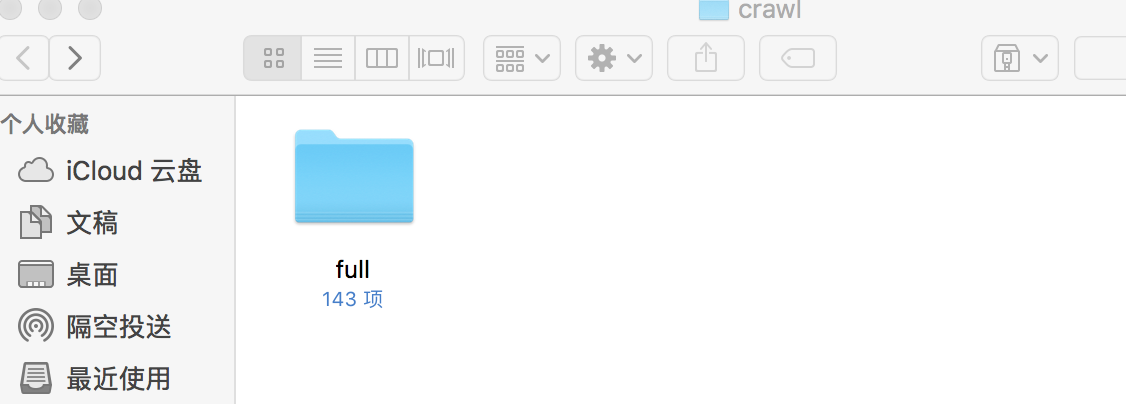
但是下载的图片不是高清的,要处理下图片的后缀
setting.py打开默认管道 设置优先级高一些
ITEM_PIPELINES = {

    'images.pipelines.ImagesPipeline': 1,

    'scrapy.pipelines.images.ImagesPipeline': 2

}
管道文件里面对后缀进行处理去掉
class ImagesPipeline(object):

    def process_item(self, item, spider):

        tmp = item['image_urls']

        item['image_urls'] = []

        for i in tmp:

            if '?' in i:

                item['image_urls'].append(i.split('?')[0])

            else:

                item['image_urls'].append(i)

        return item
最终下载的就是大图了,但是图片管道还是默认对图片会有压缩的,所以如果使用文件管道下载的才是完全的原图,非常大。
如果不下载图片,直接存图片url到mysql的话参考
https://www.cnblogs.com/php-linux/p/11792393.html
图片管道 配置最小宽度和高度分辨率
IMAGES_MIN_HEIGHT=800
IMAGES_MIN_WIDTH=600
IMAGES_EXPIRES=90 天 不会对重复的进行下载
生成缩略图
IMAGES_THUMBS={
‘small’:(50,50),
'big':(600,600)
}
scrapy 图片管道学习笔记的更多相关文章
- scrapy爬虫框架学习笔记(一)
scrapy爬虫框架学习笔记(一) 1.安装scrapy pip install scrapy 2.新建工程: (1)打开命令行模式 (2)进入要新建工程的目录 (3)运行命令: scrapy sta ...
- css 3 背景图片为渐变色(渐变色背景图片) 学习笔记
6年不研究CSS发现很多现功能都没有用过,例如渐变色,弹性盒子等,年前做过一个简单的管理系统,由于本人美工不好,设计不出好看的背景图片,偶然百度到背景图片可以使用渐变色(感觉发现了新大陆).以后的项目 ...
- Scrapy 爬虫框架学习笔记(未完,持续更新)
Scrapy 爬虫框架 Scrapy 是一个用 Python 写的 Crawler Framework .它使用 Twisted 这个异步网络库来处理网络通信. Scrapy 框架的主要架构 根据它官 ...
- Angular2之管道学习笔记
管道.可以把一个输出流与另一个输入流连接起来.类似 linux.gulp都有应用. 在Angular2中使用管道非常方便.Angular2中本身提供了一些内置管道.当然也可以自定义管道. 文档链接:h ...
- Scrapy:学习笔记(2)——Scrapy项目
Scrapy:学习笔记(2)——Scrapy项目 1.创建项目 创建一个Scrapy项目,并将其命名为“demo” scrapy startproject demo cd demo 稍等片刻后,Scr ...
- scrapy 学习笔记1
最近一段时间开始研究爬虫,后续陆续更新学习笔记 爬虫,说白了就是获取一个网页的html页面,然后从里面获取你想要的东西,复杂一点的还有: 反爬技术(人家网页不让你爬,爬虫对服务器负载很大) 爬虫框架( ...
- 机器学习框架ML.NET学习笔记【6】TensorFlow图片分类
一.概述 通过之前两篇文章的学习,我们应该已经了解了多元分类的工作原理,图片的分类其流程和之前完全一致,其中最核心的问题就是特征的提取,只要完成特征提取,分类算法就很好处理了,具体流程如下: 之前介绍 ...
- 机器学习框架ML.NET学习笔记【7】人物图片颜值判断
一.概述 这次要解决的问题是输入一张照片,输出人物的颜值数据. 学习样本来源于华南理工大学发布的SCUT-FBP5500数据集,数据集包括 5500 人,每人按颜值魅力打分,分值在 1 到 5 分之间 ...
- Redis学习笔记7--Redis管道(pipeline)
redis是一个cs模式的tcp server,使用和http类似的请求响应协议.一个client可以通过一个socket连接发起多个请求命令.每个请求命令发出后client通常会阻塞并等待redis ...
随机推荐
- kotlin基础 枚举
enum class WEEK {星期一,星期二,星期三,星期四,星期五,星期六,星期日} Kotlin 枚举类 枚举类最基本的用法是实现一个类型安全的枚举. 枚举常量用逗号分隔,每个枚举常量都是一个 ...
- (转)2019年 React 新手学习指南 – 从 React 学习线路图说开去
原文:https://www.html.cn/archives/10111 注:本文根据 React 开发者学习线路图(2018) 结构编写了很多新手如何学习 React 的建议.2019 年有标题党 ...
- WebGL学习笔记(十二):加载模型文件
目前为止,我们用到的模型顶点uv信息等,都是直接定义在代码中的,实际使用中,这些数据应该是由3D编辑器编辑好后按照一定的格式存储在文件中的,我们需要从文件中提取出对应的数据之后,组合成我们可以使用的信 ...
- 研发团队是该制定OKR还是KPI?
绩效管理和OKR的目标管理,是前行的两条腿,缺谁都会寸步难行.正确的做法是把企业的使命和任务,转化为经营目标,然后再用KPI.OKR等绩效管理工具,分解.执行.考核.. KPI是一套绩效管理的方法.全 ...
- Spark Streaming反压机制
反压(Back Pressure)机制主要用来解决流处理系统中,处理速度比摄入速度慢的情况.是控制流处理中批次流量过载的有效手段. 1 反压机制原理 Spark Streaming中的反压机制是Spa ...
- xml 3 字节的 UTF-8 序列的字节 3 无效
今天在eclipse中编写**.xml文件时,注释中的中文被eclipse识别到错误:3 字节的 UTF-8 序列的字节 3 无效,曾多次遇到该问题,问题的根源是: The cause of this ...
- html2canvas 将网页截图为图片,上传base64 到服务端
await html2canvas(getById("winyh"), { height:500, allowTaint: true, useCORS: true, }).then ...
- web page popup window model
jQuery UI dialog: https://jqueryui.com/dialog/ Semantic UI https://semantic-ui.com/modules/modal.htm ...
- Windows删除文件夹下的指定格式文件(递归删除)
问题描述: 今天遇到一个需求,需要对文件夹进行文件筛选.目录结构较为复杂(目录较多,层次较深),数据量较大(总共60GB左右). 鉴于上述情况,直接排除了人工处理方式(否则小伙伴们会打死我的). 解决 ...
- 神器之strace
原链接:https://www.jianshu.com/p/33521124bdf2来