
Android Studio 之 ROM【3】,LiveData+ViewModel+AsyncTask+Repository+RecyclerView
教程地址:https://www.bilibili.com/video/av65180549
源码地址:https://github.com/longway777/Android-2019-Tutorial-RoomBasic-step-3
RecyclerView 是一个回收视图,当滚动出屏幕外面的内容会自动回收,回收系统资源
相同的内容,支持用不同的样式来呈现!
创建2个 Layout 资源文件
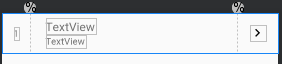
<?xml version="1.0" encoding="utf-8"?>

<androidx.constraintlayout.widget.ConstraintLayout xmlns:android="http://schemas.android.com/apk/res/android"

    xmlns:app="http://schemas.android.com/apk/res-auto"

    xmlns:tools="http://schemas.android.com/tools"

    android:layout_width="match_parent"

    android:layout_height="wrap_content"

    android:background="?attr/selectableItemBackground"

    android:clickable="true">

    <androidx.constraintlayout.widget.Guideline

        android:id="@+id/guideline2"

        android:layout_width="wrap_content"

        android:layout_height="wrap_content"

        android:orientation="vertical"

        app:layout_constraintGuide_percent="0.1" />

    <androidx.constraintlayout.widget.Guideline

        android:id="@+id/guideline3"

        android:layout_width="wrap_content"

        android:layout_height="wrap_content"

        android:orientation="vertical"

        app:layout_constraintGuide_percent="0.85" />

    <TextView

        android:id="@+id/textViewNumber"

        android:layout_width="wrap_content"

        android:layout_height="wrap_content"

        android:text="TextView"

        app:layout_constraintBottom_toBottomOf="parent"

        app:layout_constraintEnd_toStartOf="@+id/guideline2"

        app:layout_constraintStart_toStartOf="parent"

        app:layout_constraintTop_toTopOf="parent"

        tools:text="1" />

    <TextView

        android:id="@+id/textViewEnglish"

        android:layout_width="wrap_content"

        android:layout_height="wrap_content"

        android:layout_marginTop="8dp"

        android:text="TextView"

        android:textSize="18sp"

        app:layout_constraintBottom_toTopOf="@+id/textViewChinese"

        app:layout_constraintEnd_toStartOf="@+id/guideline3"

        app:layout_constraintHorizontal_bias="0.1"

        app:layout_constraintStart_toStartOf="@+id/guideline2"

        app:layout_constraintTop_toTopOf="parent" />

    <TextView

        android:id="@+id/textViewChinese"

        android:layout_width="wrap_content"

        android:layout_height="wrap_content"

        android:layout_marginBottom="8dp"

        android:text="TextView"

        app:layout_constraintBottom_toBottomOf="parent"

        app:layout_constraintStart_toStartOf="@+id/textViewEnglish"

        app:layout_constraintTop_toBottomOf="@+id/textViewEnglish" />

    <ImageView

        android:id="@+id/imageView2"

        android:layout_width="wrap_content"

        android:layout_height="wrap_content"

        app:layout_constraintBottom_toBottomOf="parent"

        app:layout_constraintEnd_toEndOf="parent"

        app:layout_constraintStart_toStartOf="@+id/guideline3"

        app:layout_constraintTop_toTopOf="parent"

        app:srcCompat="@drawable/ic_chevron_right_black_24dp" />

</androidx.constraintlayout.widget.ConstraintLayout>
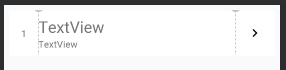
<?xml version="1.0" encoding="utf-8"?>

<LinearLayout xmlns:android="http://schemas.android.com/apk/res/android"

    xmlns:app="http://schemas.android.com/apk/res-auto"

    xmlns:tools="http://schemas.android.com/tools"

    android:layout_width="match_parent"

    android:layout_height="wrap_content"

    android:background="?attr/selectableItemBackground"

    android:clickable="true"

    android:orientation="vertical">

    <androidx.cardview.widget.CardView

        android:layout_width="match_parent"

        android:layout_height="match_parent"

        android:foreground="?selectableItemBackground"

        android:layout_marginStart="8dp"

        android:layout_marginTop="8dp"

        android:layout_marginEnd="8dp">

        <androidx.constraintlayout.widget.ConstraintLayout

            android:layout_width="match_parent"

            android:layout_height="match_parent">

            <androidx.constraintlayout.widget.Guideline

                android:id="@+id/guideline4"

                android:layout_width="wrap_content"

                android:layout_height="wrap_content"

                android:orientation="vertical"

                app:layout_constraintGuide_percent="0.10948905" />

            <androidx.constraintlayout.widget.Guideline

                android:id="@+id/guideline5"

                android:layout_width="wrap_content"

                android:layout_height="wrap_content"

                android:orientation="vertical"

                app:layout_constraintGuide_percent="0.85" />

            <TextView

                android:id="@+id/textViewNumber"

                android:layout_width="wrap_content"

                android:layout_height="wrap_content"

                android:text="TextView"

                app:layout_constraintBottom_toBottomOf="parent"

                app:layout_constraintEnd_toStartOf="@+id/guideline4"

                app:layout_constraintStart_toStartOf="parent"

                app:layout_constraintTop_toTopOf="parent"

                tools:text="1" />

            <TextView

                android:id="@+id/textViewEnglish"

                android:layout_width="wrap_content"

                android:layout_height="wrap_content"

                android:layout_marginTop="8dp"

                android:text="TextView"

                android:textSize="24sp"

                app:layout_constraintBottom_toTopOf="@+id/textViewChinese"

                app:layout_constraintEnd_toStartOf="@+id/guideline5"

                app:layout_constraintHorizontal_bias="0.0"

                app:layout_constraintStart_toStartOf="@+id/guideline4"

                app:layout_constraintTop_toTopOf="parent" />

            <TextView

                android:id="@+id/textViewChinese"

                android:layout_width="wrap_content"

                android:layout_height="wrap_content"

                android:layout_marginBottom="8dp"

                android:text="TextView"

                app:layout_constraintBottom_toBottomOf="parent"

                app:layout_constraintStart_toStartOf="@+id/textViewEnglish"

                app:layout_constraintTop_toBottomOf="@+id/textViewEnglish" />

            <ImageView

                android:id="@+id/imageView"

                android:layout_width="wrap_content"

                android:layout_height="wrap_content"

                app:layout_constraintBottom_toBottomOf="parent"

                app:layout_constraintEnd_toEndOf="parent"

                app:layout_constraintStart_toStartOf="@+id/guideline5"

                app:layout_constraintTop_toTopOf="parent"

                app:srcCompat="@drawable/ic_chevron_right_black_24dp" />

        </androidx.constraintlayout.widget.ConstraintLayout>

    </androidx.cardview.widget.CardView>

</LinearLayout>
2.创建 适配器 Adapter类 ,继承自 RecylerView.Adapter ,是 RecyclerView 的内容管理器
package com.example.roombasic;

import android.content.Intent;

import android.net.Uri;

import android.view.LayoutInflater;

import android.view.View;

import android.view.ViewGroup;

import android.widget.TextView;

import androidx.annotation.NonNull;

import androidx.recyclerview.widget.RecyclerView;

import java.util.ArrayList;

import java.util.List;

public class MyAdapter extends RecyclerView.Adapter<MyAdapter.MyViewHolder> {

    //用来存放数据的列表

    List<Word> allWords = new ArrayList<>();

    boolean use_CellCard; //是否使用 cell_card 这个样式

    public MyAdapter(boolean use_CellCard) {

        this.use_CellCard = use_CellCard;

    }

    public void setAllWords(List<Word> allWords) {

        this.allWords = allWords;

    }

    @NonNull

    @Override

    public MyViewHolder onCreateViewHolder(@NonNull ViewGroup parent, int viewType) {

        //

        LayoutInflater layoutInflater = LayoutInflater.from(parent.getContext());

        //用开关控件,控制不同的样式

        View itemView    ;

        if(use_CellCard)

            itemView = layoutInflater.inflate(R.layout.cell_card,parent,false);

        else

            itemView = layoutInflater.inflate(R.layout.cell_normal,parent,false);

        return new MyViewHolder(itemView);

    }

    //数据绑定

    @Override

    public void onBindViewHolder(@NonNull final MyViewHolder holder, int position) {

        //数据绑定

        final Word word = allWords.get(position);  //通过位置找到内容

        holder.textViewNumber.setText(String.valueOf(position + 1));

        holder.textViewEnglish.setText(word.getWord());

        holder.textViewChinese.setText(word.getChineseMeaning());

        holder.itemView.setOnClickListener(new View.OnClickListener() {

            @Override

            public void onClick(View v) {

                Uri uri = Uri.parse("http://m.youdao.com/dict?le=eng&q=" + holder.textViewEnglish.getText());

                Intent intent = new Intent(Intent.ACTION_VIEW);

                intent.setData(uri);

                holder.itemView.getContext().startActivity(intent);

            }

        });

    }

    //返回列表数据的总个数

    @Override

    public int getItemCount() {

        return allWords.size();

    }

    // 因为需要管理三个内容,左边的数字,右上英文,右下汉字,所以创建三个值来管理

    // 创建一个属于 Adapter 自身的 ViewHolder

    //加 static 防内存泄漏

    static class MyViewHolder extends RecyclerView.ViewHolder{

        TextView textViewNumber,textViewEnglish,textViewChinese;

        public MyViewHolder(@NonNull View itemView) {

            super(itemView);

            textViewNumber = itemView.findViewById(R.id.textViewNumber);

            textViewEnglish = itemView.findViewById(R.id.textViewEnglish);

            textViewChinese = itemView.findViewById(R.id.textViewChinese);

        }

    }

}
3. MainActivity.java 类
package com.example.roombasic;

import android.os.Bundle;

import android.view.View;

import android.widget.Button;

import android.widget.CompoundButton;

import android.widget.Switch;

import android.widget.TextView;

import androidx.appcompat.app.AppCompatActivity;

import androidx.lifecycle.LiveData;

import androidx.lifecycle.Observer;

import androidx.lifecycle.SavedStateViewModelFactory;

import androidx.lifecycle.ViewModelProvider;

import androidx.recyclerview.widget.LinearLayoutManager;

import androidx.recyclerview.widget.RecyclerView;

import java.util.List;

public class MainActivity extends AppCompatActivity {

    //WordDatabase wordDatabase;

    //WordDao wordDao;

    Button buttonInsert,buttonUpdate,buttonClear,buttonDelete;

    TextView textView;

    LiveData<List<Word>> allWordsLive;

    WordViewModel wordViewModel;

    RecyclerView recyclerView;

    MyAdapter myAdapter1; //cell_normal

    MyAdapter myAdapter2; //cell_card   ,这里必须弄2个适配器,要不然一切换数据加载不出来!??

    Switch aSwitch;

    @Override

    protected void onCreate(Bundle savedInstanceState) {

        super.onCreate(savedInstanceState);

        setContentView(R.layout.activity_main);

        //wordDatabase = Room.databaseBuilder(this,WordDatabase.class,"word_database")

                //.allowMainThreadQueries() //allowMainThreadQueries() 强制允许在主线程运行

        //        .build();

        //wordDao = wordDatabase.getWordDao();

        //wordViewModel = ViewModelProviders

        recyclerView = findViewById(R.id.recyclerView);

        myAdapter1 = new MyAdapter(false);

        myAdapter2 = new MyAdapter(true);

        recyclerView.setLayoutManager(new LinearLayoutManager(this));

        recyclerView.setAdapter(myAdapter1);

        wordViewModel = new ViewModelProvider(this,new SavedStateViewModelFactory(getApplication(),this)).get(WordViewModel.class);

        //allWordsLive = wordDao.getAllWordLive();

        textView = findViewById(R.id.textViewNumber);

        buttonInsert = findViewById(R.id.buttonInsert);

        buttonUpdate = findViewById(R.id.buttonUpdate);

        buttonClear = findViewById(R.id.buttonClear);

        buttonDelete = findViewById(R.id.buttonDelete);

        aSwitch = findViewById(R.id.switch1);

        //开关监听,用的是哪种样式?

        aSwitch.setOnCheckedChangeListener(new CompoundButton.OnCheckedChangeListener() {

            @Override

            public void onCheckedChanged(CompoundButton buttonView, boolean isChecked) {

                if(aSwitch.isChecked()){

                    recyclerView.setAdapter(myAdapter2);

                }

                else{

                    recyclerView.setAdapter(myAdapter1);

                }

            }

        });

        //利用 LiveData<> 与 observe的onChanged配合,数据自动刷新

        //allWordsLive.observe(this, new Observer<List<Word>>() {

        wordViewModel.getAllWordsLive().observe(this, new Observer<List<Word>>() {

            @Override

            public void onChanged(List<Word> words) {

                //当数据改变时会自动呼叫这个函数

                //String text="";

                /*StringBuilder text = new StringBuilder();

                textView.setText(text); //先将 textView 清空

                for(int i=0;i<words.size();i++){

                    Word word = words.get(i);

                    text.append(word.getId() + ":" + word.getWord() + "=" + word.getChineseMeaning() + "\n");

                    textView.setText(text);

                }*/

                myAdapter1.setAllWords(words);

                myAdapter1.notifyDataSetChanged();

                myAdapter2.setAllWords(words);

                myAdapter2.notifyDataSetChanged();

            }

        });

        buttonInsert.setOnClickListener(new View.OnClickListener() {

            @Override

            public void onClick(View v) {

                String[] english = new String[]{"Hello",

                        "World",

                        "Android",

                        "Google",

                        "Studio",

                        "Project",

                        "Database",

                        "RecyclerView",

                        "View",

                        "Value"

                };

                String[] chinese;

                chinese = new String[]{"你好",

                        "世界",

                        "安卓",

                        "谷歌",

                        "工作室",

                        "项目",

                        "数据库",

                        "回收站",

                        "视图",

                        "数值"

                };

                for(int i=0;i<english.length;i++){

                    wordViewModel.insertWords(new Word(english[i],chinese[i]));

                }

            }

        });

        buttonUpdate.setOnClickListener(new View.OnClickListener() {

            @Override

            public void onClick(View v) {

                Word word = new Word("English","英语");

                word.setId(76); //更新是用主键来更新的

                wordViewModel.updateWords(word);

                //wordDao.updateWords(word);

                //new UpdateAsyncTask(wordDao).execute(word);

                //updateView();

            }

        });

        //删除所有的记录

        buttonClear.setOnClickListener(new View.OnClickListener() {

            @Override

            public void onClick(View v) {

                //wordDao.deleteAllWords();

                //new DeleteAllAsyncTask(wordDao).execute();

                //updateView();

                wordViewModel.deleteAllWords();

            }

        });

        buttonDelete.setOnClickListener(new View.OnClickListener() {

            @Override

            public void onClick(View v) {

                Word word = new Word("English","英语");

                word.setId(76); //删除也是用主键来更新的

                wordViewModel.deleteWords(word);

                //wordDao.deleteWords(word);

                //new DeleteAsyncTask(wordDao).execute(word);

                //updateView();

            }

        });

    }

    /*void updateView(){

        List<Word> list = wordDao.getAllWords();

        String text="";

        textView.setText(text); //先将 textView 清空

        for(int i=0;i<list.size();i++){

            Word word = list.get(i);

            text += word.getId() + ":" + word.getWord() + "=" + word.getChineseMeaning() + "\n";

            textView.setText(text);

        }

    }*/

}
4.细节
项目每一行设置可点击,在cell_normal.xml 中 设置 android:clickable="true"
项目点击后,有一个背景, android:foreground="?selectableItemBackground"
Android Studio 之 ROM【3】,LiveData+ViewModel+AsyncTask+Repository+RecyclerView的更多相关文章
- Android Studio 之 ROM【2】, LiveData+ViewModel+AsyncTask+Repository
改造上一节 ROM[1], 1.利用 LiveData<List<Word>> 与 observe 中的 onChanged 配合,删除掉之前的textView更新函数(upd ...
- Android Studio 之 ROM【1】, Entity,Dao,Database
Android Studio 之 ROM, Entity,DAO,DataBase 1.Entity 实体类 package com.example.roombasic; import android ...
- How to distribute your own Android library through jCenter and Maven Central from Android Studio
In Android Studio, if you wish to include any library to your application. You could just simply add ...
- Android Studio 之 LiveData 的配合使用,底层数据变化,自动通知界面
Android Studio 之 LiveData 的配合使用,底层数据变化,自动通知界面 viewModelWithLikeData.getLikeNumber().observe(this, ne ...
- Android studio 分析内存泄漏
以前用eclipse的时候,我们采用的是DDMS和MAT,不仅使用步骤复杂繁琐,而且要手动排查内存泄漏的位置,操作起来比较麻烦.后来随着Android studio的潮流,我也抛弃了eclipse加入 ...
- Android 适配多种ROM的快捷方式
快捷方式 应该来说 很多人都做过,我们就来看一下基本的快捷方式 是怎么实现的,会有什么问题? 首先 肯定要获取权限: <!-- 添加快捷方式 --> <uses-permission ...
- [App]Android Studio First App
准备着看Android Studio的体验如何. 通过Android Studio构建一个默认的项目,添加一些元素 <RelativeLayout xmlns:android="htt ...
- Ubuntu 14.04 64位安装Android Studio 和 genymotion (下)
接上一篇,上回书说到,我们可以进android studio的编辑器了.感觉不错.挺好的,先不说genymotion,先看看你的android项目有没有r文件,项目有没有错误? 如果没有问题的话,下面 ...
- linux安装安卓开发工具android studio
http://www.android-studio.org/ http://android-studio.org/index.php/docs/guide 最近要接触android编程,本来想装ecl ...
随机推荐
- 机器学习之TensorFlow介绍
TensorFlow的概念很简单:使用python定义一个计算图,然后TensorFlow根据计算图生成高性能的c++代码. 如上图所示,使用图的方式实现了函数\(f(x,y)=x^2y+y+2\)的 ...
- [NOI2019] 弹跳
题意: 给你平面上的$n$个点,共有$m$个弹跳装置. 每个弹跳装置可以从点$p_{i}$以$t_{i}$的代价跳到矩形$(L_{i},D_{i}),(R_{i},U_{i})$中的任何一个点. 现在 ...
- Redis(序)应用场景
前言 在阅读了<大型网站技术架构:核心原理与案例分析>书后,稍微了解了Redis在大型网站架构中的应用场景和目的. 大型网站都是从小用户量,小流量的网站演变过来的,在小型网站的架构之初,L ...
- SpringBoot 打包成war
1.修改pom.xml文件 <packaging>war</packaging> <properties> <project.build.sourceEnco ...
- C++ explicit 的用法,就是必须显示调用
- P3028 汽水机(差分)
题目 P3028 [USACO10OCT]汽水机Soda Machine 解析 差分,看到\(a[i]\leq 1e9\),离散化一下,在\(l\)处\(+1\),\(r+1\)处\(-1\),这样就 ...
- es6中的arrowfunction
es6新增箭头函数,主要解决了以下几点问题 函数体内的this对象,就是定义时所在的对象,而不是使用时所在的对象. 不可以当作构造函数,也就是说,不可以使用new命令,否则会抛出一个错误. 不可以使用 ...
- vue-cli vue脚手架搭建步骤
提前在E:\nodejs文件夹下建立node_gobal和node_cache 并配置环境变量NODE_PATH:E:\nodejs\node_global\node_modules 改变用户变量中的 ...
- Angular4 innerHtml呈现富文本内容样式
import { Pipe, PipeTransform } from "@angular/core"; import { DomSanitizer } from '@angula ...
- make CMake 来龙去脉
理论上说,任意一个C++程序都可以用g++来编译. 大家都知道,写程序大体步骤如下: 1.用编辑器编写源代码,如.c文件. 2.用编译器编译代码生成目标文件,如.o. 3.用链接器连接目标代码生成可执 ...