
java读取Properties文件的方法
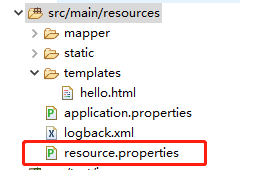
resource.properties的内容:
com.tsinkai.ettp.name=imooc

com.tsinkai.ettp.website=www.imooc.com

com.tsinkai.ettp.language=java
1、使用java.util.Properties的load(InputStream inStream)方法。
先读取文件生成inputStream流,再用load加载。
    @Test

    public void testReadProperties3() throws IOException {

        Properties properties = new Properties();

//        InputStream inputStream = this.getClass().getResourceAsStream("/resource.properties");

//        InputStream inputStream = this.getClass().getClassLoader().getResourceAsStream("resource.properties");

        Resource resource = new ClassPathResource("resource.properties");

        InputStream inputStream = resource.getInputStream();

        properties.load(inputStream);

        System.out.println(properties.getProperty("com.tsinkai.ettp.name"));

    }
2、使用org.springframework.core.io.support.PropertiesLoaderUtils;
    @Test

    public void testReadProperties() throws IOException {

        Properties properties = PropertiesLoaderUtils.loadAllProperties("resource.properties");

        String name = properties.getProperty("com.tsinkai.ettp.name");

        System.out.println(name);

    }
3、使用java.util.ResourceBundle;
    @Test

    public void testReadProperties2() throws IOException {

        ResourceBundle resourceBundle = ResourceBundle.getBundle("resource");

        String name = resourceBundle.getString("com.tsinkai.ettp.name");

        System.out.println(name);

    }
4、使用spring注解创建资源类
资源类:
package com.imooc.pojo;

import org.springframework.boot.context.properties.ConfigurationProperties;

import org.springframework.context.annotation.Configuration;

import org.springframework.context.annotation.PropertySource;

@Configuration

@ConfigurationProperties(prefix="com.imooc.opensource")//属性前缀

@PropertySource(value="classpath:resource.properties")//文件路径

public class Resource {

    private String name;

    private String website;

    private String language;

    public String getName() {

        return name;

    }

    public void setName(String name) {

        this.name = name;

    }

    public String getWebsite() {

        return website;

    }

    public void setWebsite(String website) {

        this.website = website;

    }

    public String getLanguage() {

        return language;

    }

    public void setLanguage(String language) {

        this.language = language;

    }

}
调用:
package com.tsinkai.ettp;

import org.junit.Test;

import org.junit.runner.RunWith;

import org.springframework.beans.BeanUtils;

import org.springframework.beans.factory.annotation.Autowired;

import org.springframework.boot.test.context.SpringBootTest;

import org.springframework.test.context.junit4.SpringRunner;

import com.tsinkai.ettp.common.Resource;

@RunWith(SpringRunner.class)

@SpringBootTest

public class EttpCustomApplicationTests {

    @Autowired

    Resource customResource;

    @Test

    public void readResource() {

        Resource bean = new Resource();

        BeanUtils.copyProperties(customResource, bean);

        System.out.println(bean.getName());

    }

}
java读取Properties文件的方法的更多相关文章
- java分享第十六天( java读取properties文件的几种方法&java配置文件持久化:static块的作用)
java读取properties文件的几种方法一.项目中经常会需要读取配置文件(properties文件),因此读取方法总结如下: 1.通过java.util.Properties读取Propert ...
- 用java读取properties文件--转
今天为了通过java读取properties文件,google了很长时间,终于找到了.现在特记录之和大家一起分享. 下面直接贴出代码:java类 public class Mytest pub ...
- java 读取properties文件总结
一.java读取properties文件总结 在java项目中,操作properties文件是经常要做的,因为很多的配置信息都会写在properties文件中,这里主要是总结使用getResource ...
- java基础学习总结——java读取properties文件总结
摘录自:http://www.cnblogs.com/xdp-gacl/p/3640211.html 一.java读取properties文件总结 在java项目中,操作properties文件是经常 ...
- java基础—java读取properties文件
一.java读取properties文件总结 在java项目中,操作properties文件是经常要做的,因为很多的配置信息都会写在properties文件中,这里主要是总结使用getResource ...
- Java基础学习总结(15)——java读取properties文件总结
一.java读取properties文件总结 在java项目中,操作properties文件是经常要做的,因为很多的配置信息都会写在properties文件中,这里主要是总结使用getResource ...
- java读取properties文件总结
一.java读取properties文件总结 在java项目中,操作properties文件是经常要做的,因为很多的配置信息都会写在properties文件中,这里主要是总结使用getResource ...
- java读取properties文件时候要注意的地方
java读取properties文件时,一定要注意properties里面后面出现的空格! 比如:filepath = /home/cps/ 我找了半天,系统一直提示,没有这个路径,可是确实是存在的, ...
- Java读取Properties文件的六种方法
使用J2SE API读取Properties文件的六种方法 1.使用java.util.Properties类的load()方法示例: InputStream in = lnew BufferedIn ...
随机推荐
- ABP 网站发布
报错1:HTTP Error 503. The service is unavailable. 解决:IIS->应用程序池->高级设置->进程模型->标识.将内置账户更改为Ne ...
- ESP8266 LUA脚本语言开发: 准备工作-动手编译LUA固件
前言 这节咱自己编译LUA固件 准备一台linux的机子 我把固件放到了git上,方便电脑用http下载 我先用这个连接linux 大家随意哈,只要是一台linux的机子就可以,不管是图形页面还是命令 ...
- C实现Linux中copy功能
/* mycp.c */ #include<stdio.h> #include<stdlib.h> #include<unistd.h> #include<f ...
- 安装Visual Studio IntelliCode提供代码智能提示AI
The Visual Studio IntelliCode extension provides AI-assisted development features for Python, TypeSc ...
- docker:轻量级图形页面管理工具Portainer
1.介绍 docker 图形化管理提供了很多工具,有Portainer.Docker UI.Shipyard等等,本文主要介绍Portainer. Portainer是一个开源.轻量级Docker管理 ...
- cad 一个小技巧--复制视口带冻结信息
cad使用 ctrl+c 和 ctrl+v 进行跨文件复制视口的时候,会出现复制视口冻结信息丢失,因为你只选择了视口进行复制, 如果要实现带上冻结信息,那么要把含有相关图层的图元一起 ctrl+c/v ...
- ubuntu16安装python3
正常情况下,你安装好ubuntu16.04版本之后,系统会自带 python2.7版本,如果需要下载新版本的python3.5,就需要进行更新.下面给出具体教程: 1.首先在ubuntu的终端tern ...
- Chartjs 简单使用 ------ 制作sin cos 折线图
Chart.js 一款简单干净的图表工具,基于html5 的Javascript. 可以用来制做条形,扇形,折线,混合等等的强大工具 图表要放在html 的 cancas 标签中 <canv ...
- idea 2019.2 版本把菜单栏隐藏了恢复办法
一不小心把idea的菜单栏给隐藏了(如图) ,搞了半天也恢复不了,网上也没有找到什么办法,可是搞得我焦头烂额呀,怎么找也找不到,也不见大神有过提示,最后没办法,想着去看看它的配置文件吧,于是便找到了默 ...
- [转帖]深度剖析一站式分布式事务方案 Seata-Server
深度剖析一站式分布式事务方案 Seata-Server https://www.jianshu.com/p/940e2cfab67e 金融级分布式架构关注 22019.04.10 16:59:14字数 ...