
prometheus学习系列十一: Prometheus 采集器的编写
在前面的文章已经写了官方的几个exporter的使用了。 在实际使用环境中,我们可能需要收集一些自定义的数据, 这个时候我们一般是需要自己编写采集器的。
快速入门编写一个入门的demo
编写代码
from prometheus_client import Counter, Gauge, Summary, Histogram, start_http_server

# need install prometheus_client

if __name__ == '__main__':

    c = Counter('cc', 'A counter')

    c.inc()

    g = Gauge('gg', 'A gauge')

    g.set(17)

    s = Summary('ss', 'A summary', ['a', 'b'])

    s.labels('c', 'd').observe(17)

    h = Histogram('hh', 'A histogram')

    h.observe(.6)

    start_http_server(8000)

    import time

    while True:

        time.sleep(1)
只需要一个py文件, 运行起来, 会监听在8000端口,访问127.0.0.1:8000端口。
效果图
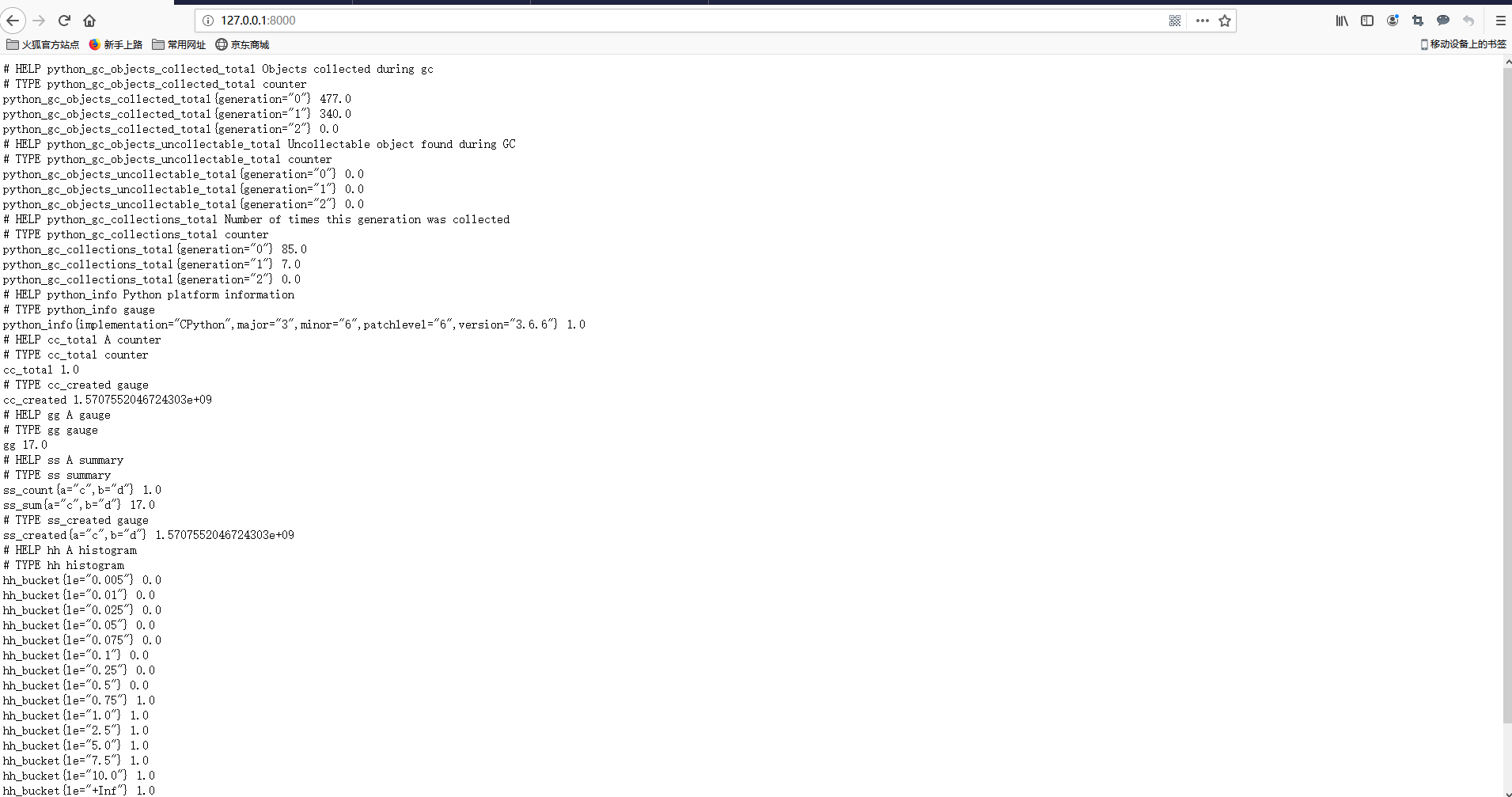
其实一个导出器就已经写好了, 就是这么简单的,我们只需要在prometheus配置来采集对应的导出器就可以了。 不过我们的导出的数据都是没有实际意义了。
数据类型介绍
Counter 累加类型, 只能上升,比如记录http请求的总数或者网络的收发包累计值。
Gauge: 仪表盘类型, 适合有上升有下降的, 一般网络流量,磁盘读写这些,会有波动和变化的采用这个数据类型。
Summary: 基于采样的,在服务端完成统计。我们在统计平均值的时候,可能以为某个值异常导致计算平均值不能准确反映实际值, 就需要特定的点位置。
Histogram: 基于采样的,在客户端完成统计。我们在统计平均值的时候,可能以为某个值异常导致计算平均值不能准确反映实际值, 就需要特定的点位置。
采集内存使用数据
编写采集类代码
from prometheus_client.core import GaugeMetricFamily, REGISTRY

from prometheus_client import start_http_server

import psutil

class CustomMemoryUsaggeCollector():

    def format_metric_name(self):

        return 'custom_memory_'

    def collect(self):

        vm = psutil.virtual_memory()

        #sub_metric_list = ["free", "available", "buffers", "cached", "used", "total"]

        sub_metric_list = ["free", "available", "used", "total"]

        for sub_metric in sub_metric_list:

            gauge = GaugeMetricFamily(self.format_metric_name() + sub_metric, '')

            gauge.add_metric(labels=[], value=getattr(vm, sub_metric))

            yield gauge

if __name__ == "__main__":

    collector = CustomMemoryUsaggeCollector()

    REGISTRY.register(collector)

    start_http_server(8001)

    import time

    while True:

        time.sleep(1)
暴露数据情况

部署代码和集成prometheus
# 准备python3 环境 参考: https://virtualenvwrapper.readthedocs.io/en/latest/

yum install python36 -y

 pip3 install virtualenvwrapper

vim /usr/local/bin/virtualenvwrapper.sh

# 文件最前面添加如下行

# Locate the global Python where virtualenvwrapper is installed.

VIRTUALENVWRAPPER_PYTHON="/usr/bin/python3"

# 文件生效

source /usr/local/bin/virtualenvwrapper.sh

# 配置workon

[root@node01 ~]# echo "export WORKON_HOME=~/Envs" >>~/.bashrc

[root@node01 ~]# mkvirtualenv  custom_memory_exporter

(custom_memory_exporter) [root@node01 ~]# pip install prometheus_client psutil

yum install python36-devel

(custom_memory_exporter) [root@node01 ~]# chmod a+x custom_memory_exporter.py

(custom_memory_exporter) [root@node01 ~]# ./custom_memory_exporter.py

# 测试是否有结果数据

[root@node00 ~]# curl http://192.168.100.11:8001/

prometheus.yml 加入如下片段
  - job_name: "custom-memory-exporter"
    static_configs:
    - targets: ["192.168.100.11:8001"]

[root@node00 prometheus]# systemctl restart prometheus
[root@node00 prometheus]# systemctl status prometheu
查询效果图

prometheus学习系列十一: Prometheus 采集器的编写的更多相关文章
- prometheus学习系列十一: Prometheus pushgateway的使用
由于网络问题或者安全问题,可能我们的数据无法直接暴露出一个entrypoint 给prometheus采集. 这个时候可能就需要一个pushgateway来作为中间者完成中转工作. promethe ...
- prometheus学习系列十一: Prometheus 安全
prometheus安全 我们这里说的安全主要是基本认证和https2种, 目前这2种安全在prometheus中都没有的, 需要借助第三方软件实现, 这里以nginx为例. 基本认证 配置基本认证 ...
- prometheus学习系列十一: Prometheus exporter详解
exporter详解 前面的系列中,我们在主机上面安装了node_exporter程序,该程序对外暴露一个用于获取当前监控样本数据的http的访问地址, 这个的一个程序成为exporter,Expor ...
- prometheus学习系列十一: Prometheus和AlertManager的高可用
前面的系列中, prometheus和alertmanager都是单机部署的,会有单机宕机导致系统不可用情况发生.本文主要介绍下prometheus和alertmanager的高可用方案. 服务的高可 ...
- prometheus学习系列十一: Prometheus 报警规则配置
prometheus监控系统的的报警规则是在prometheus这个组件完成配置的. prometheus支持2种类型的规则,记录规则和报警规则, 记录规则主要是为了简写报警规则和提高规则复用的, 报 ...
- Prometheus学习系列(九)之Prometheus 联盟、迁移
前言 本文来自Prometheus官网手册 和 Prometheus简介 FEDERATION 允许Prometheus服务器从另一台Prometheus服务器抓取选定的时间序列. 一,用例 联盟有不 ...
- Prometheus学习系列(六)之Prometheus 查询说明
前言 本文来自Prometheus官网手册和 Prometheus简介 Prothetheus查询 Prometheus提供一个函数式的表达式语言PromQL (Prometheus Query La ...
- Prometheus学习系列(五)之Prometheus 规则(rule)、模板配置说明
前言 本文来自Prometheus官网手册1.2.3.4和 Prometheus简介1.2.3.4 记录规则 一.配置规则 Prometheus支持两种类型的规则,这些规则可以定期配置,然后定期评估: ...
- Prometheus学习系列(二)之Prometheus FIRST STEPS
前言 本文来自Prometheus官网手册 和 Prometheus简介 说明 Prometheus是一个监控平台,通过在监控目标上的HTTP端点来收集受监控目标的指标.本指南将向您展示如何使用Pro ...
随机推荐
- [PHP] Laravel使用redis保存SESSION
Laravel使用redis保存SESSION 首先确认服务器已经安装redis服务,php安装了redis扩展. 1.打开config/database.php.在redis配置项中增加sessio ...
- RNN循环神经网络实现预测比特币价格过程详解
http://c.biancheng.net/view/1950.html 本节将介绍如何利用 RNN 预测未来的比特币价格. 核心思想是过去观察到的价格时间序列为未来价格提供了一个很好的预估器.给定 ...
- nginx配置文件解释
#全局配置 # For more information on configuration, see:# * Official English Documentation: http://nginx. ...
- FCB CCB FileObject
CCB ContextControlBlock 是存Private信息的,这个FO的特殊信息 FCB FileControlBlock 是存全局信息的 FO FileOb ...
- 逻辑运算符/三元运算符/Scanner
逻辑运算符 &(并且) , |(或者) , !(非) , ^(异或) , &&(短路与) , ||(短路或) 注意事项: a:逻辑运算符一般用于连接boolean类型的表达式或 ...
- centos删除指定名称的进程
vim kill_process.sh ----------------------------------- if [ "$1" = "" ]; then e ...
- linux ------ 在Vm 安装 centos系统
------------- 简介 熟悉的操作系统*(android apple windows) 主要分类 1.应用领域(桌面.服务器.嵌入式) 2.源码开放程度(开源.闭源) 3.所支持的用户数 ...
- 第四节:配置的读取、StartUp类、内置依赖注入和扩展改造
一. 配置的读取 在Asp.Net Core中,有一个 appsettings.json 文件,用于存储相应的配置信息,读取的时,要通过构造函数注入:IConfiguration Configurat ...
- ipv4的ip字符串转化为int型
要求: 将现有一个ipv4的ip字符串(仅包含数字,点,空格), 其中数字和点之间的空格(至多一个)是合法的,比如“12 .3. 4 .62”,其他情况均为非法地址.写一个函数将ipv4地址字符串转化 ...
- SQL中GROUP BY用法示例
概述 GROUP BY我们可以先从字面上来理解,GROUP表示分组,BY后面写字段名,就表示根据哪个字段进行分组,如果有用Excel比较多的话,GROUP BY比较类似Excel里面的透视表. GRO ...